

AudiCable Audio Recorder
How to Mix Songs on Spotify & Save a Mix Playlist

By
Updated on: August 19, 2026
Category: Spotify Music Tips
Spotify offers several ways to personalize your listening experience, and the Spotify Mix feature is one of the most popular tools for discovering and enjoying music. If you're wondering how to mix on Spotify, this guide explains everything you need to know — from understanding Spotify Daily Mix playlists, using mixing features on desktop and Android, to saving a Spotify Mix playlist permanently for offline listening.

Overview of Spotify Mix
Spotify uses the term "Mix" in different contexts across its platform. To avoid confusion, the sections below explain how Spotify Mix, Spotify Automix, and Mix with Transitions differ and how each feature works in practice. Understanding these distinctions is key when learning how to mix on Spotify.
What is Spotify Mix?
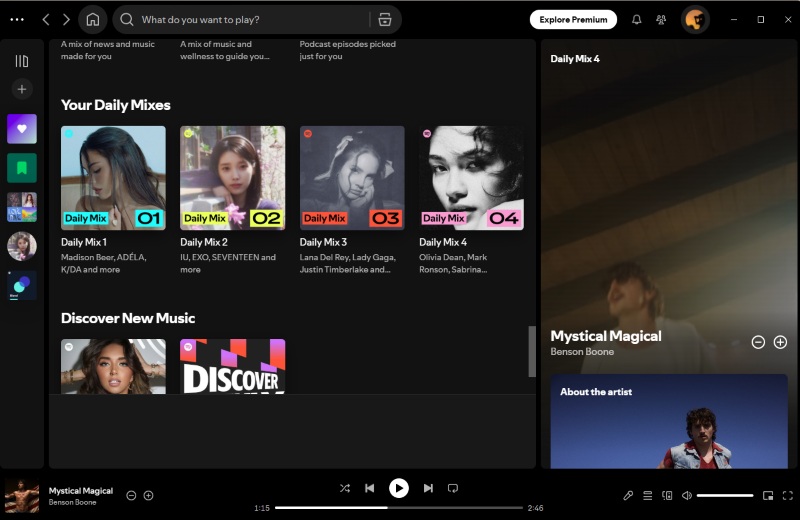
Spotify Mix is a personalized playlist feature automatically generated by Spotify's recommendation algorithm. The most common example is Spotify Daily Mix, which combines your favorite songs with new recommendations tailored to your listening habits.
Spotify creates multiple Spotify Mix playlists (such as Daily Mix 1, Daily Mix 2, etc.), each focusing on a specific genre, mood, or group of artists you frequently listen to. This makes Spotify Mix a hands-free way to enjoy curated music without manually creating playlists.
Key Features of Spotify Mix (Daily Mix):
- 🔄 Automatically updated: Spotify Daily Mix playlists refresh regularly.
- 🎧 Grouped by genre or mood: Each Spotify Mix playlist targets a specific taste.
- ✅ Available to free & Premium users: No subscription required.
- ❌ Not manually editable: You can't add or remove tracks, but listening behavior influences future updates.
How Does Spotify Mix Work?
The Spotify Mix feature is powered by Spotify's recommendation algorithm, which analyzes:
- Songs you play fully or repeatedly.
- Tracks you like, save, or skip.
- Artists and genres you follow.
- Listening patterns across time and devices.
Based on this data, Spotify groups similar songs into multiple Spotify Mix playlists. While you can't directly edit a Spotify Daily Mix, your actions strongly influence how your mixes evolve.
Spotify Mix vs Automix Spotify vs Mix Transitions
| Feature | Main Purpose | Is It a Playlist? | Premium Required? |
|---|---|---|---|
| Spotify Mix (Daily Mix) | Personalized music recommendations | Yes | No |
| Spotify Automix | Seamless transitions during playback | No | Not officially restricted; may vary by playlist or device |
| Mix with Transitions | Customizable track transitions | No | Yes |
Summary: Spotify Mix determines what you hear, while Automix and Mix with Transitions determine how songs are played.
How to Use Mixing on Spotify?
Spotify offers two different "mix" experiences:
- 1. Spotify Mix playlists (Daily Mix)
- 2. Mixing features (Automix or Mix with Transitions)
Below are step-by-step instructions on how to mix on Spotify using both.
How to Use Mixing on Spotify Desktop?
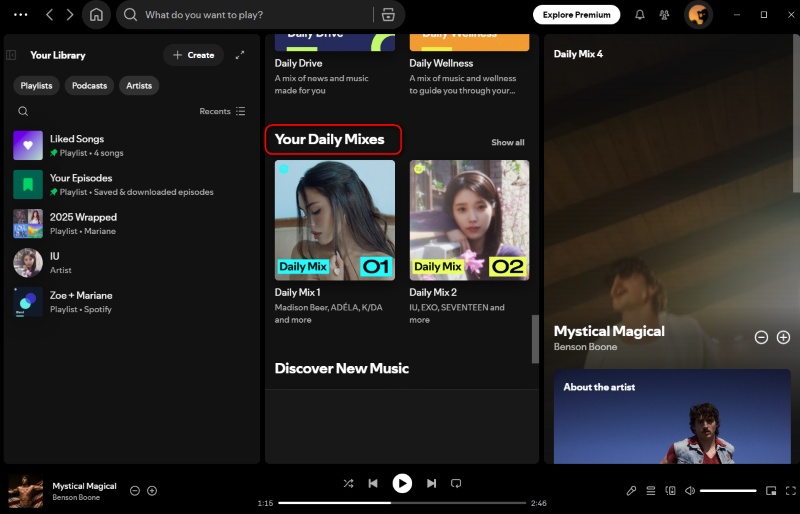
How to Play Your Daily Mix on Spotify Desktop:
Step 1: Open the Spotify desktop app or Web Player.
Step 2: Log in to your account.
Step 3: Tap the "Browse" icon or "Your Library".
Step 4: Scroll to Made for You.
Step 5: Select a Spotify Daily Mix playlist and click Play.
How to Create a Mix on Spotify Desktop:
Step 1: Open a playlist you want to mix.
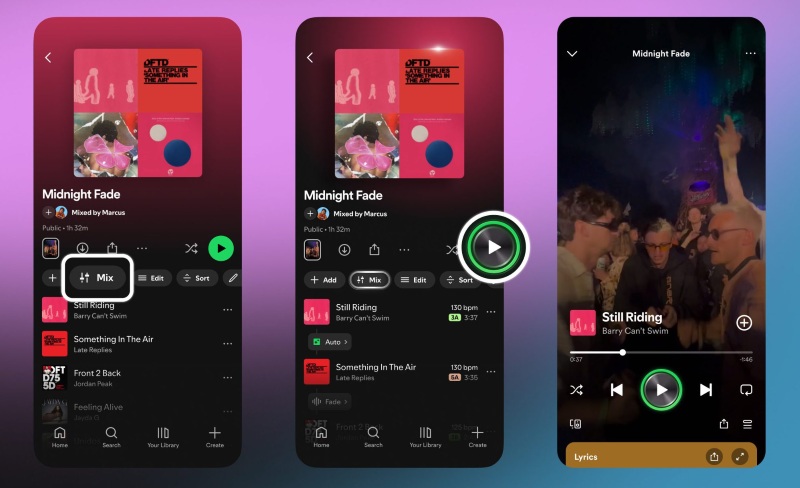
Step 2: Click on Mix Options.
Step 3: Adjust crossfade duration or transition presets.
Step 4: Play the playlist to enjoy seamless transitions.
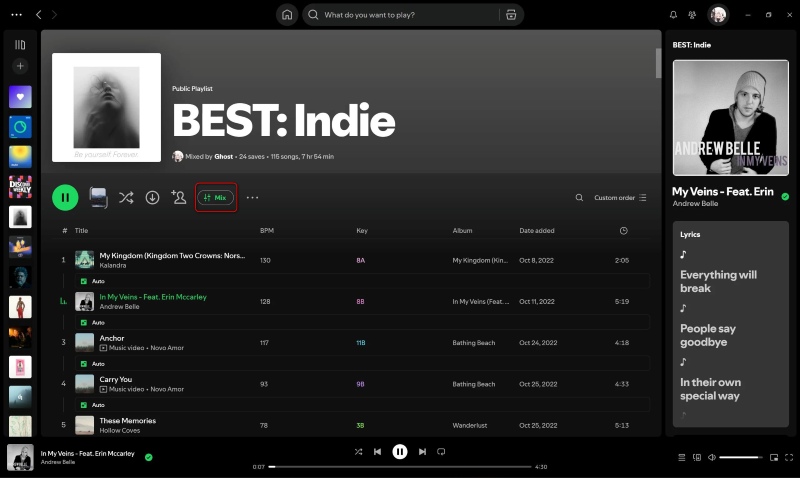
⚠️Notes: This feature is only available for Premium users and does not alter playlist content.
How to Use Mixing on Spotify Android?
How to Play Your Daily Mix on Spotify Android:
Step 1: Open the Spotify app.
Step 2: Go to "Your Library" or Search.
Step 3: Scroll to Made for You.
Step 4: Select a Daily Mix playlist.
Step 5: Tap Play.
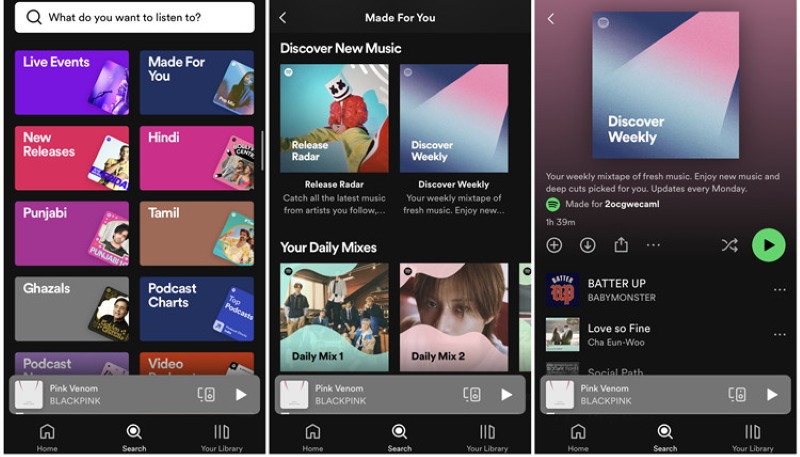
⚠️Notes: Free users may hear ads, while Premium users enjoy uninterrupted playback.
How to Create a Mix on Spotify Android:
Step 1: Open any playlist.
Step 2: Tap Mix Options.
Step 3: Set crossfade or transition preferences.
Step 4: Start playback.
How to Save a Spotify Mix Playlist Permanently?
Since Spotify Mix playlists update automatically, many users look for ways to save their Spotify Mix playlists permanently. While Spotify doesn't offer an official option, third-party tools like AudiCable Spotify Playlist Downloader can help store your favorite Daily Mix songs for offline listening.
Tool Required: AudiCable Spotify Playlist Downloader
AudiCable Audio Recorder supports converting Spotify content into MP3, AAC, WAV, FLAC, AIFF, and ALAC while preserving lossless audio quality and essential ID3 tags such as title, artist, and album information. In addition to Spotify, it also works with other popular streaming platforms, including Apple Music, Amazon Music, and YouTube Music. Compatible with both Spotify Free and Premium accounts on Windows and Mac, AudiCable offers a reliable way to save Spotify Mix playlists permanently, with free updates and technical support included.
Best AudiCable Spotify Playlist Downloader( Mac / Win )
- Save Spotify Mix playlists, songs, albums, and podcasts locally with fast and stable processing.
- Transfer Spotify audio content with lossless quality kept.
- Convert Spotify Mix tracks into multiple widely supported formats, including MP3, M4A, FLAC, WAV, OGG, and AIFF.
- Support Spotify Free and Spotify Premium accounts.
- Integrate other handy audio tools: audio editor, format converter, ID3 tags editor, CD burner, and AA/AAX converter
- Support other music platforms, such as Apple Music, Tidal, Deezer, Amazon Music, Pandora, and YouTube Music.
- Offer free updates and customer support.
💡Steps to Download Spotify Mix Playlists
💻 Steps to Download Spotify Songs to MP3 without Premium:
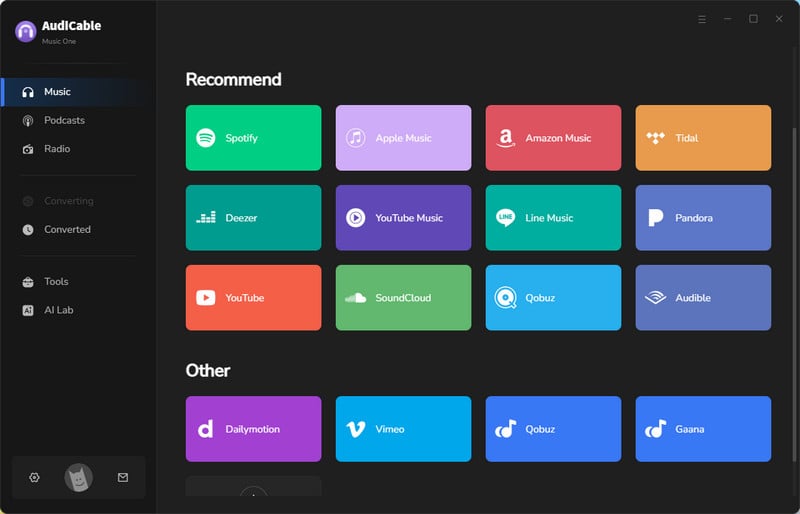
Step 1 Select Spotify as the Music Source
Download and launch AudiCable Spotify Music Recorder on your computer, and you'll see various popular streaming music platforms on Music tab. Choose to convert from "Spotify" here.
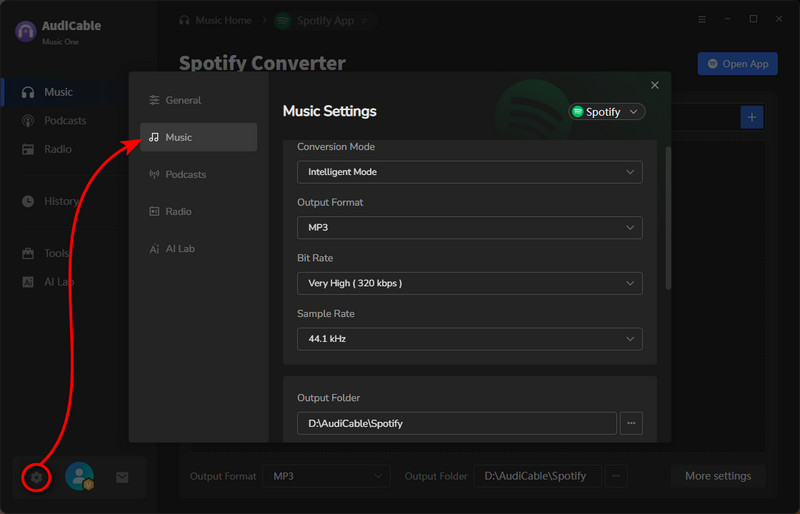
Step 2 Choose MP3 as the Output Format
Click "Settings" in the bottom left. We can see that there are multiple output formats to choose from; here we'll take MP3 as an example. You can also create a dedicated local folder to organize downloaded Spotify Mix playlist tracks.
Step 3 Add a Spotify Mix Playlist to AudiCable
Simply drag and drop the playlists from the app to AudiCable. Or, copy and paste the playlist link into AudiCable's URL parsing box. Then tick the songs you want to convert in the queue, click "Add".
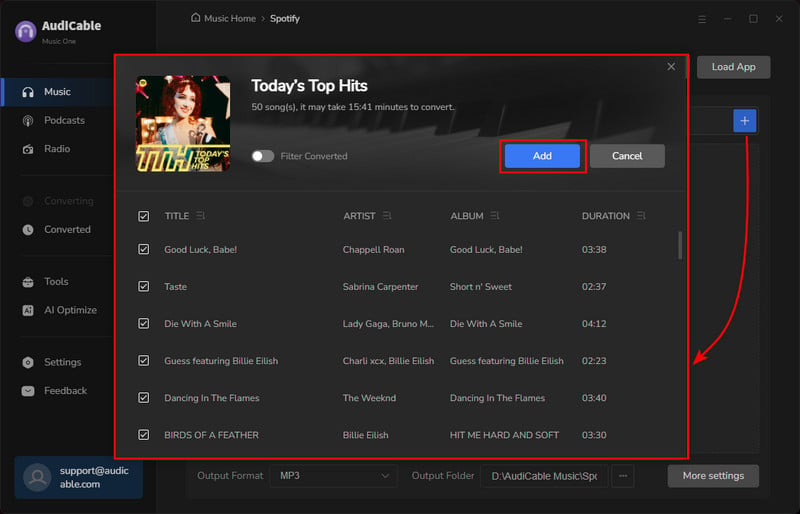
Step 4 Start Converting the Spotify Mix Playlist
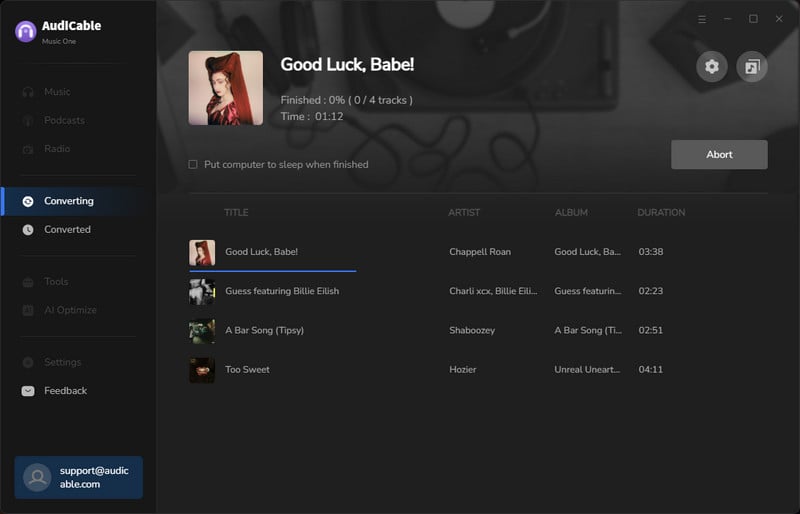
Click the "Convert" button to begin downloading your Spotify Mix songs as local MP3 files. The recording process will be finished soon. If you want to stop the conversion, just click "Abort".
Step 5 Access Your Saved Spotify Mix Songs
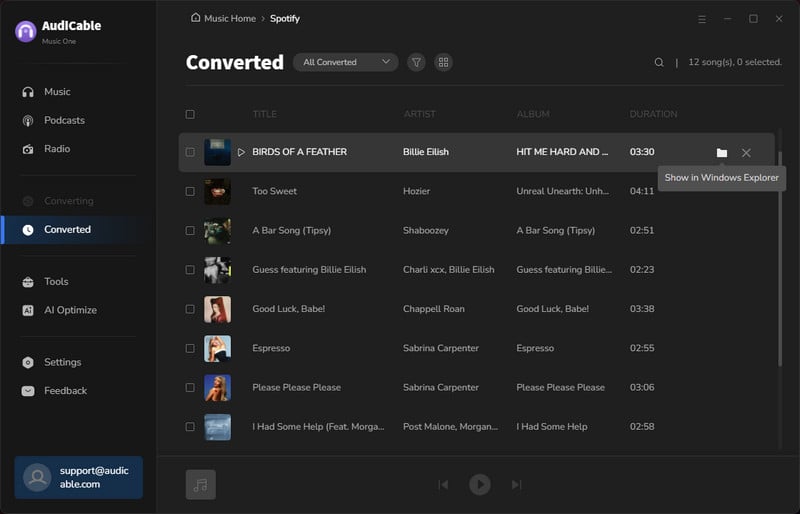
Once converted, tap "History" on the left tab, then click a "Folder" icon behind any song. Your Spotify Mix playlist will now be stored locally and ready for offline playback on any device.
FAQs about Spotify Mix
💬 Q1: What is Automix on Spotify?
Spotify Automix is a playback feature that automatically creates smooth transitions between songs. It uses beat-matching and tempo analysis to blend tracks seamlessly, similar to a DJ-style mix. Automix does not change the playlist content — it only affects how songs transition during playback. This feature is mainly available to Spotify Premium users and works best with compatible playlists.
💬 Q2: Can I combine multiple Spotify Mix playlists into one?
A: Yes. You can manually add songs from different Spotify Daily Mix playlists into a custom playlist.
💬 Q3: Can I influence my Spotify mix?
A: Yes. You can influence Spotify Mix by liking songs, skipping tracks you dislike, following artists, and exploring new genres.
Disclaimer:
- All these methods are for personal or educational use only.
- You should not use this tool to distribute music or for business.
Final Words
Learning how to mix on Spotify helps you unlock the full potential of the Spotify Mix feature. From personalized Spotify Daily Mix playlists to smooth transitions during playback, Spotify Mix makes music discovery effortless.
Although Spotify Mix playlists update automatically, you don't have to lose your favorite tracks. By saving a Spotify Mix playlist locally, you can enjoy your music anytime, anywhere — even offline.
Note: AudiCable's free trial only allows you to record the first 1 minute of each audio file. To get the full conversion, please become a registered member by buying a license from AudiCable.
Related Articles
- How to Unblock Spotify for School & Work
- How to Start a Spotify Jam & Keep Your Favorite Tracks Offline
- How to Make A Spotify Blend Playlist in 2026
- Best Spotify Album Downloaders: 2026 Full Guide
- 8 Best Spotify Podcast Downloaders (2026 Review)
- How to Cancel Spotify Premium and Keep Your Music: 2026 Guide