

AudiCable Audio Recorder
Top 7 Free Audible Downloaders in 2026

By
Updated on: August 17, 2026
Category: Music Streaming Tips
Want a reliable way to download Audible audiobooks or convert them to MP3? You're not alone. Audible is great for audiobooks and podcasts, but many users still hit the same snag: the files you download often stay locked inside the Audible app. Here's the issue in plain terms: Audible uses AA and AAX formats, and those files are protected. So even if you download a book, it usually won't play on other devices or apps.
That's why this guide is focused on the best Audible downloaders. We'll walk through both official methods and reliable third-party tools, explain what formats they support, and help you pick the right option based on what you actually need. Ready to take control of your Audible library? Scroll down to see the top Audible downloaders that actually work in 2026.
Part 1: Official Audible Downloaders
Downloading Audible Audiobooks via the Audible App
🌐Download Website: https://www.audible.com/
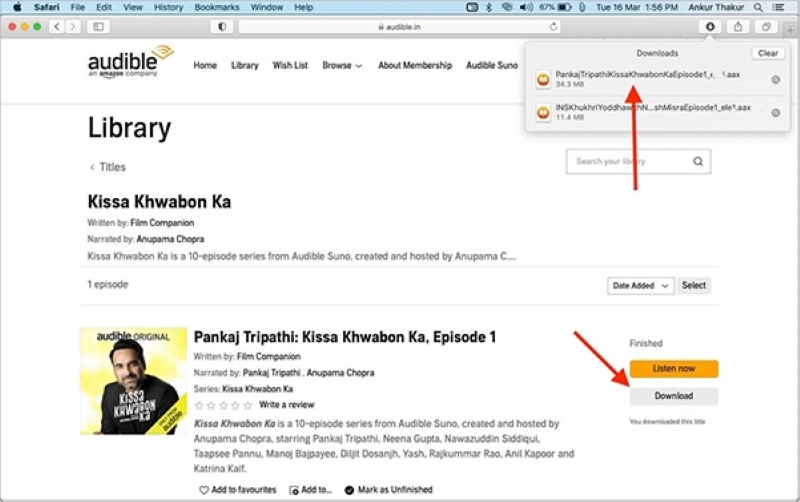
Audible's mobile app lets you download audiobooks from Audible directly to your phone or tablet for offline listening. Once a title is added into your library, you can save it locally with a single tap.
✅ Key Advantages
- Official and fully legal method.
- Extremely easy to use.
- Supports bookmarks, playback speed, and chapter navigation.
- Syncs listening progress across devices.
⚠️ Considerations
- The audiobook stays locked inside the app.
- No access to MP3 or other common formats.
- Audiobooks cannot be exported or backed up.
- Playback restricted to Audible-supported devices.
📂 How to Download Audible Audiobooks?
Step 1: Install and open the Audible app on your device.
Step 2: Sign in with your Audible account.
Step 3: Go to "Library".
Step 4: Select the audiobook you want.
Step 5: Tap the "Download" button.
Step 6: Wait for the download to complete and start listening offline.
🧑💻 Best for: Casual listeners who only need offline listening on their phone or tablet.
Saving Audible Audiobooks via AudibleSync (Windows)
🌐 Download Website: https://www.audible.com/
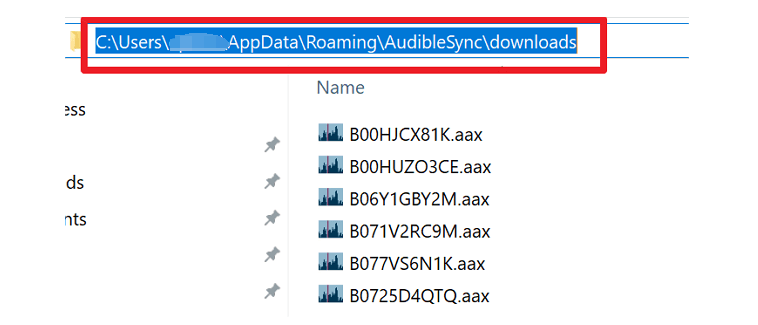
As another official method, this tool is designed to help users manage their Audible library and transfer downloaded audiobooks to compatible devices that support Audible's protected formats. AudibleSync lets you download purchased audiobooks directly to your PC and manage them locally. It's mainly designed for users who want offline access beyond mobile apps.
✅ Key Advantages
- Official Audible software.
- Allows local storage on a computer.
- Supports device transfers in some cases.
- Useful if you listen on a PC.
⚠️ Considerations
- Windows-only.
- Downloads remain in AAX/AA format.
- Cannot convert Audible audiobooks to MP3.
- Interface feels dated and occasionally unstable.
📂 How to Save Audible Audiobooks?
Step 1: Install AudibleSync on your Windows computer.
Step 2: Sign in with your Audible account.
Step 3: Open your Library.
Step 4: Select an audiobook and click Download.
Step 5: Save it locally or transfer it to a compatible device.
🧑💻 Best for: Windows users who want to store Audible files locally without converting formats.
Part 2: Best Audible Downloader
Downloading Audible books to mp3 via AudiCable (Recommended)🔥
🌐 Download Website:https://www.audicable.com/download.html
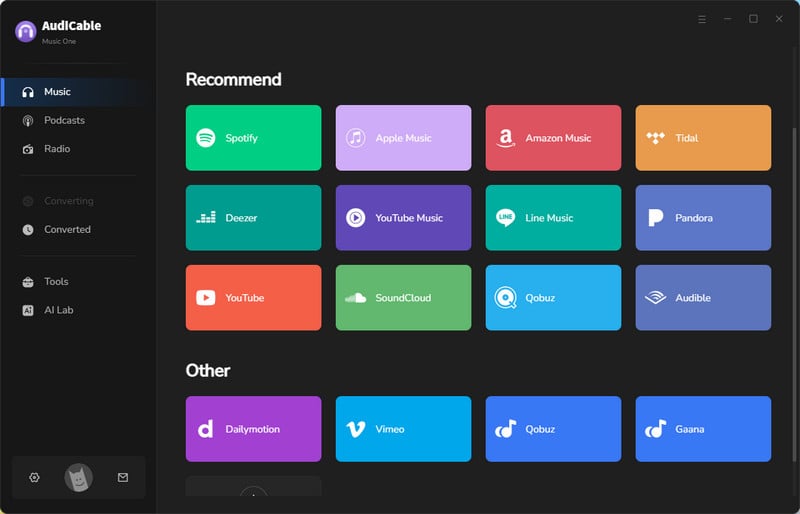
AudiCable is a comprehensive desktop application that enables converting Audible audiobooks to MP3 and other formats. It preserves chapters, metadata, and original audio quality, making it compatible with almost any device.
Beyond Audible, AudiCable also supports downloading music, podcasts, and audiobooks from 15+ popular streaming services such as Spotify, Apple Music, Amazon Music, and YouTube Music.
✅ Key Advantages
- Intuitive UI and ease of use.
- Batch download of Audible AAX/AA audiobooks to MP3/M4A/M4B.
- The conversion speed can reach up to 300X.
- Lossless output quality was kept.
- Built-in library to download podcasts and radio shows for free.
- Split the audiobook into segments by chapters/time.
- Useful tools like format converter, ID3 editor, CD burner, and AI splitter are included.
- Consistent and regular software updates ensure long-term compatibility.
- Reliable technical support included.
⚠️ Considerations
- Not fully free (trial version available)
- Requires desktop installation.
📂 How to Get Audible Audiobooks to MP3?
Step 1: Launch AudiCable Audio Recorder on your computer. From the main interface, select "Audible" from the available music platforms. Log in to your Audible account directly within the built-in web player.
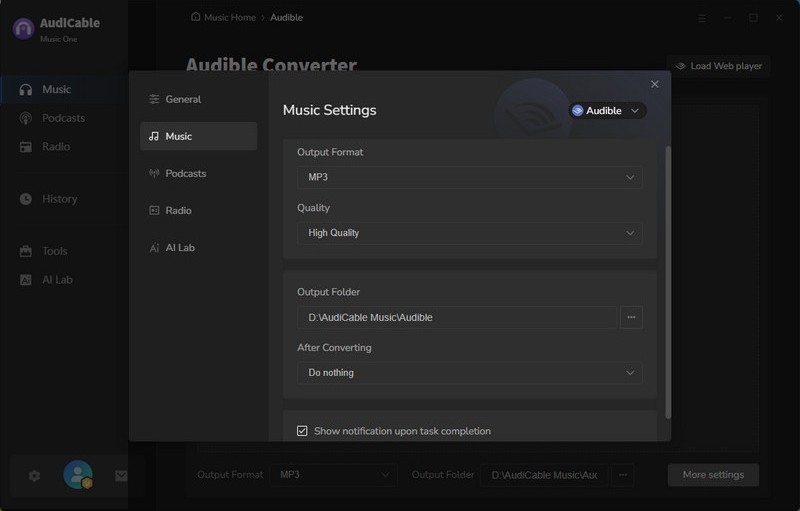
Step 2: Click the Settings icon in the bottom left corner. Under "Output Format," you can choose MP3/M4A/M4B. Here, we'll use MP3 as an example. You can also customize the output folder and output quality here.
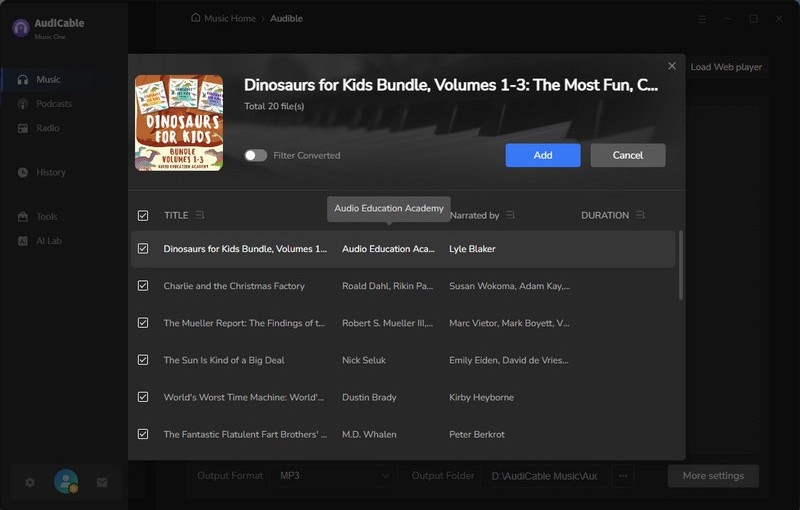
Step 3: Browse and play the audiobook you wish to convert in the embedded Audible player. Click the "+" button floating at the bottom-right corner, then select the specific chapters you want to include.
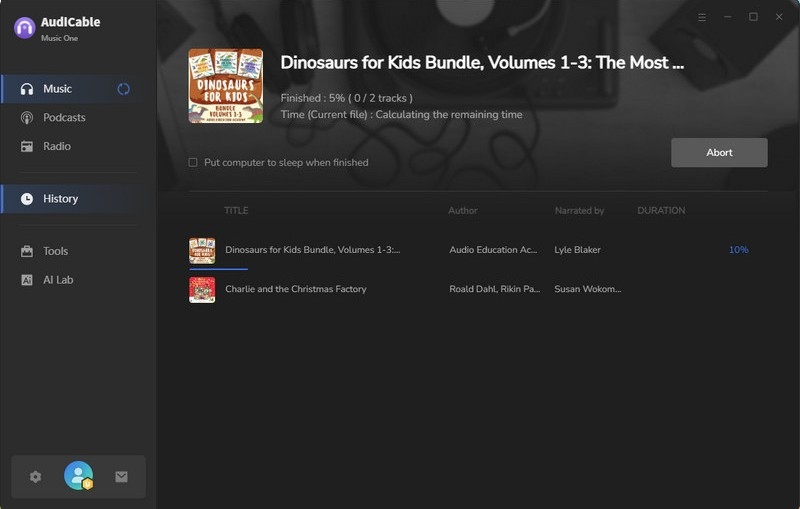
Step 4: Click the Convert button to begin converting Audible files to MP3. You can monitor the progress and estimated time remaining in the conversion window.
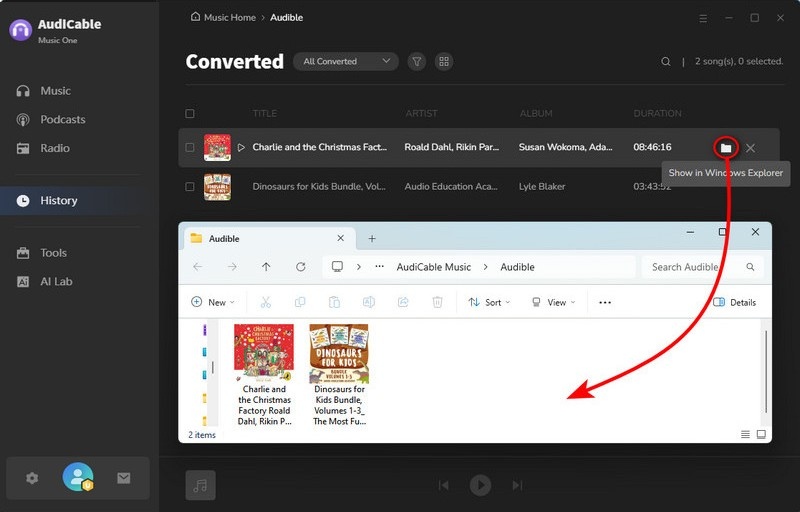
Step 5: Once conversion is complete, click "Complete". To locate your Audible book downloads, go to the "History" section in the left sidebar, then hover over the folder icon next to any title to open the output folder containing your MP3 audiobook files.
Note: You can only convert the first 1 minute of each audio with the free trial version. Please buy the full version to unlock its limits.
🧑💻 Best for: Users who want a reliable, easy-to-use Audible downloader and converter with MP3/M4A/M4B output.
Part 3: OpenAudible Audible Converters
Converting Audible Audiobooks via OpenAudible
🌐 Download Website: https://openaudible.org/
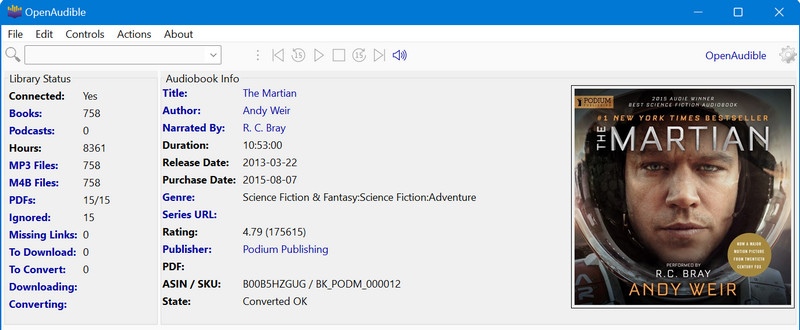
OpenAudible is a cross-platform desktop application (Windows, macOS, Linux) that allows users to export audiobooks into more common formats like MP3 or M4B. Additional features include library cataloging, file splitting/joining, and a built-in player. The software operates independently of Audible/Amazon and is available as shareware: free to try, with a license required for full functionality.
✅ Key Advantages
- Works on Windows, macOS, and Linux.
- Convert to MP3/M4B for more devices.
- Split/join chapters and export metadata.
- Works well for large libraries.
⚠️ Considerations
- Not fully free (trial limitations).
- Requires desktop installation.
- Some users report bugs or issues.
- Only documentation, no official customer support.
📂 How to Convert Audible Audiobooks to Local Files?
Step 1: Download and install OpenAudible on your computer.
Step 2: Log in with your Audible/Amazon account.
Step 3: Import your library to load your purchased titles.
Step 4: Select the audiobooks you want to download.
Step 5: Download the selected titles as AAX files.
Step 6: Convert them to MP3 or M4B if needed.
🧑💻 Best for: Users with large Audible libraries who want structured downloads and exports.
Part 4: Open-Source Audible Rippers
Exporting Audible Audiobooks via AaxAudioConverter
🌐 Download Website: https://github.com/audiamus/AaxAudioConverter
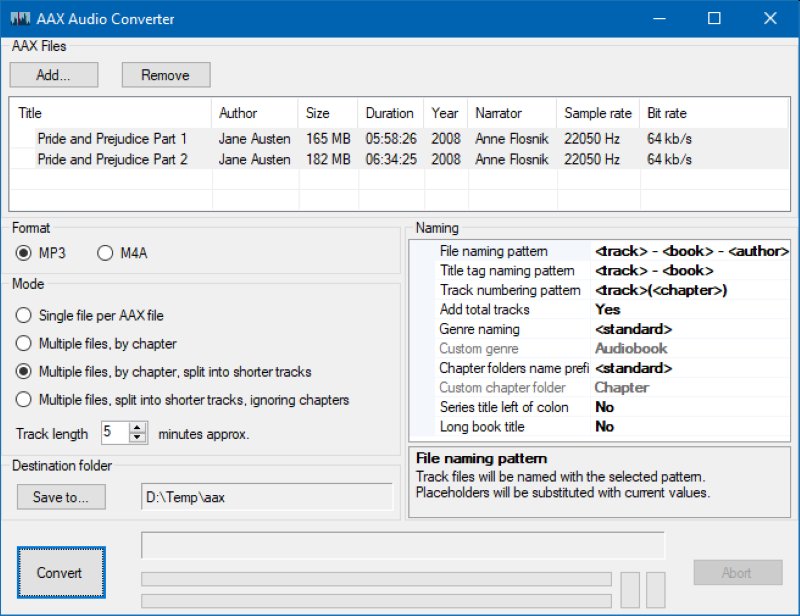
AaxAudioConverter is a free, open-source tool for Windows. It converts Audible audiobook files (.aax) into popular formats like MP3 or M4A/M4B, while keeping chapters, cover art, and other details. It uses FFmpeg for reliable conversion and is maintained by the community on GitHub.
✅ Key Advantages
- Free and open-source.
- Preserves chapters and metadata.
- Converts Audible AAX files to MP3 / M4A / M4B.
- Fast conversion using FFmpeg
⚠️ Considerations
- Windows only.
- Requires Audible activation codes.
- No built-in downloader.
- Requires some technical setup.
📂How to Export Audible Audiobooks as Local Files?
Step 1: Download and install AaxAudioConverter (Windows).
Step 2: Download Audible audiobooks as .aax files using an official Audible method.
Step 3: Open AaxAudioConverter and add the .aax files.
Step 4: Provide Audible an activation code if required.
Step 5: Choose output format (MP3 / M4A / M4B).
Step 6: Start conversion and access the output files.
🧑💻 Best for: Users with some hands-on skills, who use Windows systems and want to convert Audible audiobooks to a universal format.
Ripping Audible Audiobooks via BookLibConnect
🌐 Download Website: https://github.com/audiamus/BookLibConnect
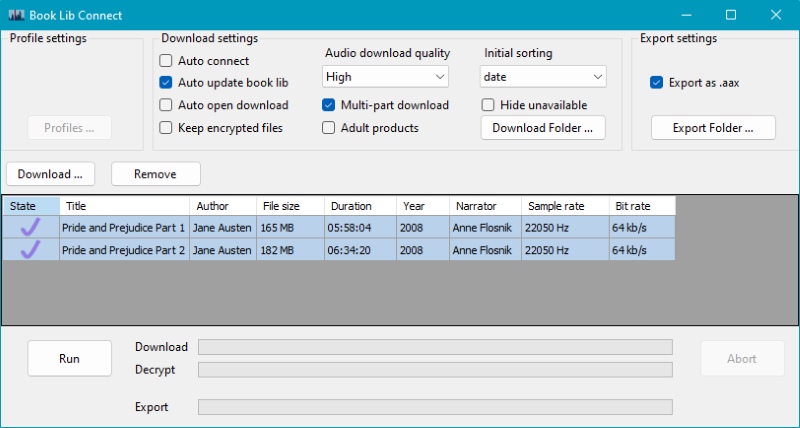
BookLibConnect is a lesser-known free Windows tool that lets you download your purchased Audible audiobooks. You can sign in to your account, view your library, and save books as ready-to-play M4B files or as AAX files for further conversion.
✅ Key Advantages
- Free and open source.
- Downloads audiobooks directly from Audible.
- Browser-based login (no password stored).
- Outputs M4B or AAX files.
- Simple library view and download progress.
⚠️ Considerations
- Windows only
- Smaller user base
- Limited documentation
📂 How to Rip Audible Audiobooks to Offline Files?
Step 1: Install and launch BookLibConnect.
Step 2: Log In Audible account via Browser.
Step 3: Import & View Audible Library.
Step 4: Select Books to Download.
Step 5: Locate the Downloaded Files.
🧑💻 Best for: Users looking for alternative Audible downloaders outside mainstream tools.
Getting Audible Audiobooks via Libation
🌐 Download Website: https://getlibation.com/
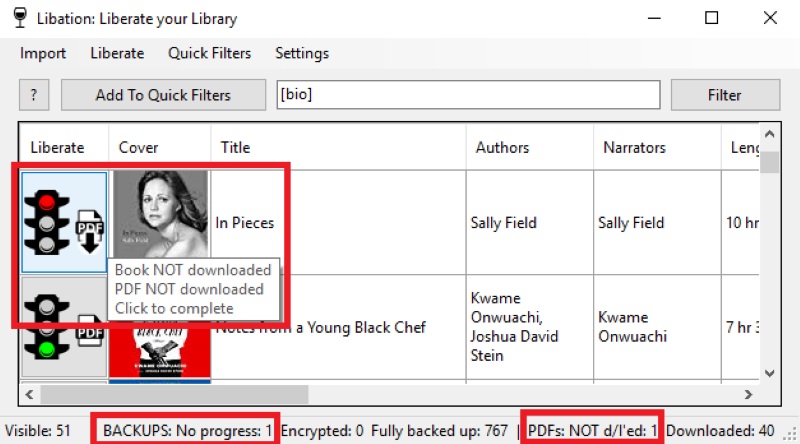
Libation is a free, cross-platform app (Windows/Mac/Linux) that lets you download your purchased Audible audiobooks, remove the protections, and save them as standard MP3 or M4B files for easy organization and playback anywhere.
✅ Key Advantages
- Completely free.
- Works on Windows, macOS, and Linux.
- Supports MP3 and M4B output.
- Library management features (search, tags, filters)
⚠️ Considerations
- The interface is basic.
- Requires technical setup.
- May have bugs or download issues.
📂 How to Get Audible Audiobooks to A Locally Stored File?
Step 1: Download and install Libation from the website.
Step 2: Add your Audible account to Libation.
Step 3: Import your library (scan your Audible titles).
Step 4: Select audiobooks you want to download.
Step 5: Start download and decryption (Liberate/backup).
Step 6: Open the output folder to find your MP3/M4B files.
🧑💻 Best for: Users with some technical knowledge who want to download Audible audiobooks to their local device.
Part 5: A Side-by-Side Comparison
| TOOL | PLATFORM | OUTPUT FORMAT | ENCRYPTED FILE UNLOCKING | EASE OF USE | BEST FOR |
|---|---|---|---|---|---|
| AudiCable Audio Recorder | Win / Mac | MP3 / M4A / M4B | ✓ | ⭐⭐⭐⭐⭐ | All-in-one solution with high stability |
| Audible App | iOS / Android | AAX / AA | ✕ | ⭐⭐⭐⭐⭐ | Simple offline listening on mobile |
| AudibleSync | Windows | AAX / AA | ✕ | ⭐⭐⭐ | PC users who want local storage |
| OpenAudible | Win / Mac / Linux | MP3 / M4B | ✓ | ⭐⭐⭐⭐ | Large Audible libraries |
| AaxAudioConverter | Windows | MP3 / M4A / M4B | ✓ | ⭐⭐ | Tech-savvy Windows users |
| BookLibConnect | Windows | M4B / AAX | Partial | ⭐⭐⭐ | Simple Audible downloading |
| Libation | Win / Mac / Linux | MP3 / M4B | ✓ | ⭐⭐⭐ | Free Local Backups without Restrictions |
Disclaimer:
- All these methods are for personal or educational use only.
- You should not use this tool to distribute music or for business.
Part 6: FAQs about Audible Downloaders
💬 Q1: What is the best format to download Audible audiobooks?
A: M4B is ideal for audiobooks because it supports chapters and bookmarks, while MP3 offers the widest device compatibility. The best format depends on how and where you plan to listen.
💬 Q2: Will converting Audible audiobooks to MP3 affect audio quality?
A: High-quality converters like AudiCable Audio Recorder preserve the original audio quality, chapters, and metadata. However, some free or less-maintained tools may result in slight quality loss.
💬 Q3: Do I need technical skills to use open-source Audible rippers?
A: Some, like AaxAudioConverter, require entering an Audible activation code and basic knowledge of file management. If you prefer a simpler workflow, desktop recorders like AudiCable are more user-friendly.
💬 Q4: How to download audiobooks from Audible to MP3 without losing chapters or bookmarks?
A: Tools like AudiCable, OpenAudible, or Libation allow you to convert Audible AAX/AA files to MP3 while keeping chapter markers, metadata, and cover art intact. This ensures that long audiobooks remain easy to navigate even after conversion.
Conclusion
Audible is an incredible place to dive into audiobooks, but being stuck with AA or AAX files can feel restrictive. With the right tools, you can download and enjoy your Audible audiobooks on any device while keeping chapters, bookmarks, and metadata intact. Whether you prefer a simple mobile solution, a powerful all-in-one recorder, or a free open-source ripper, there's an option that fits your needs.
Grab control of your Audible library today: explore the tools listed above, try out a free trial, and start building a personal, unlocked Audiobook collection that travels with you wherever you go. Your favorite stories deserve to be listened to on your terms!
Get the Best Audible Downloader now!!

