


AudiCable Audio Recorder
7 Best SoundCloud to WAV Converters in 2026 (Tested & Reviewed)

By
Updated on: August 19, 2026
Category: SoundCloud Music Tips
🏆 Featured Tool
AudiCable SoundCloud to WAV Converter
- 🎧 Preserve the best available audio quality
- ⚡ Stable batch download for full playlists
- 💻 Windows & Mac supported with a simple workflow
Whether you’re making music, DJing, editing audio, or building your own personal track library, SoundCloud is a solid pool of inspiration. When you discover tracks you might want to use later for offline listening, audio projects, or just creative workflows, choosing the right format for saving them becomes important.
WAV keeps uncompressed audio data, so it is the go-to option for pro-level audio work, sharp playback, and detailed editing. Still, not every SoundCloud downloader or converter really delivers the quality people expect. Some convert compressed audio into a WAV container only, while others throw in issues such as ads, unstable downloads, or they flat out lack batch support.
That’s where different types of tools come in. Here are 7 ways to download SoundCloud to WAV, depending on your needs for quality, speed, or simplicity.
👍See also: YouTube to WAV Converter: 11 Tools Tested in 2026
- Quick Comparison Table of SoundCloud to WAV Downloaders
- How to Choose the Best SoundCloud to WAV Converter
- Best Desktop Tools for High-Quality SoundCloud to WAV
- Best Online SoundCloud to WAV Converters
- Open-source / Advanced Batch Tool
- SoundCloud to WAV: Quick Decision Guide
- FAQs About SoundCloud to WAV Downloaders
📊 Quick Comparison Table of SoundCloud to WAV Downloaders
| Tool | Type | Source Quality Preservation | Playlist / Batch | Stability | Ease | Metadata | Best For |
|---|---|---|---|---|---|---|---|
| AudiCable SoundCloud Converter | Desktop | High (Best Available Quality) | ✅ Yes | Very stable | Easy | Full ID3 + artwork | 🏆 Best overall workflow |
| Apowersoft Streaming Audio Recorder | Desktop / Web | High | ❌ No | Medium | Easy | Basic tags | Real-time recording |
| Audacity | Desktop (Open-source) | Depends | Manual | Medium | Moderate | Limited | Audio editing |
| SoundCloudMate | Online | Basic | ❌ No | Medium | Very easy | None | Single tracks |
| Soundverter | Online | Basic | ❌ No | Medium | Very easy | None | Fast conversion |
| MusicVerter | Online | Basic (Premium) | ❌ No | Medium | Very easy | Limited | Casual use |
| GitHub WAV Tool | Open-source | Depends | ✅ Yes | High (local) | Low | Varies | Batch automation |
How to Choose the Best SoundCloud to WAV Converter
In most cases, converting SoundCloud to WAV does not improve audio quality, because WAV is only a container format. The final output depends entirely on the original source audio, meaning compressed streams cannot gain extra detail even after conversion. A good converter should focus on preserving the best available source quality without unnecessary re-encoding.
Key Factors to Consider:
Before choosing a SoundCloud to WAV downloader, it’s worth checking a few key factors:
Best Desktop Tools for High-Quality SoundCloud to WAV
AudiCable SoundCloud to WAV Converter [Stable & High Quality Output]
🔍Website: https://www.audicable.com/
🛡️ Stability & Security: High
In our testing, AudiCable performed best among desktop SoundCloud to WAV converters due to its stable batch performance and high-quality output. Unlike browser-based converters, AudiCable is designed for managing larger music libraries, offering batch conversion and full metadata preservation in a single workflow. It helps preserve important track information, such as title, artist, album, and cover art, while processing multiple files more efficiently. Besides WAV output, AudiCable also supports formats including MP3, FLAC, AIFF, and ALAC, giving users more flexibility for different audio needs, from everyday listening to editing and production workflows.
😀 Main Advantages:
- Download SoundCloud playlists in batches.
- Save music to WAV, MP3, FLAC, AAC, AIFF, and ALAC.
- Support SoundCloud Free, Go, and Go Plus.
- Preserves sound quality, ID3 tags, cover art, and track info after conversion.
- Provide a clean, ad-free interface suitable for beginners.
- Built-in SoundCloud web player - download music directly without switching apps.
- Supports popular streaming platforms like Spotify, Apple Music, Amazon Music, Tidal, etc.
- Includes tools of Format Converter, ID3 editing, CD burner, AI audio splitting, etc.
- Regular updates and technical support.
☹️ What We Dislike:
- Free trial has download limits.
✅ How to Download SoundCloud Music to WAV?
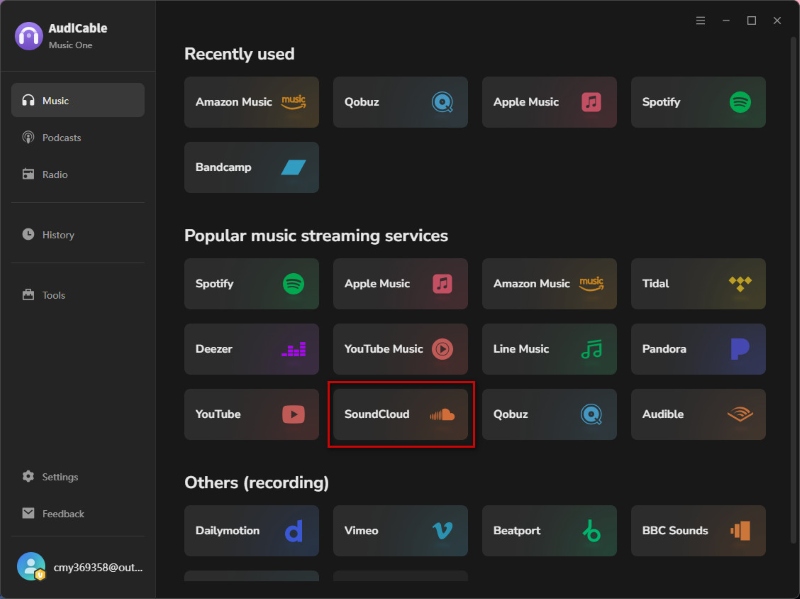
- Step 1: Download and install AudiCable SoundCloud Music Converter on Mac or Windows. Open the Music tab, choose SoundCloud.
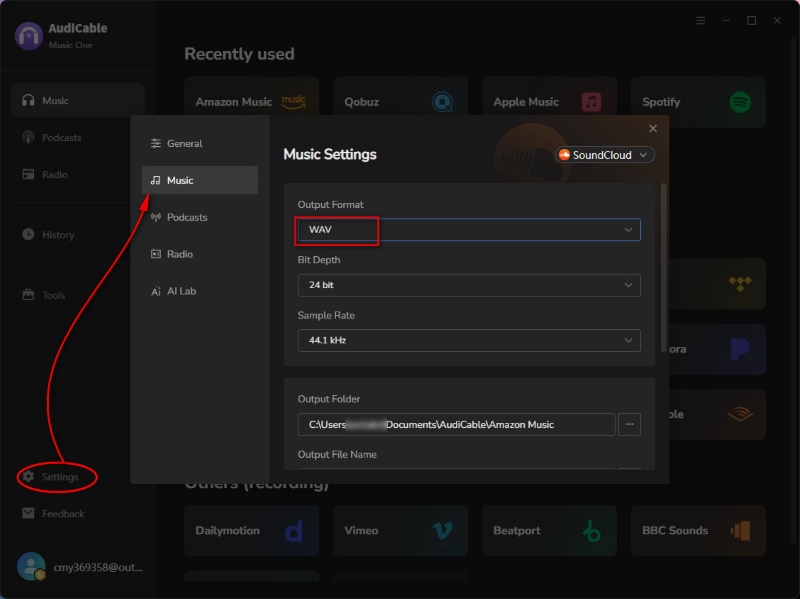
- Step 2: Click “Settings” in the bottom-left corner and set WAV as the output format. Adjust output quality and other parameters if needed.
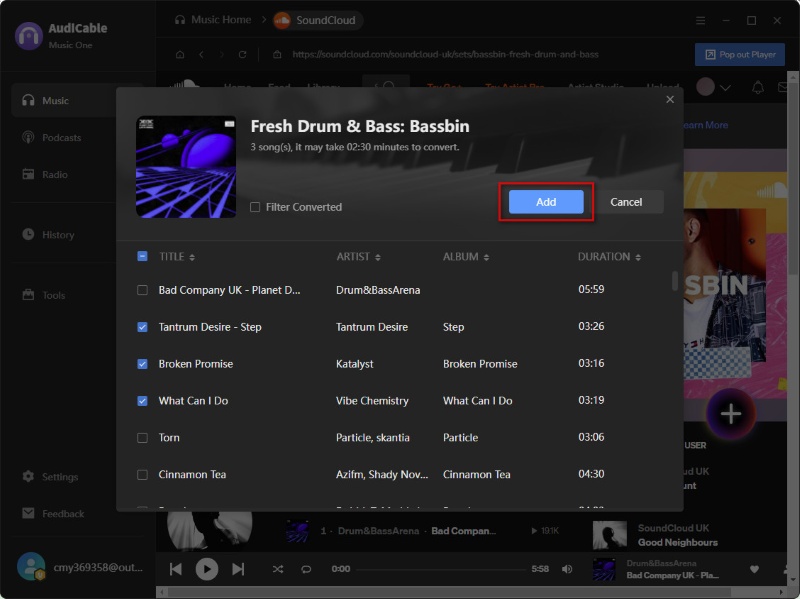
- Step 3: Drag and drop a SoundCloud playlist or paste its link. Select the tracks you want and click "Add".
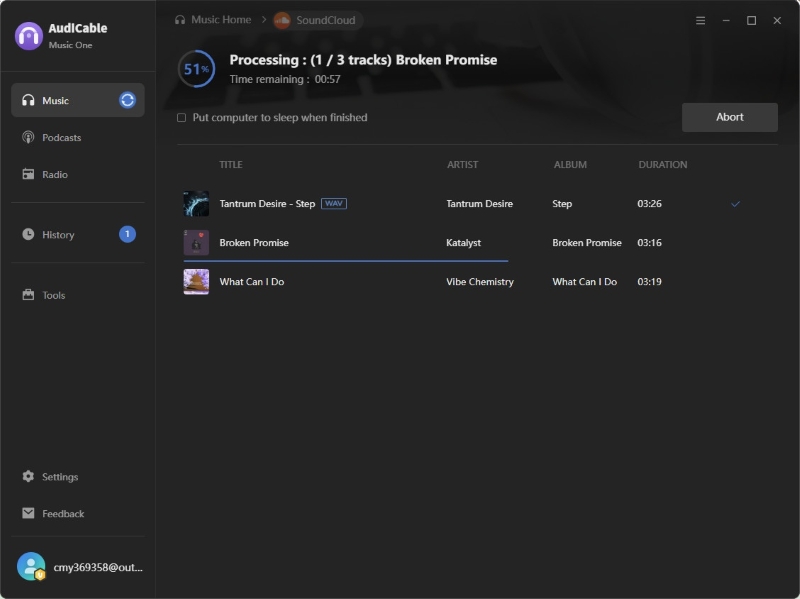
- Step 4: Click "Convert" to start downloading SoundCloud tracks. If you want to stop the download, just click "Abort".
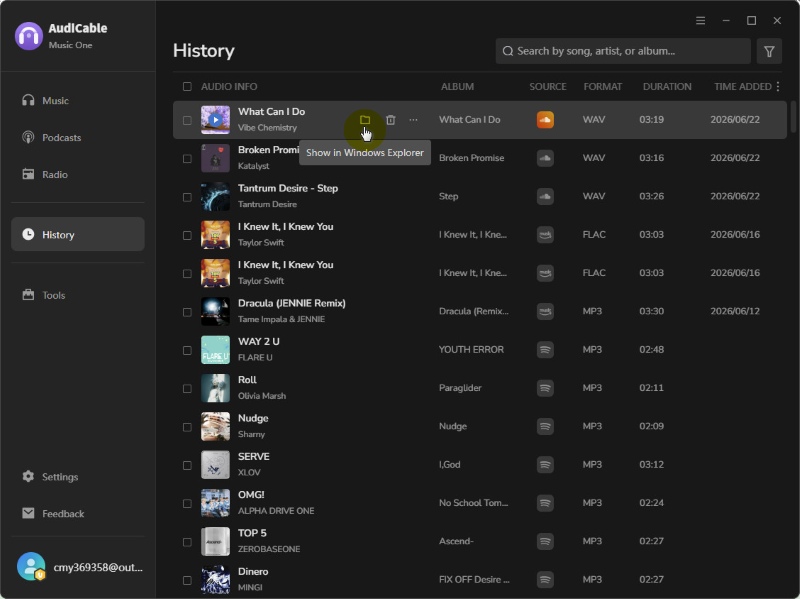
- Step 5: Go to the "History" tab and click the folder icon to locate your saved WAV files.
⭐Testing Notes:
We tested it with a playlist containing multiple tracks. The conversion process continued normally without manual restart, and most metadata fields were retained after export.
Apowersoft Streaming Audio Recorder [Real-Time Recording & WAV Output]
🔍Official Website: https://www.apowersoft.com/free-audio-recorder-online
🛡️ Stability & Security: Medium
Apowersoft Streaming Audio Recorder is a desktop and web-based audio recording tool that allows users to capture SoundCloud playback audio in real time and save it as local audio files. Instead of directly downloading tracks, it records the sound played on your computer and exports it to formats like WAV for offline listening and audio management. It also supports system sound recording, microphone input, and basic audio customization features, making it suitable for users who need a simple recording-based solution.
😀 Main Advantages:
- Supports high-quality audio formats, including WAV.
- Works with SoundCloud and other popular streaming platforms.
- Simple interface with an easy-to-use built-in audio recorder.
- Supports recording system sound and microphone input.
- No complicated setup required for basic audio recording.
☹️ What We Dislike:
- Requires real-time playback during recording.
- No efficient batch downloading for playlists.
- Recording quality may be affected by system audio settings or background noise.
🎙️ How to Record SoundCloud Tracks in WAV Format?
- Step 1: Download and install Apowersoft Streaming Audio Recorder from the official website, then launch the program.
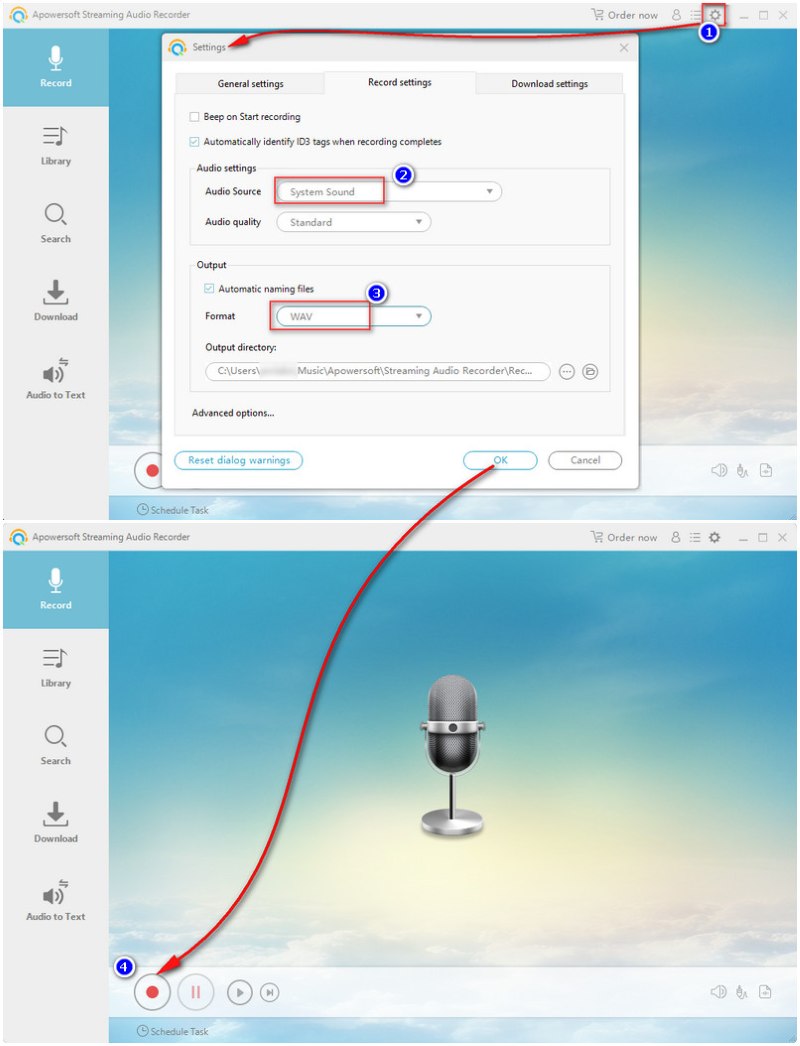
- Step 2: Open the settings menu, select System Sound as the audio source, and choose WAV as the output format.
- Step 3: Open SoundCloud and play the track you want to save. Click "Start Recording" to capture the audio in real time.
- Step 4: Click "Stop" when the track finishes. The recorded SoundCloud audio will be saved as a WAV file on your device.
⭐Testing Notes:
Apowersoft primarily acts as a live capture tool during testing. While its output quality is usually good, it needs to play the entire track in real time, making it impractical for long playlists. System audio settings can also cause minor volume fluctuations, particularly when switching between applications during recording.
Audacity Audio Recorder [Free Recording & Audio Editing Control]
🔍Download Site: https://www.audacityteam.org/download/
🛡️ Stability & Security: High
Audacity is a free, open-source audio recording and editing software that allows users to save SoundCloud music as WAV files by capturing system audio in real time. Unlike simple recording tools, Audacity also provides advanced editing features such as trimming, noise reduction, and audio enhancement, making it a good choice for users who want more control over recording quality and post-processing.
😀 Main Advantages:
- Available on Windows, Mac, and Linux platforms.
- Completely free and open-source with no subscription required.
- Exports high-quality WAV audio files.
- Provides powerful built-in audio editing tools, including trimming, noise reduction, and audio effects.
☹️ What We Dislike:
- Setup can be slightly technical for beginners.
- Not suitable for efficient batch downloading of SoundCloud playlists.
- Recording quality depends on system audio settings and recording configuration.
🎙️ How to Save SoundCloud Music as WAV?
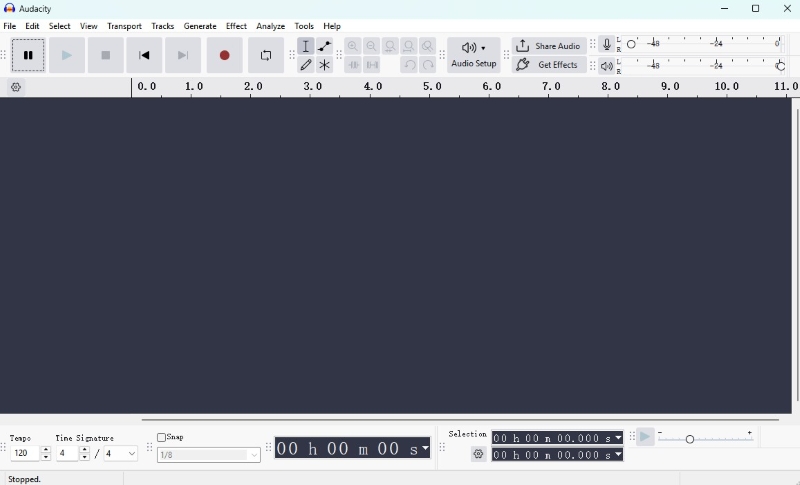
- Step 1: Download and install Audacity, then open Audio Setup and set the recording input to system audio / (loopback).
- Step 2: Play the SoundCloud track you want to save. Click Record in Audacity and stop recording when the track finishes.
- Step 3: Edit the recorded audio if needed, then go to File > Export Audio and select WAV as the output format.
⭐Testing Notes:
Audacity offered the most control over the recording process, especially when fine-tuning system audio input. However, the setup process required multiple configuration steps before recording was possible. In testing, it performed well for single-track captures, but managing multiple SoundCloud tracks became time-consuming compared to dedicated converters.
Best Online SoundCloud to WAV Converters
SoundCloudMate [Quick Online WAV Conversion]
🔍Online Site: https://SoundCloudMate.app/SoundCloud-to-wav
🛡️ Stability & Security: Medium
SoundCloudMate is a web-based SoundCloud downloader that allows users to convert individual SoundCloud tracks into downloadable audio files, including WAV format. By simply pasting a SoundCloud track URL, users can generate a download link without installing software or configuring additional audio settings. It works well as a simple SoundCloud song downloader for users who only need to save individual tracks.
😀 Main Advantages:
- No software installation required.
- Fast conversion process for individual SoundCloud tracks.
- Simple copy-and-paste URL workflow.
- No additional setup or audio configuration required.
☹️ What We Dislike:
- Audio quality depends on the available source file.
- Not suitable for large playlists or batch downloads.
- Offers limited control over audio editing and customization.
- Not designed for advanced audio processing workflows.
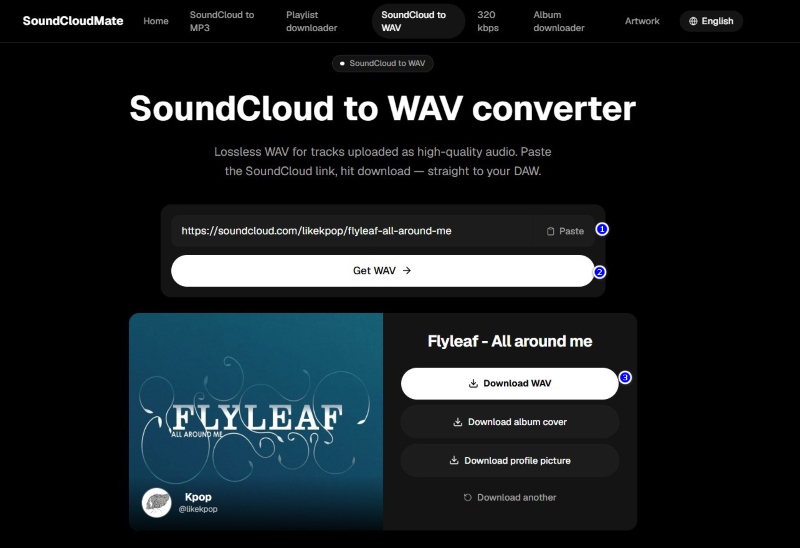
🎧 How to Rip SoundCloud Music to WAV?
- Step 1: Copy the SoundCloud track URL that you want to convert.
- Step 2: Paste the SoundCloud link into SoundCloudMate.
- Step 3: Click "Get WAV" to start the conversion process.
- Step 4: Click "Download WAV" to save the converted audio file to your device.
⭐Testing Notes:
SoundCloudMate efficiently downloads single tracks. However, testing revealed inconsistent performance tied to server traffic, causing longer processing times for extended audio. Therefore, it's ideal for sporadic use, not for compiling a comprehensive music library.
Soundverter [Fast Cloud-Based SoundCloud to WAV Converter]
🔍Download Site: https://soundverter.com/
🛡️ Stability & Security: Low
Soundverter is a cloud-based SoundCloud converter that transforms track URLs into downloadable audio files, including WAV, by processing audio on its server. It focuses on a simple link-based workflow, allowing users to quickly convert SoundCloud tracks into multiple formats without installing any software.
😀 Main Advantages:
- Directly converts SoundCloud links into WAV and other audio formats.
- Fast processing for single-track conversions.
- Works on both desktop and mobile browsers.
☹️ Limitations:
- No audio editing or post-processing features.
- Output quality depends on the original source file.
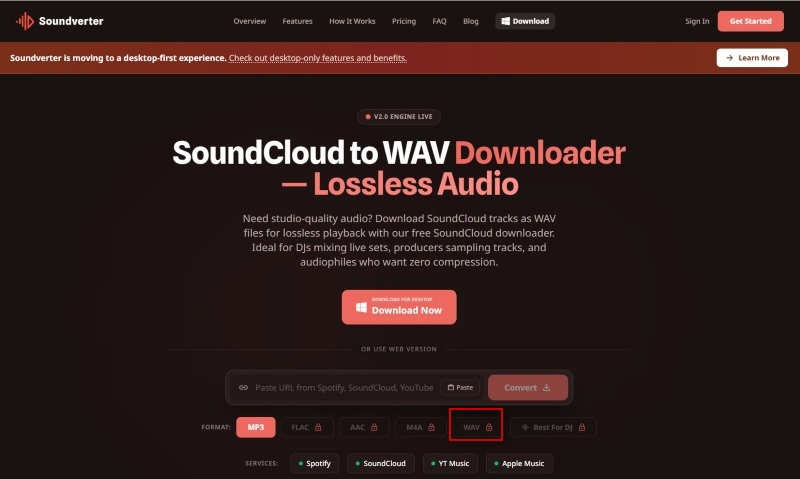
- WAV output and advanced features require a paid upgrade.
🎧 How to Convert SoundCloud Music to WAV with Soundverter?
- Step 1: Open Soundverter and paste your SoundCloud track, playlist, or album URL into the input box.
- Step 2: Select WAV as the output format and start the conversion process.
- Step 3: Wait for the conversion to complete, then click Convert or Download to save the WAV file to your device.
⭐Testing Notes:
Most of the time, Soundverter converted audio fast, especially short ones. However, the tool was so simple that users had limited control over the output. It was handy but not perfect for people who need reliable audio quality.
MusicVerter [Simple Online SoundCloud to WAV Converter]
🔍Download Site: https://www.musicverter.com/soundcloudtowav
🛡️ Stability & Security: Low
MusicVerter is an online audio conversion tool focused on turning SoundCloud content into downloadable WAV files through a lightweight browser-based process. It allows users to extract SoundCloud audio directly from a URL without installing any software or configuring recording settings, making it suitable for quick and simple conversions.
😀 Main Advantages:
- Converts SoundCloud links into downloadable audio files online.
- No desktop software required.
- Simple URL-based workflow for fast conversions.
☹️ Limitations:
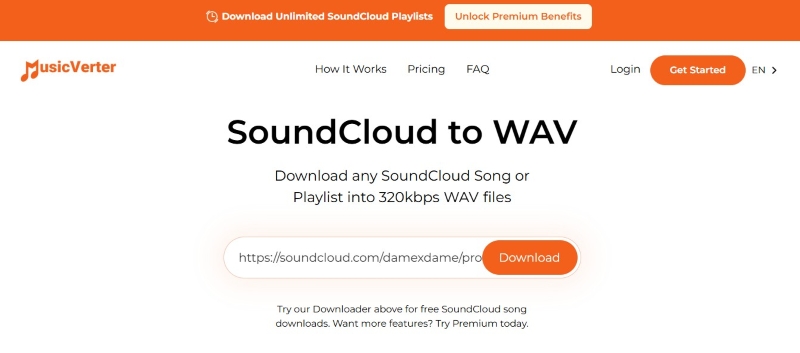
- Free version supports MP3 only; WAV and other formats require Premium access.
- No audio editing or post-processing features.
- Depends on Internet connection and server availability.
🎧 How to Get SoundCloud Tracks in WAV Format?
- Step 1: Copy the SoundCloud track URL.
- Step 2: Paste it into MusicVerter and start the conversion process.
- Step 3: Choose output format (MP3 free, WAV for premium users).
- Step 4: Click Download to save the file to your device.
⭐Testing Notes:
In testing, the MP3 output worked smoothly, but the lack of access to higher-quality formats in the free version made it less competitive compared to other online tools.
Open-source / Advanced Batch Tool
GitHub WAV Folder Tool [Open-Source Batch SoundCloud to WAV Converter]
🔍Access Site: https://github.com/DavidAlexanderMoe/Spotify_and_SoundCloud_Playlist_to_WAV_Folder/
🛡️ Stability & Security: High
This is an open-source Python tool that converts Spotify and SoundCloud playlists into local WAV audio folders. It works by reading playlist metadata, matching tracks through external sources, downloading the corresponding audio streams, and converting them into WAV format using FFmpeg. The final output is automatically organized into structured folders based on playlists, making it ideal for batch music processing and offline library building.
😀 Main Advantages:
- Supports batch download of SoundCloud playlists and converts tracks into WAV files.
- Outputs high-quality WAV audio for offline use or editing.
- Fully free and open-source solution.
- Runs locally on your computer for better privacy and control.
☹️ Limitations:
- Requires technical knowledge to set up and run.
- May require SoundCloud API credentials depending on configuration.
- Not beginner-friendly compared to web-based tools.
🎧 How to Download SoundCloud Music to WAV?
- Step 1: Install Python (ensure it is added to PATH) and FFmpeg on your computer for audio processing.
- Step 2: Obtain SoundCloud API credentials (Client ID or access token) if required by the script.
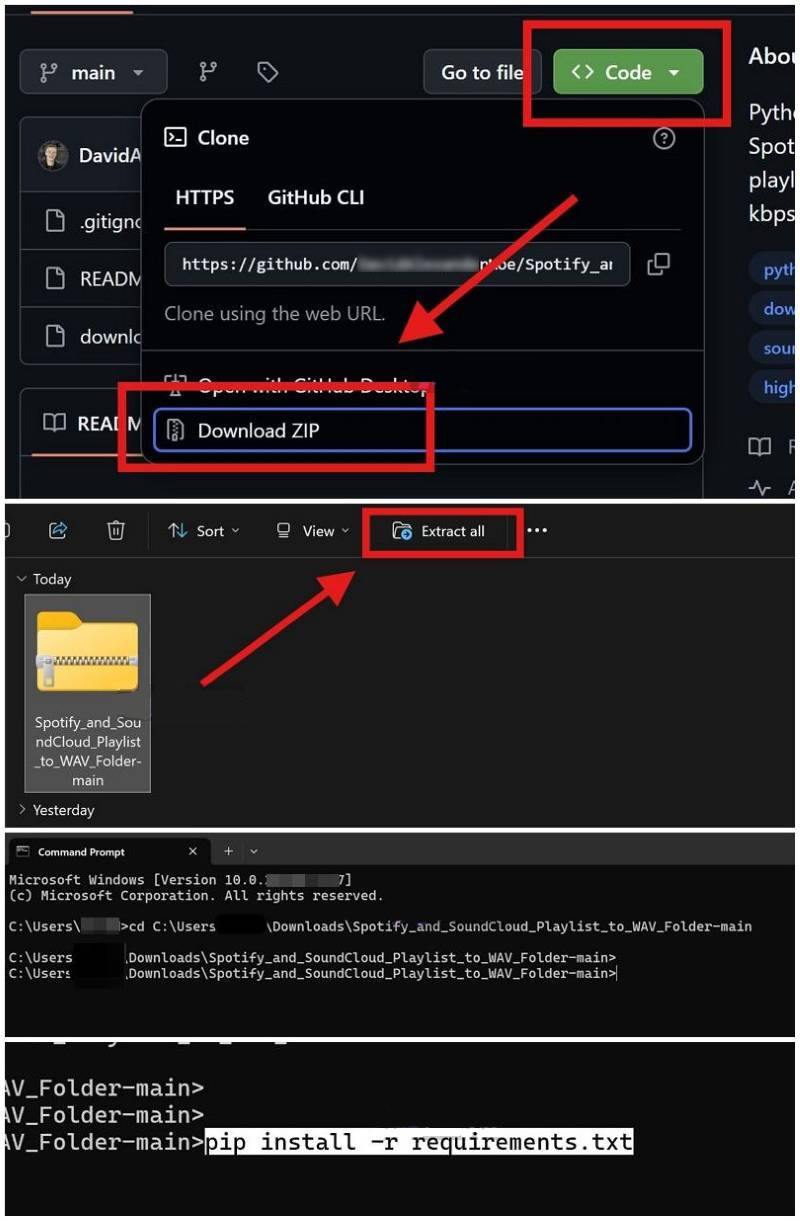
- Step 3: Download the GitHub repository as a ZIP file, extract it, and copy the folder path.
- Step 4: Open Terminal or CMD, navigate to the folder, install dependencies using
pip install -r requirements.txt, then runpython downloader.py. - Step 5: Enter your SoundCloud credentials and playlist URL, then start the script to download and convert tracks into WAV files.
⭐Testing Notes:
In our testing, the GitHub tool provided flexible batch processing capabilities, but required significant setup time before it could be used. Once configured, it handled large playlists efficiently, though troubleshooting dependencies and API configuration was necessary for stable operation.
SoundCloud to WAV: Quick Decision Guide
Choose the tool type based on your download needs:
⚡ Need a quick and simple download?
→ Online SoundCloud to WAV converters (SoundCloudMate / Soundverter / MusicVerter)
🎧 Need high-quality WAV output and stable performance?
→ Desktop SoundCloud to WAV converters (AudiCable / Apowersoft)
✂️ Need recording and audio editing control?
→ Audio recording tools (Audacity)
🤖 Need playlist automation or batch processing?
→ Open-source tools (GitHub WAV Tool)
✨Pro Tips: For users who want a more complete workflow with stable batch downloading and high-quality WAV output, desktop tools like AudiCable SoundCloud to WAV converter are the most reliable option.
FAQs About SoundCloud to WAV Downloaders
💬 Q1: Is WAV better than MP3 for SoundCloud downloads?
A: WAV is not always better than MP3 — it depends on your needs. WAV preserves uncompressed audio data, making it ideal for music production, DJing, and audio editing. MP3 use smaller file size, making it better for everyday listening.
💬 Q2: Are free SoundCloud to WAV converters safe?
A: Free SoundCloud to WAV converters can be convenient, but safety depends on the tool. Users should be careful with websites that contain excessive ads, redirects, or suspicious downloads. Trusted desktop software and well-known tools are usually more reliable.
💬 Q3: Can I convert a SoundCloud playlist to WAV?
A: Yes. Some desktop SoundCloud converters, such as AudiCable SoundCloud to WAV Converter, support playlist and batch WAV downloads. Online tools are typically designed for single-track conversions. For larger playlists, desktop tools are usually more suitable due to their batch processing capabilities.
Disclaimer:
- All these methods are for personal or educational use only.
- You should not use this tool to distribute music or for business.
The End
There are many ways to convert SoundCloud to WAV. Choose a tool based on your needs. Online tools are ideal for single-track downloads, recording tools offer more control, and open-source tools are better for processing multiple files. For a balance of ease of use, stability, and high-quality WAV output, desktop software like AudiCable SoundCloud Converter is the best choice for most users.
Ready to save SoundCloud tracks in WAV with a smoother workflow? Get AudiCable SoundCloud Converter today!

