


AudiCable Audio Recorder
Spotify to WAV Converter: 7 Best Tools & Download Guide

By
Updated on: August 19, 2026
Category: Spotify Music Tips
Spotify provides good music streaming, but it prevents users from downloading tracks as independent audio files like WAV. Saved songs are locked within the app, even for Spotify Premium users. This means you cannot use them for DJ sets, personal edits, listening on other devices, or as secure copies. Therefore, many users look for a Spotify to WAV converter. Good tools let you keep your music collection, like albums or single songs, as high-quality, uncompressed audio.
This guide lists eight of the best ways to convert Spotify songs to WAV for 2026. It includes computer programs, online tools, and free software from GitHub. Each option is different, so the best one for you will depend on what you need and how you plan to use it.
See also >>> 7 Best SoundCloud to WAV Converters in 2026 (Tested & Reviewed)
📑 Content
- Why is WAV the Best Choice for Spotify Music?
- Quick Comparison Table of Spotify to WAV Tools
- 7 Best Spotify to WAV Converter Tools in 2026 (Full Reviews)
- AudiCable Spotify to WAV Converter (High Quality & Fast)
- Apowersoft Streaming Audio Recorder
- Audacity Audio Recorder Free
- ConverterFactory
- Soundverter
- Spytify
- Spotify and SoundCloud Playlist to WAV Folder
- Final Verdict
- FAQs about Spotify to WAV Converter
Why is WAV the Best Choice for Spotify Music?
Unlike MP3 or AAC, which compress audio by removing certain details to make files smaller, the WAV format saves the complete sound recording. It captures every part of the audio, ensuring the original wave pattern remains unchanged, and the sound quality is preserved without any loss. If you need full control over your music files, WAV is the most flexible format.
WAV is commonly used for:
- 🎧 DJ mixing and live performance
- 🎬 Video and content editing
- 🎼 Music production and mastering
- 💾 High-quality offline music storage
Spotify’s offline downloads are designed only for in-app playback, not for external use. This means users who need editable or transferable audio files often turn to a Spotify to WAV downloader instead.
Quick Comparison Table of Spotify to WAV Tools
Before diving into details, here’s a quick overview to help you choose the right tool:
| Tool | Type | Speed | Output Quality | Batch Conversion | Metadata Support | Ease of Use | Best For |
|---|---|---|---|---|---|---|---|
| AudiCable Spotify to WAV Converter | Desktop Converter | 10x Faster | 🎧 Lossless WAV | ✅ Yes | ✅ Full ID3 + Artwork | Very Easy | Best overall choice |
| Apowersoft Streaming Audio Recorder | Desktop Audio Recorder | Real-time | Good | ⚠️ Limited | ✅ Auto ID3 Tags | Easy | Simple recording |
| Audacity | Audio Recorder | Real-time | High | ❌ No | ⚠️ Manual | Medium–Hard | Advanced editing |
| ConverterFactory | Online Converter | ⚡ Medium | Medium–Good | ⚠️ Limited | ⚠️ Basic | Easy | Quick online conversion |
| Soundverter | Web Tool | ⚡ Medium | Good | ✅ Limited | ✅ Yes | Easy | Casual browser use |
| Spytify | Open-source (Windows) | Real-time | High | ⚠️ Partial | ✅ Yes | Medium | Free Windows users |
| Spotify Playlist to WAV Folder (GitHub) | Script Tool | ⚡ Depends | High | ✅ Yes | ⚠️ Basic | Hard | Developers & batch tasks |
7 Best Spotify to WAV Converter Tools in 2026 (Full Reviews)
AudiCable Spotify to WAV Converter (High Quality & Fast)
🔍Official Website: https://www.audicable.com/
Recommend Level: ⭐⭐⭐⭐⭐
AudiCable Spotify to WAV converter can download Spotify audio to multiple formats, including WAV, which is a lossless PCM audio format that preserves original sound data without compression artifacts. It handles bulk downloads of music and podcasts. High-quality WAV is an option, plus other formats like MP3 and FLAC. It keeps all metadata, like ID3 tags and cover art, so your files are organized. The program is reliable and fast. You can also edit audio, like cutting parts or mixing songs. The converted files work on most players. Owning your music locally means no internet is needed. This is great for serious listeners who want to build a permanent music library easily.
😀 Key Advantages:
- Owns a clean and user-friendly interface.
- Exports Spotify music to WAV, MP3, FLAC, AAC, ALAC and AIFF.
- Keeps original audio quality with true lossless output.
- Converts Spotify songs, playlists, albums, and podcasts in batches.
- Preserves full ID3 tags, including title, artist, album art, and artwork.
- Works with both Spotify Free and Premium accounts.
- Includes extra tools: CD burner, tag editor, format converter, and more.
- Supports other music platforms like Apple Music, Amazon Music, SoundCloud, Tidal, etc.
☹️ Considerations:
- The free trial has limitations in downloading.
✅ How to Download Spotify Music to WAV?
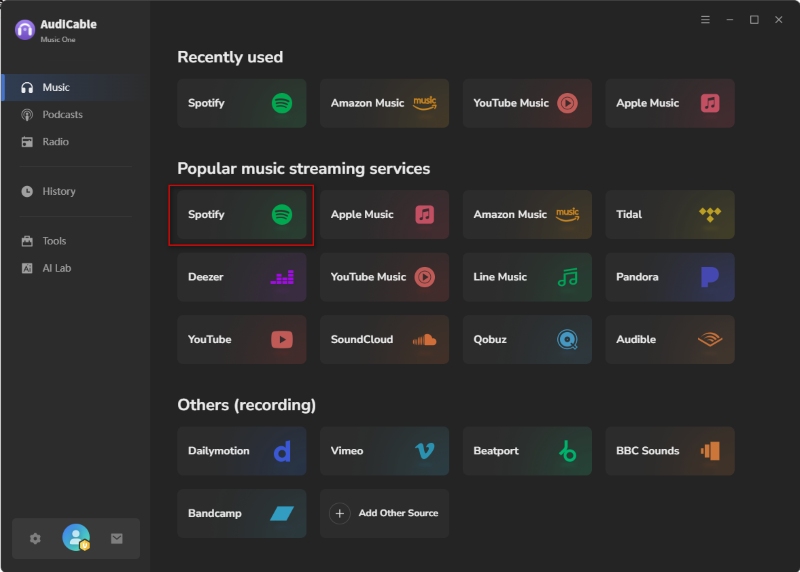
Step 1: Install and open AudiCable Spotify to WAV Converter, then choose "Spotify" in the music tab to start importing tracks.
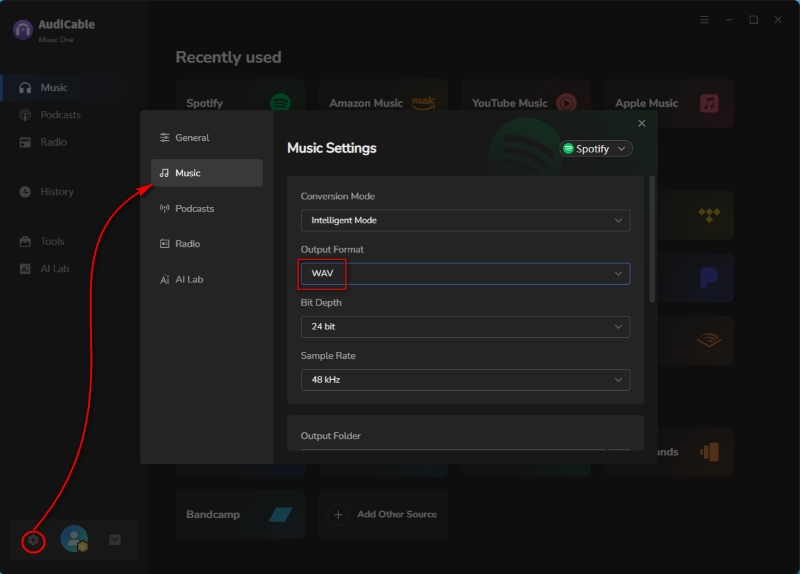
Step 2: Open Settings, select "WAV" as the output format, and set a local folder to save your converted files.
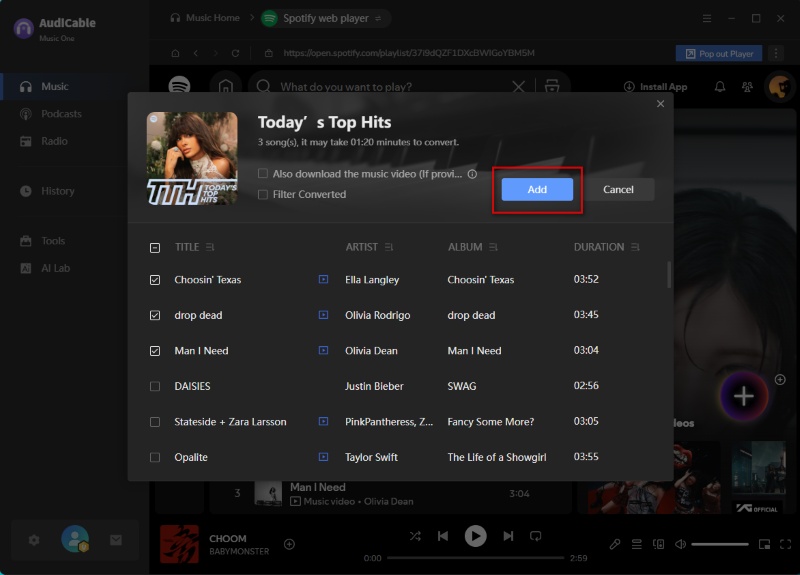
Step 3: Drag and drop a Spotify playlist or paste its link. Select the tracks you want and click "Add".
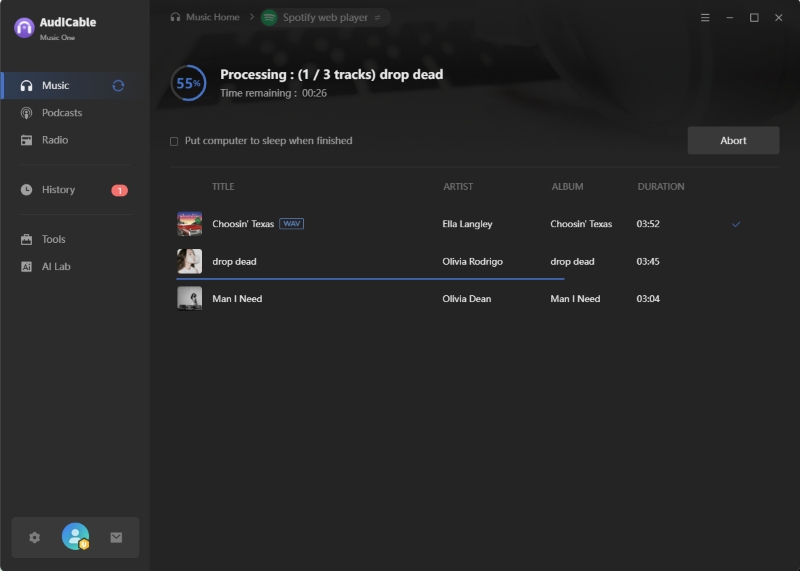
Step 4: Click "Convert" to start downloading Spotify tracks.
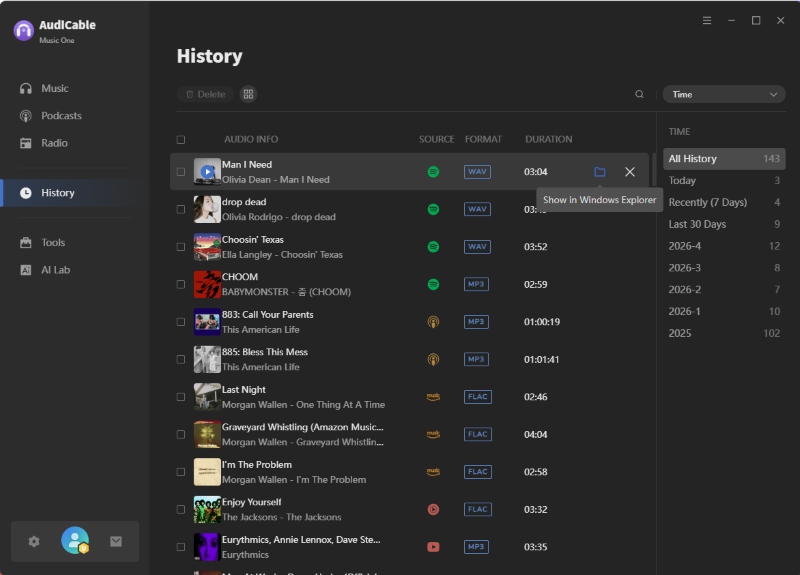
Step 5: Go to the "History" tab and click the folder icon to locate your saved WAV files.
Apowersoft Streaming Audio Recorder
🔍Access Site: https://www.apowersoft.com/free-audio-recorder-online
Recommend Level: ⭐⭐⭐
For users wanting to save Spotify music as WAV, Apowersoft Streaming Audio Recorder acts as a recording tool. It captures the system's audio output while music plays, saving it as a local file. This is different from direct downloads. Compared with its free online version, key features over the desktop version include automatic ID3 tag detection, audio editing capabilities, and format conversion. It's a good option if you like recording audio rather than using a dedicated Spotify download tool.
😀 Key Advantages:
- Supports high-quality recording with stable sound quality and multiple output formats.
- Automatically detects song information and keeps ID3 tags after recording.
- Includes built-in tools for audio editing and format conversion.
- Features a simple, intuitive interface.
☹️ Considerations:
- Performs real-time recording, which is slower and less efficient than direct downloading.
- Imposes several limitations in the free version.
- Prioritizes recording over true lossless Spotify to WAV conversion.
✅ How to Record a Spotify Track to WAV?
Step 1: Download and install the Apowersoft app from the official website, and then launch it.
Step 2: Set System Sound as the recording source and adjust the output format to WAV in Settings.
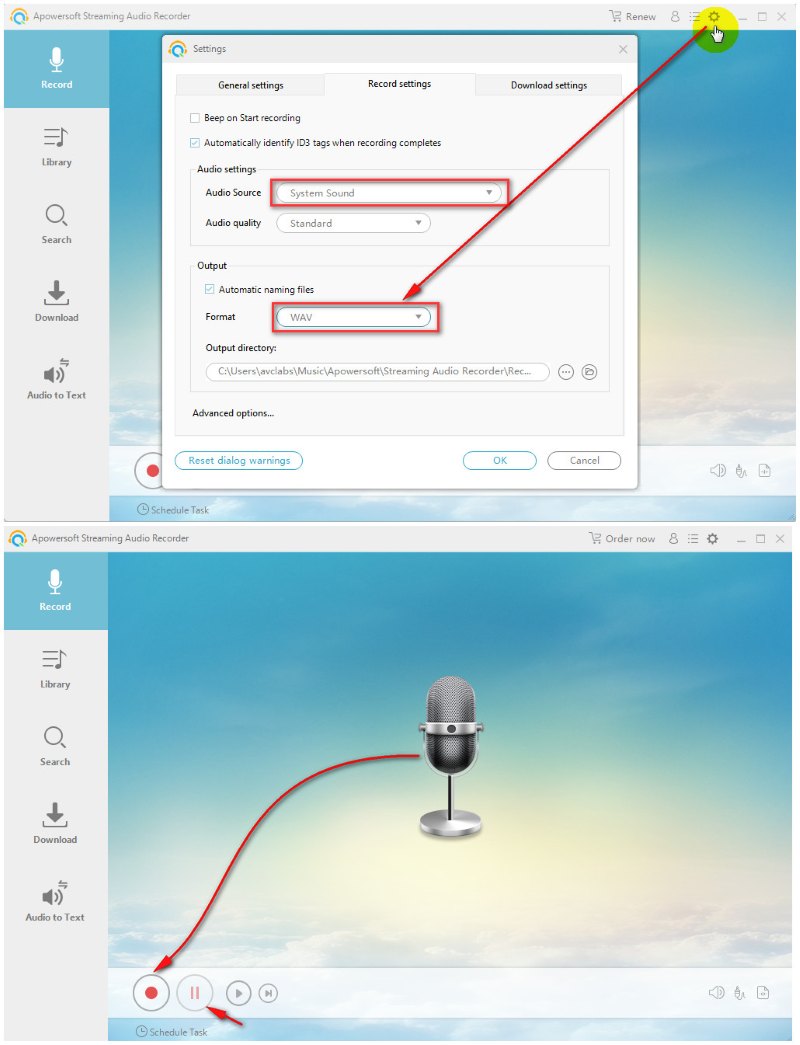
Step 3: Play the Spotify track and click “Start Recording” in the app.
Step 4: Click “Stop” when finished, and the audio file will be saved automatically.
Audacity Audio Recorder Free
🔍Access Site: https://www.audacityteam.org/download/
Recommend Level: ⭐⭐⭐⭐
Audacity records computer audio in real time by capturing system output as Spotify plays, rather than downloading files directly. The audio is then converted into a waveform that can be exported as a WAV file, maintaining good clarity throughout the process. While it also provides powerful waveform editing tools, its recording method is less efficient than dedicated converters, as it requires manual playback and real-time capture. It is suitable for users who want to manually explore how to convert Spotify to WAV through system recording and editing, especially if they need basic audio saving with advanced editing control.
😀 Key Advantages:
- Supports high-quality audio recording and exports directly to the WAV format.
- Provides powerful waveform editing tools for enhancing audio.
- Works as a free, open-source software with no subscription required.
- Supports multiple audio formats and flexible export options.
☹️ Considerations:
- Requires real-time recording, which is slower than direct downloading.
- Has a learning curve and may not be beginner-friendly at first.
- Lacks built-in Spotify integration for direct importing.
🎙️ How to Get Spotify Tracks in WAV Format with Audacity?
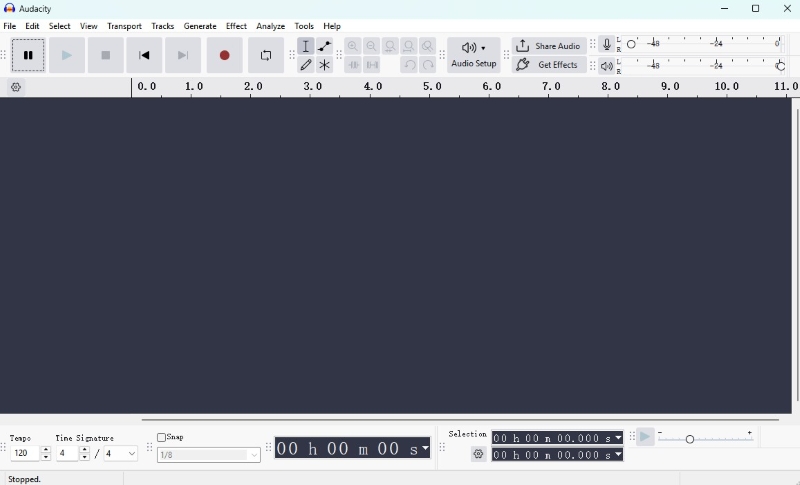
Step 1: Install Audacity and open Audio Setup. Set the recording input to system audio / (loopback).
Step 2: Play the Spotify track and click Record in Audacity, then click Stop when finished.
Step 3: Edit the recording if needed, then go to File > Export Audio and select WAV as the output format.
ConverterFactory
🔍Access Site: https://converterfactory.com/spotify-to-wav
Recommend Level: ⭐⭐⭐
ConverterFactory is a simple online tool for users who want to quickly download Spotify music as WAV without installing software. It offers a free, web-based service to convert Spotify links to WAV files. This online tool is convenient for simple, occasional use by those who don't need professional desktop software. Be aware that web-based tools may rely on indirect processing or third-party sources, which can result in inconsistent availability and conversion success rates compared to desktop software.
😀 Key Advantages:
- Owns a simple and beginner-friendly interface.
- Supports direct Spotify URL handling for quick conversion.
- Offers a convenient browser-based Spotify-to-WAV workflow without installation.
☹️ Considerations:
- Lacks stability compared to dedicated desktop converters.
- Relies on indirect or multi-step processing rather than direct downloading.
- Provides limited control over advanced conversion settings.
🎧 How to Rip Spotify Music to WAV?
Step 1: Open ConverterFactory and paste the downloadable Spotify URL (or upload a file) into the input box.
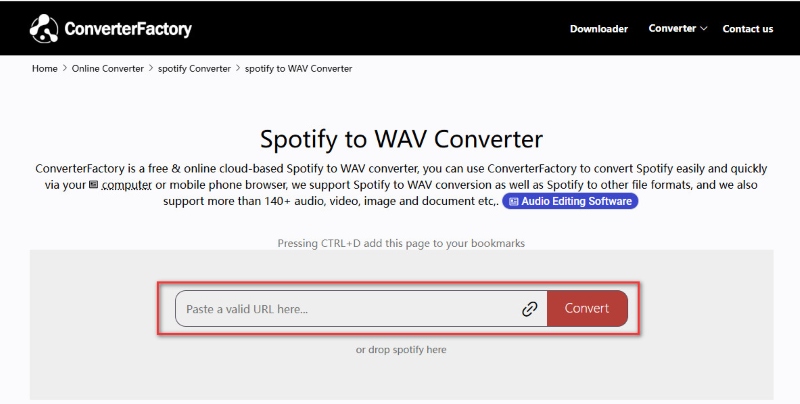
Step 2: Select WAV as the output format and click “Convert” to start.
Step 3: Once finished, click “Download” to save the WAV file to your device.
Soundverter
🔍Access Site: https://soundverter.com/spotify-to-wav
Recommend Level: ⭐⭐⭐⭐
Soundverter is another browser tool that converts Spotify songs to WAV, MP3, FLAC, AAC, and M4A, which is a reliable solution for users searching for how to download WAV files from Spotify using link-based conversion. It supports converting many songs at once, keeps song information like artist and cover art, and offers various sound quality choices. Because it works online and uses links, results can differ depending on song availability. It's ideal for quick, online conversions rather than professional, long-term desktop use.
😀 Key Advantages:
- Supports WAV output, batch conversion, and multiple audio formats.
- Keeps metadata such as title, artist, album, and cover art.
- Works on both desktop and mobile browsers for quick and easy conversion.
☹️ Considerations:
- Relies on online processing, so speed and success rates may vary.
- Requires payment to unlock WAV output and advanced features.
- Uses link-based conversion, which is less stable than dedicated desktop converters.
🎧 How to Convert Spotify Music to WAV with Soundverter?
Step 1: Open Soundverter and paste the Spotify song, playlist, or album link into the converter.
Step 2: Choose WAV as the output format and start the conversion.
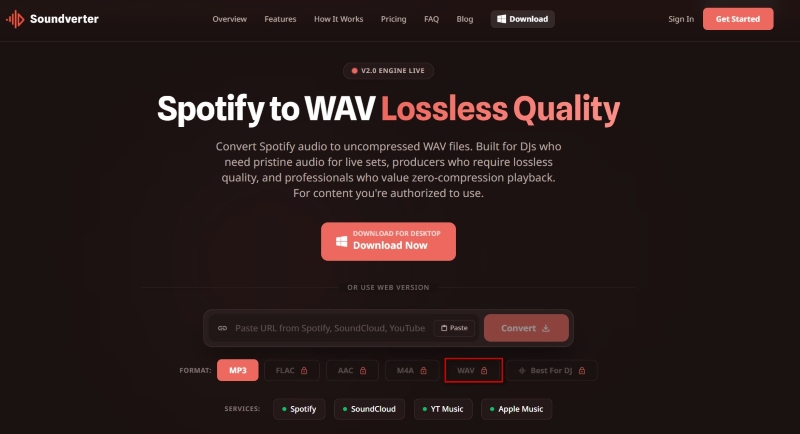
Step 3: Wait for processing to finish, then click “Download” to save the WAV file.
Spytify
🔍Access Site: https://github.com/jwallet/spy-spotify
Recommend Level: ⭐⭐⭐⭐
For Windows users, Spytify offers a free, open-source way to record Spotify music into local files like WAV or MP3. It records the sound Spotify plays rather than directly downloading tracks. The tool automatically separates songs, removes ads, and preserves metadata such as title, artist, album, and cover art. Although this method is slower, it helps maintain original track quality and avoids some issues found in traditional downloaders. It works with both Spotify Free and Premium, with better quality available for Premium users.
😀 Key Advantages:
- Supports WAV and MP3 output with automatic track splitting.
- Keeps song metadata like title, artist, album, and cover art.
- Removes ads automatically and works with both Spotify Free and Premium.
- Offers a free, open-source solution with no subscription required.
☹️ Considerations:
- Supports Windows only, with no macOS or mobile version.
- Records from the Spotify desktop app instead of directly downloading tracks.
- Requires real-time recording, which is slower than direct downloading.
🎧 How to Save Spotify Music as WAV with Spytify?
Step 1: Install Spytify on Windows and open it together with the Spotify desktop app.
Step 2: Go to “Settings” and set WAV as the output format.
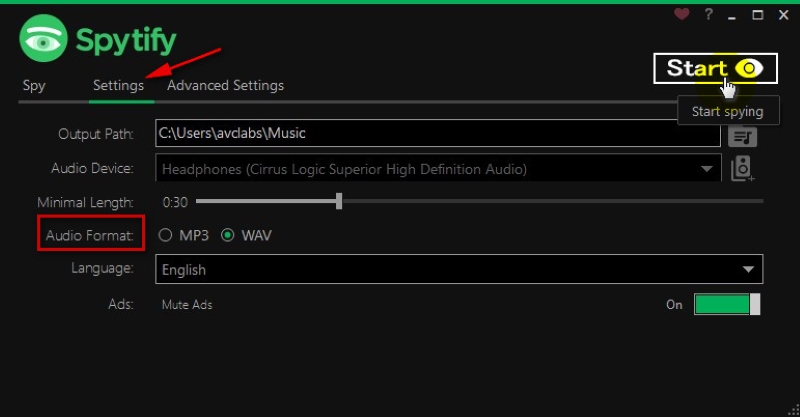
Step 3: Click “Start” and play music in Spotify to begin recording.
Step 4: Click “Stop” when finished, then open the output folder to get your WAV files.
Spotify and SoundCloud Playlist to WAV Folder
🔍Access Site: https://github.com/DavidAlexanderMoe/Spotify_and_SoundCloud_Playlist_to_WAV_Folder/
Recommend Level: ⭐⭐⭐⭐
This GitHub tool converts Spotify and SoundCloud playlists into WAV files. It searches audio sources online and then uses FFmpeg to generate organized WAV folders with track details. It is a free and open-source solution, ideal for advanced users who want batch playlist conversion and more control over the process. However, it requires technical setup such as Python, FFmpeg, API credentials, and command-line usage, so it may not be suitable for beginners.
😀 Key Advantages:
- Supports batch conversion of Spotify playlists into organized WAV folders.
- Offers a free, open-source solution with full user control.
- Keeps basic metadata such as track names and album information.
☹️ Considerations:
- Requires technical setup, including Python, FFmpeg, and API keys.
- Has no graphical interface and relies entirely on command-line operations.
- Uses indirect processing instead of direct Spotify downloads.
🎧 How to Convert Spotify Playlist to WAV Folder
Step 1: Install Python and FFmpeg on your computer (make sure Python is added to PATH).
Step 2: Get Spotify API credentials from developer.spotify.com (Client ID and Client Secret).
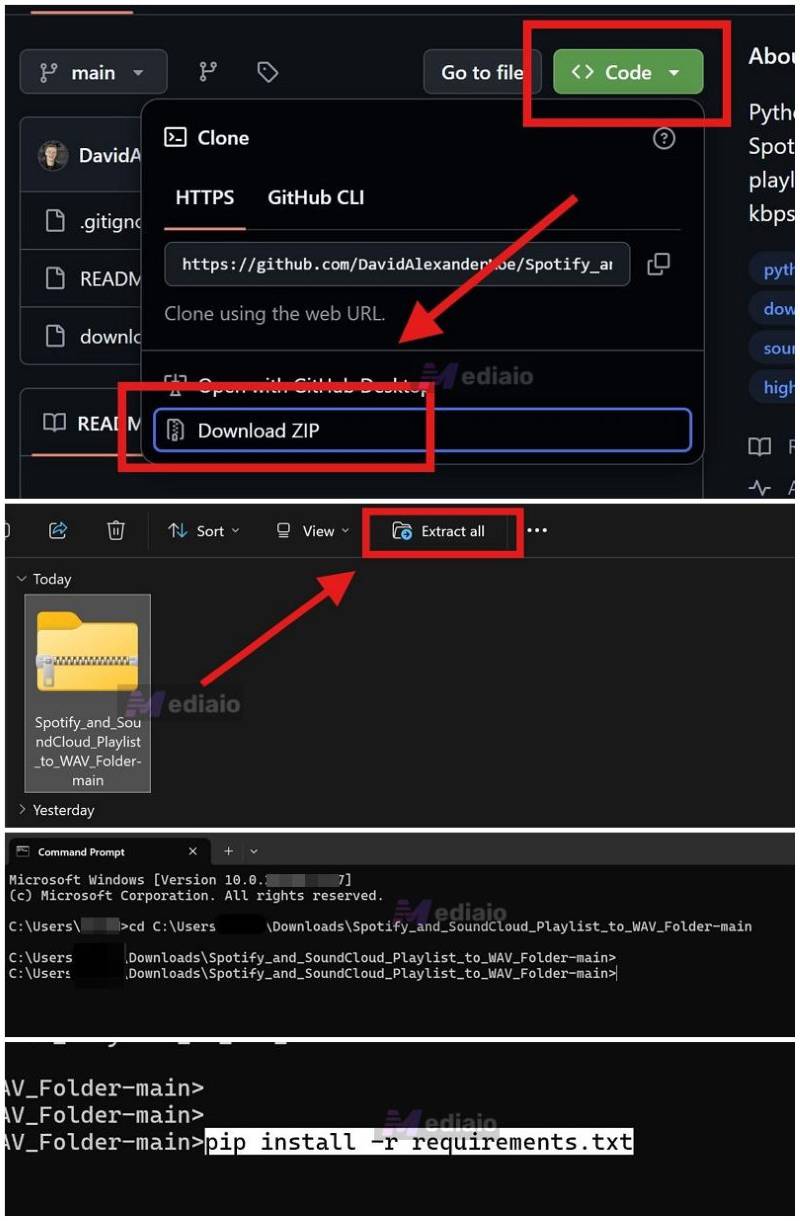
Step 3: Download the GitHub project (ZIP), extract it, and open a terminal in the folder.
Step 4: Install dependencies and run the script (pip install -r requirements.txt → python downloader.py).
Step 5: Enter your Spotify API keys and playlist link, then start the conversion to generate WAV files.
Final Verdict
Each Spotify to WAV converter on this list fits different needs. Online tools like ConverterFactory and Soundverter are convenient for quick use. Free tools like Audacity, Spytify, and GitHub scripts work well for users who prefer open-source solutions. However, most of these options tend to have a few trade-offs, such as real-time recording delays, limited batch support, missing metadata, or more complicated setup requirements.
For anyone who wants a simple, high-quality, and reliable way to save Spotify music as WAV, AudiCable Spotify to WAV Converter is the best overall solution. It offers fast batch downloading, true lossless WAV output, full ID3 tags and album artwork preservation, plus extra tools like a tag editor and format converter.
👍See also: 10 Free Tools to Download Spotify Music to MP3 - 2026 Best
FAQs about Spotify to WAV Converter
💬 Q1: Does Spotify Premium allow WAV downloads?
No. Spotify Premium does not support downloading music in WAV or any other standalone audio file format. Even with a paid subscription, downloaded songs are encrypted and can only be played within the Spotify app. They cannot be exported, converted, or used outside the platform.
💬 Q2: Can I convert Spotify playlists to WAV in bulk?
Yes. Desktop software such as AudiCable Spotify to WAV Downloader, as well as certain open-source solutions, allow users to convert multiple tracks at once. This is significantly more efficient than converting songs one by one.
💬 Q3: Can I use WAV files converted from Spotify songs in DJ or editing software?
Yes. Once Spotify tracks are converted into WAV format, they can typically be imported into DJ software, video editing tools, and music production programs. WAV is an uncompressed audio format, which makes it widely compatible and suitable for mixing, editing, and professional audio workflows.
💬 Q4: Is converting Spotify to WAV legal?
Converting copyrighted Spotify content may be subject to local copyright laws. Users should ensure compliance with applicable regulations and platform terms of service.
Wrapping It Up
Overall, while Spotify doesn’t support exporting music as WAV files, there are still several tools that make it possible depending on your needs — whether it’s quick online conversion, free open-source options, or more advanced desktop software.
If you’re looking for the most reliable, fast, and all-in-one solution with high-quality WAV output and full playlist support, AudiCable Music One remains the top choice.
👉 Get the best AudiCable Spotify to WAV Converter now!!

