


AudiCable Audio Recorder
How to Convert Spotify to MP3 (8 Free Methods in 2026)

By
Updated on: August 19, 2026
Category: Spotify Music Tips
Ever wished your Spotify music could travel with you — beyond the app, offline, and on any device? While Spotify lets you stream millions of tracks, it doesn't officially allow saving them as MP3s. Luckily, there are ways to convert Spotify to MP3, download entire playlists, and enjoy your favorite tracks anytime. This guide walks you through the most practical methods for downloading Spotify songs to MP3, from desktop converters and Android apps to online tools and recording solutions.
See also >>> Two Methods to Download Beatport Music to MP3
📑 Content
Method 1 Converting Spotify to MP3 via Stable Desktop Spotify Music Converter
Desktop software offers a versatile way to convert Spotify to MP3. With batch downloads, customizable output formats, and stable performance, it's perfect for music enthusiasts who want high-quality offline Spotify tracks.
AudiCable Spotify Music Converter (Most Stable)
🔍Website: https://www.audicable.com/
For users wanting high-quality MP3s, AudiCable Spotify Music Converter excels. It supports both Spotify Free and Premium accounts and can process songs, playlists, podcasts, and audiobooks while preserving ID3 tags. Beyond MP3, it exports to AAC, WAV, FLAC, AIFF, and ALAC. You can even download Spotify podcasts and video content, making it one of the most versatile Spotify to MP3 converters. AudiCable is widely considered the best Spotify MP3 converter, especially for users who want stable batch downloads.
😀 Key Advantages:
- Convert Spotify music to MP3, AAC, WAV, FLAC, AIFF, and ALAC.
- Preserve song lyrics and Spotify metadata as editable ID3 tags.
- Batch download Spotify songs, albums, playlists, and podcasts up to 10× faster.
- Works with both Spotify Free and Premium accounts.
- Organize music by playlist, album, and artist efficiently.
- Supports other music platforms like Apple Music, Amazon Music, YouTube Music, Tidal, Deezer, etc.
- Includes Format Converter, ID3 Editor, AA/AAX Converter, Vocal Remover AI, and CD Burner.
- Offers free updates and responsive customer support.
☹️ Considerations:
- The free version allows downloading only the first minute of each track.
- Desktop-only; no mobile app available.
💻 Steps to Convert Spotify Music to MP3:
Step 1: Install and open AudiCable Spotify Music Recorder, then choose "Spotify" in the Music tab to start importing tracks.
Step 2: Open Settings, select "MP3" as the output format, and set a local folder to save your converted files.
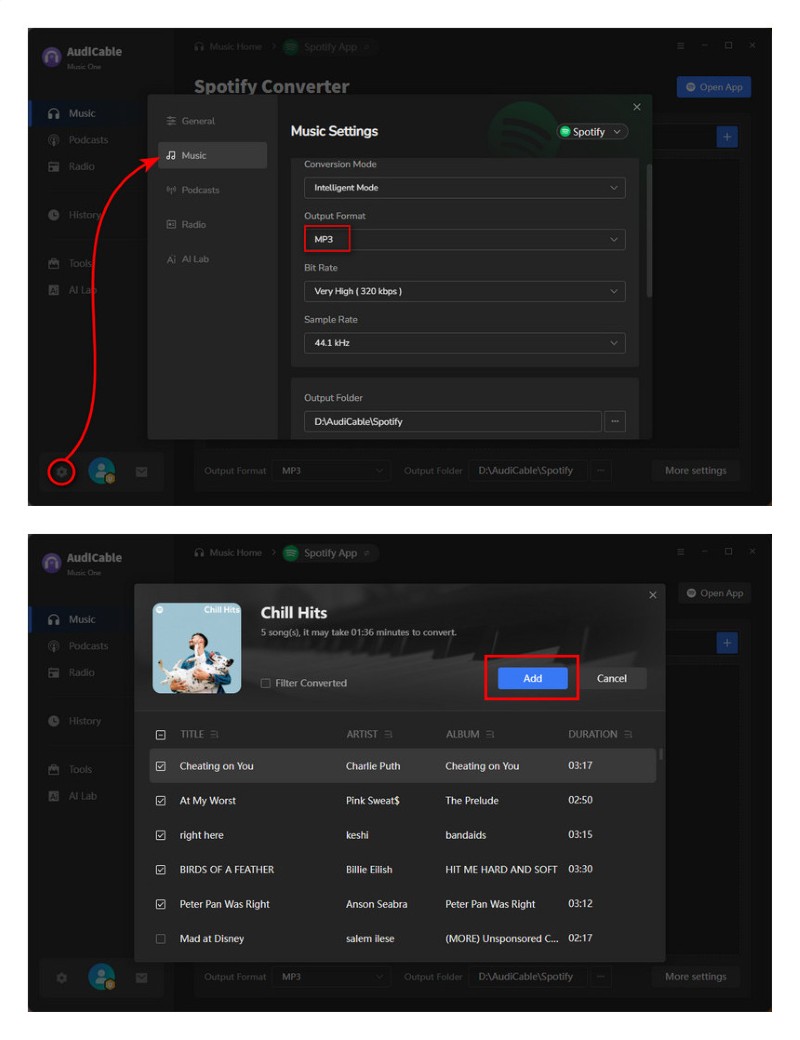
Step 3: Drag and drop a Spotify playlist or paste its link. Select the tracks you want and click "Add".
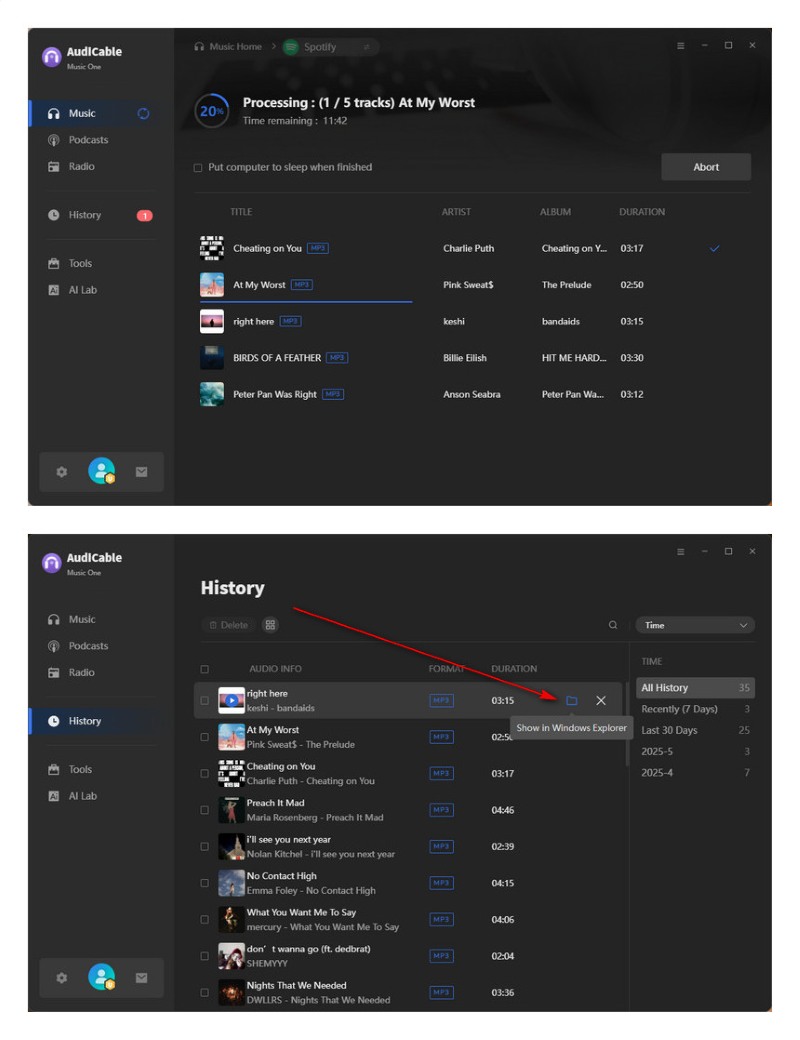
Step 4: Click "Convert" to start downloading Spotify tracks.
Step 5: Go to the "History" tab and click the Folder icon to locate your saved MP3 files.
👍Read also: How to Get Spotify Premium for Free - 100% Work
Method 2 Downloading Spotify Songs to MP3 via Android Spotify Music Downloader
If you prefer downloading music directly on your smartphone, some Android apps allow you to download Spotify to MP3 easily.
Fildo
🔍Website: https://fildo.net/Android
Fildo is an Android music streaming and downloader app that allows users to discover and download songs directly on their mobile devices. Instead of hosting music files itself, Fildo functions as a search-based interface that gathers results from multiple third-party music sources and organizes them in one place. Users can stream songs within the app or download them in formats such as MP3 and FLAC for offline listening. Since Fildo is not available on the Google Play Store, users must download the APK file manually from the official website and install it on their Android device. Fildo is a popular option for Spotify to MP3 for android users who prefer mobile downloading.
😀 Key Advantages:
- Free to use.
- Provides music streaming and downloads.
- The app supports both MP3 and FLAC formats.
☹️ Considerations:
- Requires manual APK installation since it is not available on Google Play.
- Music availability depends on third-party sources.
📱 Steps to Extract Spotify to MP3:
Step 1: Visit the Fildo website and download the latest Android APK file.
Step 2: Enable installation from unknown sources, then install the APK on your device.
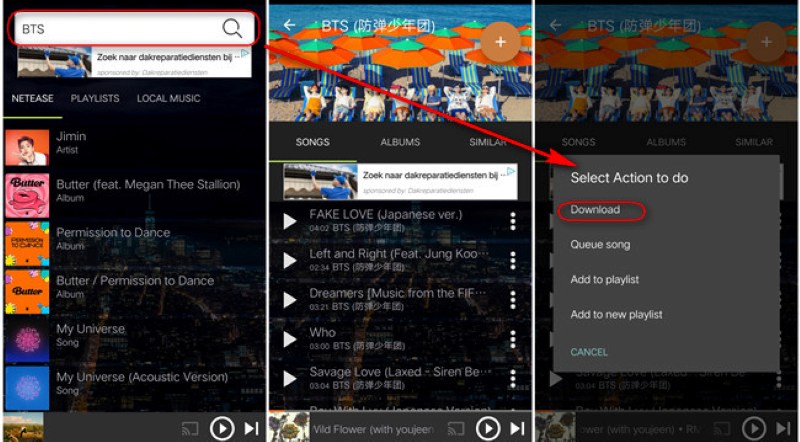
Step 3: Open the app and search for songs, artists, or albums.
Step 4: Choose a track and download it as an MP3 file to your device.
SpotiFlyer
🔍Website: https://github.com/Shabinder/SpotiFlyer
SpotiFlyer is an open-source music downloader hosted on GitHub that allows users to download songs using Spotify links. Instead of downloading audio directly from Spotify, SpotiFlyer uses Spotify metadata to locate matching audio files from other online sources. The tool supports multiple platforms, including Android devices, desktop systems, and web environments, making it a flexible option for users who want to save music locally. It can also function as a lightweight Spotify song downloader for playlists and albums.
😀 Key Advantages:
- Free and open-source.
- Clean user interface without advertisements.
- Works across Android, desktop systems, and web environments.
- Allows downloading Spotify playlists or albums.
☹️ Considerations:
- Some tracks may not perfectly match the original versions.
- The project is no longer actively updated or maintained.
📱 Steps to Download Spotify to MP3:
Step 1: Visit the GitHub page and download the SpotiFlyer app.
Step 2: Copy the Spotify song, album, or playlist link.
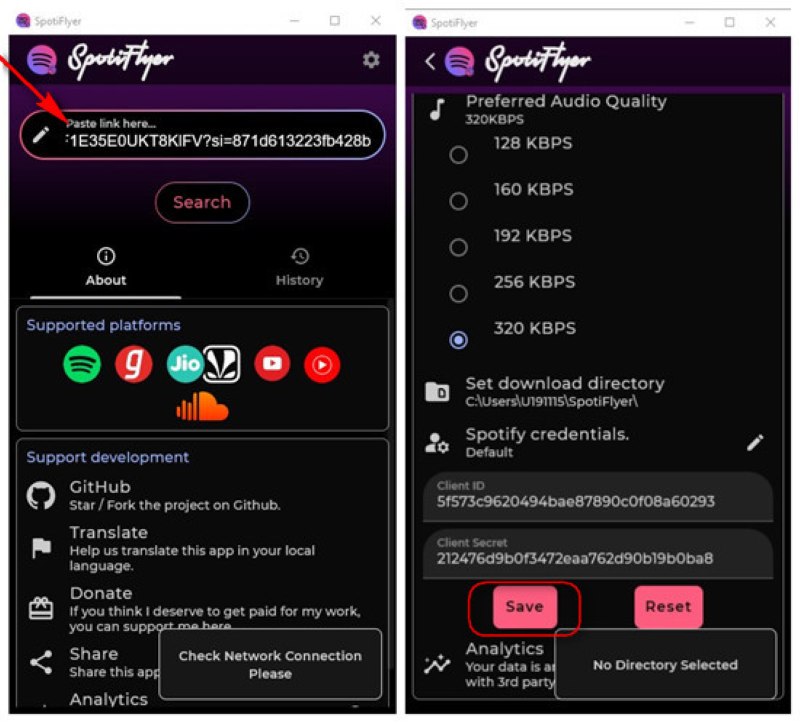
Step 3: Paste the Spotify link into SpotiFlyer, and the tool will search for matching audio sources.
Step 4: Start the download, and the music files will be saved locally.
Method 3 Extracting Spotify to MP3 via Free Online Spotify Music Converter
Online tools are convenient for quick Spotify music to MP3 conversions. They're ideal for single-track or occasional downloads. These tools are often used as a quick Spotify to MP3 online solution without installing software.
Spotidownloader
🔍Website: https://spotidownloader.com/en19
Spotidownloader is a web-based Spotify downloader that allows users to download Spotify music. With this online tool, users can convert Spotify link to MP3 files without additional software installation. It's a simple and free solution for anyone looking to save their favorite Spotify songs offline.
😀 Key Advantages:
- No login or software installation required.
- Free and beginner-friendly interface.
- Works on both desktop and mobile browsers.
☹️ Considerations:
- Primarily supports single-track downloads.
- The actual audio quality may be lower than the claimed bitrate.
🌐 Steps to Download Spotify Songs to MP3:
Step 1: Copy the Spotify track link you want to download.
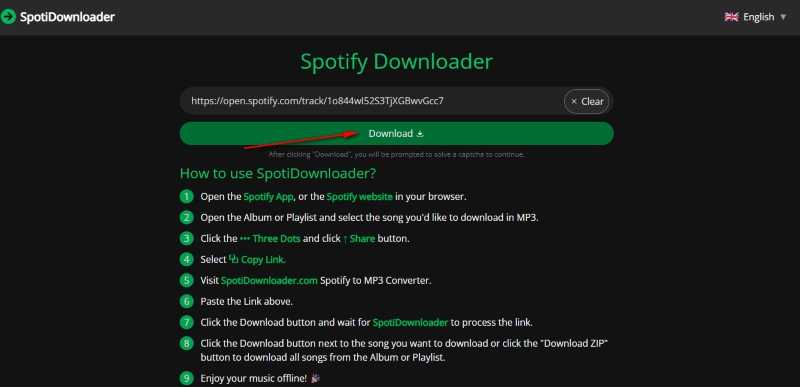
Step 2: Open the Spotidownloader website and paste the Spotify link into the input box.
Step 3: Click the "Download MP3" button to convert and save the Spotify song as an MP3 file.
SpotiSaver
🔍Website: https://spotisaver.net
SpotiSaver is a free, easy-to-use Spotify to MP3 converter that allows users to save Spotify tracks, albums, and playlists as MP3 files directly from a web browser. Instead of hosting music files itself, SpotiSaver retrieves audio from external sources and organizes it using Spotify metadata such as track titles and album artwork.
😀 Key Advantages:
- Free and simple to use.
- No software installation required.
- Supports downloading short playlists as well as individual tracks.
☹️ Considerations:
- During periods of high traffic, the website may ask users to try again later.
- Some tracks may be missing or unavailable depending on external sources.
🌐 Steps to Download Spotify Playlist to MP3:
Step 1: Copy the Spotify track or playlist link you want to download.
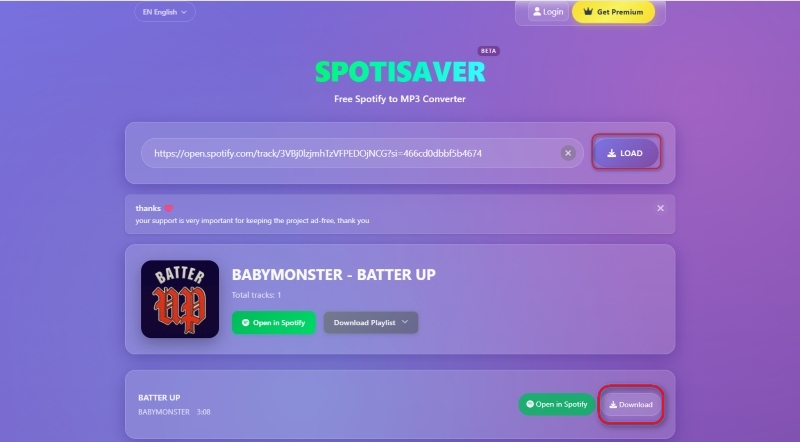
Step 2: Paste the URL into the input box on the SpotiSaver website.
Step 3: Click the "LOAD" button to process the link.
Step 4: The tool will analyze the track or playlist metadata and generate download options. Click "Download" to save the MP3 file to your device.
SpotMate
🔍Website: https://spotmate.online/en1
SpotMate is a Spotify downloader online that allows users to convert Spotify songs into MP3 files directly in a web browser. With its simple interface, SpotMate helps users create an offline music library so they can play their favorite Spotify songs on any device without needing an internet connection.
😀 Key Advantages:
- Easy to use.
- Works on any browser.
- No accounts or personal information required.
☹️ Considerations:
- Process one track at a time.
- Some users may experience failed downloads or missing songs when converting large playlists.
🌐 Steps to Rip Spotify Music to MP3:
Step 1: Copy the Spotify track URL.
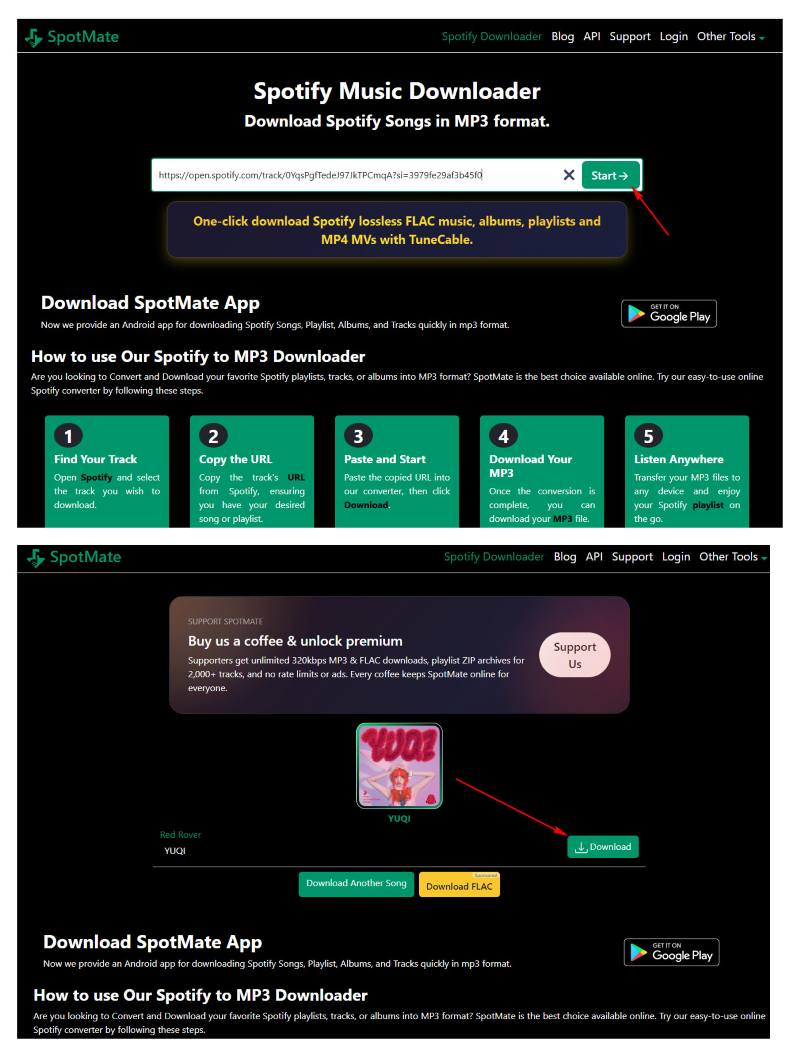
Step 2: Go to the SpotMate website and paste the link into the input box.
Step 3: Click "Start", then choose "Download" to convert the link into an MP3 file.
See Also: Best Free Spotify Music to MP3 Downloaders
Method 4 Ripping Music from Spotify to MP3 via the Useful Spotify Audio Recorder
Audio recorders can capture Spotify playback in real time and export it as MP3. This method works on any platform and is an ideal alternative solution. It is useful when you need to download Spotify music to local files without direct download tools.
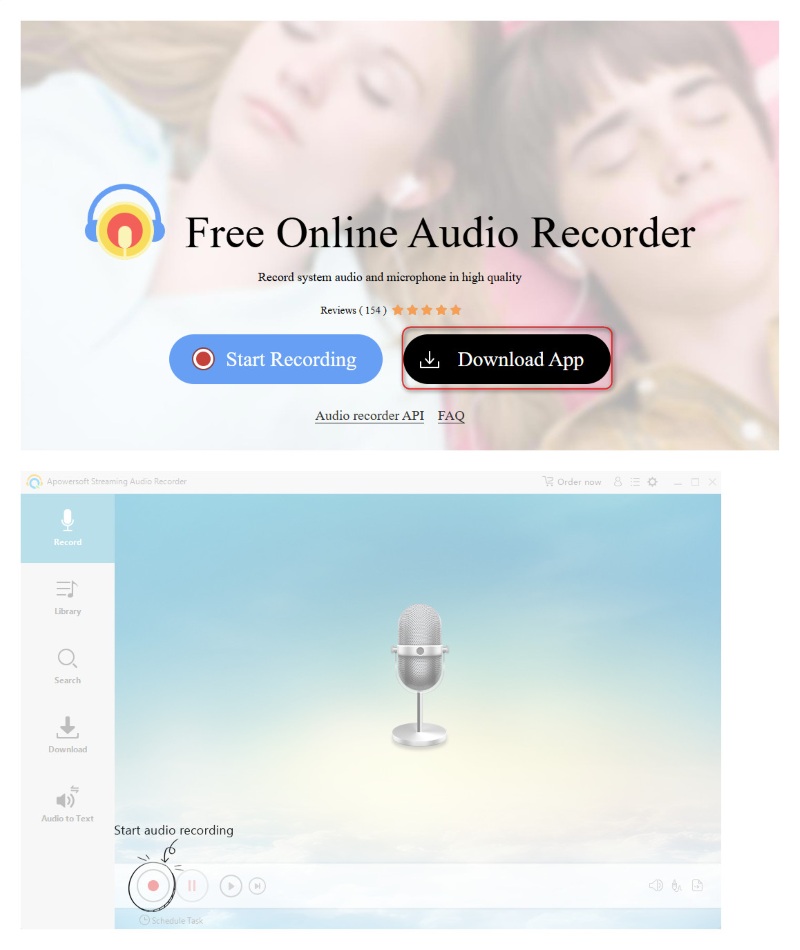
Apowersoft Streaming Audio Recorder
🔍Website: https://www.apowersoft.com/free-audio-recorder-online
Apowersoft Streaming Audio Recorder is a desktop application that allows users to record high‑quality audio from Spotify and other streaming sources, then save the recordings as MP3 or other formats. Compared with the free online version, the desktop recorder offers more advanced features such as built‑in editing tools, automatic ID3 tagging, and batch recording, making it suitable for both casual users and those building a more organized offline music library.
😀 Key Advantages:
- High‑quality audio recording with MP3, WAV, FLAC, AAC, and WMA output formats.
- Automatic ID3 tagging for track title, artist, album, and cover art.
- Built‑in editing tools for trimming, merging, volume adjustment, and fade effects.
- Supports batch recording and scheduled recording for multiple tracks.
- Allows exporting recordings directly to iTunes or mobile devices.
☹️ Considerations:
- Requires installation on a desktop computer.
- A paid license is required to unlock the full set of features.
- Beginners may need some time to learn the interface and settings.
💻 Steps to Save a Spotify Track to MP3:
Step 1: Download and install the Apowersoft app from the official website, then launch it.
Step 2: Select “System Sound” as the recording source and set output format to MP3 in Settings.
Step 3: Play the Spotify track you want and click “Start Recording” in the app.
Step 4: Click “Stop” when finished, and the MP3 file will be saved automatically.
Audacity
🔍Website: https://www.audacityteam.org/download
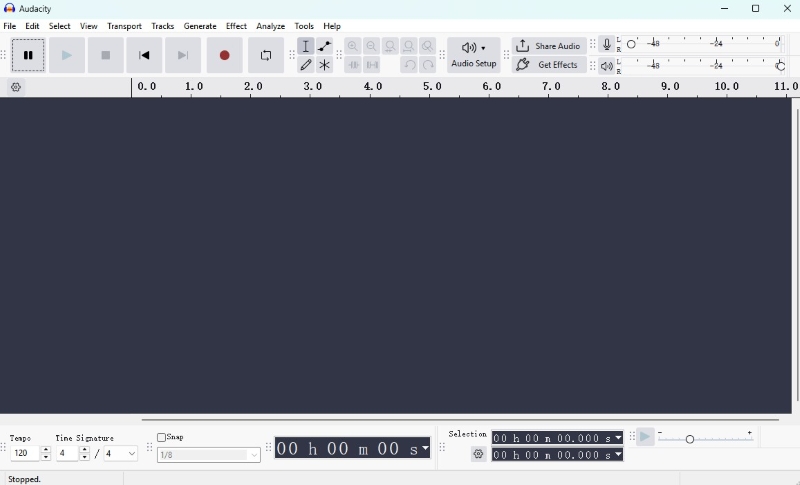
Audacity is a free and open-source desktop audio recorder and editor available for Windows, macOS, and Linux. It provides powerful recording capabilities, multi‑track editing, audio effects, and support for exporting files in multiple formats, including MP3. Unlike simple one‑click audio recorders, Audacity is a flexible tool for capturing Spotify tracks in real time and exporting them as MP3 files. Many users rely on it when other Spotify to MP3 free tools are unavailable or unstable.
😀 Key Advantages:
- Completely free and open‑source.
- Supports multiple output formats such as MP3, WAV, FLAC, and AIFF.
- Compatible with Windows, macOS, and Linux systems.
- Includes powerful editing tools.
☹️ Considerations:
- Requires manual setup to capture system audio.
- Recording occurs in real time.
🎙️ Steps to Get Spotify Tracks in MP3 Format:
Step 1: Download and install Audacity on your device.
Step 2: Open Audio Setup and set the recording input to system audio / (loopback).
Step 3: Click Record in Audacity and play the Spotify track you want to capture.
Step 4: Click Stop once the track finishes recording.
Step 5: Edit the recording if needed, then go to File > Export Audio, select MP3, and save the file.
Final Comparison Table
Quick Comparison: The table below compares the most popular Spotify to MP3 tools based on output quality, speed, playlist support, and ease of use.
| Tool | Type | Platform | Batch Download | Output Quality | Speed | Playlist Support | ID3 Tags | Ad-free | Ease of Use |
|---|---|---|---|---|---|---|---|---|---|
| AudiCable Spotify Music Converter | Desktop Converter | Windows / macOS | ✔ Yes | Up to 320 kbps + Lossless | Fast (up to 10×) | ✔ Full Playlist & Albums | ✔ Complete | ✔ Yes | ⭐⭐⭐⭐⭐ |
| Fildo | Android App | Android | Limited | Medium | Medium | Partial | Partial | ✔ Yes | ⭐⭐⭐ |
| SpotiFlyer | Open-source Downloader | Android / Desktop / Web | ✔ Yes | Medium | Medium | ✔ Playlist | Partial | ✔ Yes | ⭐⭐⭐ |
| Spotidownloader | Online Tool | Browser | ✘ No | Low – Medium | Fast | Single Track | ✘ No | ✘ No | ⭐⭐⭐⭐ |
| SpotiSaver | Online Tool | Browser | Limited | Medium | Medium | Short Playlists | Partial | ✔ Yes | ⭐⭐⭐⭐ |
| SpotMate | Online Tool | Browser | ✘ No | Medium | Medium | Single Track | ✘ No | ✔ Yes | ⭐⭐⭐⭐ |
| Apowersoft Streaming Audio Recorder | Desktop Recorder | Windows / macOS | ✔ Yes | High | Medium | Manual Recording | ✔ Yes | ✔ Yes | ⭐⭐⭐⭐ |
| Audacity | Audio Recorder / Editor | Windows / macOS / Linux | ✘ No | High | Real-time | Manual Recording | Partial | ✔ Yes | ⭐⭐ |
Disclaimer:
- All these methods are for personal or educational use only.
- You should not use this tool to distribute music or for business.
FAQs about Converting Spotify Songs to MP3
💬 Q1: Can I convert Spotify podcasts or videos to MP3?
AudiCable Spotify Music Converter supports podcasts and Spotify video downloads. Whereas, most basic online tools focus only on music tracks and cannot handle video content.
💬 Q2: Are online Spotify to MP3 converters safe?
Many online tools are safe if downloaded from official websites, but be cautious with ads and pop-ups. Avoid sites that ask for personal information or install additional software.
💬 Q3: Can I play converted Spotify MP3s on all devices?
Yes. MP3 is widely compatible with smartphones, tablets, car audio systems, smart speakers, and most media players. Just transfer the files via USB, storage, or Wi-Fi sync.
Wrapping It Up
Converting tracks to MP3 quietly opens the door to more freedom — your playlists can accompany you offline, on any device, and in any moment you choose. Among the tools available, AudiCable Music One stands out for its speed, high-quality audio, and full metadata preservation, making it an excellent choice for building a personal, organized offline library. Mobile apps and online solutions also have their place for quick or occasional downloads.
Ultimately, the best method depends on your needs — whether you're looking for convenience, flexibility, or the easiest way to download Spotify songs to MP3 and keep your favorite music close wherever life takes you.
Get the best AudiCable Spotify to MP3 Converter now!!

