


AudiCable Audio Recorder
Best Spotify Playlist Downloader 2026: 11 Tools Tested

By
Updated on: August 27, 2026
Category: Spotify Music Tips
If you've ever searched for a free Spotify playlist downloader, you've probably come across dozens of websites claiming to let you download Spotify playlists instantly. Many of these Spotify playlist downloader online tools promise to convert Spotify playlists into MP3 files with just a few clicks. But in practice, our testing told a slightly different story. A few tools only grabbed two or three songs, while others could “see” the playlist but then failed to finish the download properly. One tool spent over 30 minutes processing a playlist without success, and another one created an empty ZIP file.
To identify the best Spotify playlist converter, we tested 11 popular tools using the same playlists and network conditions. Our goal was to find out which tools could reliably convert Spotify playlists to MP3 files while maintaining good audio quality.
See also >>> Top 9 Free SoundCloud Playlist Downloaders Online in 2026
📑 Content
- Quick Comparison Table of Spotify Playlist Downloaders
- Best Overall Spotify Playlist Downloader
- Best Free Online Spotify Playlist Downloaders
- SpotiSaver
- spotidown.co
- Spotmate
- spotidown.app
- spodownloader
- Spotisongdownloader.com
- spotidown.me
- Spotidost
- spotidownloader
- spowload.cc
- Free vs Paid, Online vs Desktop: How to Choose
- FAQs about Spotify Playlist Downloader
📊 Spotify Playlist Downloader Comparison (2026 Test Results)
| Tool | Playlist Support | Test Outcome | Audio Quality | Speed | Ads & Redirects | Best For | Overall Score |
|---|---|---|---|---|---|---|---|
| AudiCable Audio Recorder | Full playlists | Downloaded complete playlists successfully | 320kbps MP3 / Lossless FLAC | Fast (up to 10×) | None | Reliable full-playlist downloads | 9.8/10 |
| spotidown.co | Full playlists | Successfully downloaded playlist ZIP files | 128–320 kbps (varies) | Slow | Moderate | Free playlist downloads | 8.0/10 |
| SpotiSaver | Full playlists | Worked after multiple retries | 128–160 kbps | Moderate | Minimal | Browser-based playlist downloads | 7.2/10 |
| spotidown.app | Limited (5 tracks) | Downloaded only first 5 songs | Up to 320 kbps | Fast | Minimal | Quick playlist previews | 6.5/10 |
| Spotmate | Limited (3 tracks) | Downloaded only 3 songs | 128–160 kbps | Fast | Minimal | Small downloads | 5.8/10 |
| spotidown.me | Limited (3 tracks) | Downloaded only 3 songs | 128–160 kbps | Fast | Moderate | Single-track downloads | 5.5/10 |
| spodownloader | Individual tracks only | Playlist detected but required manual downloads | 128–160 kbps | Medium | Minimal | One-by-one downloading | 5.2/10 |
| Spotisongdownloader.com | Limited (2 tracks) | Downloaded only 2 songs | 128–160 kbps | Fast | Moderate | Occasional song downloads | 5.0/10 |
| spotidownloader | Broken playlist support | Generated an empty ZIP file | Up to 320 kbps | Slow | Frequent Redirects | Individual songs only | 3.5/10 |
| spowload.cc | Single tracks only | Playlist downloads require payment | 128–160 kbps | Medium | Frequent Redirects | Single-song downloads | 3.2/10 |
| Spotidost | Failed | Playlist processing never completed | Unknown | Very slow | Minimal | Not recommended | 2.0/10 |
Best Overall Spotify Playlist Downloader
AudiCable Spotify Playlist Downloader (Most Stable)
Our Test Result
| Playlist Recognition | Full Playlist Download | Output Format | Download Stability | Download Speed | Audio Quality |
|---|---|---|---|---|---|
| Yes | Yes | MP3, AAC, WAV, FLAC, AIFF & ALAC | Excellent | Up to 10× | 320kbps MP3 / Lossless FLAC |
🔍Website: https://www.audicable.com/
AudiCable is a dependable Spotify playlist to MP3 converter for pulling Spotify playlists in high quality. Whether you’re using a free or Premium account, you can download full playlists while preserving key metadata like song title, artist, album, and artwork. It also supports a wide range of output formats, including MP3, AAC, WAV, FLAC, AIFF, and ALAC. During testing, it handled large playlists smoothly and delivered consistent results, making it a simple, hassle-free option without playlist size limits.
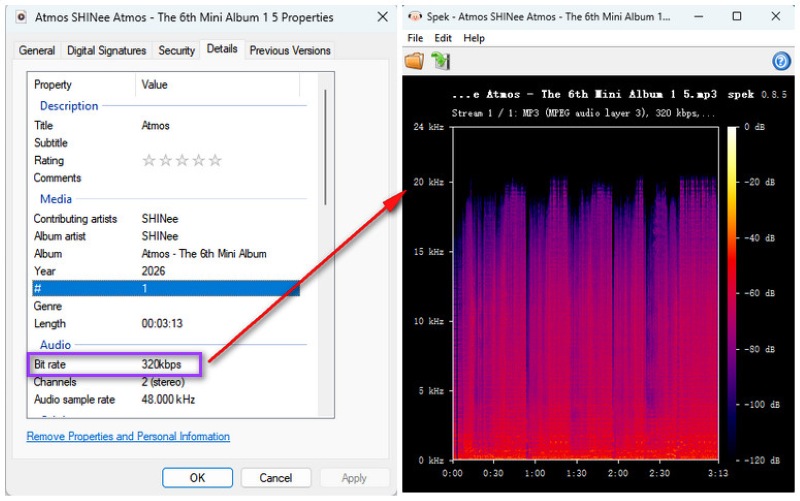
We tested AudiCable with Spotify playlists containing dozens of tracks. The software successfully recognized and processed the complete playlist without interruptions. Our spectrum analysis showed that the downloaded MP3 files retained audio frequencies up to around 20 kHz, suggesting that AudiCable functions as a genuine 320kbps Spotify downloader with better audio preservation than most web-based tools tested.
😀 Key Advantages:
- Converts entire Spotify playlists to MP3, AAC, WAV, FLAC, AIFF, and ALAC.
- Works with both Spotify Free and Premium accounts.
- Downloads Spotify songs, playlists, albums, and podcasts in batch mode.
- Preserves full metadata, including song title, artist, album info, lyrics, and artwork.
- Allows users to batch download Spotify playlists at up to 10X faster, with no limits on playlist size.
- Includes extra tools such as format converter, ID3 tag editor, CD burner, and more.
- Supports multiple platforms like Apple Music, Amazon Music, YouTube Music, Tidal, and Deezer.
- Offers free updates and responsive customer support.
☹️ Considerations:
- Desktop-only tool, with no mobile app available.
💻 Quick Steps to Download Spotify Playlists to MP3 using AudiCable:
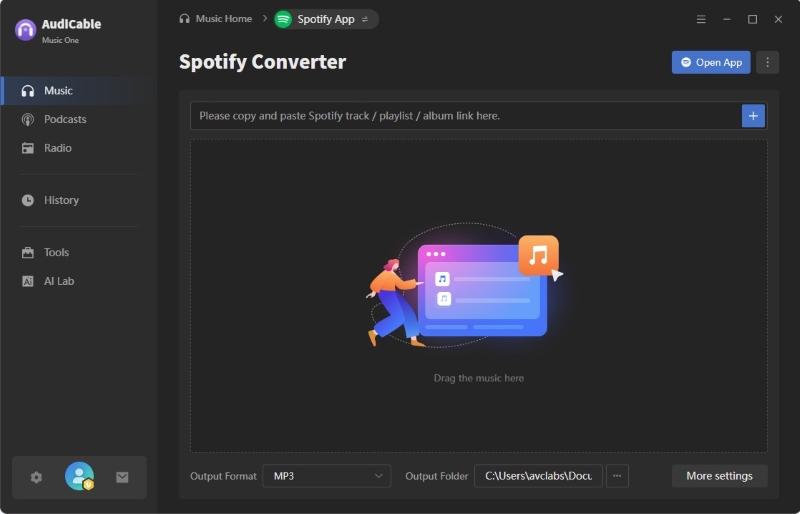
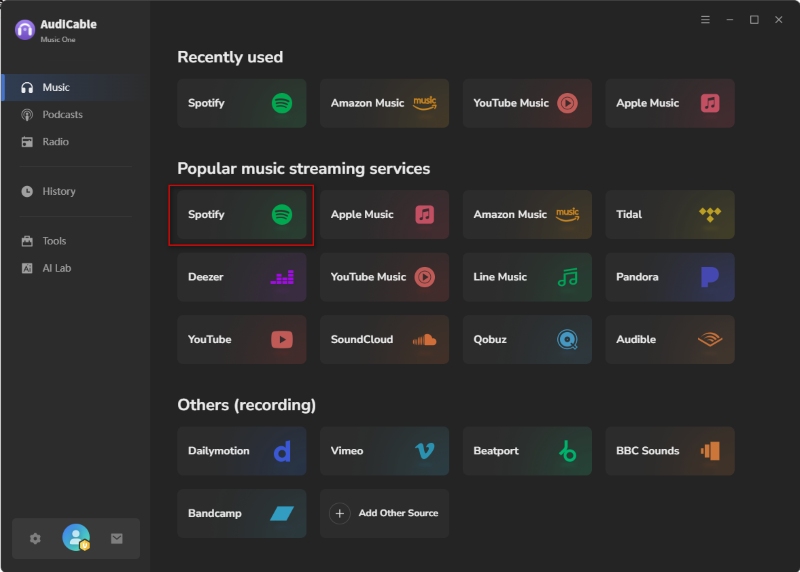
Step 1: Install and launch AudiCable Spotify to MP3 Converter. In the Music tab, select "Spotify" as your source platform.
Step 2: Open Settings, choose MP3 as the output format, and select a folder where you'd like to save the downloaded files.
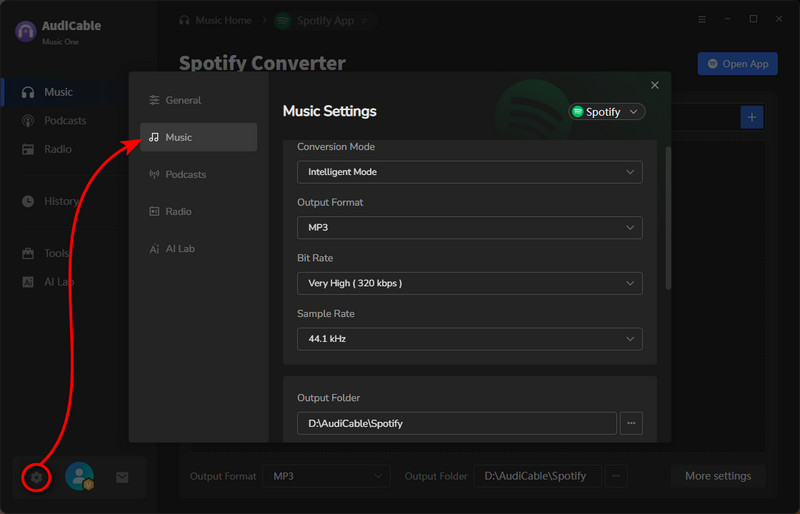
Step 3: Find a Spotify playlist you'd like to save. Simply drag and drop it into AudiCable, or copy and paste the playlist link into the app. Once the playlist loads, click Add to import it.
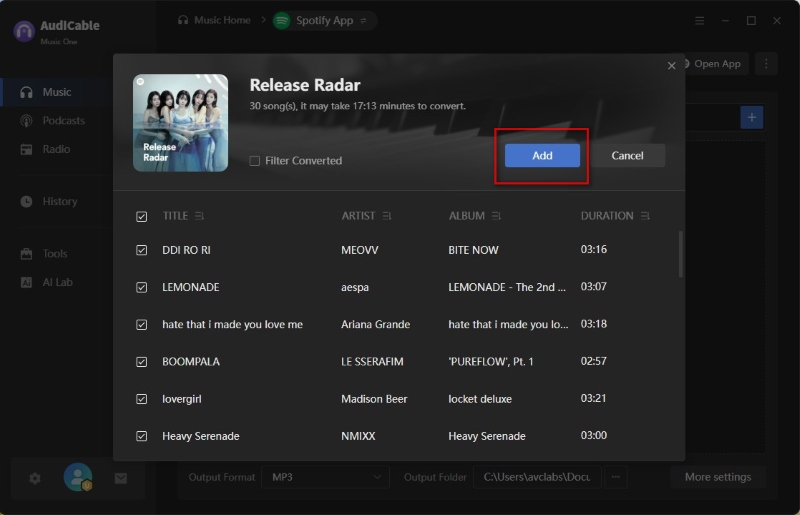
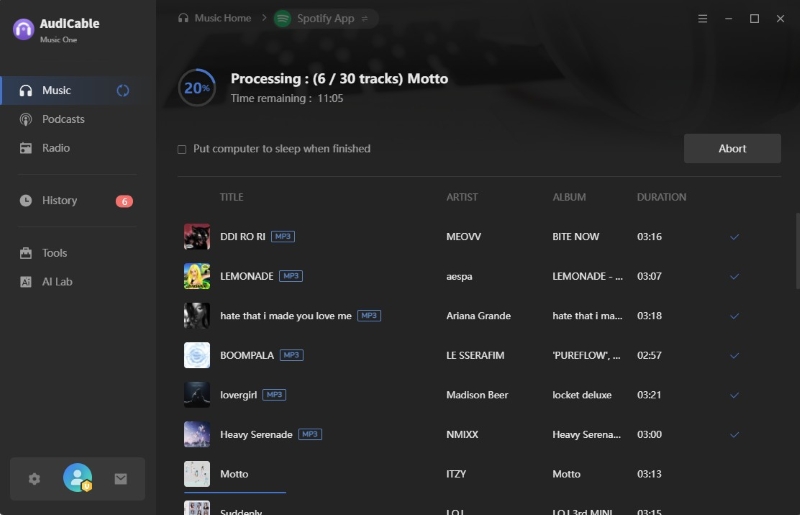
Step 4: Click Convert to start downloading and converting the whole Spotify playlist to MP3s.
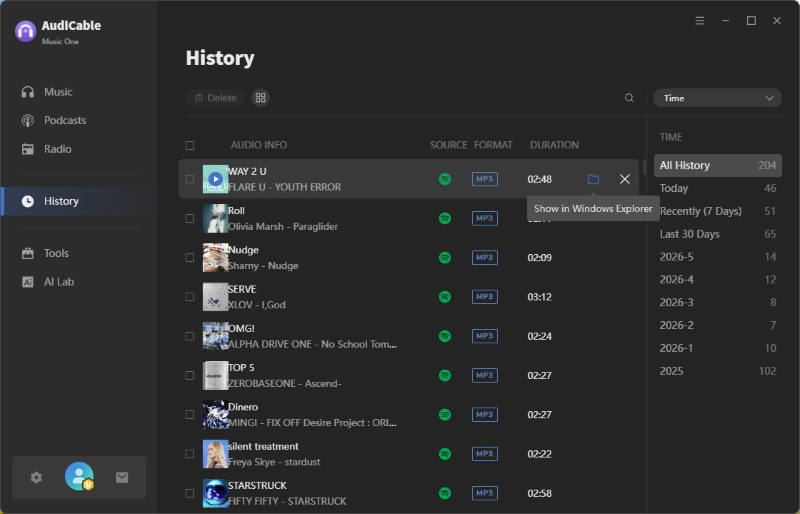
Step 5: Once the conversion is complete, open the History tab and click the folder icon to access your downloaded MP3 files.
Best Free Online Spotify Playlist Downloaders
SpotiSaver Spotify Playlist Downloader (Browser Tool)
Our Test Result
| Playlist Recognition | Full Playlist Download | Output Format | Stability | Speed | Audio Quality |
|---|---|---|---|---|---|
| Yes | Yes | MP3 | Low | Moderate | 128~160 kbps |
🔍Website: https://spotisaver.net/en/playlist
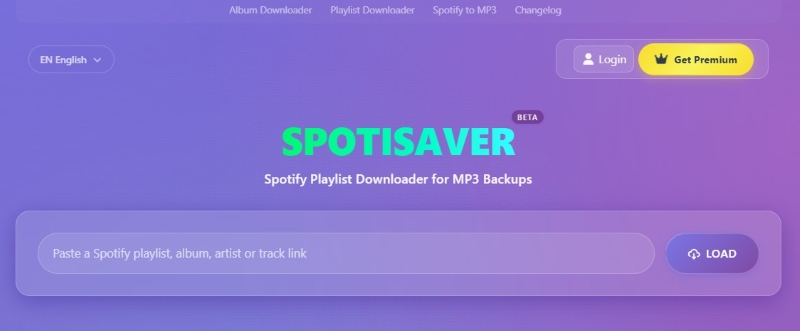
Spotisaver is a simple web tool for downloading Spotify playlists. You can download one track at a time or grab an entire playlist, usually as a ZIP. It runs right inside your browser without needing a Spotify account, and it also keeps the song details. You can even export MP3 files, with quality reaching up to 320 kbps when available.
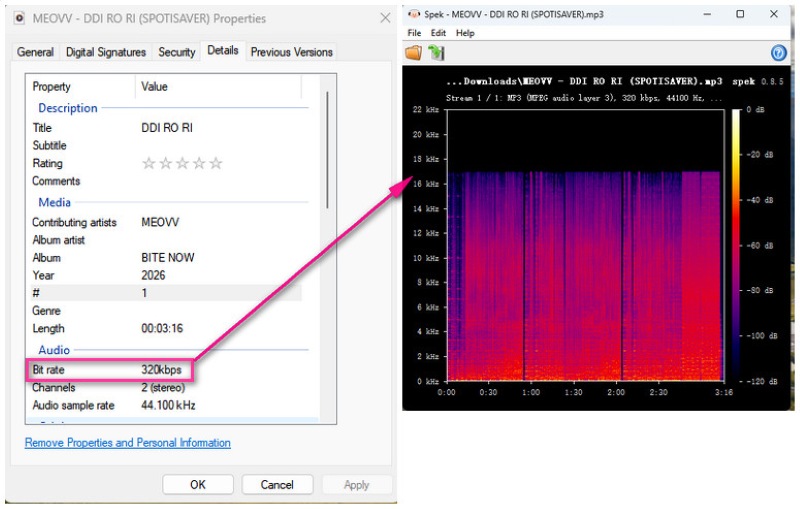
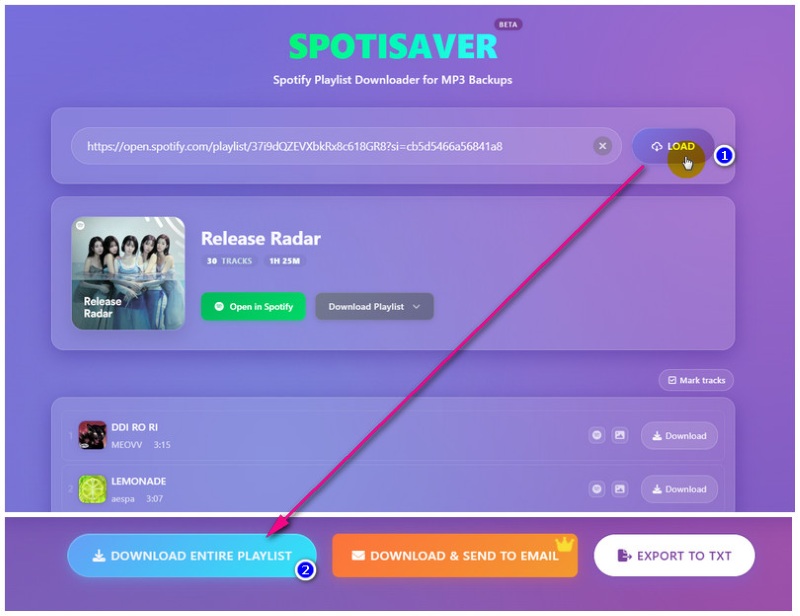
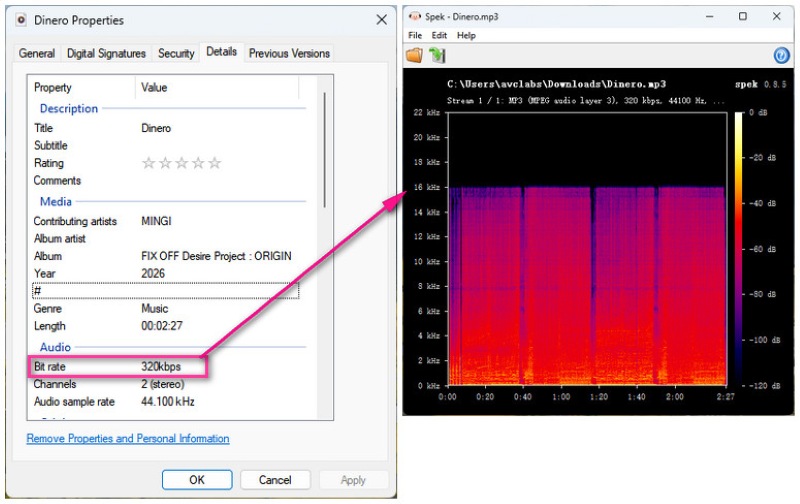
The tool successfully recognized our playlist and eventually downloaded the complete list. However, during peak hours, multiple attempts were required before downloads could start. We frequently ran into the message: "⚠️ Sorry, no download slots are free right now due to high load. Please try again in a few minutes." As a result, the overall experience wasn't always as smooth as we'd hoped. Moreover, the spectrum of many songs abruptly cuts off at 16–17 kHz, so although the bitrate shows 320 kbps MP3, it is likely transcoded from a lower-quality source.
😀 Pros:
- No Spotify login needed.
- Supports Spotify playlists and individual tracks.
- Can download entire playlists as ZIP files.
- Simple and beginner-friendly interface.
☹️ Cons:
- Inconsistent performance during peak traffic.
- May occasionally download incorrect track versions.
- Free users face playlist size and processing limits.
💻 Steps to Get a Spotify Playlist as MP3 Files:
Step 1: Copy the Spotify playlist link from Spotify.
Step 2: Paste the link into Spotisaver and let it load the playlist.
Step 3: Download the entire playlist as a ZIP file and save it to your device.
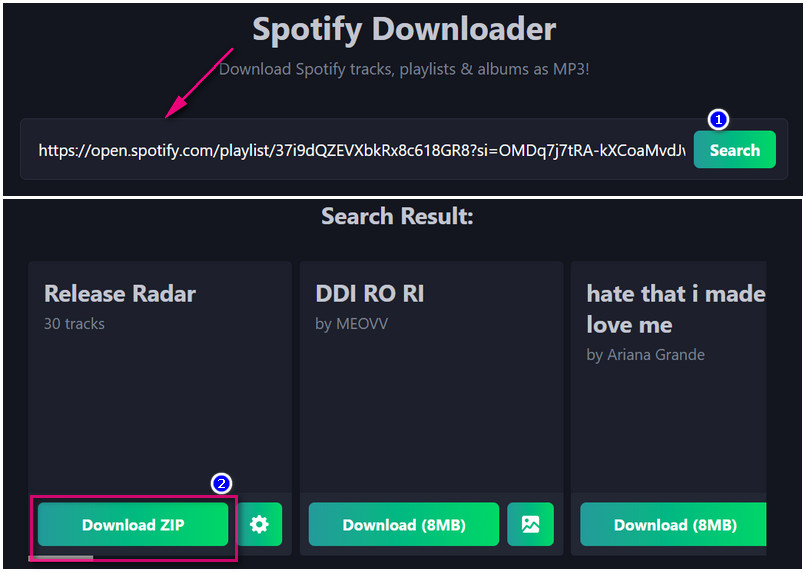
SpotiDown.co Spotify Playlist Downloader (Web-Based Tool)
Our Test Result
| Playlist Recognition | Full Playlist Download | Output Format | Download Stability | Download Speed | Audio Quality |
|---|---|---|---|---|---|
| Yes | Yes | MP3 | Good | Slow | 128–320 kbps (varies) |
🔍Website: https://spotidown.co/en6
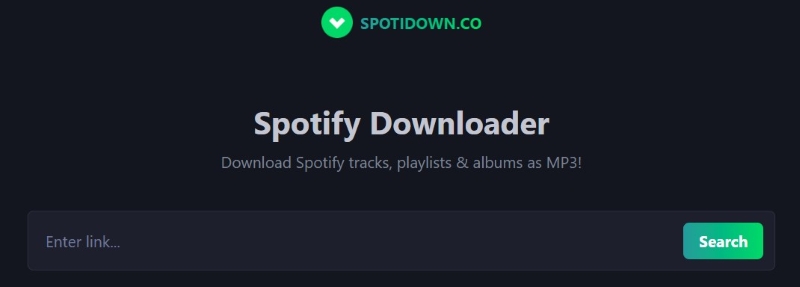
SpotiDown.co makes downloading Spotify easy and convenient. It can handle links and load songs, albums, or playlists directly in your browser. Basic metadata such as song index, title, artist, and release date are optional and can be retained for easy organization.
The entire playlist was successfully downloaded as a ZIP file, but the first test took approximately 25 minutes, and the second test took even longer. In a playlist with a total of 30 songs, 15 downloaded MP3 files retained audio frequencies up to 20 kHz, while the rest were high-frequency truncated files.
😀 Pros:
- No installation or Spotify login required.
- Downloads complete playlists as ZIP files.
- Works directly in the browser with a simple interface.
- Preserves basic metadata.
☹️ Cons:
- Audio quality may vary across tracks.
- Performance can be inconsistent during busy periods.
- Only supports MP3 output.
💻 How to Convert Spotify Playlists to MP3 for free:
Step 1: Copy a Spotify playlist link.
Step 2: Paste it into SpotiDown and tap Search.
Step 3: Download the playlist and save the ZIP file to your device.
Spotmate Spotify Playlist Downloader (Simple Online Tool)
Our Test Result
| Playlist Recognition | Full Playlist Download | Output Format | Songs Downloaded | Stability | Audio Quality |
|---|---|---|---|---|---|
| Yes | No | MP3 | 3 | Medium | 128~160 kbps |
🔍Website: https://spotmate.online/en1
Spotmate gives you a sort of simple path to download Spotify tracks and playlists online. It’s pretty easy to use; you don’t need a login, and it handles saving both individual songs and playlists. Overall, Spotmate is a good no-setup tool, kind of handy for when you want to quickly stash your Spotify music without extra fuss.
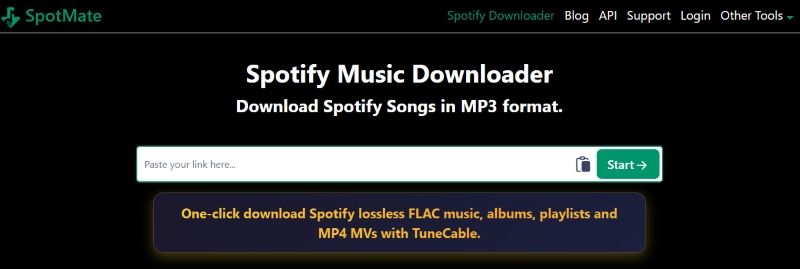
Although the tool recognized the playlist, only three songs could be downloaded. Also, we noticed similar audio quality limitations during testing, with some tracks showing signs of lower-source transcoding.
😀 Pros:
- Simple copy-and-paste workflow for Spotify songs and playlists.
- Clean and beginner-friendly interface, easy to get started.
☹️ Cons:
- Playlist support is extremely limited.
- Audio quality may vary across tracks.
- Track matching may be inaccurate at times.
SpotiDown.app Spotify Playlist Downloader (Simple Online Tool)
Our Test Result
| Playlist Recognition | Full Playlist Support | Output Format | Songs Downloaded | Speed | Audio Quality |
|---|---|---|---|---|---|
| Yes | No | MP3 | 5 | Fast | Up to 320 kbps |
🔍Website: https://spotidown.app/en6
SpotiDown.app supports songs and playlists with a simple interface. It's convenient for downloading a few tracks quickly. Since it's browser-based, it works on most devices. However, performance can vary due to server load and track compatibility. It's a simple, online tool for quick Spotify downloads.
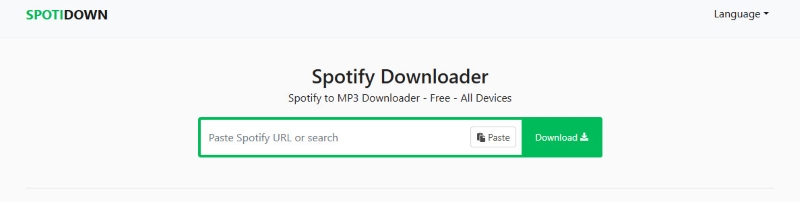
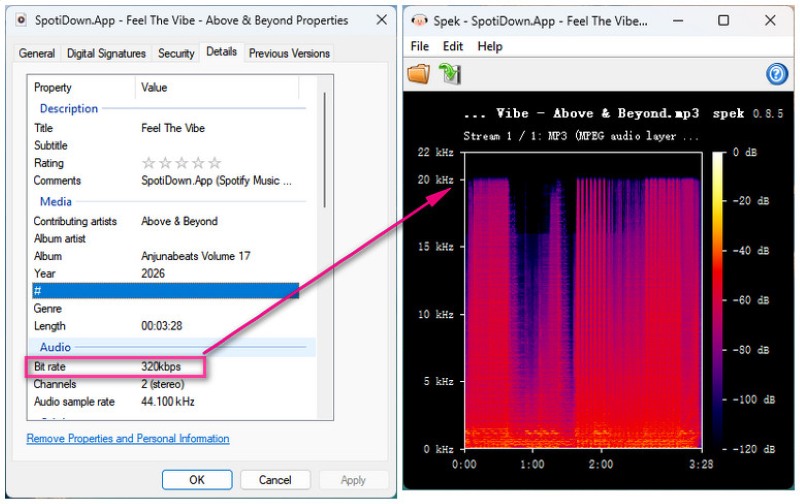
This tool only offers free downloads of the first five songs in the playlist; a subscription is required to download the full playlist. The good news is that the audio quality of most MP3s is well preserved, retaining audio frequencies up to around 20 kHz, with only a few high-frequency frequencies truncated.
😀 Pros:
- Retain good audio quality
- Quick for basic downloads
- No installation or login required
☹️ Cons:
- Does not support downloading the entire playlist
- Limited advanced features
Spodownloader Spotify Playlist Downloader (Browser-Based Tool)
Our Test Result
| Playlist Recognition | Full Playlist ZIP | Output Format | Download Stability | Speed | Audio Quality |
|---|---|---|---|---|---|
| Yes | No | MP3 / M4A | Low | Medium | 128~160 kbps |
🔍Website: https://spodownloader.com/
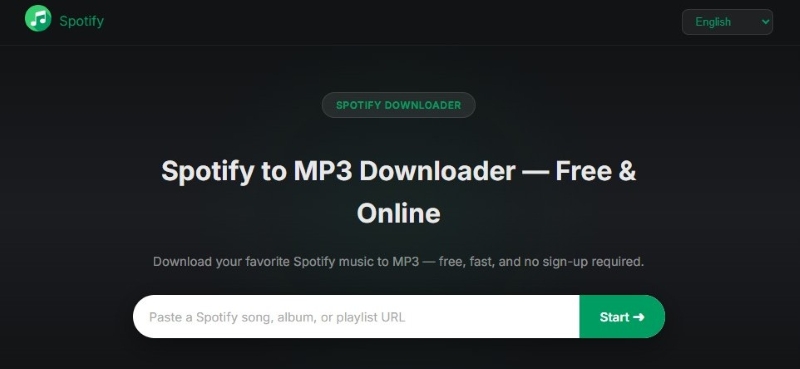
Spodownloader is a tool for downloading Spotify music directly in your web browser. Simply paste a song or playlist link, and it generates download choices. No software or account is needed. It's convenient for saving individual tracks or entire playlists. Keep in mind that download success and quality can differ.
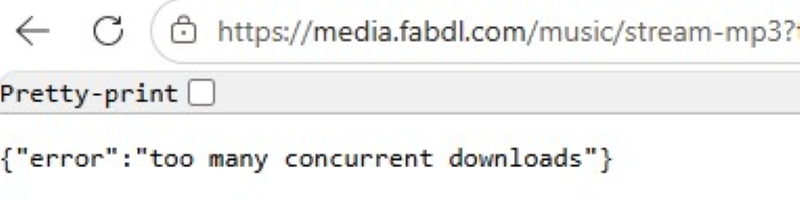
The playlist was detected correctly, but songs had to be downloaded individually. During peak periods, an error message may appear: Too many concurrent downloads.
😀 Pros:
- Playlist detection works
- No installation required
- Simple interface
☹️ Cons:
- One-by-one downloads only
- Downloads frequently return error pages
- Low success rate
Spotisongdownloader.com Spotify Playlist Downloader (MP3 & M4A Tool)
Our Test Result
| Playlist Recognition | Full Playlist Support | Output Format | Download Stability | Download Speed | Audio Quality |
|---|---|---|---|---|---|
| Yes | No | MP3 / M4A | Medium | Fast | 128~160 kbps |
🔍Website: https://spotisongdownloader.com/en1/
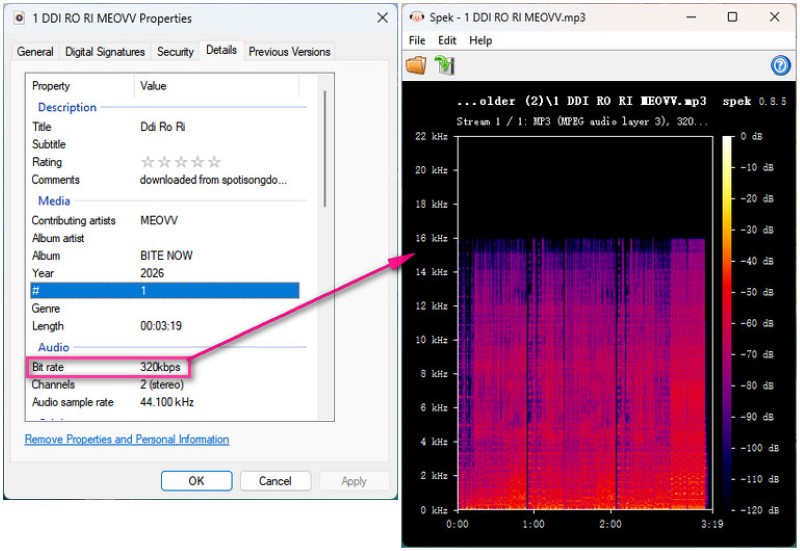
SpotiSongDownloader gives you a choice between MP3 and M4A downloads. You can also pick the audio quality ahead of time, and then download with that setting. The output quality comes in a range from 64 kbps to 320 kbps. With the free version, you get the first two tracks only. If you want the whole playlist, then you’ll need a registered account.
Despite selecting an output quality of 320kbps, the downloaded file detected high-frequency interference.
😀 Pros:
- Simple interface
- Offers both MP3 and M4A output formats
- No software installation required
☹️ Cons:
- Audio quality may vary across tracks
- Playlist ZIP downloads may require a paid plan
SpotiDown.me Spotify Playlist Downloader (Fast Web Tool)
Our Test Result
| Playlist Recognition | Full Playlist Support | Output Format | Download Stability | Download Speed | Audio Quality |
|---|---|---|---|---|---|
| Yes | No | MP3 | Medium | Fast | 128~160 kbps |
🔍Website: https://spotidown.me/en1
SpotiDown.me simplifies downloading Spotify content. It's fast and user-friendly on desktop/mobile. While download quality can vary, it's a convenient tool for quick, easy Spotify downloads. If you only want to download one song, this tool is very fast; it only takes a few seconds to download a song.

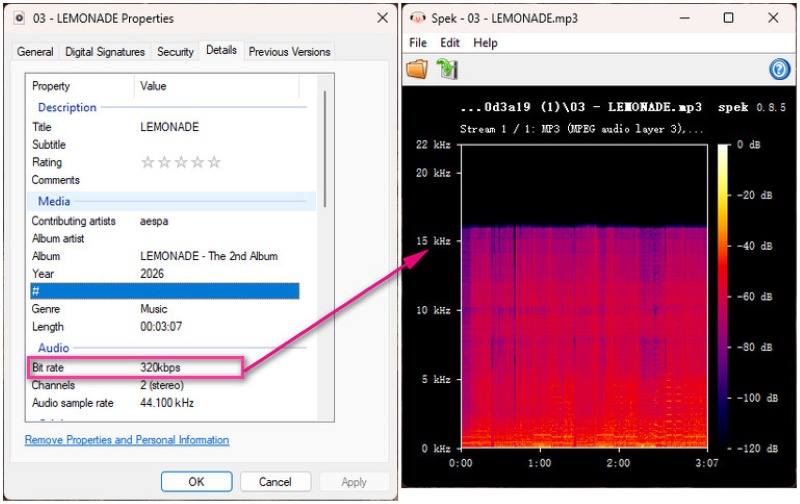
However, if you want to download a playlist, the service's free option only downloads three songs from the playlist. Furthermore, the downloaded MP3 files don't retain their audio quality well, exhibiting high-frequency clipping.
😀 Pros:
- Works on desktop and mobile browsers
- Simple copy-and-paste workflow
- Fast and beginner-friendly interface
☹️ Cons:
- Playlist limitations
- No advanced features
- Relies on external sources rather than Spotify audio streams
Spotidost Spotify Playlist Downloader (Browser Tool – Unstable Performance)
Our Test Result
| Playlist Recognition | Full Playlist Support | Output Format | Download Stability | Speed | Audio Quality |
|---|---|---|---|---|---|
| Yes | No | Unknown | Low | Unknown | Unknown |
🔍Website: https://spotidost.com/download
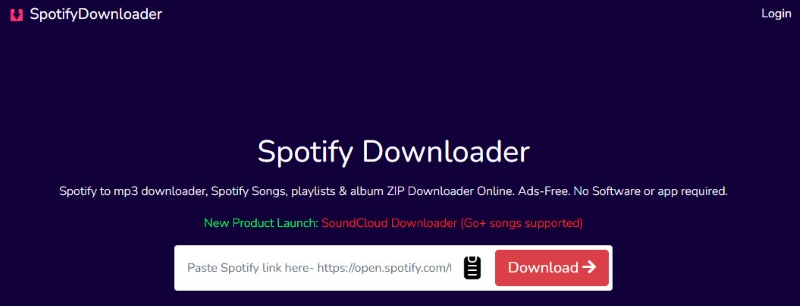
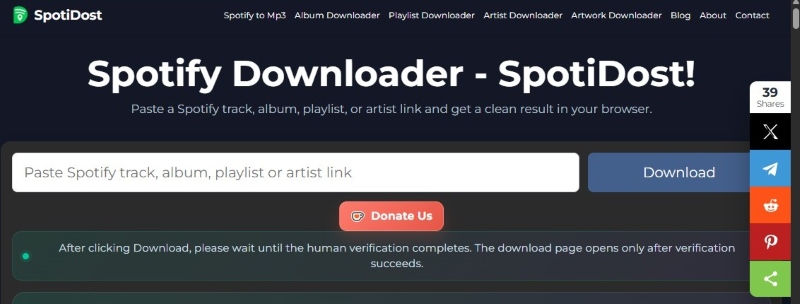
Spotidost is another browser tool that allows you to download Spotify songs and playlists without installing any software. It claims that simply pasting the Spotify link will automatically download the content.
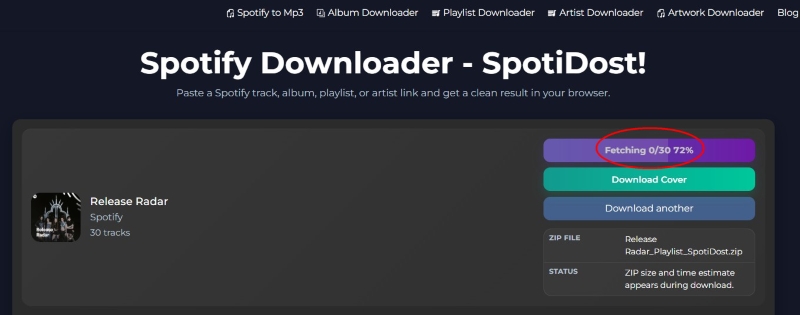
The playlist was recognized, but downloading still hadn't started after more than 30 minutes. We tried three times at different times, and each time the playlist got stuck in the "Fetching" state, while the single song downloads did not respond.
😀 Pros:
- Supports playlist detection
☹️ Cons:
- Extremely slow
- Poor user experience
spotidownloader Spotify Playlist Downloader (Browser Tool – Failed Playlist Support)
Our Test Result
| Playlist Recognition | Full Playlist Support | Output Format | Download Stability | Download Speed | Audio Quality |
|---|---|---|---|---|---|
| Yes | No | MP3 | Low | Medium | Up to 320 kbps |
🔍Website: https://spotidownloader.com/en19
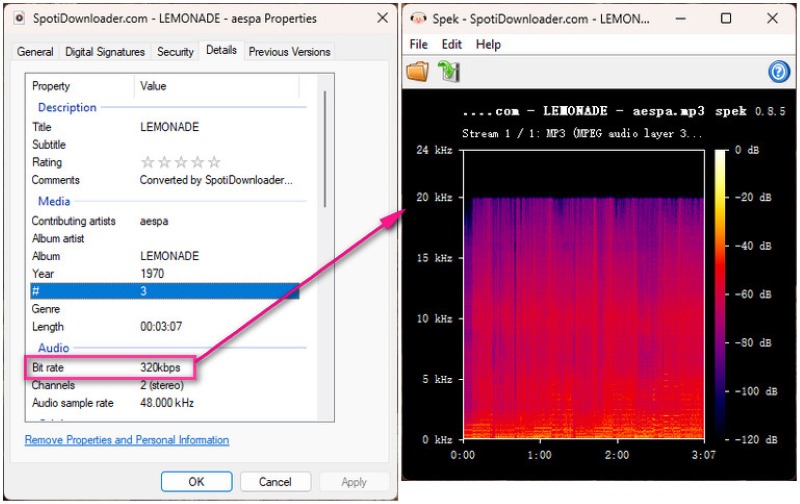
SpotiDownloader claims to support downloading Spotify songs, albums, and playlists via a browser-based interface. However, in our tests, while single tracks downloaded successfully, playlist support was disappointing. The playlist we tested did download as a zip file, but it was an empty list, meaning the tool doesn't actually support playlist downloads.
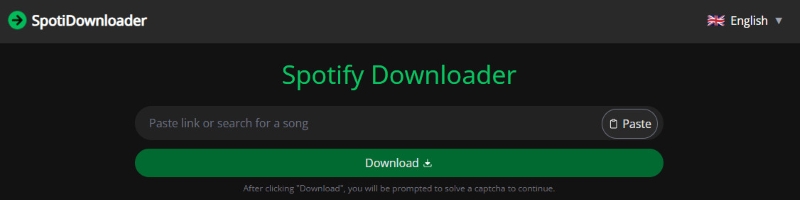
While it performed poorly on download playlists, surprisingly, the audio quality of downloaded Spotify singles was well preserved.
😀 Pros:
- Individual Spotify songs downloaded successfully
- Downloaded tracks tested showed good sound quality
☹️ Cons:
- Redirect-heavy experience
- Playlist downloads did not work properly
- An empty ZIP file was presented
spowload.cc Spotify Playlist Downloader (Single-Track Focus Tool)
Our Test Result
| Playlist Recognition | Full Playlist Support | Output Format | Download Stability | Download Speed | Audio Quality |
|---|---|---|---|---|---|
| Yes | No | MP3 | Low | Medium | 128~160 kbps |
🔍Website: https://spowload.cc/spotify-playlist-downloader
Download Spotify songs easily with Spowload, a browser tool. Paste a link, get a track, and no installs. The service only supported individual song downloads. To download playlists, you need to pay. Spowload.cc is fine for one song at a time, but if you want to download multiple songs, this tool isn't a good choice.
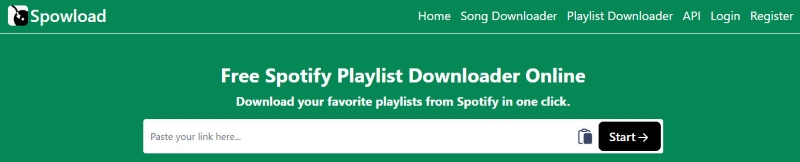
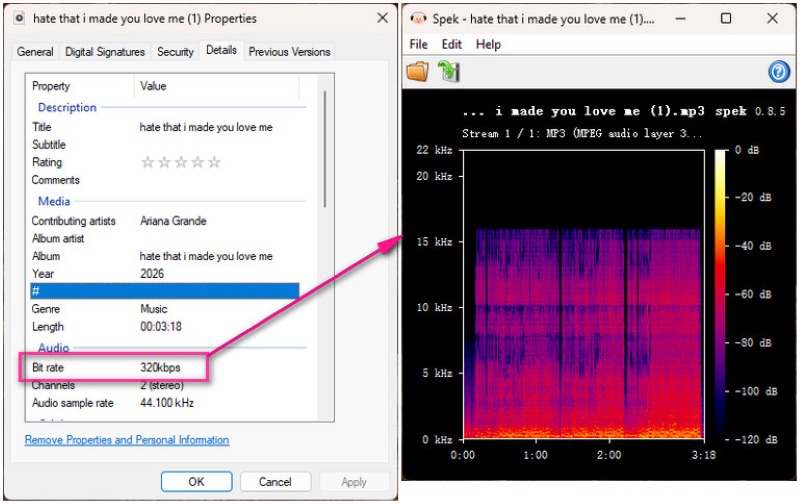
The service frequently redirected users to other pages. Also, although the file is labeled as 320 kbps MP3, the frequency cutoff around 16 kHz suggests it may be transcoded from a lower-quality source rather than true high-bitrate audio.
😀 Pros:
- Simple browser-based interface
- Works for individual Spotify songs
☹️ Cons:
- Frequent redirects
- Audio quality may vary depending on the source
How These Spotify Playlist Downloaders Work? (General Steps)
Step 1: Copy the Spotify playlist link.
Step 2: Paste the link into the tool’s input field and start the analysis.
Step 3: Wait for the system to process and display available tracks.
Step 4: Download individual songs or a partial ZIP file if available.
Our Take
Only a limited number of tools in our testing were actually capable of downloading complete Spotify playlists. While a few services could save Spotify playlists as MP3 files successfully, they often came with trade-offs such as inconsistent audio quality, slower speeds, or the need to retry during peak traffic hours. Most other tools either failed to process full playlists or only supported partial downloads. As a result, online Spotify playlist to MP3 converters remain unreliable for users who expect stable, high-quality, and full playlist conversion.
Free vs Paid, Online vs Desktop: How to Choose
Key Differences at a Glance
Focus on playlist limits, audio quality, and reliability — these are the real deciding factors.
| Factor | Free Tools | Paid Tools |
|---|---|---|
| 💰 Cost | Free | Subscription / one-time |
| 🔥 Playlist Limits | ⚠️ Often partial / limited tracks | ✅ Full playlist support |
| 🎧 Audio Quality | ❗ Inconsistent / varies by track | 🎯 Stable & higher quality output |
| ⬇️ Reliability | ⚠️ May fail or slow | ✅ Stable & predictable |
| ⚙️ Features | Basic only | Batch, convert, edit tools |
| 📦 Long-term use | Occasional use | Regular users |
👉 Best for
- Free: quick / light use
- Paid: stable + full playlist downloading
| Factor | Online Tools | Desktop Tools |
|---|---|---|
| 🌐 Setup | No install, browser only | Requires installation |
| 🔥 Playlist Support | ⚠️ Partial / unstable support | ✅ Full playlist support |
| 🎧 Audio Quality | ⚠️ Variable quality | 🎯 More consistent output |
| ⬇️ Stability | ❗ Affected by server load | ✅ Runs locally, more stable |
| 🏷️ Metadata | Basic tags only | Full ID3 + artwork + lyrics |
| 📦 Large Playlists | Often fails with many tracks | Designed for batch processing |
| 🔊 Output Formats | Mostly MP3 | MP3 / AAC / WAV / FLAC / ALAC |
👉 Best for
- Online: quick one-off downloads
- Desktop: heavy / frequent / full playlist use
Disclaimer:
- All these methods are for personal or educational use only.
- You should not use this tool to distribute music or for business.
FAQs about Spotify Playlist to MP3 Downloader
💬 Q1: Why doesn’t a downloaded MP3 always sound like true 320kbps audio quality?
Even if a file is labeled 320kbps, the actual quality may be lower because the source audio is already compressed or re-encoded. A common sign is reduced high-frequency detail in the spectrum analysis. As a result, the bitrate may show 320kbps, but the real audio quality is not equivalent to true 320kbps encoding.
💬 Q2: What is the safest way to convert a Spotify playlist to MP3?
The safest approach is to use trusted desktop applications with stable conversion engines and metadata preservation features. These tools are generally more reliable than random online converters, which may include ads, redirects, or unstable download behavior.
💬 Q3: Can I play converted Spotify MP3s on all devices?
Yes, most of the time you can. MP3 is pretty universally supported on smartphones, tablets, in-car audio, smart speakers, and most media players. You just move the files over by USB, through storage, or via Wi‑Fi sync.
Need a Better Way to Organize Your Music?
After downloading your favorite tracks, keep your music collection organized with Sonikr Media Hub. Browse local music by album or artist, create playlists, mark favorite tracks, and quickly find songs with built-in search and filters—all in one desktop app.
Explore Sonikr →Wrapping It Up
After testing 11 Spotify playlist downloaders, we found that most free online tools struggle with large playlists, impose song limits, or suffer from stability issues. While SpotiSaver and spotidown.co performed better than many competitors, AudiCable Music One delivered the most reliable experience overall. If you need a stable Spotify playlist converter that can batch download Spotify playlist collections, preserve metadata, and convert Spotify playlists to MP3 with consistent quality, it remains the strongest option we tested.
Get the best AudiCable Spotify Playlist to MP3 Converter now!!
Related Articles
- Top 9 Free YouTube Playlist to MP3 Downloaders [Full Review]
- Top 9 Free SoundCloud Playlist Downloaders Online in 2026
- Apple Music Playlist Downloaders: Save Playlists as MP3/FLAC
- 8 Best Spotify Podcast Downloaders (2026 Review)
- TuneCable Spotify Downloader Review [2026]
- 8 YouTube to MP3 Sites Tested: Safe Picks & Risks (2026)

