


8 YouTube to MP3 Sites Tested: Safe Picks & Risks (2026)

By
Updated on: August 7, 2026
Category: YouTube Music Tips
Free doesn't always mean safe. With so many YouTube to MP3 sites available online, it can be difficult to tell which ones are actually safe to use. Some sites rely on misleading download buttons, aggressive redirects, or questionable download behavior. To find out which sites are worth using, we put 8 popular YouTube to MP3 converters through hands-on tests. Rather than ranking them based on conversion speed or available formats, we focused on security, download behavior, redirects, and actual audio quality.
In this guide, we'll show you what we found, including which sites performed well, which ones raised red flags, and what to look for before downloading an MP3 from any online converter.
🛡️ Editor's Pick: A Safer YouTube to MP3 Converter
Prefer to avoid redirects, misleading download buttons, and unexpected files from online converters? AudiCable YouTube to MP3 Converter provides a desktop-based alternative with local file management and batch conversion.
📑 Content
How We Tested YouTube to MP3 Sites for Safety and Quality
We tested each site using the same process to make the results easier to compare. Instead of relying solely on a site's advertised features, we looked at what actually happened during a real download—from the first click to the final audio file.
Our tests focused on three areas: security signals, download behavior, and actual audio quality.
1. Security Checks with VirusTotal
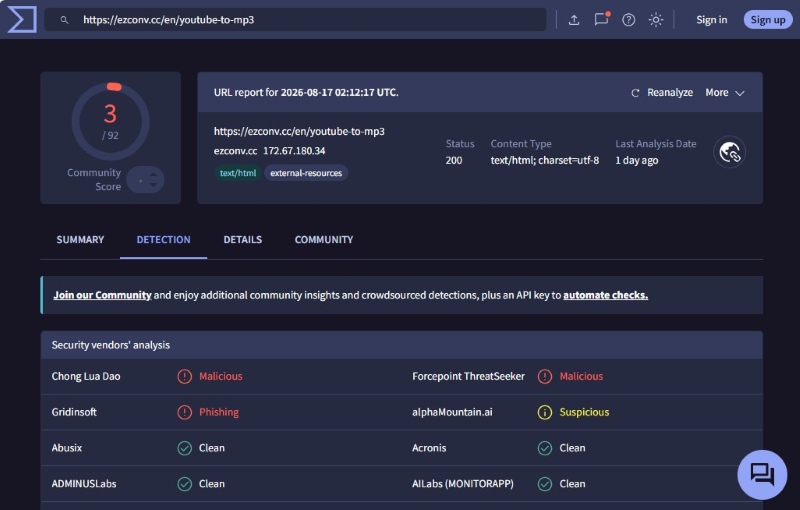
We checked each site's URL with VirusTotal to see whether major security engines flagged it as malicious or suspicious. We recorded the number of detections for each site and used the results as one safety signal—not as a guarantee that a site was completely safe. A clean scan was therefore treated as a positive sign, while any detection was flagged for closer review.
2. Redirects and Download Behavior
We tested the download process from the moment we entered a YouTube URL to the moment the audio file was saved. We watched for unexpected redirects, fake or misleading download buttons, pop-ups, notification requests, and other behavior that could lead users away from the intended download. We also checked the downloaded file itself. A legitimate audio download should result in an expected file type such as MP3, M4A, or WAV—not an unexpected executable or other suspicious file.
3. Verifying Audio Quality with Spek
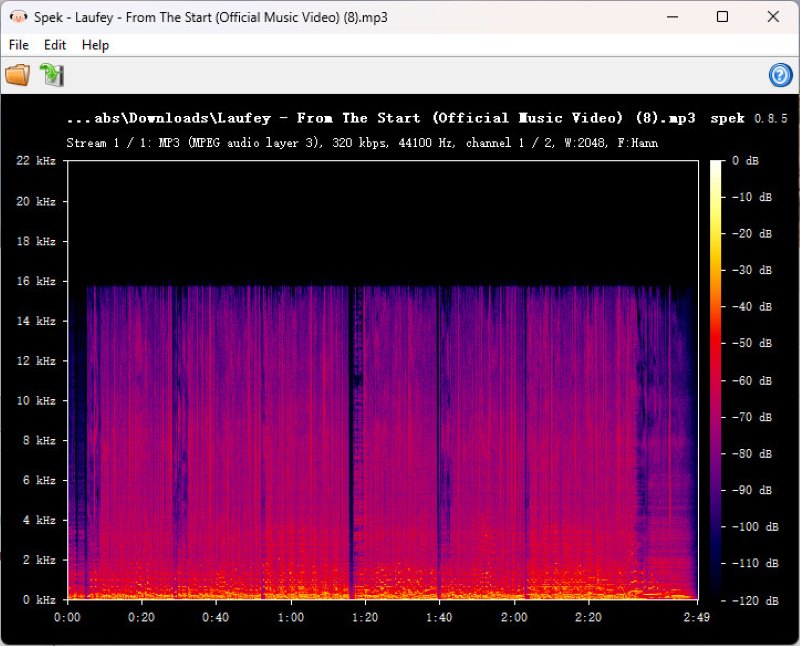
A site claiming to offer 320 kbps MP3 files doesn't necessarily mean the output contains 320 kbps worth of audio information. To check the actual output, we analyzed downloaded files with Spek and looked at their frequency spectrum. We paid particular attention to obvious frequency cutoffs that could indicate lower-quality or transcoded audio. This helped us distinguish between the bitrate advertised by a site and the characteristics of the file it actually delivered.
4. Download Reliability
Finally, we checked whether each site could consistently complete a conversion and deliver the expected audio file. We noted failed conversions, broken download buttons, unusually long processing times, and other issues that could affect the actual user experience.
How We Interpreted the Results
We didn't label a site “safe” or “unsafe” based on a single test. Instead, we considered the overall results across security scans, download behavior, redirects, and audio quality. A site with a clean VirusTotal result could still receive a caution rating if it used misleading download buttons or unexpected redirects.
Tested YouTube to MP3 Converters Compared
| Converter | VirusTotal | Download Behavior | Audio Quality | Verdict |
|---|---|---|---|---|
| OnlyMP3 | 0/92 detections | No redirects observed | ~16 kHz cutoff | ✓ Recommended |
| Loader.to | 0/91 detections | ⚠️ Redirects during download | ~16 kHz cutoff | ✗ Not recommended |
| YTBMP3 | 0/98 detections | No major issues observed | Up to ~20 kHz | ✓ Recommended |
| AMP3 | 1/92 detection | No redirects observed | ~20 kHz | ⚠ Use with caution |
| YTMP3 | 0/92 detections | ⚠️ Redirect before download completes | ~15 kHz cutoff | ⚠ Use with caution |
| Tunexa | 0/92 detections | Successful but unstable | ~20 kHz | ⚠ Use with caution |
| ToolSmart | 0/92 detections | ⚠️ Unexpected .exe on first click | ~16 kHz cutoff | ⚠ Use with caution |
| EZConv | 3/92 detections | Successful; no redirects | ~16 kHz cutoff | ⚠ Use with caution |
8 YouTube to MP3 Sites: Safety Test Results
1. OnlyMP3 — Low-Risk Results, but Audio Quality Falls Short
🔗 https://en.onlymp3.to/converter-v6
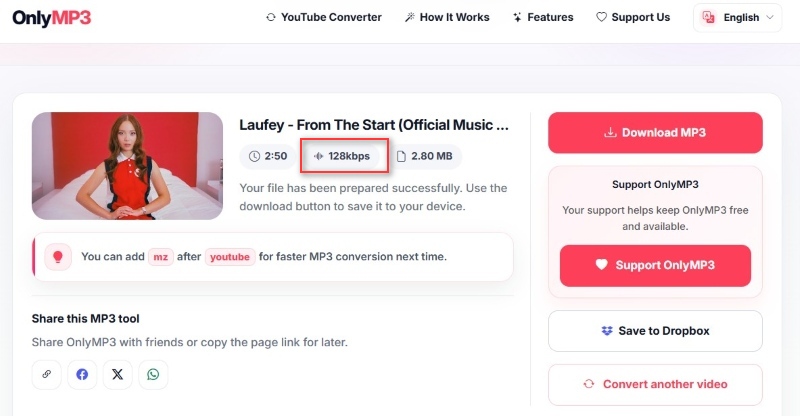
True to its name, OnlyMP3 focuses exclusively on converting YouTube content to MP3 and keeps the process simple without unnecessary steps. After pasting a YouTube video link, it generates an MP3 file at 128kbps. The converted file showed a frequency cutoff around 16 kHz in Spek analysis, which is consistent with its bitrate level and suggests that the output was not falsely labeled as a higher-quality file. During our test, we did not encounter obvious redirect issues or misleading download buttons.
📋Quick Test Result
| Test | Result |
|---|---|
| Security Check | 0/92 VirusTotal detections |
| Ads & Redirects | No redirects during testing |
| Download | ✓ Successful |
| Audio Quality | Around 16 kHz cutoff |
| Verdict | Recommended |
✅Pros:
- Transparent quality output.
- Minimal interface with a straightforward workflow.
- No intrusive redirects observed.
❌ Cons:
- No control over output quality settings.
- Not suitable for users who need batch downloads.
2. Loader.to — Security Scan Passed, but Redirects Are a Concern
🔗 https://it.loader.to/1/
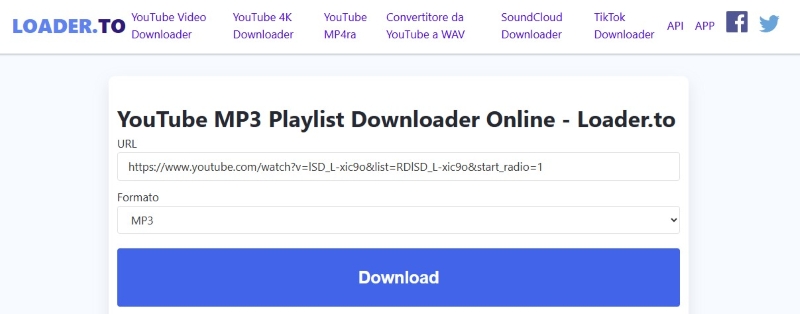
Loader.to was able to convert YouTube videos to MP3 successfully, but Spek analysis showed a frequency cutoff at around 16 kHz. Although the downloaded files were relatively large and similar in size to files from tools offering 320kbps output, the lower frequency range suggests that file size alone does not always reflect actual audio quality. The download process was also less seamless than expected: clicking the download button triggered a redirect, and a second click was required to start the actual download. While Loader.to showed no detections in our basic VirusTotal scan, these additional redirects may lead users to encounter misleading buttons or unrelated pages.
📋Quick Test Result
| Test | Result |
|---|---|
| Security Check | 0/91 VirusTotal detections |
| Ads & Redirects | Redirect ads detected |
| Download | ✓ Successful |
| Audio Quality | Frequency cutoff around 16 kHz |
| Verdict | Not recommended |
✅ Pros:
- Passed a basic VirusTotal security check.
- Successfully converts YouTube videos to MP3.
❌ Cons:
- Redirect to ads during the download process.
- Audio quality may be lower than expected.
- Requires careful clicking to avoid misleading pages.
3. YTBMP3 — Clean Results with Better Audio Quality
🔗 https://ytbmp3.org/convert/
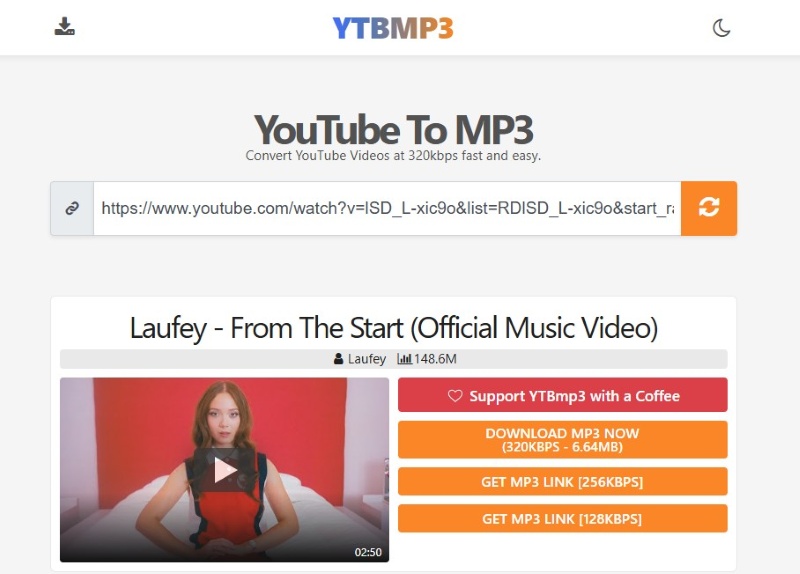
YTBMP3 offers three output quality options: 320kbps, 256kbps, and 128kbps. In our testing, the downloaded 320kbps MP3 file showed a frequency range extending to around 20 kHz in Spek analysis, while the 128kbps option showed a noticeable cutoff at around 16 kHz. The 128kbps file was also significantly smaller, with a file size of about one-third of the 320kbps version. Beyond audio quality, YTBMP3 also supports MP4 previews and provids a clean browsing experience without ads or redirects during testing.
📋Quick Test Result
| Test | Result |
|---|---|
| Security Check | 0/98 VirusTotal detections |
| Ads & Redirects | No major issues observed |
| Download | ✓ Successful |
| Audio Quality | Frequency range up to around 20 kHz |
| Verdict | Recommended |
✅ Pros:
- Simple conversion process.
- No ads or suspicious redirects during testing.
- Offers multiple quality options, including 320kbps output.
❌ Cons:
- No advanced download or music management features.
- Online service availability may change over time.
4. AMP3 — One Security Flag Calls for Caution
🔗 https://amp3.cc/
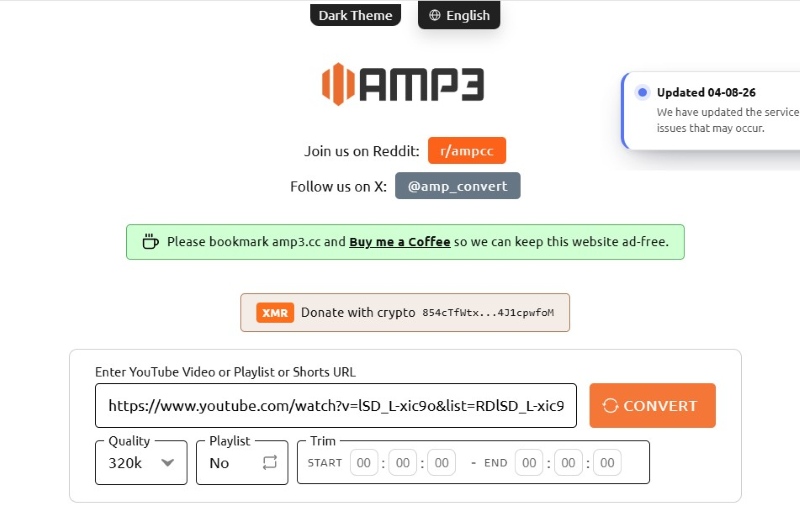
AMP3 is a straightforward YouTube to MP3 converter that performed well during testing. It provides adjustable output quality, including a 320kbps option, and the downloaded file showed a frequency range around 20 kHz in Spek analysis. No redirects were observed during our test. However, one VirusTotal security vendor, Forcepoint ThreatSeeker, flagged the URL as malicious, so users should exercise caution despite the clean download experience.
📋Quick Test Result
| Test | Result |
|---|---|
| Security Check | 1/92 VirusTotal detections |
| Ads & Redirects | No redirects during testing |
| Download Test | ✓ Successful |
| Audio Quality | Around 20 kHz frequency range |
| Verdict | Usable with limitations |
✅ Pros:
- No redirect issues during testing.
- Successfully converted YouTube videos during testing.
- Provides high-quality MP3 output options.
❌ Cons:
- Flagged as malicious by one VirusTotal security vendor.
- Occasional website instability during testing.
- Limited control over output files.
5. YTMP3 — Clean Scan, but the Download Flow Needs Attention
🔗 https://yt-to-mp3.net/
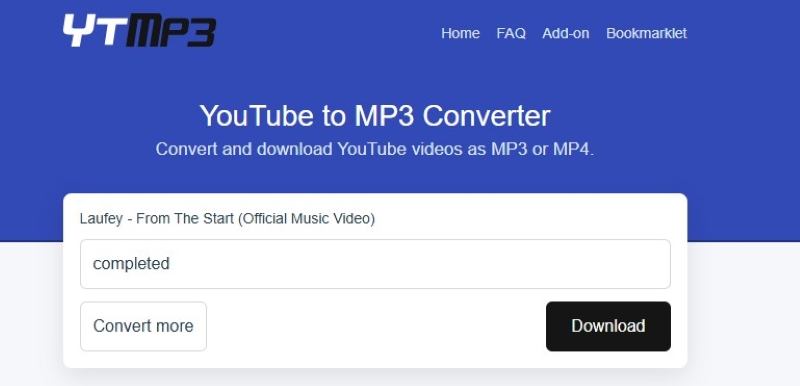
Downloading audio with YTMP3 involves a two-step process, and the initial parsing stage takes a relatively long time—about half a minute for a three-minute video. After clicking the "Download" button, you are redirected to another page, while the audio download proceeds in the background. You can simply ignore the redirect and wait for the download to finish. Overall, the site is free of intrusive ads and features a clean, simple layout.
📋Quick Test Result
| Test | Result |
|---|---|
| Security Check | 0/92 VirusTotal detections |
| Download Test | ✓ Successful |
| Ads & Redirects | No major issues observed |
| Audio Quality | Around 15 kHz cutoff |
| Verdict | Use with Caution |
✅ Pros:
- Clean, ad-free interface.
- Works without additional software.
❌ Cons:
- Limited features.
- Slow parsing speed.
- Redirect occurs before download completion.
6. Tunexa — Few Red Flags, but the Download Experience Matters
🔗 https://en.tunexa.io/
Simply paste a YouTube link into Tunexa, and the video is automatically processed. Clicking "Download Video" opens a page with options for both video and audio downloads, including audio quality settings from 63kbps to 320kbps and multiple video resolutions. Compared with single-function converters, Tunexa offers more flexible options. However, the download page occasionally refreshes or feels unstable during audio downloads, which slightly affects the overall user experience.

📋Quick Test Result
| Test | Result |
|---|---|
| Security Check | 0/92 VirusTotal detections |
| Ads & Redirects | No ads or redirects during testing |
| Download | Successful but unstable |
| Audio Quality | Around 20 kHz frequency range |
| Verdict | Usable with limitations |
✅ Pros:
- Supports audio and video downloads.
- Offers multiple quality options.
- More versatile than basic converters.
❌ Cons:
- Unstable download experience.
- Possible interruption during conversion.
7. ToolSmart — An Unexpected EXE Download Is a Major Red Flag
🔗 https://www.toolsmart.ai/online-feature-youtube-to-mp3/
After pasting a YouTube link into ToolSmart, a purple "Download Audio" button appears. However, the first click downloads an .exe file instead of the audio file. Clicking the same button again successfully downloads the YouTube audio as an MP3. We repeated the test with multiple YouTube links at different times and observed the same behavior. Although the expected MP3 could be downloaded after a second click, the repeated appearance of an unexpected executable makes the download process a significant safety concern. On the positive side, ToolSmart did not trigger forced redirects during our testing.
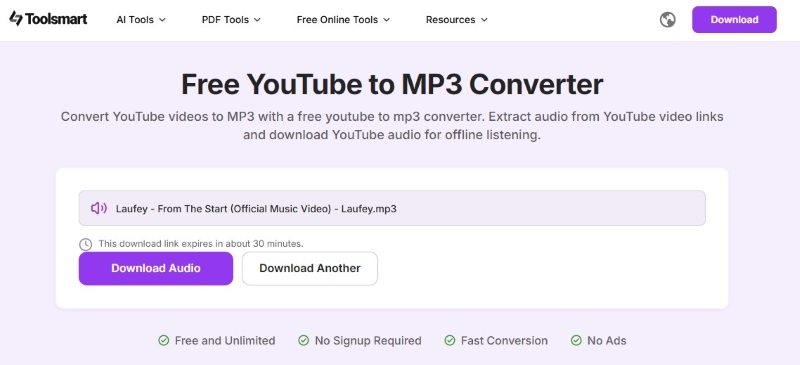
⚠️ Red Flag: Why an .exe File Is Not a Normal MP3 Download
A YouTube to MP3 converter should normally deliver an audio file in the format you selected, such as .mp3, .m4a, or .wav. An .exe file is a Windows executable, so it should never be treated as an audio download. If an online converter gives you an unexpected executable file, don't open or run it. Check the file extension first and delete it if you did not intentionally download an executable.
📋Quick Test Result
| Test | Result |
|---|---|
| Security Check | 0/92 VirusTotal detections |
| Ads & Redirects | Suspicious ads present; no forced redirects |
| First Download | ⚠️ Unexpected .exe file |
| MP3 Download | ✓ Successful after a second click |
| Audio Quality | Around 16 kHz cutoff |
| Verdict | Use with caution |
✅ Pros:
- Easy for beginners to use.
- No forced redirects during our testing.
❌ Cons:
- Unexpected .exe download on the first click.
- Requires extra attention when checking downloaded files.
- Limited audio quality based on Spek analysis.
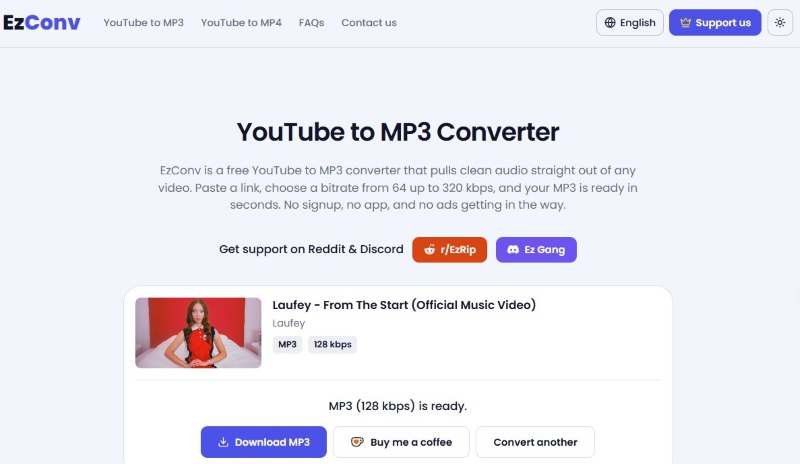
8. EZConv — Functional Download, but Security Concerns Remain
🔗 https://ezconv.cc/3ca77
EZConv successfully completed our testing and provided a usable YouTube to MP3 conversion experience. However, its security reputation requires some caution. During our VirusTotal check, 3 out of 92 security vendors flagged the URL as suspicious, including detections associated with phishing or malware categories. In addition, this service has changed domains multiple times, which may make it harder for users to identify the official website. While the current EZConv domain worked normally during testing, users should verify the website address carefully and avoid unofficial copies.
📋Quick Test Result
| Test | Result |
|---|---|
| Security Check | 3/92 VirusTotal detections |
| Download Test | ✓ Successful |
| Ads & Redirects | No |
| Audio Quality | 16 kHz cutoff |
| Verdict | Use with caution |
✅ Pros:
- Successful conversions.
- Simple browser-based workflow.
- Works directly in a browser.
❌ Cons:
- Flagged by some vendors.
- Security reputation requires caution.
- Domain changes may cause confusion.
A More Controlled Alternative: AudiCable YouTube to MP3 Converter
After testing multiple online YouTube to MP3 sites, we found that safety depends on more than a clean security scan. A clean VirusTotal result does not always mean a converter is reliable or risk-free. Some sites may still involve redirects, misleading buttons, unstable downloads, or lower-than-expected audio quality. That is why we combined security checks, download tests, and audio analysis for a more complete evaluation. Free online converters can still work for occasional downloads, but their reliability may change over time. For users who regularly save YouTube music, a desktop solution can provide a more stable and consistent experience.
AudiCable YouTube to MP3 Converter provides a more controlled way to convert YouTube videos into local audio files. Instead of relying on temporary online pages, it runs as desktop software, offering a cleaner workflow without intrusive third-party ads or redirect pages. Compared with many free online converters, AudiCable focuses on stability, audio quality, and better music file management. It allows users to download YouTube audio in multiple formats, preserve metadata, manage files more efficiently, and handle multiple downloads in one place.
AudiCable YouTube to MP3 Converter (Win / Mac)
- A cleaner and more stable workflow — No need to deal with changing websites, redirects, or pop-ups.
- Flexible output options — Convert YouTube videos to MP3, AAC (M4A), WAV, FLAC, AIFF, and ALAC.
- Better control over your music files — Keep downloads organized with folders, ID3 tags, and album artwork.
- Easy batch downloads — Save multiple YouTube videos at once without repeating the same steps.
- All-in-one music downloader — Convert and manage music from YouTube Music, Spotify, Apple Music, Amazon Music, Tidal, Qobuz, and other supported streaming services in one place.
- Useful built-in tools — Includes an audio editor, format converter, tag editor, CD burner, and AI audio splitter.
💡 How to Convert YouTube Videos to MP3?
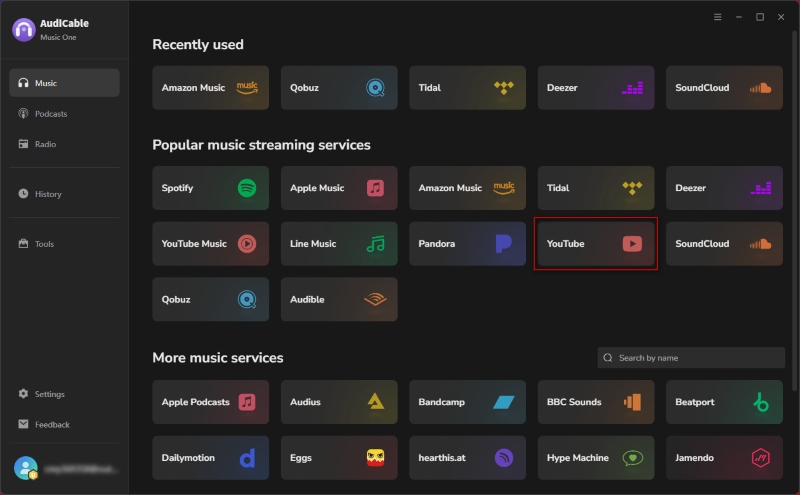
Step 1 Choose YouTube from the Music Interface
Download and open AudiCable Audio Recorder, then select "YouTube" from the music interface. The YouTube web player will open automatically.
Step 2 Adjust Output Parameters
Open "Settings" and choose MP3 as the output format. You can also customize the bitrate, output folder, and other preferences before starting the conversion.
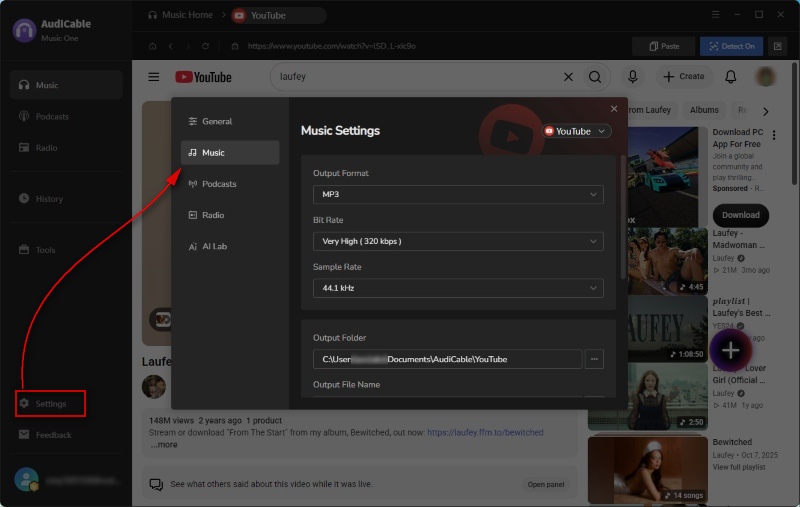
Step 3 Add the YouTube Video to AudiCable
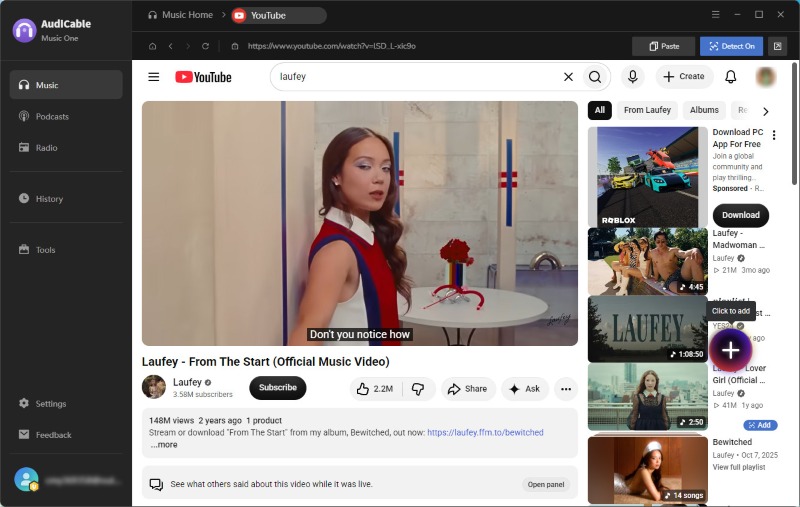
Find the video you want to convert in the YouTube web player. A floating "+" button will appear in the lower-right corner. Click it to add the video to AudiCable.
Step 4 Start the Conversion
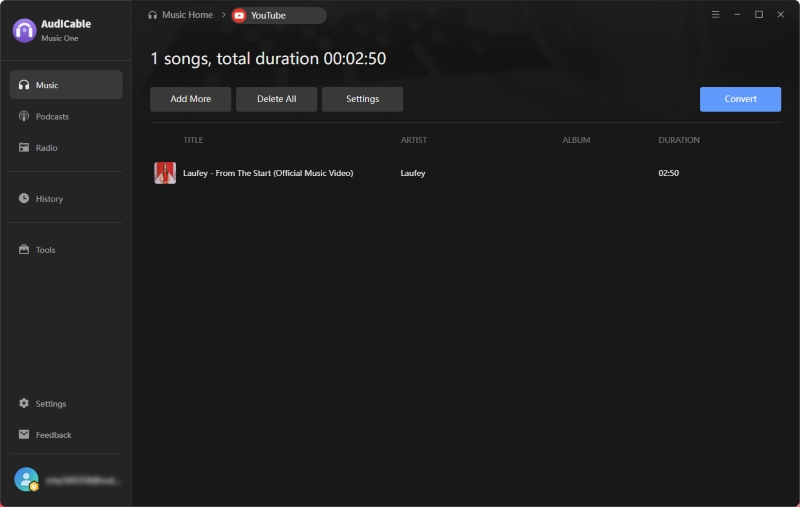
Click the "Convert" button, and AudiCable will convert the selected content into MP3 files at a fast speed. To add more videos, simply click "Add More".
Step 5 Find Your Converted MP3 Files
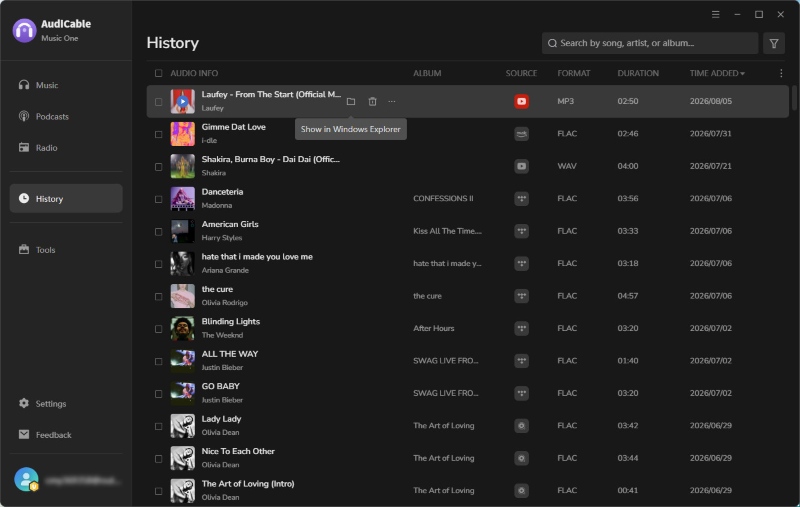
After the conversion is complete, select "History" from the left tab to view your conversion records. Click the folder icon to open the location where the MP3 files are saved.
Step 6 (Optional) Verify Audio Quality with Spek
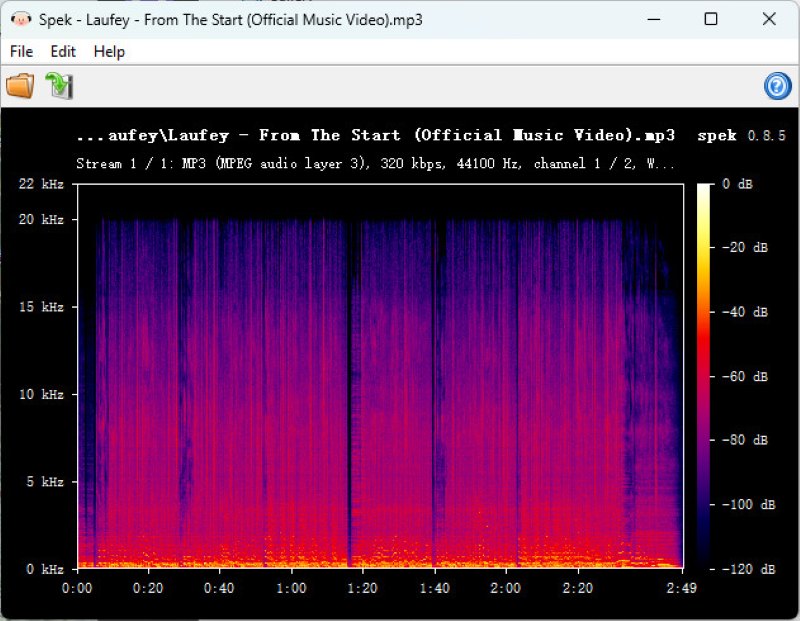
Open the converted MP3 file with Spek to check the frequency spectrum. The tested file extends to around 20 kHz, matching the expected MP3 quality setting.
Quick Safety Tips Before Using Any YouTube MP3 Converter
Whether you use an online converter or desktop software, understanding how to keep YouTube to MP3 downloads safe can help reduce potential risks. The following quick checks can help you identify common security issues and make safer choices when downloading YouTube audio:
- 🔍 Scan the website URL with VirusTotal to check for known security issues.
- 🔍 Avoid allowing notification permissions unless they are absolutely necessary.
- 🔍 Check the downloaded file extension — normal audio files should end with .mp3, .m4a, or .wav. Avoid files with extensions such as .exe, .apk, or .zip, which may contain unwanted software.
- 🔍 Verify audio quality with Spek if quality matters — a sharp cutoff around 16 kHz may indicate that a “320kbps” file does not contain true high-quality audio.
FAQs About Safe YouTube to MP3 Websites
💬 Q1: Is YouTube to MP3 safe?
A: YouTube to MP3 conversion can be safe when you use a trustworthy converter and avoid websites with aggressive ads, misleading buttons, or suspicious downloads. The main risks usually come from unreliable third-party sites rather than the conversion process itself.
💬 Q2: What makes a safe YouTube to MP3 converter?
A: A safe YouTube to MP3 converter should provide a clean download process, avoid unnecessary permissions, offer transparent audio quality, and protect users from misleading pages or unwanted software.
💬 Q3: Is a desktop converter the safest YouTube to MP3 converter option?
A: In many cases, a desktop converter provides a more stable and controlled experience because it does not rely on changing websites, browser ads, or temporary download pages. It can also offer better file management and batch conversion options.
💬 Q4: Can a YouTube MP3 converter really produce 320kbps audio?
A: A converter can output a 320kbps MP3 file, but the final quality depends on the original audio source. A larger file size or a 320kbps label does not always mean better audio quality.
Disclaimer:
- All these methods are for personal or educational use only.
- You should not use this tool to distribute music or for business.
Final Thoughts
A free YouTube to MP3 converter may seem convenient, but our tests show that safety depends on more than just whether a site can complete a download. Redirects, misleading buttons, unstable pages, and unclear audio quality can all affect the overall experience.
For users who only convert a few videos occasionally, a reliable online converter may still be useful. However, if you regularly save YouTube audio and want a more stable workflow, a desktop solution like AudiCable YouTube Converter provides better control, fewer interruptions, and a cleaner conversion experience.
The safest choice is the one that matches your needs while keeping your files, device, and listening experience protected.
Try a safer YouTube to MP3 conversion experience!!
Related Articles
- YouTube to WAV Converter: 11 Tools Tested in 2026
- 11 Best FREE YouTube Shorts to MP3 Converters in 2026
- Is EzMP3 Safe & Reliable in 2026? Full Test & Best Alternatives
- Listen to YouTube Music Offline without Premium
- How to Download and Transfer YouTube Music to USB Drive
- Top 8 Free YouTube Playlist to MP3 Downloaders [Full Review]

