


AudiCable Audio Recorder
Is EzMP3 Safe & Reliable in 2026? Full Test & Best Alternatives

By
Updated on: August 19, 2026
Category: YouTube Music Tips
We tested EzMP3, an online YouTube to MP3 converter. It's fast and requires no extra software, good for quick downloads. However, our tests showed problems: sound quality varied, there were sometimes wrong links, and it wasn't always available. It's fine for a few one-off downloads. But if you need steady quality, reliable access, or plan to use it often, it's not the best.
For users seeking a more reliable solution, we also explored several EzMP3 alternatives that provide greater stability, more consistent audio quality, and a smoother overall downloading experience.
👍See also: Y2Mate Review & Alternatives: Tested in 2026
📑 Content
Why People Are Searching for EzMP3
EzMP3 has become one of the most searched YouTube to MP3 tools because it offers a quick and simple way to download audio online. Users don’t need to install software or create an account — just paste a YouTube link and convert it instantly. But convenience is also what makes many users cautious. People searching for EzMP3 converter are usually not just looking for a downloader. They also want to know:
- Is EzMP3 safe and reliable to use?
- Does it really provide high-quality MP3 files?
- Why does the site sometimes stop working or redirect users?
- Are there safer or more stable alternatives available?
Worries make sense - free tools online often differ sharply when it comes to reliability, performance, or ease of use. Because real-world testing beats promises made in descriptions, our evaluation put EzMP3 through trials using multiple gadgets, web browsers, and downloading conditions.
Our Hands-On EzMP3 Test
To evaluate EzMP3 in realistic conditions, we tested it across desktop and mobile devices using different types of YouTube content, including music tracks, podcasts, and longer videos.
Testing Setup
- Device: Windows 11 laptop + Android phone
- Browser: Chrome and mobile browser
- Videos tested: 16 YouTube links
- Content types: music, speech, live recordings
- Output format: MP3
We focused on how EzMP3 behaves in everyday use, not just ideal conditions.
How EZMP3 Works in Real Use
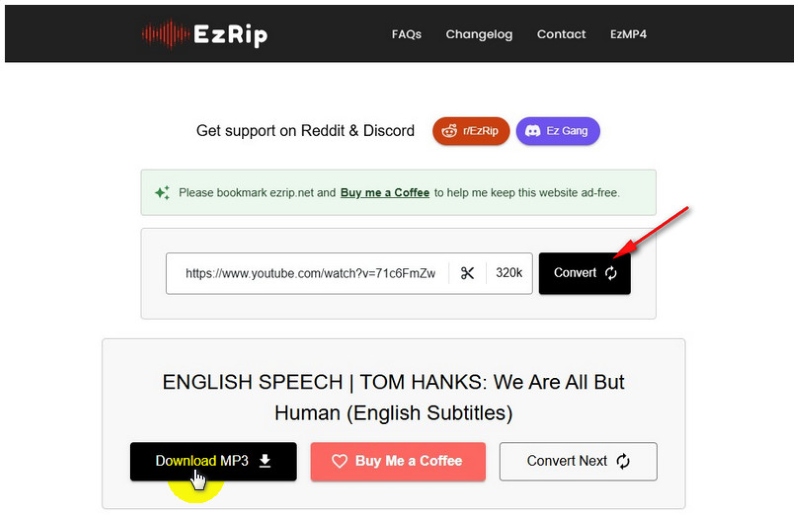
Step 1: First, we opened EzMP3 converter (currently accessible via ezmp3.co at the time of testing) and pasted a YouTube video URL into the little input field.
Step 2: Then we clicked the "Convert" button. After that the whole thing handled the video on its own, most of the time around 20 seconds for videos that aren’t too long.
Step 3: When it was done processing , we hit the download button to save the MP3 onto our device. That part was pretty straightforward.
Performance: Speed, Stability & User Experience
In most cases, EzMP3 processed downloads quickly (around 10–20 seconds for standard YouTube links). However, performance of this EzMP3 YouTube converter was not fully consistent.
Key issues found:
- Occasional delays during peak usage or with longer videos.
- Some failed conversions requiring restart.
- Page refresh needed to continue downloads.
- Experience on mobile affected by ads and redirects.
- Pop-ups and misleading buttons disrupted the user flow.
EZMP3 is fast, but not consistently reliable for heavy or repeated use.
Audio Quality Test
Audio quality was the most inconsistent part of our testing. We analyzed several downloaded files using Spek audio spectrum analyzer, a tool commonly used to visualize the frequency range of audio files and verify whether a track truly matches its claimed bitrate. To check each file, we followed a simple process:
Open the downloaded MP3 file in Spek → Observe the frequency spectrum cutoff point → Compare high-frequency extension with typical 320kbps expectations(usually close to 20kHz) → Cross-check multiple samples from different videos.
While EzMP3 often labels downloads as “high quality” or “320kbps”, the results were not consistent across all files. Some tracks showed relatively full frequency ranges suitable for casual listening, but others displayed earlier high-frequency cutoffs, suggesting reduced effective audio quality despite the higher bitrate label.
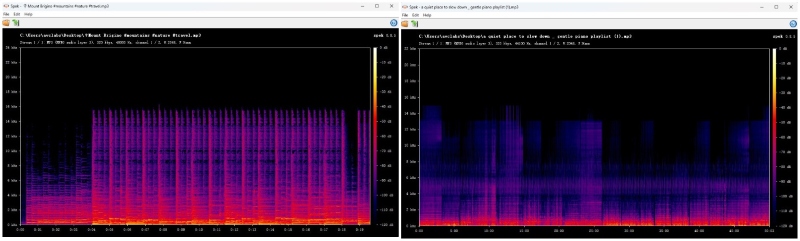
Overall, these results indicate that EzMP3 does not consistently deliver guaranteed original-quality audio across different downloads, especially when compared across multiple sources and video types.
EzMP3 Limitations & Reliability Concerns
Beyond testing performance, EZMP3 also shows structural limitations:
| Area | Limitation | Impact on Users |
|---|---|---|
| Availability | Occasional downtime or domain access changes | May interrupt regular use |
| Download Features | No playlist or batch downloading support | Inefficient for multiple files |
| Metadata Support | No ID3 tag management | Music files may lack organization |
| Format Flexibility | Limited output format options | Less suitable for advanced audio workflows |
| Workflow Control | Minimal customization settings | Limited control over output preferences |
EZMP3 is best suited for casual, one-off downloads, not long-term or professional use.
👍See also: 13 Best Free YouTube to MP3 Download Sites
3 Best EzMP3 Alternatives
While EZMP3 is convenient for basic downloads, users seeking better stability, audio quality, and advanced features may prefer more reliable desktop-based solutions.
Comparison Overview
| Tool | Stability | Audio Quality | Ease of Use | Best For |
|---|---|---|---|---|
| EZMP3 | Medium | Inconsistent | Very Easy | Quick downloads |
| AudiCable Audio Recorder | High | High | Easy | Music library management |
| NoteBurner YouTube Ripper | High | Medium-High | Easy | General users |
| yt-dlp | Very High | Very High | Advanced | Power users |
AudiCable Audio Recorder (Best Overall Alternative)
⬇️ Download website: https://www.audicable.com/
After testing several EzMP3 alternatives, AudiCable Audio Recorder feels way more stable and polished than most online converters. What you will notice immediately is that you will not have to deal with annoying ads or fake download buttons. It's a smooth downloading experience, especially with full playlists or when downloading in batches from sites like YouTube, Spotify, Apple Music, and SoundCloud. Our tests show good audio quality of the converted files with full ID3 tags and lyrics which makes music libraries organization much easier.
Another benefit is that AudiCable Audio Recorder is more than just an MP3 downloader – it also offers useful extras such as format conversion, tag editing, audio tools and even CD burning in a neat desktop interface. If you download music a lot, and you care about reliability, sound quality and long-term usefulness, AudiCable is easily among the most practical and trustworthy alternatives to EzMP3.
✅ Key Advantages:
- Clean and without ads interface, easy to use.
- Batch downloads multiple YouTube videos at once.
- Almost 100% success rate in our tests - even for long videos.
- Flexible formats: MP3, AAC, WAV, FLAC, AIFF, and ALAC.
- Preserves original audio quality and complete ID3 tags (title, artist, album, etc).
- Bonus tools: Audio editor, Format converter, Tag editor, CD burner, AI splitter.
⚠️ Considerations:
- Desktop only (no mobile app)
📂 How to Convert YouTube Videos to MP3?
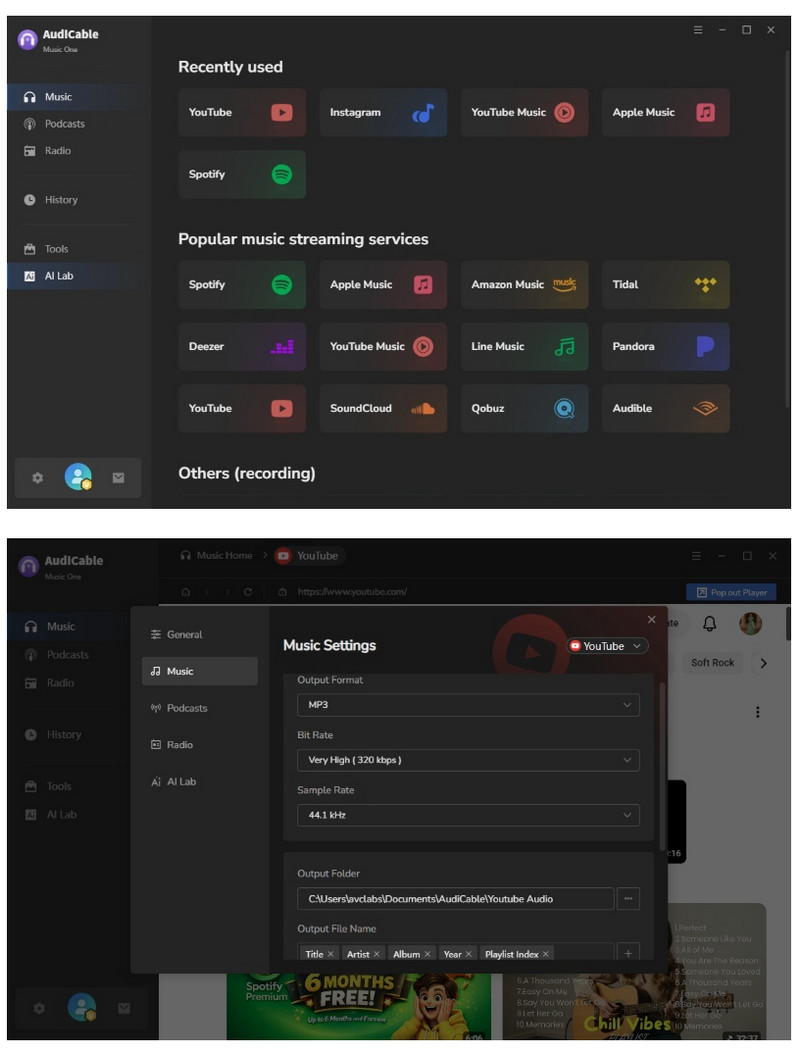
- Step 1: Launch AudiCable, tap YouTube icon to access the built-in web player, then go to "Settings" (gear icon) to choose output format as "MP3" and change the output settings.
- Step 2: Play any YouTube video in the built-in player, then click the “+” icon to add it to the download queue and hit "Convert" to begin downloading.
- Step 3: After conversion, go to “History”, tap the folder icon next to a song to view all saved MP3 files.
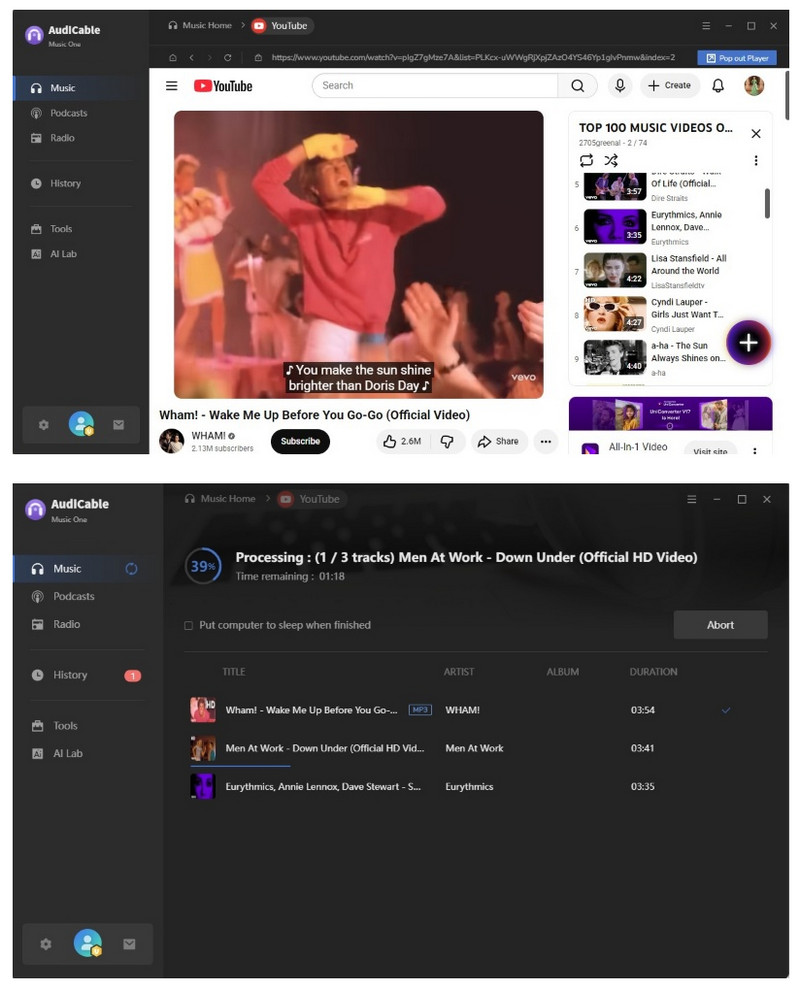
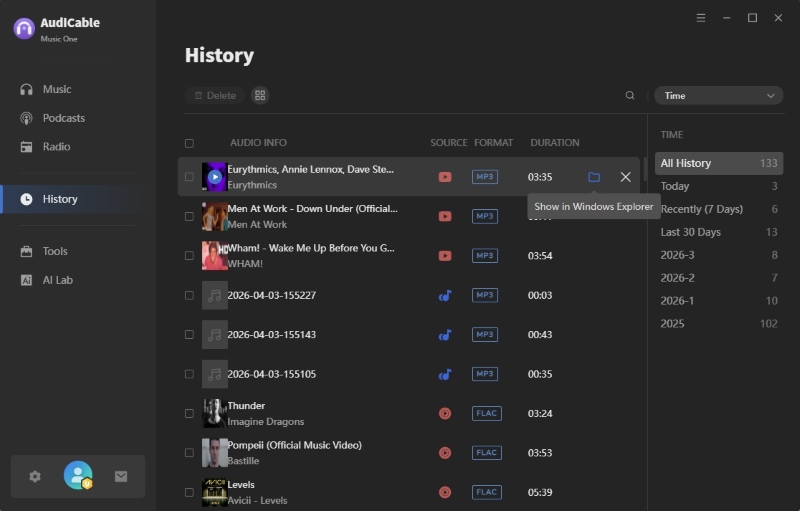
⚠️Tips: It is especially useful for users building music libraries or creating ringtone-ready audio files.
NoteBurner YouTube Ripper
⬇️ Official Website: https://www.noteburner-video.com/all-in-one-downloader.html
NoteBurner YouTube Ripper is a kind of straightforward desktop tool that rips audio from YouTube clips and then turns it into MP3, or AAC (M4A) formats. From what we saw in testing, standard conversions generally worked without much drama, so it feels like a solid pick for everyday, basic use. The look of the app is pretty neat and intuitive too, so if someone is new to this stuff they can still get moving fast. It’s offered for both Windows and macOS, so it fits most people.
Now, it’s not a pure audio-only tool, but it does support well over 1,000 websites, and it also lets you download videos as MP4 or MKV, up to 1080p. That part is handy if you ever need the full video, plus the soundtrack, rather than just the audio track.
✅ Main Advantages:
- Supports downloading audio and videos from 1,000+ websites, including YouTube and Instagram.
- Allows converting online videos to MP3 or MP4 with relatively good output quality.
- Simple and beginner-friendly interface that is easy to navigate.
- Suitable for users who want a lightweight alternative to EzMP3 for basic downloading needs.
⚠️ Things to Remember:
- Output format options may feel limited for advanced users.
- Premium pricing could be less appealing.
📂 How to Download A YouTube Video to MP3?
- Step 1: Install and launch NoteBurner on your PC or Mac, then go to "YouTube" and pick it.
- Step 2: Open Settings to decide the output quality, and choose the place you want the files saved.
- Step 3: Hit Download, then select "Download as Audio".
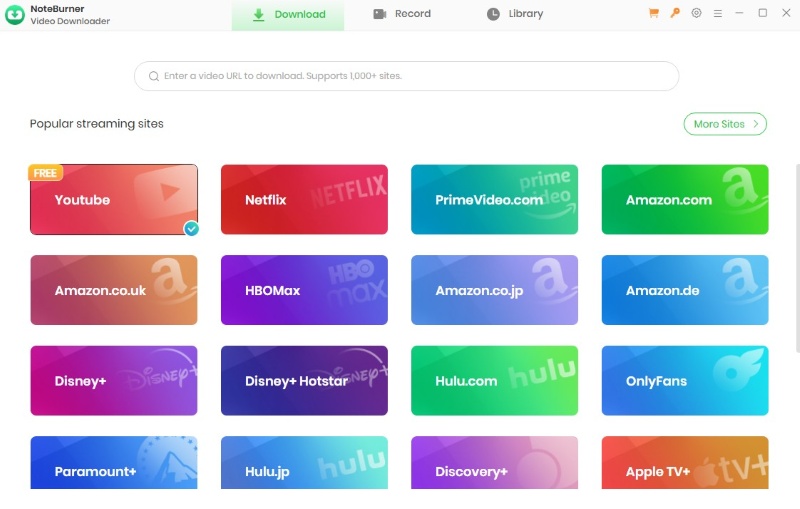
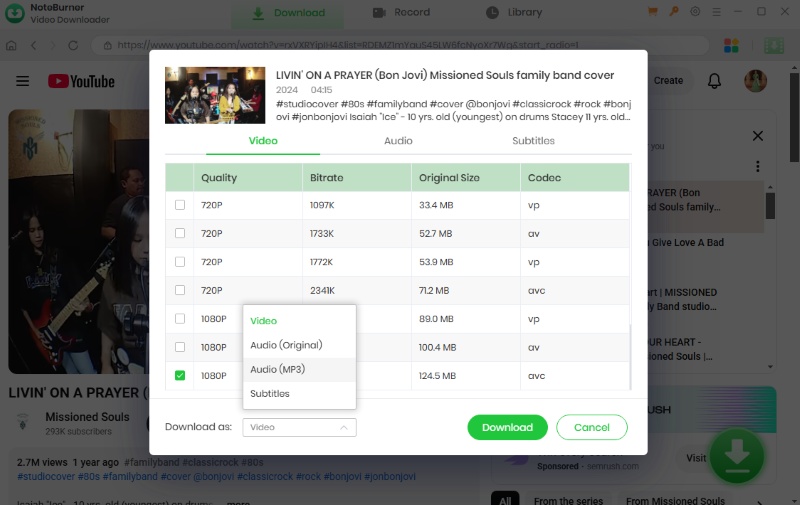
yt-dlp
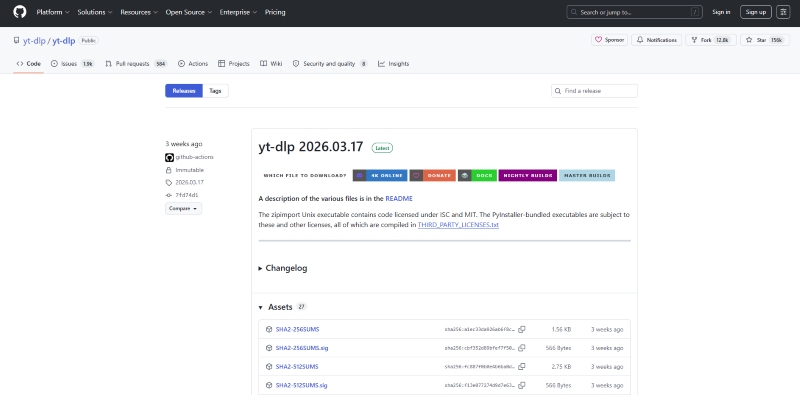
⬇️ Download website: https://github.com/yt-dlp/yt-dlp
Yt-dlp is this sort of powerful command-line tool meant for people who want way more control than typical online converters. It doesn’t really have a visual interface, more like it just throws everything at you, and still it comes with advanced abilities such as high quality audio extraction, batch processing, and an detailed format selection.
In real use, it feels quick and reliable too, and it’s way more flexible than browser based tools, specially when you’re dealing with playlists or huge scale downloads. The only true give and take is the learning curve , because pretty much everything is done via commands rather than just clicking around.
✅ Key Benefits:
- Free and open-source.
- Get full control over the audio quality, the format choice, and even how the downloads are handled, settings included.
- Good for playlists and bulk downloads, quite efficient.
- Comes with extra stuff, like subtitles, auto trimming, and custom file naming.
⚠️ Considerations:
- No graphical user interface, so you’re working without the usual buttons.
- Need at least a bit of setup and some basic terminal usage.
- A little more steep for new users, like the learning curve is higher than expected.
📂 How to grab YouTube audio using yt-dlp?
- Step 1: First download yt-dlp from GitHub, install it , then make sure it gets added to your system path.
- Step 2: Open your terminal, run this command with your own video URL:
- Step 3: Hit Enter, and the audio will get extracted, then saved as an MP3 right in your folder.
yt-dlp -x --audio-format mp3 https://www.youtube.com/watch?v=VIDEO_ID
To achieve the best audio quality, you can use the --audio-quality option (0 being the best, 10 the worst):
yt-dlp -x --audio-format mp3 --audio-quality 0 https://www.youtube.com/watch?v=VIDEO_ID
FAQs About EzMP3
💬 Q1: Is EzMP3 safe to use?
A: EZMP3 is usually regarded as safe enough for basic use because it runs straight in the browser and does not really ask for account registration. Even so, people can run into ads, odd redirects, pop ups, or unstable mirror domains while using it. And like many other free online converters, it’s better to not tap anything that looks suspicious for download, and just keep an updated browser with ad blocking turned on.
💬 Q2: Why is EzMP3 not working?
A: In some cases, the active EZMP3 domain may change. For example, during our testing, ezmp3.co was accessible while ezmp3.cc was temporarily unavailable. The service may also stop working during periods of high traffic, temporary server overload, or due to browser compatibility issues, which can affect loading and conversion performance.
💬 Q3: Does EzMP3 work on iPhone and Android?
Yes, EzMP3 can be used on both iPhone and Android, mostly through mobile web browsers. Still, the behavior on phones tends to be a bit less consistent than on desktop, especially for iOS users.
💬 Q4: What is the best YouTube to MP3 converter?
The best YouTube to MP3 converter really depends on what you’re doing:
Casual downloads → EzMP3 is straightforward and handy.
Frequent music downloads → desktop tools like AudiCable Music One tend to deliver better reliability and sound quality.
Advanced users → yt-dlp gives the most control, and flexibility overall.
Disclaimer:
- All these methods are for personal or educational use only.
- You should not use this tool to distribute music or for business.
The End
EZMP3 is still a pretty convenient YouTube to MP3 converter for quick, occasional downloads. It feels fast, free, and simple to use so it’s pretty appealing for more casual users. At the same time, a few little problems showed up when testing, like inconsistent audio sound quality and those annoying redirects, plus fairly limited functions compared to tools that are more full-featured.
For basic use, it still works fine. But if you want more stable performance, cleaner audio output, playlist support, and an overall smoother ride, alternatives such as AudiCable Audio Recorder, NoteBurner YouTube Ripper, or yt-dlp are usually the better, more reliable long-term choice.
If EZMP3 feels too limited, AudiCable Audio Recorder offers a smoother and more reliable alternative.
Related Articles
- Y2Mate Review & Alternatives: Tested in 2026
- Streamrip Review: What It Is, How to Use It & Is It Safe?
- Best YouTube Audio Rippers & MP3 Converters in 2026
- 8 YouTube to MP3 Sites Tested: Safe Picks & Risks (2026)
- How to Download and Transfer YouTube Music to USB Drive
- Top 9 Free YouTube Playlist to MP3 Downloaders [Full Review]

