


AudiCable Audio Recorder
Best Free Instagram Audio Downloader (2026) – Convert to MP3

By
Updated on: August 19, 2026
Category: Music Streaming Tips
Ever heard a catchy Instagram Reel or a viral audio clip and wished you could save it instantly? Instagram doesn’t let you download audio directly — whether it’s a motivational quote, a trending beat, or your favorite snippet, you’re stuck if you want offline access or to remix it.
That’s why we tested 10 Instagram audio downloaders in 2026, comparing speed, reliability, audio quality, and safety. This guide will help you find the fastest, safest, and highest-quality tools to turn Instagram Reels and videos into MP3 effortlessly.
📑 Content
- Best Instagram Audio Downloaders in 2026
- AudiCable Instagram Audio Downloader (Safest Desktop Tool)
- NoteBurner Video One (Desktop Tool)
- Wondershare UniConverter (Desktop Tool)
- Reelsave.app (Online Tool)
- Indownloader.app (Online Tool)
- Toolzin.com (Online Tool)
- Audiodropper.com (Online Tool)
- Fastvideosave.net (Online Tool)
- Reeltools.app (Online Tool)
- Suninsta.com (Online Tool)
- Instagram Audio Downloaders Comparison Table
- FAQs About Instagram Audio Downloaders
10 Best Instagram Audio Downloader Tools in 2026 (Free & Fast)
AudiCable Instagram Audio Downloader (Safest Desktop Tool)
⬇️ Download website:https://www.audicable.com/
🔍 Recommend Level: ⭐⭐⭐⭐⭐
In our tests, AudiCable Instagram Audio Downloader delivered one of the most stable and high-quality experiences for Instagram audio to MP3 conversion, achieving nearly 100% success rates. It supports multiple output formats, including MP3, AAC, WAV, and FLAC, and preserves the original audio quality from Instagram downloads (up to 128 kbps). On top of that, AudiCable lets you export your files at higher bitrates—up to 320 kbps if you want, giving you clearer, more versatile audio for offline listening or your creative projects.
Unlike basic tools, AudiCable functions as a powerful Instagram reel audio downloader while also supporting platforms like Spotify, Apple Music, and YouTube Music. This makes it more than just an Instagram to MP3 converter—it’s a complete audio solution.
✅ Key Advantages:
- Stable performance for Instagram audio downloads.
- High-quality output (up to 320kbps).
- Supports multiple formats, like MP3, AAC, WAV, FLAC, etc.
- A clean, ad-free interface.
- Offers responsive customer support.
- Extra free features: Audio Editor, Audio Splitter, and more included with AudiCable.
⚠️ Considerations:
- Adopts Record Mode, moderate download speed.
- Paid version needed for full features.
📂 Tutorial on Converting Instagram Audio to MP3:
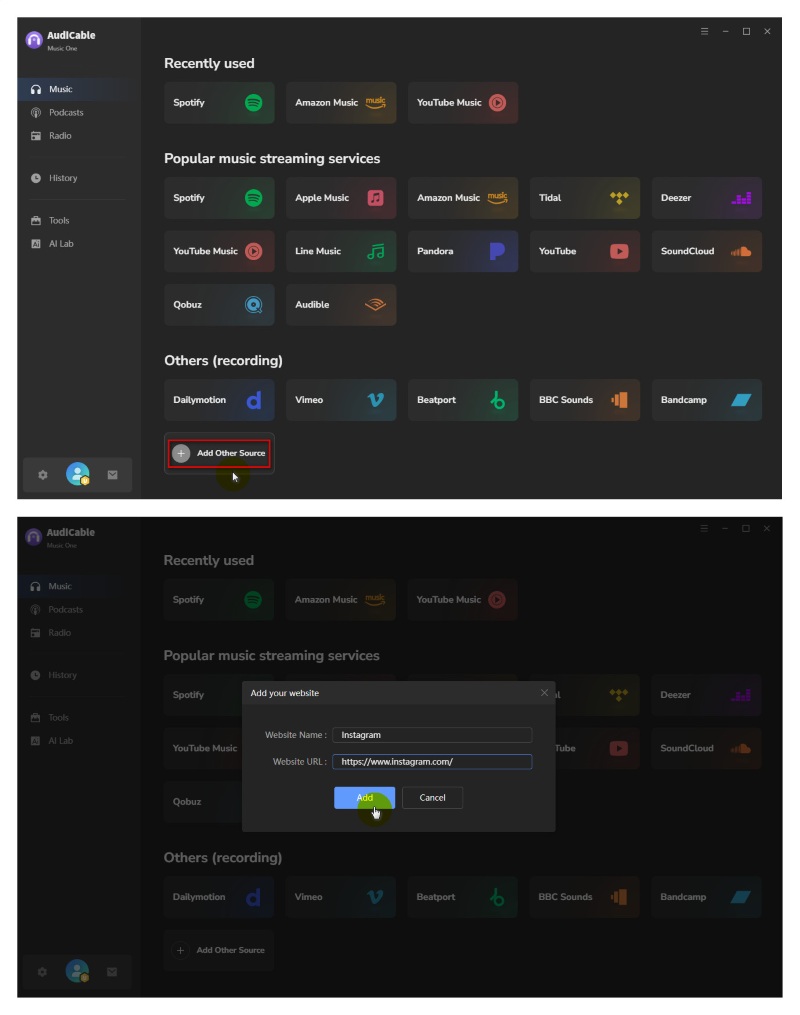
- Step 1: Open AudiCable Music One, click “Add Other Source”. Then add Instagram as a source.
- Step 2: Select the output format, quality, and output folder.
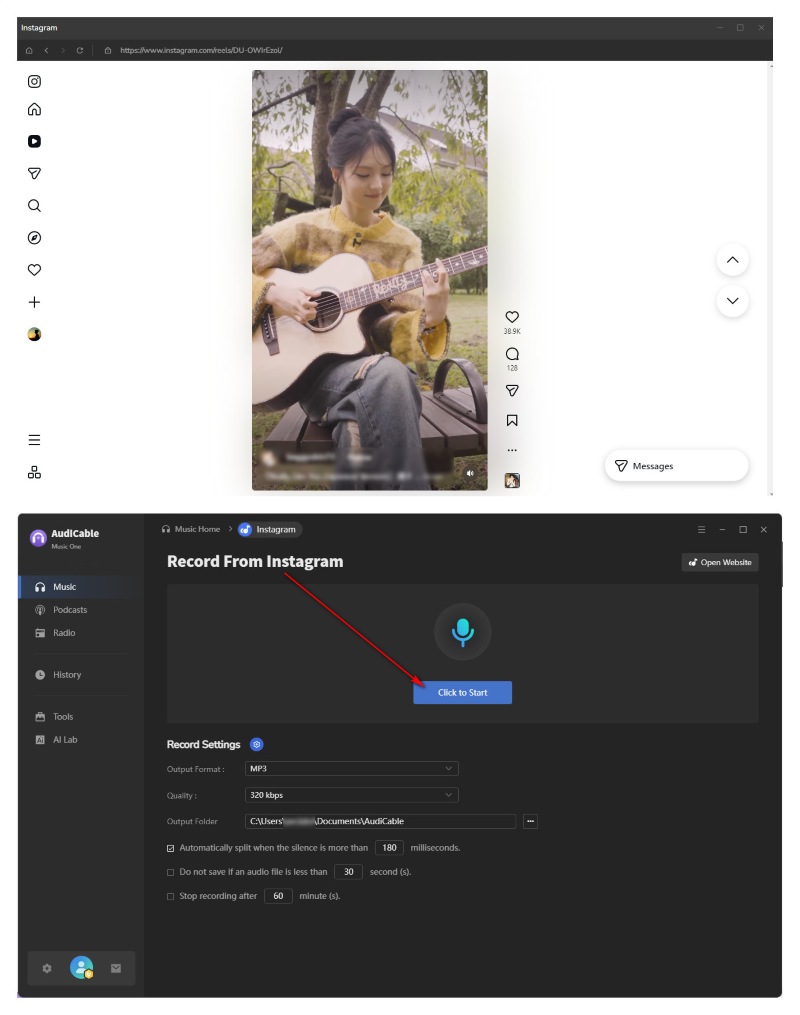
- Step 3: Play the Instagram video or Reel. Then, tap "Click to Start," and AudiCable will automatically download the audio from the Instagram video.
- Step 4: When the reel ends, just hit “Stop Recording”. Your Instagram audio download will be ready in seconds.
In this video, you will learn how to download Instagram Audio to MP3 easily.
💬 Video Guide: How to Download Instagram Audio to MP3
NoteBurner Video One (All-in-One Video Downloader)
⬇️ Download website: https://www.noteburner-video.com/all-in-one-downloader.html
🔍 Recommend Level: ⭐⭐⭐⭐⯪
In our testing, NoteBurner Video One worked reliably for downloading Instagram videos and extracting audio to MP3. While it’s not a dedicated Instagram audio downloader, it performs well as a versatile tool for handling multiple platforms and formats.
Supporting over 1,000+ websites and resolutions up to 1080p HD, NoteBurner offers a clean and intuitive interface. It’s a solid option if you need both video downloading and audio extraction in one place.
✅ Key Advantages:
- Supports 1,000+ websites.
- High-quality output (up to 1080p).
- Convert Instagram videos to MP3 or MP4.
- Clean and user-friendly interface.
⚠️ Considerations:
- Desktop-only.
- A bit expensive for users on a tight budget.
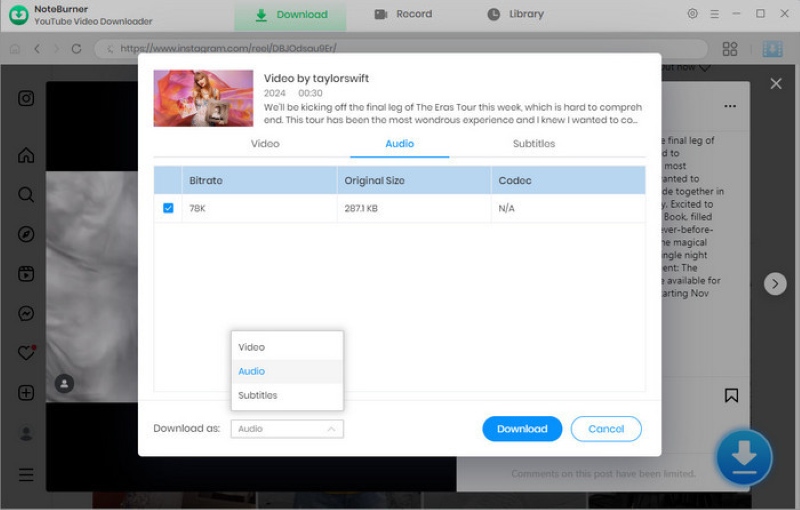
📂 How to Download Instagram Audio:
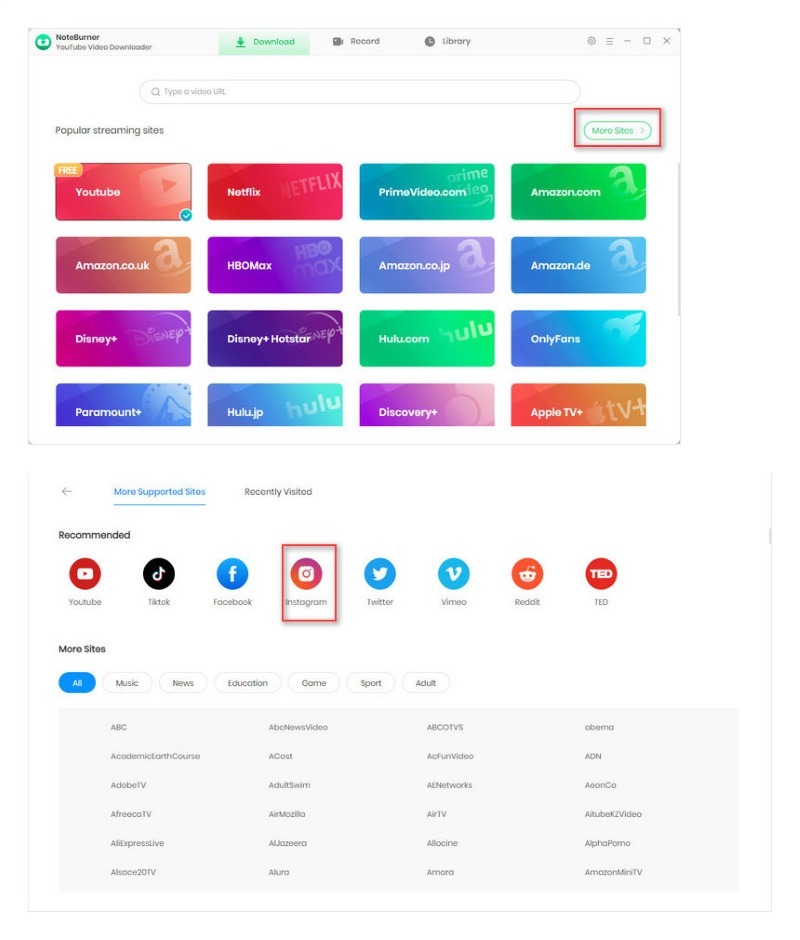
- Step 1: Launch NoteBurner Video One and select More Sites > Instagram.
- Step 2: Paste the video link or play the Reel.
- Step 3: Click Download and choose Download as Audio.
Wondershare UniConverter (Desktop Tool)
⬇️ Download website: https://videoconverter.wondershare.com/
🔍 Recommend Level: ⭐⭐⭐⭐⯪
In practice, Wondershare UniConverter works as a reliable workaround for downloading Instagram audio to MP3. While it’s not a one-click Instagram downloader, the process of pasting a video link and converting it remains stable and efficient.
From our testing, it stands out for its fast Instagram to MP3 conversion. Compared to many online tools, UniConverter delivers more dependable results, especially when handling longer videos or higher-quality files.
✅ Key Advantages:
- Advanced editing and conversion features.
- Fast and stable conversion performance.
- High-quality MP3 output.
- Wide format support.
⚠️ Considerations:
- Higher price.
- More features than needed for simple use
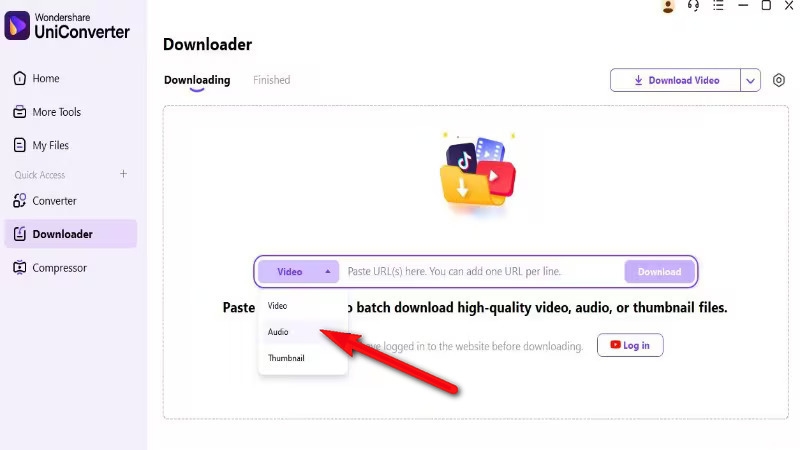
📂 How to Download Instagram Audio:
- Step 1: Open UniConverter and navigate to the Downloader section.
- Step 2: Paste the Instagram video URL and choose Audio as the output format.
- Step 3: Click Download to start converting the video to MP3.
ReelSave.app (Online Tool)
⬇️ Online site: https://reelsave.app/
🔍 Recommend Level: ⭐⭐⭐⭐
ReelSave.app provides a quick and simple way to convert Instagram to MP3 without installing any software. Just paste the link, and the tool usually processes it within seconds. Based on our testing, it’s especially convenient for occasional use on both desktop and mobile devices. However, like most online tools, the experience can vary slightly, with ads and occasional inconsistencies in output quality.

✅ Key Advantages:
- No installation required.
- Fast and easy to use.
- Works on both desktop and mobile browsers.
⚠️ Considerations:
- May include ads during use.
- Output quality can vary.
- Limited format options and customization.
📂 How to Download Instagram Audio:
- Step 1: Copy the Instagram Reel link.
- Step 2: Paste it into the input bar, then click the Download button.
- Step 3: Download the audio as MP3.
INDownloader.app (Online Tool)
⬇️ Online site: https://indownloader.app/
🔍 Recommend Level: ⭐⭐⭐⭐
INDownloader is a convenient Instagram audio downloader, a free online tool. It performs fast and is easy to navigate, making it a solid choice for quick MP3 downloads. It's useful for people who need Instagram to MP3 downloads. However, output options remain quite basic compared to more advanced tools.
✅ Key Advantages:
- Free and web-based.
- Simple and straightforward workflow.
- Works on both desktop and mobile devices.
⚠️ Considerations:
- Limited features.
- Parsing may occasionally fail.
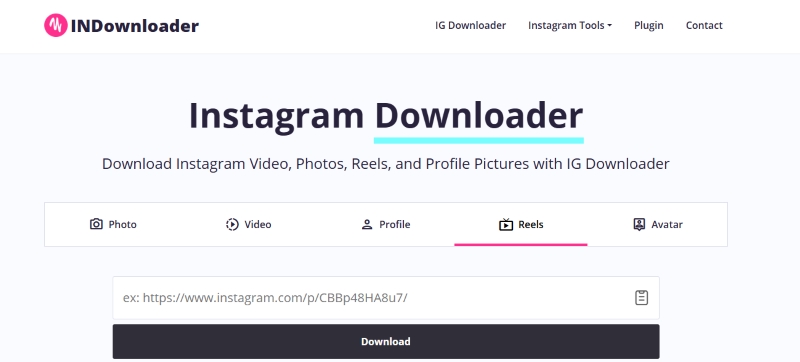
📂 How to Download Instagram Audio:
- Step 1: Copy the link of the Instagram video or Reel.
- Step 2: Paste the link into INDownloader.
- Step 3: Click Download, and the audio will be saved as an MP3 file.
Toolzin.com (Online Tool)
⬇️ Online site: https://toolzin.com/tools/instagram-audio-downloader/
🔍 Recommend Level: ⭐⭐⭐⯪
From hands-on use, Toolzin feels more like a multi-purpose Instagram downloader than a dedicated audio extraction tool. It supports downloading content from Reels, posts, and stories, offering more flexibility across different content types. It works well for general downloads and is a practical option if you want an all-in-one solution rather than a focused audio tool.
✅ Key Advantages:
- No installation required.
- Supports Instagram Reels, posts, and stories.
- Flexible for different types of content downloads.
⚠️ Considerations:
- Speed and output quality can vary.
- May require occasional verification or extra steps.
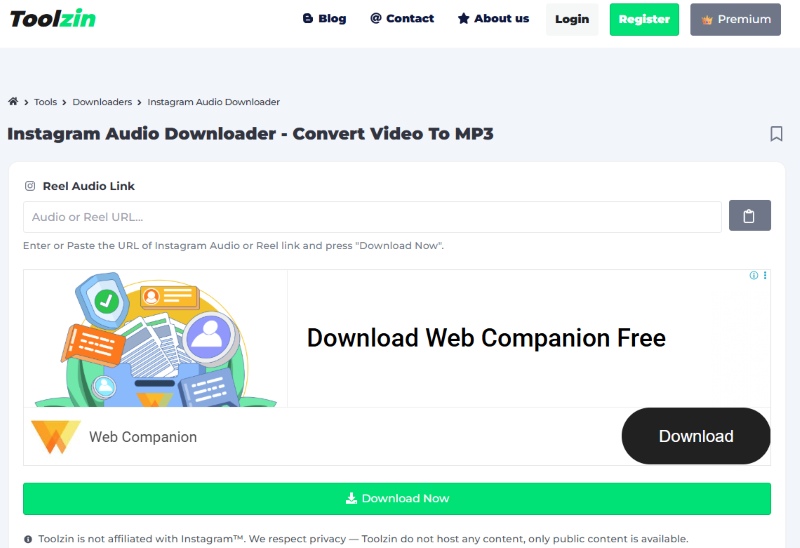
📂 How to Download Instagram Audio:
- Step 1: Copy the link of the Instagram video.
- Step 2: Paste it into Toolzin.
- Step 3: Click the Download icon to save the audio.
AudioDropper.com (Online Tool)
⬇️ Online site: https://audiodropper.com/
🔍 Recommend Level: ⭐⭐⭐⭐
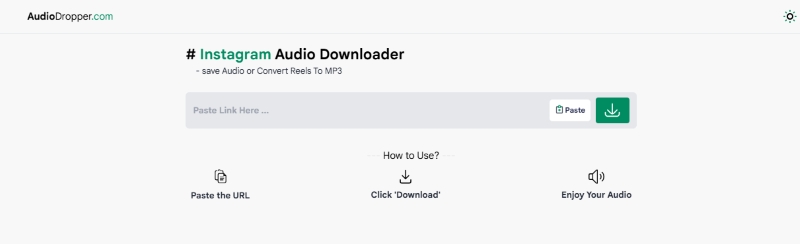
AudioDropper stands out with its clean interface and smooth extraction process, making it easy to download Instagram audio with minimal effort. It performs well for fast, casual use and is best suited for users who prioritize speed and ease over customization.
✅ Key Advantages:
- Free and no installation required.
- Clean and simple user interface.
- Fast audio extraction process.
⚠️ Considerations:
- Limited control over format and audio quality.
- May include occasional ads or server issues.
📂 How to Download Instagram Audio:
- Step 1: Copy the Instagram video or Reel link.
- Step 2: Paste the link into AudioDropper.
- Step 3: Click Download to save the audio as MP3.
💡 Tips: If you want more control over audio quality and a more stable download experience, AudiCable Instagram Audio Downloader can be a better choice.
⬇️ Download Instagram Audio in original quality:
FastVideoSave.net (Online Tool)
⬇️ Online site: https://fastvideosave.net/
🔍 Recommend Level: ⭐⭐⭐⯪
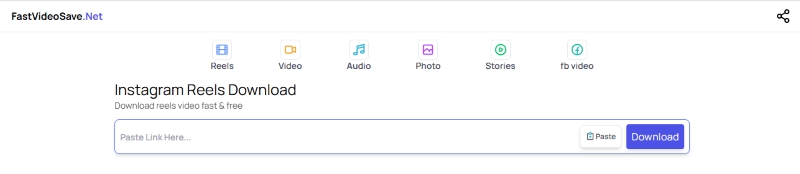
FastVideoSave feels like a speed-first tool—paste a link. It supports Instagram Reels, videos, and IGTV. From testing, its performance is fast but not always consistent. Output quality and parsing may vary, and the interface is more functional than polished. It’s best suited for casual, quick downloads rather than frequent or high-quality needs.
✅ Key Advantages:
- Fast processing.
- Supports Reels, videos, and IGTV content.
- Free and simple to use.
⚠️ Considerations:
- Parsing may occasionally fail.
- Ads may interrupt the download process.
📂 How to Download Instagram Audio:
- Step 1: Copy the link of the Instagram Reel.
- Step 2: Paste it into FastVideoSave.
- Step 3: Click Download to extract the audio as MP3.
ReelTools.app (Online Tool)
⬇️ Online site: https://www.reeltools.app/tools/download-instagram-audio
🔍 Recommend Level: ⭐⭐⭐⭐
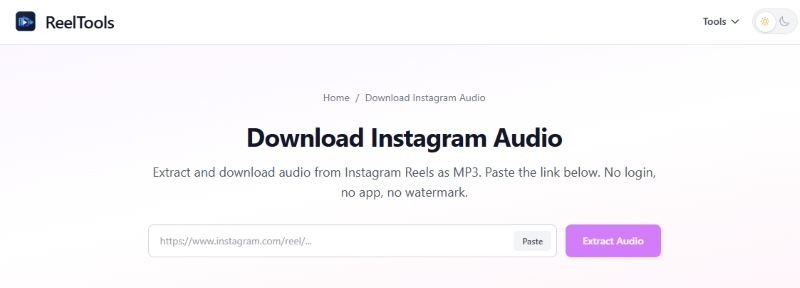
ReelTools is a creator-focused downloader designed more for structured workflows than quick, one-off downloads. It handles individual tasks reliably, making it a practical choice for content reuse. While it’s not built for bulk downloading, its clean layout and straightforward process make audio extraction simple and efficient.
✅ Key Advantages:
- Well-structured interface.
- Straightforward audio extraction.
- Mobile-friendly and accessible.
⚠️ Considerations:
- Limited format options and output control.
- No batch download support.
📂 How to Download Instagram Audio:
- Step 1: Copy the Instagram post link.
- Step 2: Paste it into ReelTools.
- Step 3: Click “Extract Audio” and export the file as MP3.
SunInsta.com (Online Tool)
⬇️ Online site: https://suninsta.com/
🔍 Recommend Level: ⭐⭐⭐⯪
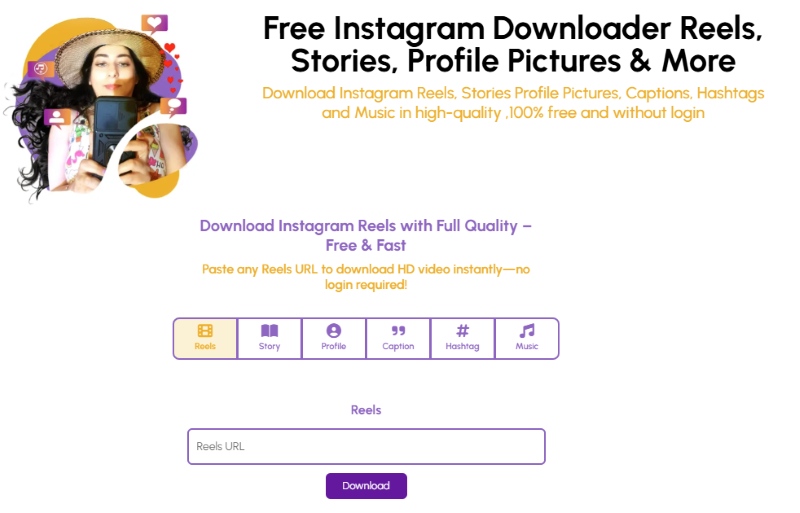
SunInsta feels more like a multi-purpose Instagram downloader with audio extraction as one of its features. It handles Instagram links reliably, but the process typically follows a generate-then-download flow, making it less instant than some alternatives. From hands-on use, it’s simple and effective for occasional downloads, though performance can be a bit slower, and link detection may occasionally fail.
✅ Key Advantages:
- Free and no login required.
- Supports multiple Instagram content types.
- Simple and easy-to-use interface.
⚠️ Considerations:
- Slower compared to other tools.
- Occasional link detection issues.
📂 How to Download Instagram Audio:
- Step 1: Copy the Instagram video.
- Step 2: Paste it into SunInsta.
- Step 3: Click Download to process and save the audio file.
📊 Instagram Audio Downloader Comparison Table
| Tool | Type | Audio Quality | Speed | Reliability | Formats | Ads-Free | Price | Recommend | Key Strength | Best For |
|---|---|---|---|---|---|---|---|---|---|---|
| AudiCable Instagram Audio Downloader | Desktop | High (320kbps+) | Fast | Very Stable | MP3, AAC, WAV, FLAC | Yes | Free Trial / Paid($79.90) | ⭐⭐⭐⭐⭐ | Best overall performance, no ads | Frequent high-quality downloads |
| NoteBurner Video One | Desktop | High | Fast | Stable | MP3, MP4 | Yes | Free Trial / Paid ($129.95) | ⭐⭐⭐⭐⯪ | Supports 1,000+ sites | Multi-platform downloading |
| Wondershare UniConverter | Desktop | High | Fast | Stable | MP3, WAV, WMA, etc | Yes | Free Trial / Paid($69.99) | ⭐⭐⭐⭐⯪ | Fast conversion + editing | Advanced users |
| Reelsave.app | Online | Medium | Fast | Moderate | MP3 | No | Free | ⭐⭐⭐⭐ | Quick, no install | Casual users |
| Indownloader.app | Online | Medium | Fast | Moderate | MP3 | Partial | Free | ⭐⭐⭐⭐ | Direct MP3 extraction | Quick downloads |
| Toolzin.com | Online | Medium | Moderate | Moderate | Limited | No | Free | ⭐⭐⭐⯪ | Supports multiple IG content types | Flexible use |
| Audiodropper.com | Online | Medium | Fast | Moderate | MP3 | Partial | Free | ⭐⭐⭐⭐ | Clean UI, simple extraction | Simple use |
| Fastvideosave.net | Online | Variable | Very Fast | Less Stable | MP3 | No | Free | ⭐⭐⭐⯪ | Speed-focused | One-time fast use |
| Reeltools.app | Online | Medium | Moderate | Stable | MP3 | Partial | Free / Freemium | ⭐⭐⭐⭐ | Creator-friendly workflow | Content creators |
| Suninsta.com | Online | Medium | Slow | Moderate | MP3 | Partial | Free | ⭐⭐⭐⯪ | Multi-purpose downloader | General use |
Key Takeaways
- Best Overall (Quality + Stability): AudiCable
- Fastest Tool: Wondershare UniConverter / Fastvideosave
- Best Free Online Option: Reelsave / Indownloader
- Best for Creators: Reeltools
- Most Reliable Long-term: Desktop tools > Online tools
FAQs About Instagram Audio Downloaders
💬 Q1: Are Instagram audio downloader tools safe?
A: Most online tools are generally safe but may include ads, pop-ups, or trackers. Desktop software is usually safer because it runs locally.
💬 Q2: Do Instagram audio downloaders work for all videos?
A: Not always. Some tools fail for private accounts or copyrighted content. Desktop tools like AudiCable often have better compatibility.
💬 Q3: How to ensure the downloaded Instagram audio keeps original quality?
A: Choose tools that explicitly support high bitrates (like 320kbps MP3) or lossless formats. Avoid tools that compress audio or convert to low-quality MP3.
💬 Q4: Can I use downloaded Instagram audio for TikTok or YouTube?
A: Yes. After downloading, you can use the audio in TikTok, YouTube, or editing tools like CapCut, Premiere Pro, and Final Cut Pro. This is especially helpful for creating Shorts or Reels-style content. Just be aware that some copyrighted tracks may be muted or limited depending on the platform.
Disclaimer:
- All these methods are for personal or educational use only.
- You should not use this tool to distribute music or for business.
The End
Whether you’re a casual Instagram scroller or a content creator who relies on high-quality audio, choosing the right tool can make all the difference. Our testing in 2026 shows that while online tools are convenient for quick grabs, desktop solutions like AudiCable Instagram Audio Downloader consistently deliver superior audio quality, stability, and flexibility.
Give it a try and enjoy your Instagram audio offline—your playlists and creative projects deserve nothing less.
Get the best AudiCable Instagram Audio Downloader now!!
Related Articles
- 11 Best FREE YouTube Shorts to MP3 Converters in 2026
- 12 Best Sites to Download MP3 Music for FREE
- Effective Ways to Convert Spotify to MP3 in 2026
- Best YouTube Audio Rippers & MP3 Converters in 2026
- Spotify Video Downloaders That Actually Work in 2026 (Tested Methods)
- Top 13 Free Unblocked Music Sites & Apps for School in 2026

