


AudiCable Audio Recorder
Spotify Video Downloader That Actually Works in 2026

By
Updated on: August 19, 2026
Category: Spotify Music Tips
Looking for a Spotify video downloader that truly works in 2026? You're not alone. As Spotify continues to expand beyond audio, users can now watch Spotify music videos, video podcasts, and short visual content like Canvas. Searches for Spotify video download and Spotify to MP4 converter are growing fast. However, most tools claiming to download Spotify videos either fail or only extract audio, making it increasingly difficult to find a reliable solution.
This guide highlights the Spotify video downloader methods that actually work in 2026, evaluated for stability, real-world performance, and user demand. Whether you want to save Spotify music videos or video podcasts, you'll find ways to reliably convert Spotify videos to MP4.
- What Is a Spotify Video?
- Method 1. Desktop Spotify Video Downloader (Stable & Practical)
- Method 2. Open-Source Spotify to MP4 Downloader
- Method 3. Free Spotify to MP4 Converter via Screen Recording
- Method 4. Online Spotify Video Downloader Website
- Comparison Table: Spotify Video Downloader Methods (2026)
- Video Guide: How to Download Spotify Videos to MP4?
- FAQs about Spotify Video Downloader
What Is a Spotify Video?
A Spotify video is any video-based content on Spotify that complements its audio streaming. Common types include:
| Spotify Music Videos | Spotify Video Podcasts | Spotify Canvas Videos |
|---|---|---|
| Official music videos released by artists and labels, playable on Spotify. | Full-length video podcasts with synchronized video, often lasting minutes to hours. | Short looping visuals (3–8 seconds) are attached to songs for visual engagement. |
Spotify does not provide an official option to download videos as standalone files. To save these videos locally, users usually rely on third-party tools or screen recording solutions.
Method 1. Desktop Spotify Video Downloader (Stable & Practical)
Desktop software is the most reliable way to download Spotify videos to MP4. This kind of tool is less affected by Spotify updates and offers higher stability than most online solutions.
AudiCable Spotify Video Downloader
For users looking for high-quality Spotify video download and Spotify video podcast downloader functionality, AudiCable Spotify Video Downloader is a solid choice. It allows you to save Spotify songs, playlists, albums, podcasts, and videos as MP4, MP3, AAC, or WAV, without requiring a Premium subscription or the Spotify app.
AudiCable organizes downloads by artist and album, creating a clean, ready-to-play library. With fast, lossless conversion, all tracks and videos maintain their original quality. Beyond Spotify, AudiCable supports YouTube, Apple Music, Amazon Music, and Tidal, making it an all-in-one solution for offline media.
Access Site: https://www.audicable.com/
✅Key Advantages
- Download Spotify songs, podcasts, music videos, and video podcasts in batches.
- Preserve original audio and video quality.
- Convert music and videos to MP3, AAC, WAV, FLAC, AIFF, and ALAC.
- Supports Spotify Free and Premium accounts, as well as other platforms.
- Retain track lyrics and ID3 tags, including title, artist, album, artwork, and track number.
- Integrate Audio Editor, Format Converter, Tag Editor, AA/AAX Converter, CD Burner, and Vocal Remover.
- Free updates and responsive customer support.
⚠️ Considerations
- Free version limits each track to one-minute previews; full access requires a subscription.
📂How to Use AudiCable to Download Videos from Spotify?
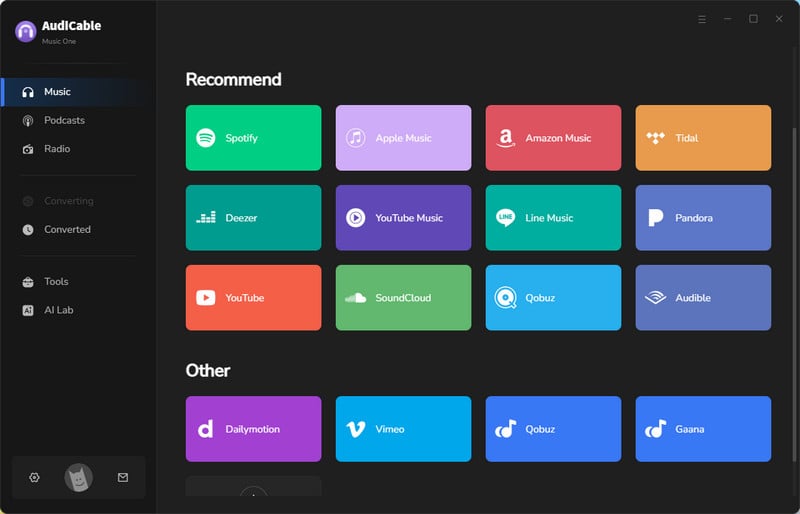
Step 1: AudiCable Music One works on both Windows and Mac. Just download and install the right version for your system, launch the program, then click Bandcamp to open the embedded web player.
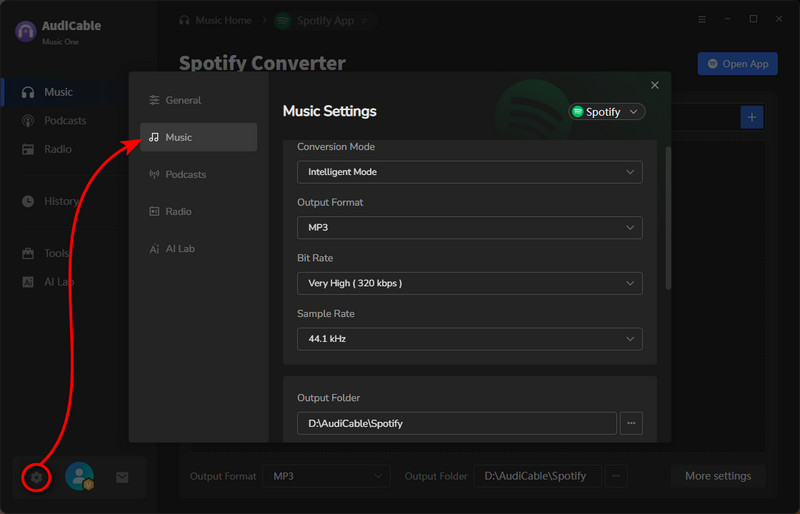
Step 2: Click the "Settings" icon at the bottom left. Set your preferred output format and choose a destination folder for downloaded Spotify audio and video files. Spotify videos will be automatically downloaded in MP4 format.
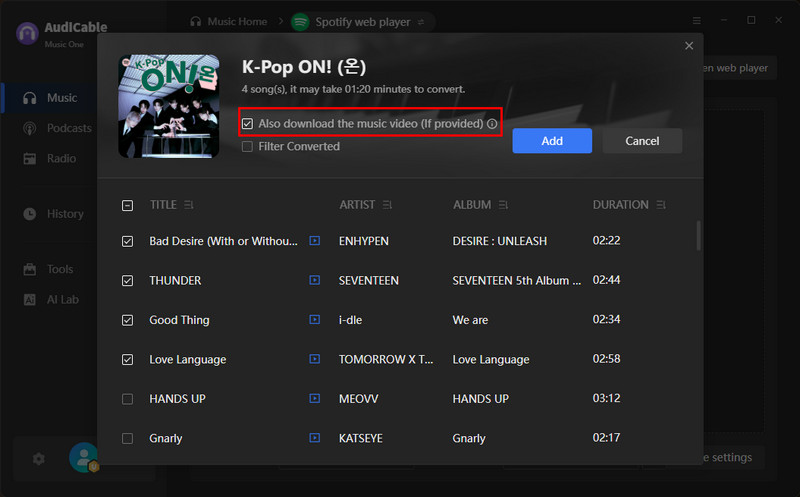
Step 3: Navigate to the song or playlist with the music video you wish to download. Click the "+" button at the lower right corner of the Spotify Web Player to add tracks. Then, enable the "Also download the music video" option.
Step 4: Click "Convert" to begin downloading Spotify songs as MP3 and videos as MP4 simultaneously. Monitor real-time progress and estimated time remaining.
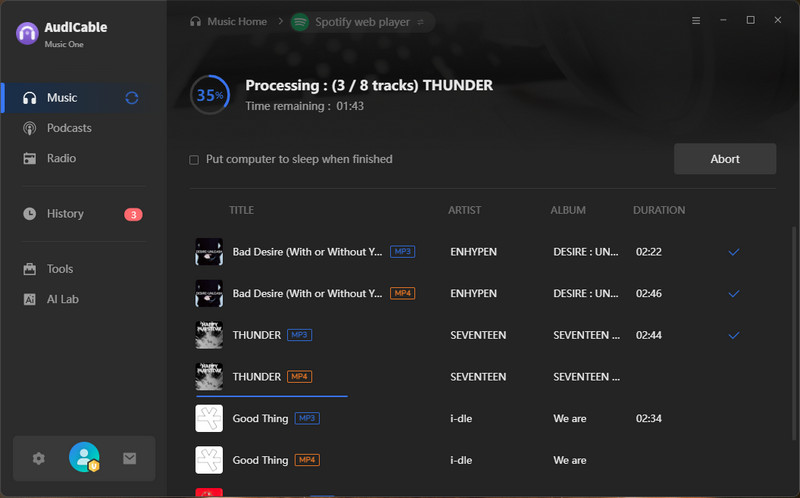
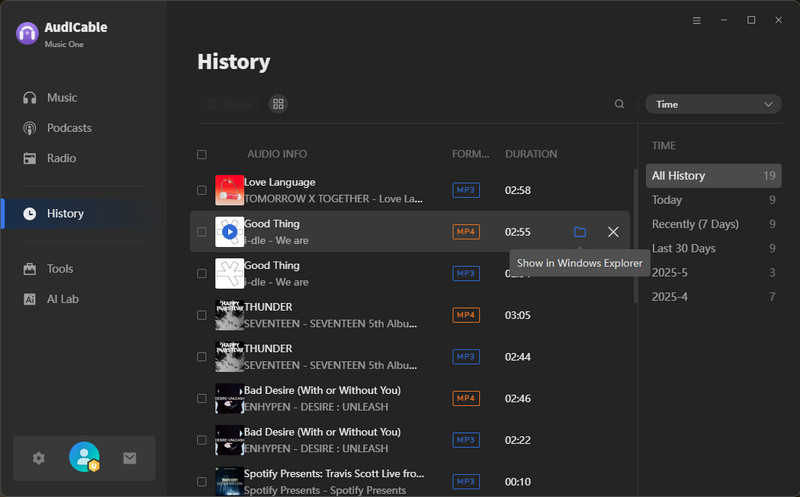
Step 5: Once the conversion is complete, go to the "History" section. Here you can review all past downloads. Click the file icon next to any entry to open its output folder directly.
Method 2. Open-Source Spotify to MP4 Downloader
Open-source solutions offer transparency and customization but require technical knowledge.
Votify (Desktop Alternative)
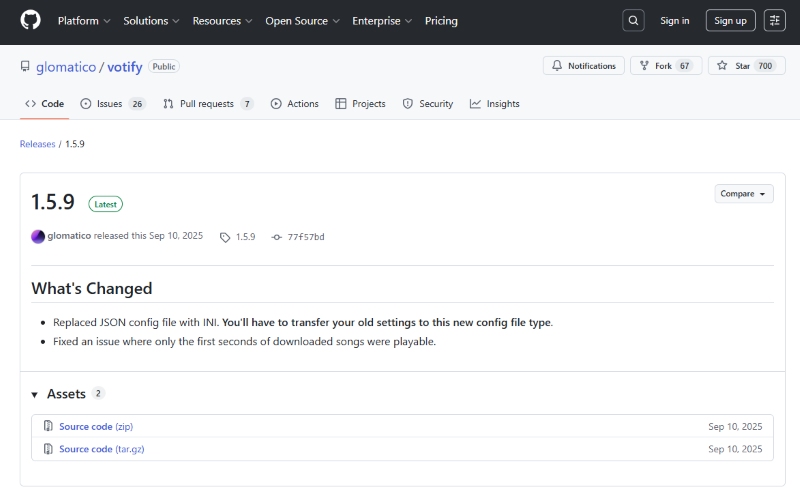
Votify is a powerful open-source command-line tool that allows advanced users to download Spotify content, including music videos and video podcasts, in MP4 format. It supports batch downloads of songs, albums, playlists, and entire artist catalogs while preserving audio and video quality.
As a flexible Spotify video downloader, Votify is highly customizable through command-line options and configuration files, making it ideal for users who prefer open-source solutions and technical control. However, it requires Python, FFmpeg, and some setup knowledge, so it's better suited for experienced users rather than beginners.
Access Site: https://github.com/glomatico/votify
✅Key Advantages
- Free and open-source.
- Support batch downloads of songs, albums, playlists, and artist catalogs.
- Highly customizable via command-line options.
⚠️ Considerations
- Complex setup; not beginner-friendly.
- No graphical interface.
- Community-supported, no official help.
- Some features may require a Spotify Premium account.
How to Download Spotify Videos to MP4 Via Votify?
Step 1: Before using Votify, you need to install Python 3.10 or newer and make sure FFmpeg is installed and working in your system's command line.
Step 2: Once the environment is ready, you can install Votify by running "pip install votify" in your terminal.
Step 3: Log in to Spotify in your browser and export your cookies (a cookies.txt file) using a browser extension.
Note: To download videos, you also need Widevine keys; follow Votify's guide to set them up.
Step 4: Download a video podcast with:
votify download "SPOTIFY_VIDEO_PODCAST_URL" --video --format mp4
Note: Download a music video the same way, just replace the URL with the Spotify music video link.
Step 5: Votify will merge the video and audio into a single MP4 file in your output folder.
Note: Some features may need a Spotify Premium account.
Method 3. Free Spotify to MP4 Converter via Screen Recording
Screen recording is a reliable free method that captures video playback directly, bypassing encryption issues.
OBS Studio (Free & Open Source)
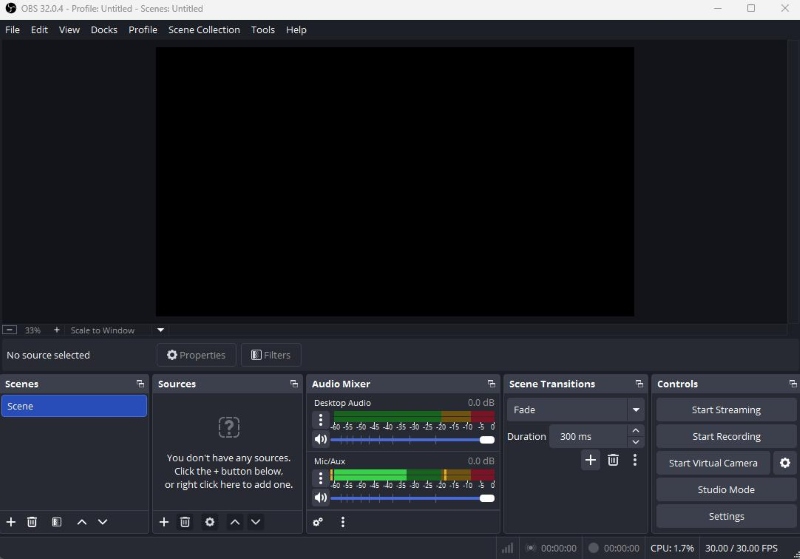
OBS (Open Broadcaster Software) is a free, open-source program for video recording. Unlike traditional downloaders, OBS captures video playback in real time, making it suitable for downloading Spotify music videos, video podcasts, and even Canvas clips. As a flexible Spotify to MP4 converter, OBS records both audio and video at high quality and works on Windows, macOS, and Linux.
Access Site: https://obsproject.com/
✅Key Advantages
- Work on Windows, macOS, and Linux.
- Record Spotify video playback in real time.
- Completely free and open-source.
- Support multiple scenes, sources, and streaming setups.
⚠️ Considerations
- Manual setup and recording required.
- No built-in editing tools.
- Support depends on community forums.
- Occasional stability issues are reported.
How to Record Spotify Videos with OBS?
Step 1: Install OBS and open it.
Step 2: Create a new scene by clicking the + in the Scenes panel.
Step 3: In the Sources box, select Window Capture to record the Spotify window or Display Capture to record the full screen.
Step 4: Make sure Desktop Audio is enabled in the Audio Mixer so that Spotify sound is recorded.
Step 5: Set the recording format by going to Settings, then Output, then Recording. Choose MP4 and select a folder for saving files.
Step 6: Click Start Recording and play the Spotify video or podcast you want to capture.
Step 7: When finished, click Stop Recording. The MP4 file will be saved in the folder you selected.
Method 4. Online Spotify Video Downloader Website
Online tools are popular because they do not require installation. However, their functionality is usually limited.
CanvasDownloader (For Spotify Canvas Videos Only)
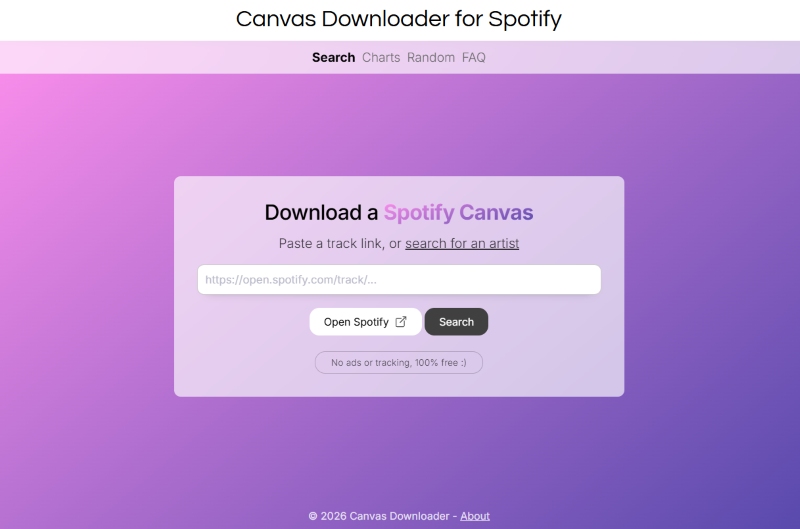
Canvasdownloader is a free, web-based tool designed to view and download Spotify Canvas videos. To use it, you simply paste a Spotify track link into the website, and it fetches the corresponding Canvas video so you can save it to your device as an MP4 or GIF.
Access Site: https://www.canvasdownloader.com/
✅Key Advantages
- Free, no installation required.
- Works on Windows, macOS, and Linux.
⚠️ Considerations
- Only supports short Canvas clips.
- May be affected by Spotify updates or downtime.
How to Download Spotify Canvas Videos with Canvasdownloader?
Step 1: Find a Spotify song that has a Canvas video and copy the song's link.
Step 2: Open Canvasdownloader.com.
Step 3: Paste the Spotify link into the website's input box.
Step 4: Click the Download button to save the Canvas video as an MP4 or GIF.
Step 5: Open the downloaded file to view the Canvas clip offline.
Comparison Table: Spotify Video Downloader Methods (2026)
| Tool / Method | Music Videos | Video Podcasts | Canvas Videos | Output Format | Ease of Use | Stability | Best For |
|---|---|---|---|---|---|---|---|
| AudiCable Spotify Video Downloader | ✅ Yes | ✅ Yes | ❌ No | MP4, MP3, AAC, WAV, FLAC, AIFF, ALAC | ★★★★★ | ★★★★★ | Stable, high-quality Spotify to MP4 downloads |
| Votify (Open-Source) | ✅ Yes | ✅ Yes | ❌ No | MP4 | ★★ | ★★★ | Advanced users preferring an open-source Spotify video downloader |
| OBS Studio (Screen Recording) | ✅ Yes | ✅ Yes | ✅ Yes | MP4 (Recorded) | ★★ | ★★★★ | Users who want a free method and don't mind real-time recording |
| Canvasdownloader (Online Tool) | ❌ No | ❌ No | ✅ Yes | MP4 / GIF | ★★★★ | ★★ | Downloading short Spotify Canvas videos only |
Key Takeaways
- AudiCable delivers the best balance of stability, quality, and ease of use for Spotify music videos and video podcasts.
- Votify is powerful but better suited for technical users.
- OBS Studio supports all video types but requires manual recording.
- Canvasdownloader is limited to short Canvas clips.
💬 Video Tutorial - How to Download Spotify Videos to MP4?
FAQs about Spotify Video Downloader
💬 Q1: Do Spotify video downloaders work the same on Windows and macOS?
Not always. Some tools are platform-specific or offer different features depending on the OS, so compatibility should be checked before use.
💬 Q2: Is video quality affected when converting Spotify videos to MP4?
Yes, depending on the method. Desktop tools like AudiCable Spotify Video Downloader preserve the original resolution, while screen recording may reduce quality based on system settings.
💬 Q3: Why do Spotify video downloaders stop working?
Online tools can be disrupted by Spotify updates. Changes to video delivery or playback mechanisms may temporarily break compatibility until the tools are updated.
Disclaimer:
- All these methods are for personal or educational use only.
- You should not use this tool to distribute music or for business.
The End
Finding a reliable Spotify video downloader isn't always easy, since different types of videos require different approaches, and not every tool works consistently. For those looking for a stable, practical way to convert Spotify music videos and video podcasts to MP4, a desktop solution like AudiCable Spotify Video Downloader can be a solid choice, offering dependable performance and broad format support. Ultimately, the best option depends on your needs, platform, and quality expectations.
Get the best AudiCable Spotify Video to MP4 Converter now!!

