


AudiCable Audio Recorder
TuneCable Spotify Downloader Review [2026]

By
Updated on: August 27, 2026
Category: Music Streaming Tips
Want to enjoy your Spotify playlists on any device? Finding a Spotify music downloader that actually delivers can be harder than it seems. Most people try all kinds of converters online, only to find that the actual performance is a far cry from what is advertised. So where does TuneCable Spotify Downloader actually stand? If you're still wavering, this comprehensive TuneCable Spotify Downloader review is exactly what you need. We put it to the test, evaluating download speed, output audio quality, metadata preservation, pricing, and its pros and cons.
![TuneCable Spotify Downloader Review [2026]](../images/article/tunecable-spotify-downloader-review.jpg)
📑 Content
- Quick Verdict & Overall Rating
- Part 1. What is TuneCable Spotify Downloader?
- Part 2. Hands-on Test: Download Speed, Audio Quality & ID3 Tag Retention
- Part 3. How to Use TuneCable Spotify Downloader?
- Part 4. Pricing & Trial Limits
- Is TuneCable Spotify Downloader Safe and Free from Viruses?
- FAQs about TuneCable Spotify Downloader
Quick Verdict & Overall Rating
To kick things off, let's start with a quick verdict and the overall rating.
Overall Score
4.5 / 5
Pros
- High-quality audio output (320 kbps MP3, 24-bit / 44.1 kHz FLAC).
- Fast batch downloading (up to 40x) of Spotify playlists, albums, etc.
- Flexible settings for output format, bitrate, sample rate, output file naming, etc.
- Full ID3 tags, lyric files, and cover art.
Cons
- Purchase required for full version.
- Installation needed.
Part 1. What is TuneCable Spotify Downloader?
TuneCable Spotify Downloader is an expert in downloading Spotify songs, albums, playlists, podcasts, audiobooks, and music videos. Available for Windows, Mac, and Android, it's compatible with most common systems, catering to a wide range of users. No longer limited to the Spotify app, this Spotify downloader allows users to listen to Spotify songs offline on any device, anywhere, including MP3 players, DJ software, media players, car audio systems, and home theaters.
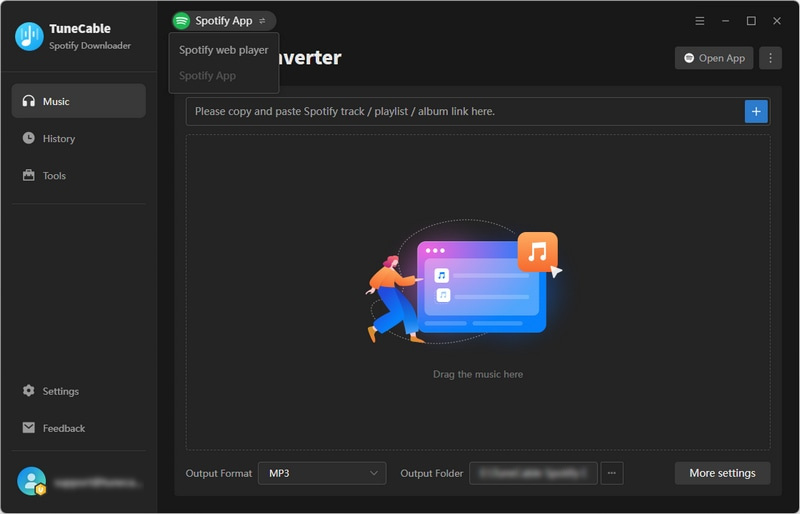
Deep Dive Into Key Features
Now that we've covered the basics, let's take a closer look at what really sets TuneCable Spotify Downloader apart.
- Multi-format conversion: Support MP3, AAC, ALAC, FLAC, WAV, and AIFF formats.
- Lossless audio quality and high-speed download: Maintain up to Spotify Lossless (24-bit / 44.1 kHz) audio quality, supporting download speeds up to 40x
- Complete metadata: Automatically save song information such as album art, artist, album, and year.
- Efficient music library organization: Efficiently sort your Spotify library into multi-level folders by artist, year, genre, album, and more.
- Backup and restore Spotify library: Back up your entire Spotify library, including songs, favorite artists, created playlists, etc., and restore them to any Spotify account with one click.
- High-quality music videos and video podcasts: Preserve high-quality music videos and download favorite video podcasts locally.
- Various built-in audio tools: Format converter, CD burning, ID3 editor, audio editor, export to iTunes, etc.
Part 2. Hands-on Test: Download Speed, Audio Quality & ID3 Tag Retention
Beyond the feature list, real-world performance matters. We tested speed and audio quality to see how it stacks up. Here is a quick overview of our hands-on test results:
| Batch Support | Output Quality | Conversion Speed | Success Rate | Metadata |
|---|---|---|---|---|
| ✅ | up to Spotify Lossless | ⚡ Fast (up to 40x) | 100% | ✅ All accurate (title, artist, album, year, disc number, genre, etc.) |
1. Conversion Speed
- Test conditions: Downloading an entire album containing 15 songs (total duration: 54 mins & 6 secs).
- Actual performance: The actual download time was approximately 86 seconds on Windows 11. That said, the actual download speed during our testing was approximately 38x. Overall batch processing performance was stable with very few instances of buffering.
While real-world speed falls slightly short of the claimed 40x, it remains impressively fast. Actual performance depends on network conditions. A stable, high-speed connection will get you closer to the advertised rate.
2. Audio Quality
- Supported formats: MP3, AAC, FLAC, ALAC, WAV, and AIFF
- Test setup:
- Premium account logged in
- Output parameter settings: "Recommended" (on Windows version) and "Original" (on Android version)
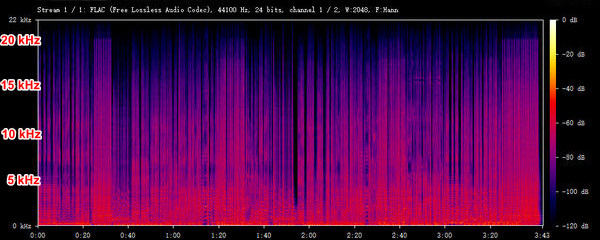
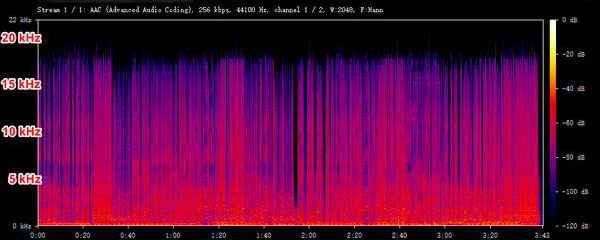
- Actual output audio quality: Support up to Spotify Lossless quality (24-bit/44.1 kHz FLAC) on desktop version and up to 256 kbps AAC on Android.
We tested the output quality of the TuneCable Spotify Downloader desktop and Android versions separately, and analyzed the actual quality using the Spek app. The details were well preserved according to our spectrum analysis.
Desktop version: up to 24-bit/44.1 kHz FLAC
Android version: up to 256 kbps AAC
3. ID3 Tags Identification
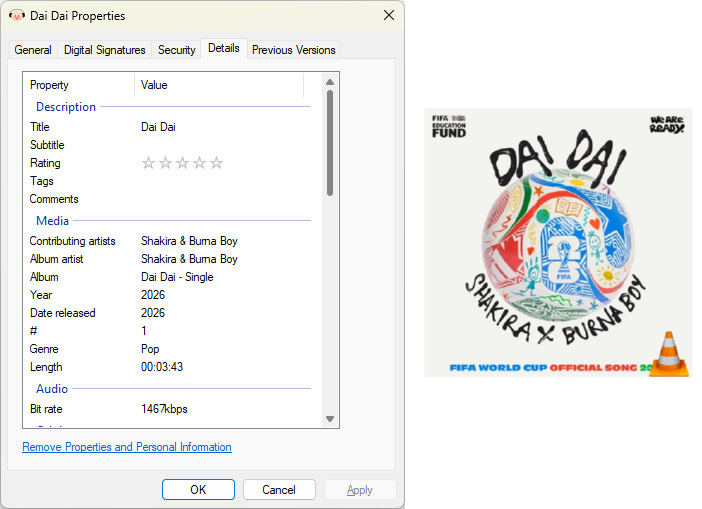
Metadata capture: According to the output files, TuneCable Spotify Downloader preserves comprehensive metadata—including title, artist, album, year, disc number, and genre. All ID3 tags were complete and error-free. No notable omissions were observed.
Part 3. How to Use TuneCable Spotify Downloader?
TuneCable Spotify Downloader is a user-friendly software with an intuitive and clear interface. Taking the Windows version as an example, here are the simple steps to use TuneCable Spotify Downloader.
Step 1 Launch TuneCable Spotify Downloader. Choose the Spotify App or Spotify web player to download music, then sign in to your Spotify account.

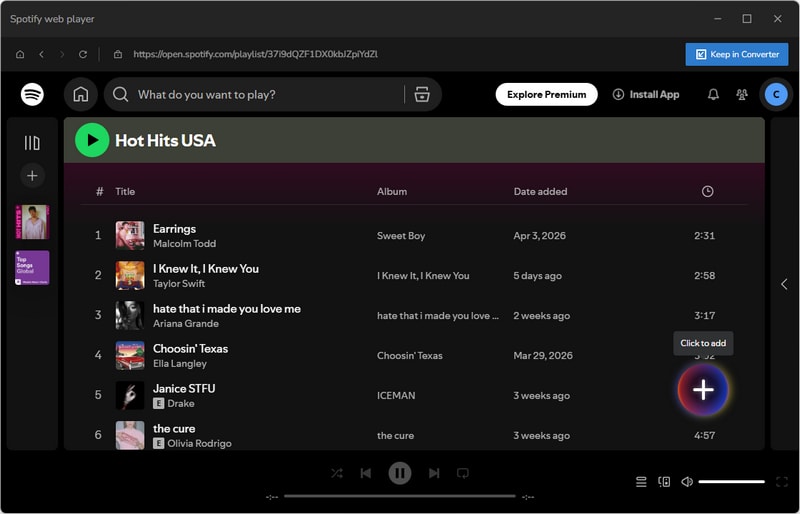
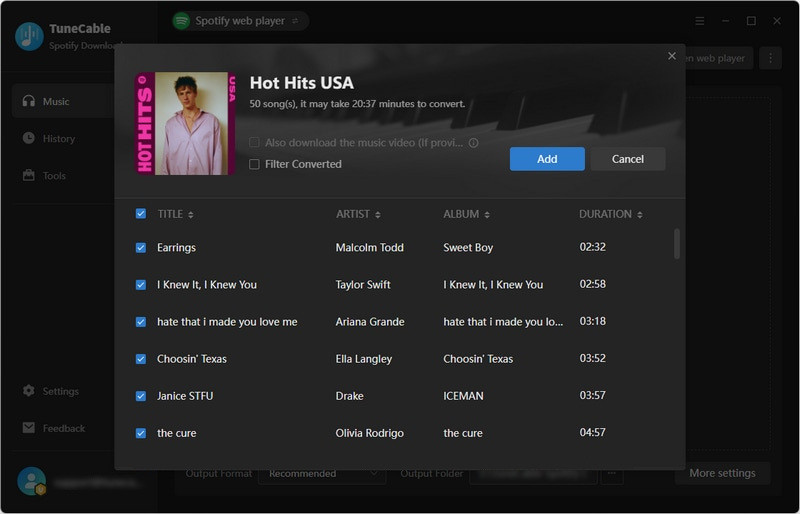
Step 2 Locate the music you want to download, then hit "Click to add". Select the tracks you want and click "Add". To download other playlists, click "Add More" and add songs again.
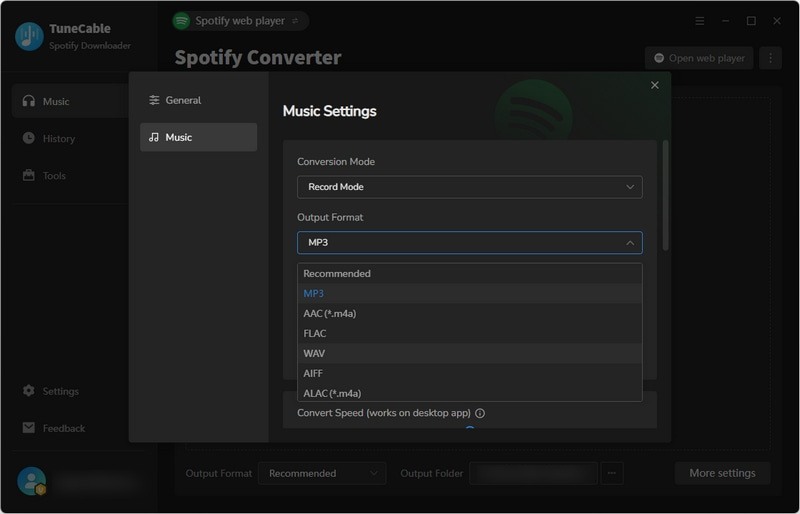
Step 3 Click "Settings" to select the output format, bit rate/bit depth, sample rate, output file name, etc.
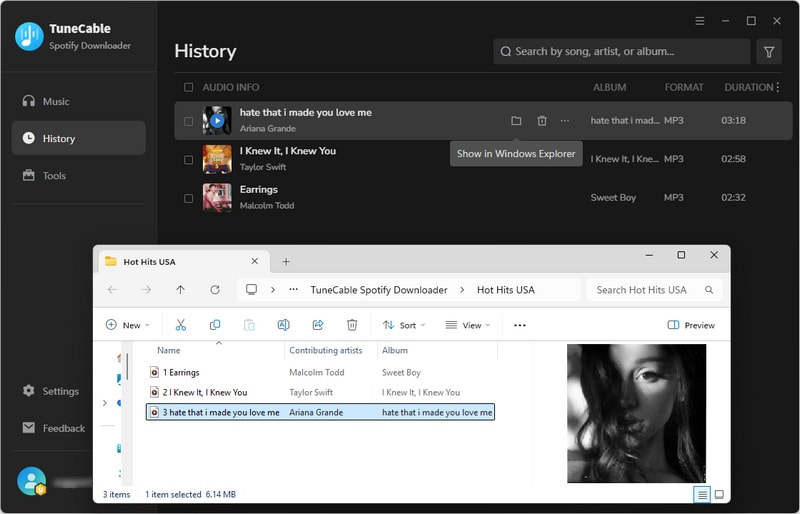
Step 4 Click "Convert" and wait for the download to complete. Finally, you can view the downloaded Spotify songs in "History".
Want to use the Android version of TuneCable Spotify Downloader? Check this guide.
Part 4. Pricing & Trial Limits
Trial Limits: The trial version of TuneCable Spotify Downloader currently only downloads the first minute of the song. Other tools such as tag editor, format converter, and audio editor are available for free. To unlock the full version, you need to purchase their plans.
Pricing: TuneCable Spotify Downloader currently offers annual and lifetime plans. Specific pricing is as follows:
| Plan | Pricing | Note |
|---|---|---|
| Annual Plan | $44.95 | ~$3.75 / Month |
| Lifetime Plan | $89.9 | Lifetime free updates |
Is TuneCable Spotify Downloader Safe and Free from Viruses?
Before we put TuneCable to the test, we looked into what users were saying about TuneCable Spotify Downloader. The most common concern we encountered was whether the software is safe and virus-free. Here's what we found during the testing:
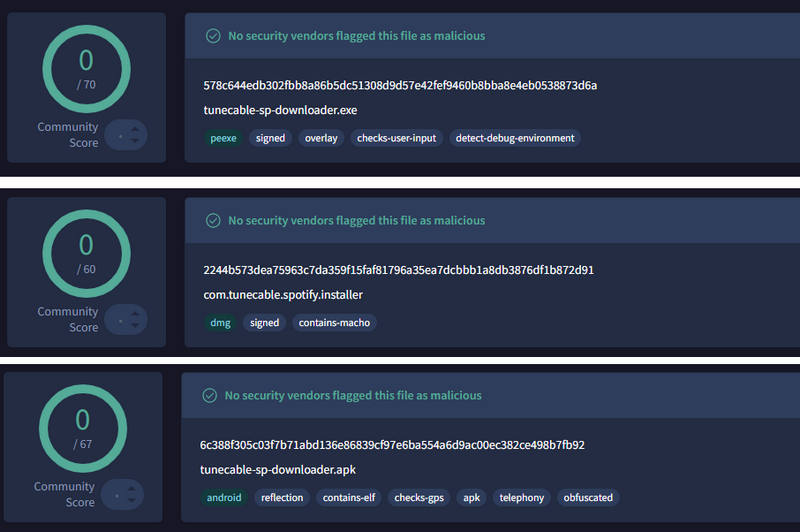
- VirusTotal scan: We used VirusTotal to scan the installation package (exe, dmg & apk), and the results were 0/70, 0/60, and 0/67, indicating no viruses or Trojans.
- No bundled software: During the installation process, we found no third-party malware, browser plugins, or unwanted pop-up ads.
- Spotify account safety: While testing the software, we found a few user reports on review platforms about potential account bans. The test accounts we used (including Free and Premium accounts) functioned normally, and we have not received any official warning emails so far. Additionally, based on customer service responses and user feedback, TuneCable's backup and restore feature provides a certain level of data security for their Spotify libraries.
FAQs about TuneCable Spotify Downloader
💬 Q1: Does TuneCable require a Spotify Premium account?
Not necessary. Both Spotify free and Spotify Premium accounts are supported on TuneCable Spotify Downloader.
💬 Q2: Can I transfer downloaded Spotify songs to an MP3 player or phone?
Yes. TuneCable Spotify Downloader can download Spotify songs in MP3, AAC, ALAC, FLAC, WAV, and AIFF formats. Simply connect your computer to the target device via a data cable. You can easily transfer the downloaded music to any device, such as an MP3 player.
💬 Q3: Does TuneCable keep original track metadata and lyrics?
Yes. Metadata, including title, artist, album, year, disc number, genre, and album art, can be perfectly saved after conversion. Simply check "save lyrics" in the settings. You can download the lyrics file (.lrc or .txt) to your local computer.
Final Verdict: Is TuneCable Worth It?
Compared to some online tools, TuneCable Spotify Downloader may not be as lightweight. However, as a professional download software, TuneCable Spotify Downloader excels in download speed and output audio quality. With download speeds up to 40x and support for Spotify Lossless audio quality, these excellent features make TuneCable a very stable and feature-rich choice for users who prioritize batch downloads and high performance in Spotify audio downloads.
We started this review wondering if TuneCable could deliver on its promises. The short answer is yes. But whether it's the right fit for you depends on how much you value offline Spotify playback and how often you actually need it.

