


AudiCable Audio Recorder
Qobuz vs Spotify: Full Comparison of Audio Quality & Features

By
Updated on: August 19, 2026
Category: Music Streaming Tips
Spotify is the streaming giant everyone knows. Qobuz is the audiophile favorite that keeps popping up in headphone forums. Two music services. Two very different approaches to how you listen. One dominates the mainstream. The other caters to critical ears. Both claim to offer the best experience—but they define "best" in completely different ways.
So which one should you choose? Let’s break down their differences and see which one is the better choice for your listening habits.

- Part 1 Quick Comparison — Spotify or Qobuz?
- Part 2 Spotify vs Qobuz: A Brief Overview
- Part 3 Detailed Comparison: Spotify vs Qobuz Features, Sound Quality & Pricing
- Pricing & Subscription Plans
- Sound Quality Comparison
- Music Library Size & Catalog Coverage
- Music Discovery & Recommendation System
- User Experience & Device Compatibility
- Offline Listening & Download Features
- Part 4 How to Download Spotify & Qobuz Music as MP3/FLAC & More
Part 1 📊Quick Comparison — Spotify or Qobuz?
Before diving into the details, here is a quick overview of Spotify and Qobuz.
| Feature | Spotify | Qobuz |
|---|---|---|
| Best For | Everyday listening & discovery | Hi-Res & audiophile listening |
| Audio Quality | High-quality / up to lossless CD | Lossless + Hi-Res (up to 24-bit / 192kHz) |
| Music Discovery | Best-in-class AI recommendations | Human-curated editorial discovery |
| Library & Content | Music + podcasts + audiobooks | Music-focused catalog (100M+ tracks) |
| Experience & Devices | Highly compatible across devices | Hi-fi focused, limited mainstream device support |
See our full comparison below ↓
Part 2 Spotify vs Qobuz: A Brief Overview
Spotify and Qobuz are both music streaming services, but they are built around very different listening priorities. For users searching for a Spotify alternative, Qobuz stands out by offering a more focused music experience centered around high-quality playback.
Spotify is built for discovery. It tries to get you to find music quickly using personalized playlists, recs that learn, and a listening flow that just keeps going across devices. It’s made for everyday use, where the tracks seem to shift with your habits, and even the general mood you’re in.
Qobuz is more about audio quality, like really leaning into it. It puts the spotlight on lossless playback and Hi-Res options, aiming to deliver music with extra detail and fidelity. Instead of algorithm-driven discovery, it offers a more intentional listening experience for users who care about sound quality.
Part 3 Detailed Comparison: Spotify vs Qobuz Features, Sound Quality & Pricing
Pricing & Subscription Plans
Spotify raised its US subscription prices again in February 2026, marking the third hike in three years. Qobuz's pricing looks similar on the surface, but the annual billing options tell a different story. When comparing Qobuz vs Spotify price, the monthly cost looks similar, but the value depends on what you need. Spotify offers a free tier, while Qobuz focuses on premium lossless streaming and Hi-Res audio.
| Spotify | Qobuz | |
|---|---|---|
Individual |
$12.99/month | $12.99–$15.29/month (monthly) / $10.83/month (annual) |
Duo |
$18.99/month | $17.99/month (monthly) / $14.99/month (annual) |
Family |
$21.99/month | $21.90/month (monthly) / $20.83/month (annual) |
Student |
$6.99/month | $4.99/month |
Free Tier |
Yes (ad-supported) | No |
Free Trial |
1 month | 1 month |
Spotify raised its individual premium plan to $12.99 per month starting February 2026, with Duo rising to $18.99 and Family reaching $21.99 for up to six accounts. The student plan now costs $6.99/month. A free ad-supported tier remains available, and new Premium users get a 1-month free trial.
Qobuz doesn't offer a free tier, but its pricing structure is more flexible than Spotify's. Standard monthly subscriptions are slightly higher than Spotify's, but annual prepayment brings the individual plan down to $10.83/month—cheaper than Spotify's monthly rate. The annual Duo comes to $14.99/month, and the annual family plan comes to $20.83/month for up to six accounts. The student plan at $4.99/month is the cheapest student-tier hi-res streaming option available.
The Sublime Difference
Qobuz offers a premium tier called Sublime, available only as an annual subscription. For $179.99/year ($15/month) for Sublime Solo, it costs just a few dollars more than the standard Studio plan but gives you up to 60% off hi-res downloads from the Qobuz store. A $25 hi-res album drops to $10—if you buy more than a few albums a year, Sublime pays for itself.
Sublime Duo is available at $269.89/year (about $22.49/month), and Sublime Family at $349.99/year (about $29.17/month), both with the same 60% discount on downloads.
Verdict: Which One Gives You Better Value?
| Scenario | Recommendation |
|---|---|
| You want a free, ad-supported option | Spotify — the only service with a free tier |
| You want hi-res audio and pay month-to-month | Qobuz — $17.99/month; audio quality is unmatched |
| You want hi-res audio on a budget | Qobuz — annual plan at $10.83/month, cheaper than Spotify |
| You frequently buy digital music for permanent ownership | Qobuz Sublime — a 60% discount pays for itself quickly |
| You're a student | Qobuz — $4.99/month, cheapest hi-res student plan |
| You're sharing with family or a partner | Tie — both offer Duo and Family plans at similar prices |
Sound Quality Comparison
This is where the two services differ the most—and probably why you're reading this comparison. Here's the short version: Qobuz offers technically superior audio. Spotify offers CD-quality lossless audio. Whether you can hear the difference depends on your gear and your ears. The biggest difference in the Spotify lossless vs Qobuz comparison is not just file quality, but the listening experience. Qobuz is designed around Hi-Res lossless audio, while Spotify focuses more on accessibility and everyday convenience.
Comparison Table
| Spotify | Qobuz | |
|---|---|---|
Max Quality |
24-bit / 44.1 kHz FLAC (CD quality) | 24-bit / 192 kHz FLAC (Hi-Res) |
Max Bitrate |
1,411 kbps | 9,216 kbps |
Hi-Res Catalog |
N/A | 185,000+ albums |
Free Tier Quality |
160kbps (web) / 320kbps (mobile) | N/A (no free tier) |
Spotify streams at CD quality (24-bit / 44.1kHz FLAC). That means audio is sampled 44,100 times per second—enough to cover the full range of human hearing.
Qobuz goes up to Hi-Res (24-bit / 192kHz FLAC), sampling at 192,000 times per second. In theory, that captures more detail from the original studio recording.
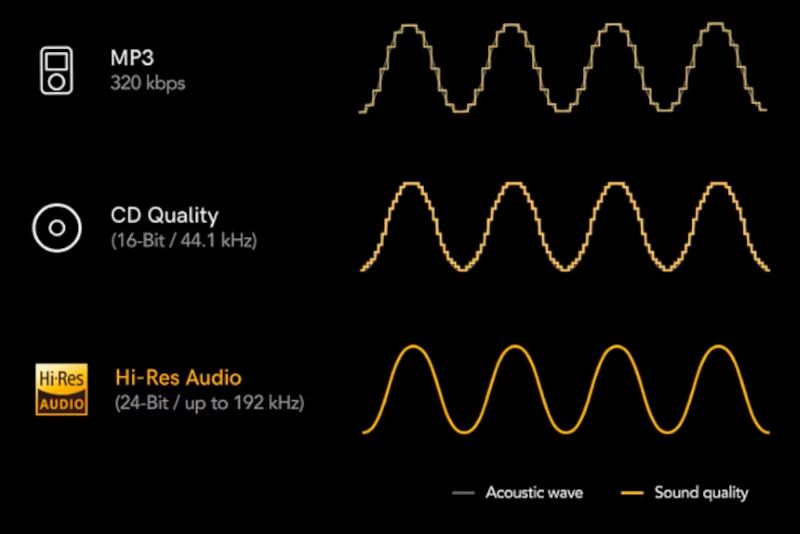
What does that extra detail get you? In practice, a truer representation of the original master. But here's the catch: most adults can't hear above 16–18 kHz anyway, and there's real debate about whether humans can perceive the difference above 44.1kHz. To some, it's about having the best possible file. To others, it's a placebo.
Can You Actually Hear It? Only if you have the right gear. The difference is noticeable when you're listening through:
- ✅ A dedicated DAC
- ✅ A proper amplifier
- ✅ Wired headphones or speakers
If you're using Bluetooth earbuds, casual headphones, or listening on the go, you won't hear the difference. Bluetooth compresses the audio signal, which cancels out the Hi-Res benefit.
Verdict: Qobuz is best for high-end audio setups, while Spotify is ideal for everyday listening and mobile-friendly convenience.
Music Library Size & Catalog Coverage
Looking at the Qobuz library vs. Spotify, both platforms provide access to more than 100 million tracks, but their catalogs are organized differently. On quantity alone, they're evenly matched—you're not losing access to music by choosing one over the other. The difference is in focus.
Spotify covers virtually every genre and era—mainstream pop, underground indie, international hits, and everything in between. Beyond music, it also packs 5 million+ podcasts and a growing audiobook library. It's an all-in-one app for audio.
Qobuz, by contrast, is music-first. It doesn't do podcasts or audiobooks. Its editorial curation skews toward classical, jazz, and world music—genres where listeners often want more than just a playlist. Many albums come with detailed liner notes, digital booklets, and editorial content that appeal to music enthusiasts who want context with their listening.
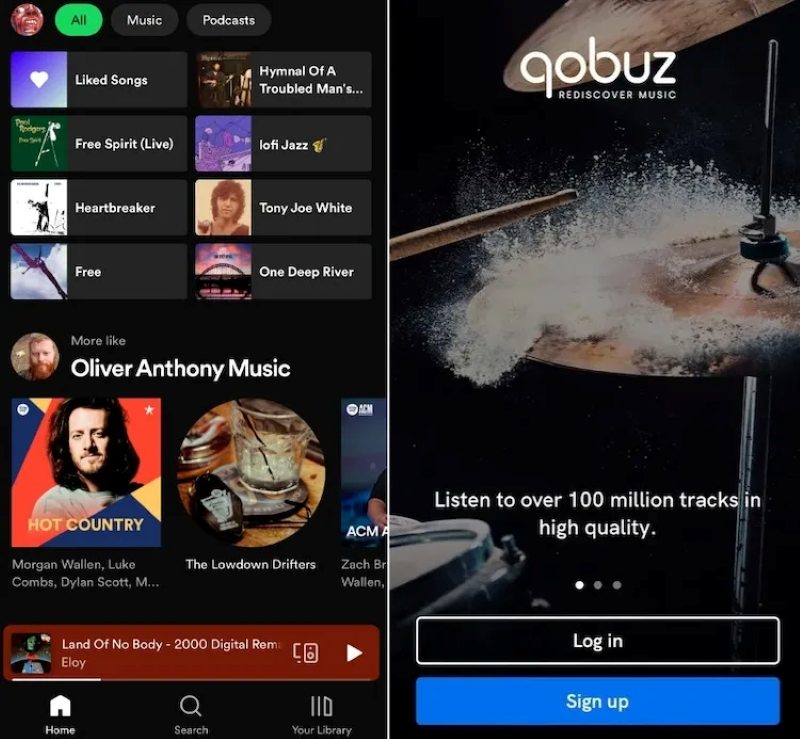
Verdict: If you want a single app for music, podcasts, and audiobooks, Spotify wins. If you're a classical or jazz listener who values album context and editorial depth, Qobuz is the better fit.
Music Discovery & Recommendation System
Spotify and Qobuz take completely different approaches to helping you find new music.
Spotify: The Algorithm King
Spotify's recommendation engine is the industry gold standard. It studies your listening habits and serves up personalized playlists like Discover Weekly, Daily Mixes, and Release Radar. The more you listen, the smarter it gets. It's designed to keep you engaged without you having to think about it.
The catch? Some users note that Spotify's algorithm has become better at giving "more of the same" than true discovery—recycling familiar tracks rather than pushing you into new territory. Still, for most listeners, it remains the most effortless way to find new music.
Qobuz: Human Curation First
Qobuz leans on human curation. Think of it like a record store clerk who actually knows music—not a computer that knows what you clicked on.
Its Discover page is built around three spaces:
- Editor's Picks — 100% human-curated. No algorithms.
- For You — Personalized recommendations driven by your listening history.
- Release Watch — Real-time feed of new releases from artists and labels you follow.
Qobuz also features Spotlight, which pairs artists with interviews and articles from the Qobuz magazine—so discovery comes with context, not just a playlist. The intention is to avoid the "algorithmic bubble" where platforms keep feeding you the same kind of music.

Verdict: Choose Spotify if you want effortless, personalized recommendations, while Qobuz is a better choice if you prefer human-curated discovery and enjoy exploring music more actively.
User Experience & Device Compatibility
A music streaming service is only useful if it fits your daily workflow. Both Spotify and Qobuz offer apps across multiple platforms, but their experiences are different.
Spotify works on virtually every platform — iOS, Android, Windows, Mac, Web, smart TVs, gaming consoles, car systems, and hundreds of third-party devices. It's the most widely compatible streaming service available.
Qobuz is available on iOS, Android, Windows, Mac, Web, and select hi-fi platforms like Sonos, Bluesound, Naim, and Roon. It lacks native support for smart TVs, gaming consoles, and most mainstream smart speakers.

Spotify's interface is clean, intuitive, and consistent across devices. Qobuz's interface is music-only and more focused on album artwork and editorial content. For car use, both support Android Auto and CarPlay, but Spotify's integration is smoother and more responsive.
Verdict: Choose Spotify if you listen across multiple device types—phone, laptop, TV, console, car, speakers. Choose Qobuz if your primary setup is a hi-fi system, computer, or phone, and you prefer a music-only interface.
Offline Listening & Download Features
Spotify offers offline downloads exclusively through its mobile and desktop apps. Premium subscribers can download songs, albums, and playlists for offline playback. By the end of May 2026, background downloading became available on iOS; downloads continue even when the app is closed. All downloads are encrypted and tethered to your subscription.
Qobuz offers two options: streaming downloads (app-based, works like Spotify) and music purchases. Buy an album from the Qobuz store, and you get DRM-free FLAC files—yours to keep forever, even after you cancel.
Verdict: Choose Spotify for simple app-based offline playback. Choose Qobuz if you want the option to permanently own DRM-free music files.
👍 Read more: Spotify vs. Pandora - Which One is Right for You?
Part 4 How to Download Spotify & Qobuz Music as MP3/FLAC & More
While Spotify and Qobuz both support offline listening, downloaded songs remain locked inside their apps and cannot be played freely as regular audio files. Many users search for terms like Spotify music downloader and Qobuz music downloader because they want more flexible ways to manage their music. For users who want more flexibility, saving music as MP3, FLAC, or other formats provides a more convenient way to manage their personal music library.
Tool Required: AudiCable Spotify & Qobuz Music Converter
AudiCable Streaming Audio Downloader is a strong streaming music converter meant to help people save songs from Spotify, Qobuz, and other common platforms as local audio files. It lets you grab tracks, albums, and playlists, then turn them into more widely accepted formats like MP3, FLAC, WAV, AIFF, and more, so you can play them offline in a flexible way.
Using advanced audio conversion technology, AudiCable keeps the sound quality that’s available, while also holding onto the key metadata such as song titles, artists, albums, and even cover artwork. It also includes batch conversion and extra audio utilities, for example, format conversion, CD burner, and other adjustments, so it is easier to organize and enjoy your own music collection on different devices.
Best AudiCable Streaming Audio Downloader( Mac / Win )
- Download music from Spotify, Qobuz, Tidal, Apple Music, Amazon Music, and other music sources with ID3 tags kept.
- Batch download music to MP3, FLAC, WAV, AAC, AIFF, and ALAC at 10x speed.
- Keep the original audio quality up to Qobuz Hi-Res, Spotify Lossless, Apple Music Lossless, etc.
- Support streaming music for free and premium accounts.
- Integrate format converter, tag editor, CD burner, and vocal remover, etc.
- Free software updates and customer support.
💡Steps to Download Music from Spotify & Qobuz for Free
Step 1 Select Music Platform
Launch AudiCable Music One on your computer. The main interface displays various supported music platforms. We choose "Qobuz" as an example here. For Spotify users, you can also check out the guide on how to convert Spotify music to MP3.
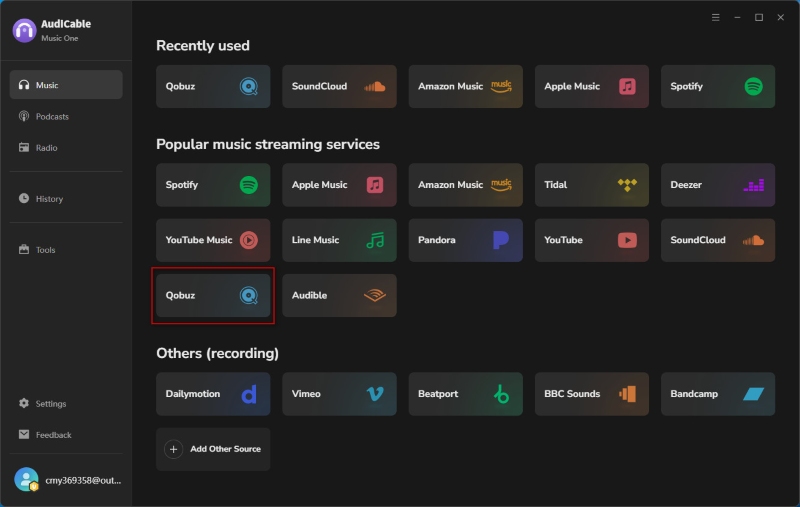
Note: If you wish to download music from websites not displayed on the main interface, you can click "Add Other Source" and enter the website name and URL to access and download the music.
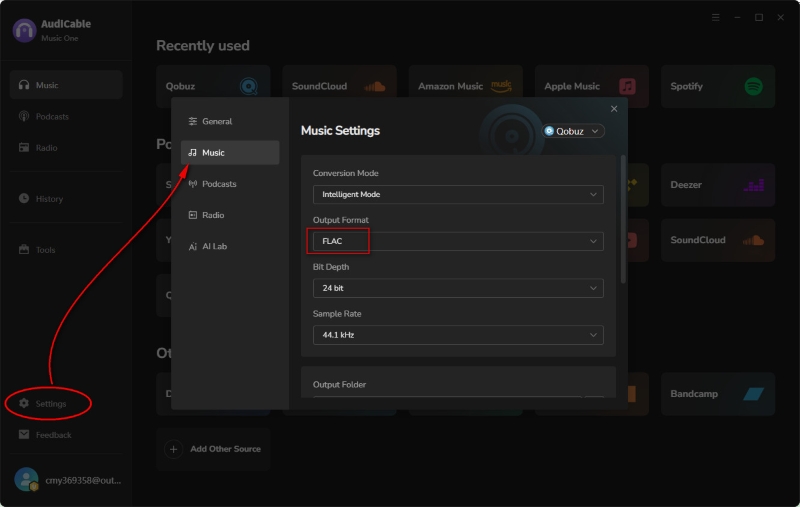
Step 2 Adjust Output Parameters
Click "Settings" in the bottom-left corner and choose your preferred output format, such as FLAC. You can also adjust the conversion mode, customize the output folder, and more.
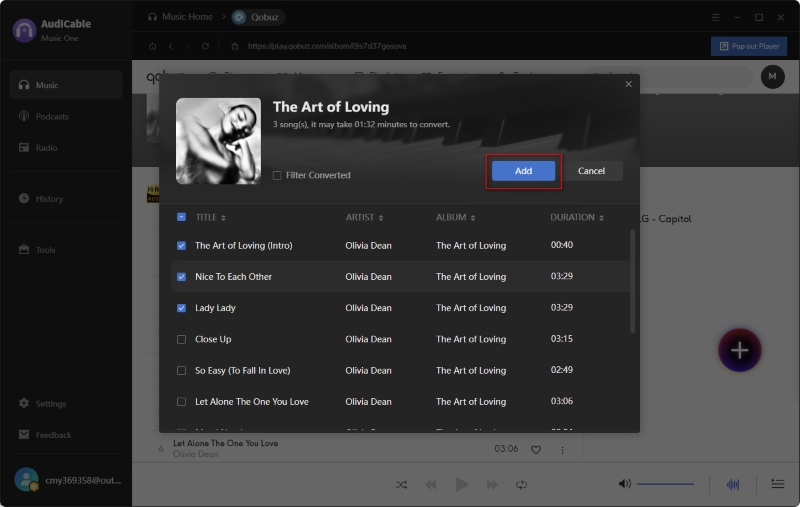
Step 3 Add Tracks to AudiCable
Find the Qobuz playlist, album, or track you want to save, then drag and drop it into AudiCable or paste the music link directly. Select the songs you need and click "Add" to import them.
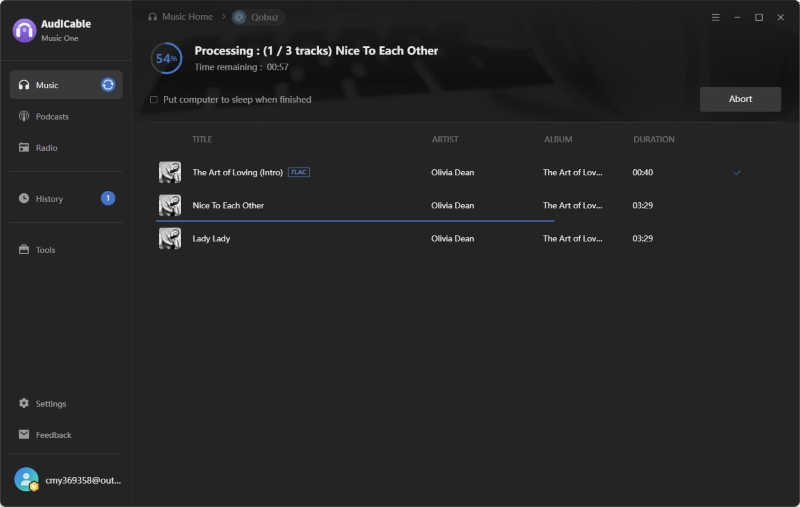
Step 4 Start Converting Music to FLAC
Click the "Convert" button, and AudiCable will start converting songs to the local drive. The conversion will complete automatically, and you can stop the process anytime by clicking Abort.
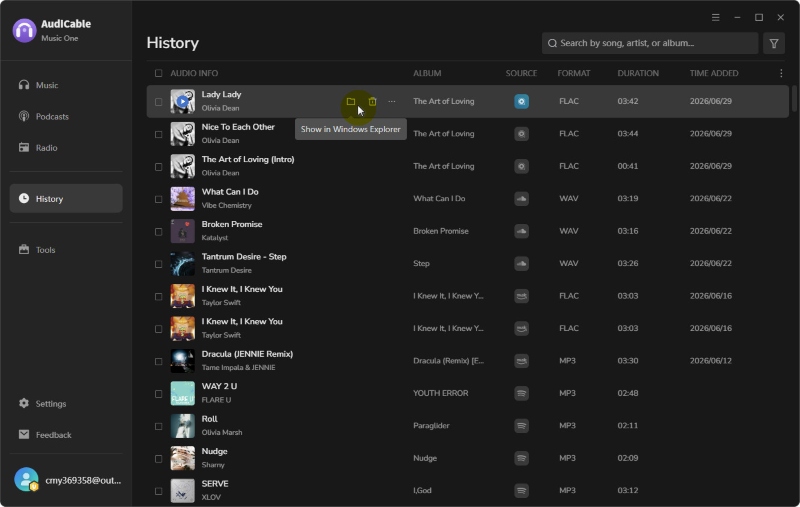
Step 5 Get Downloaded Songs on the Local Folder
Once the conversion is done, navigate to the left "History" column to view all of your saved tracks. Click the folder icon to locate your saved FLAC files.
Disclaimer:
- All these methods are for personal or educational use only.
- You should not use this tool to distribute music or for business.
Wrapping It Up
In this Qobuz vs. Spotify detailed comparison, we explored pricing, sound quality, music libraries, discovery features, and offline listening options. Spotify remains a strong choice for convenience and everyday listening, while Qobuz appeals to listeners who value Hi-Res audio, lossless quality, and a more focused music experience. For those who want more flexibility beyond app-based offline listening, AudiCable Streaming Audio Downloader offers a way to save Spotify and Qobuz music as local audio files in formats like MP3, FLAC, and WAV.
Get AudiCable Streaming Audio Downloader now and take more control over your streaming music collection.

