


AudiCable Audio Recorder
Best Spotify Album Downloaders: 2026 Full Guide

By
Updated on: August 19, 2026
Category: Spotify Music Tips
Streaming is everywhere, yet the desire to own your music never fades. Many users want to keep their favorite Spotify albums for good—as offline MP3s with the full artwork and track details. Maybe you're building your ultimate personal library, reviving an old device with your classics, or simply tired of songs disappearing behind a paywall. You're looking for a downloader you can actually rely on.
This guide provides a thorough look at the most effective Spotify album downloaders available in 2026. By the end, you'll have a clear understanding of which tools work best.
- Part 1: Best Spotify Album Downloaders in 2026
- AudiCable Spotify Album Recorder - [Desktop][Hot]
- Spotmate.online - [Online]
- Spotidown.app - [Online]
- Spotisongdownloader.com - [Online]
- Spotdown.org - [Online]
- Spotdl - [Online]
- SpotDL - [CLI]
- Part 2: A Comparison Table of Spotify Album Downloaders
- Part 3: FAQs about Spotify Album Downloader
Best Spotify Album Downloaders in 2026
Here's a breakdown of the top Spotify album downloaders currently on the market, including online tools, desktop software, and open-source projects. Each is evaluated for audio quality, metadata retention, usability, and reliability.
AudiCable Spotify Album Recorder – The Best Stable Spotify Album Downloader
If you've ever wanted to grab a full Spotify album without worrying about losing quality or track info, AudiCable Spotify Album Recorder has you covered. It keeps every note crystal clear while automatically saving all the metadata and album artwork. It's a stable and hassle-free way to get your favorite albums offline.
What sets AudiCable apart is its versatility. It lets you save Spotify albums in MP3, FLAC, AAC, WAV, AIFF, or ALAC, and works seamlessly with other platforms like Apple Music, Amazon Music, Tidal, and YouTube Music. With batch recording, automatic album art preservation, and a clean, ad-free interface, AudiCable is the perfect choice for anyone who wants a reliable, high-quality Spotify album downloader.
✅Key Advantages
- Ad-free, safe, and easy-to-use interface.
- Download Spotify songs, albums, playlists, podcasts, and videos in batches.
- Lightning-fast downloads (10×): Full original audio quality with Spotify Lossless FLAC (24-bit) support.
- Preserve all song details automatically: lyrics, album art, title, artist, track number, and others.
- Convert tracks to MP3, AAC, WAV, FLAC, AIFF, or ALAC as needed.
- Supports Spotify Free and Premium accounts, as well as other platforms.
- Integrate Format Converter, ID3 Editor, AA/AAX converter, CD Burner, Audio Editor and Vocal Remover.
- Free updates and responsive customer support.
⚠️ Considerations
- AudiCable offers a one-minute trial for each track, and a subscription is required to unlock the full version.
💻 How to Download a Full Spotify Album to MP3 with AudiCable (Step-by-Step)
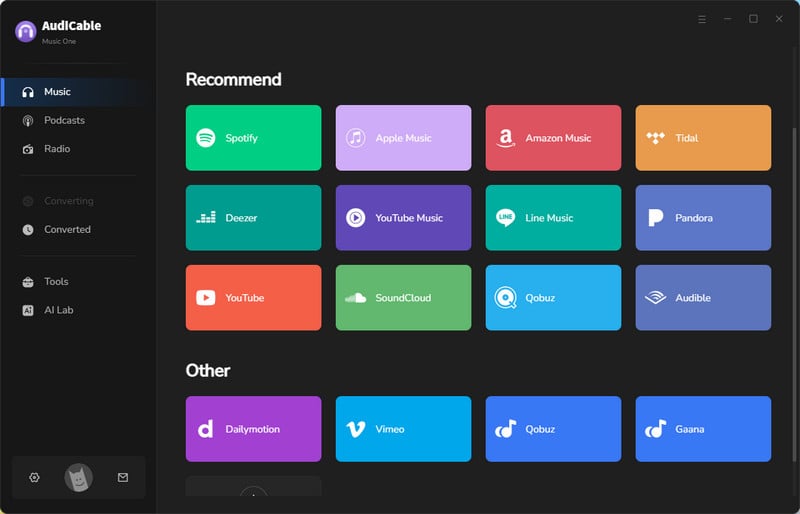
Step 1 Select the Spotify Platform and App Mode
Launch AudiCable Spotify Album Recorder on your computer. On the Music tab, you'll see several supported streaming platforms. Choose to convert from "Spotify" here.
Step 2 Choose Output Format
Press "Settings" in the bottom left corner, then select the output format and other custom parameters. Here, we'll use MP3 output as an example.
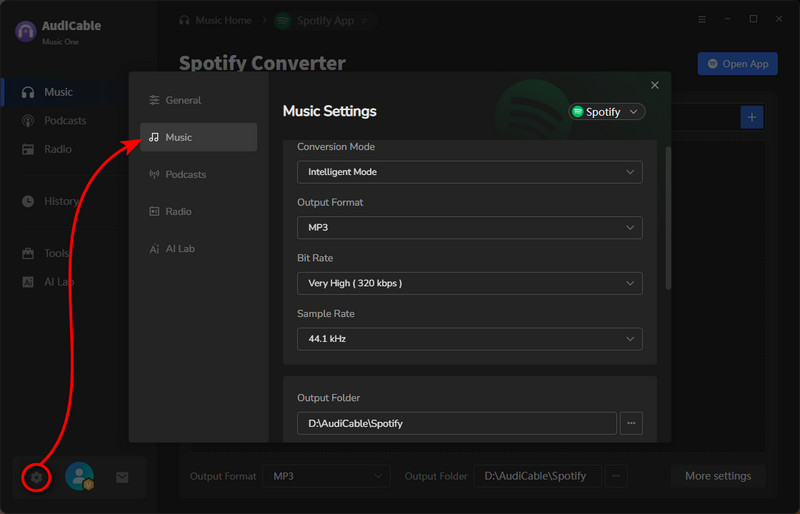
👉Tip: To better organize all your downloaded Spotify albums, you can create a dedicated folder. Here, if you select "album" in the Output File Name field, AudiCable can also function as a Spotify album cover downloader, preserving the complete album art. You can then change the cover art for your Spotify albums in Tools > Tag Editor.
Step 3 Add a Spotify Album to AudiCable
Drag and drop the album directly from the Spotify app into AudiCable. Or simply copy the album link and paste it into AudiCable's URL box. Select the tracks you want from the album and click Add.
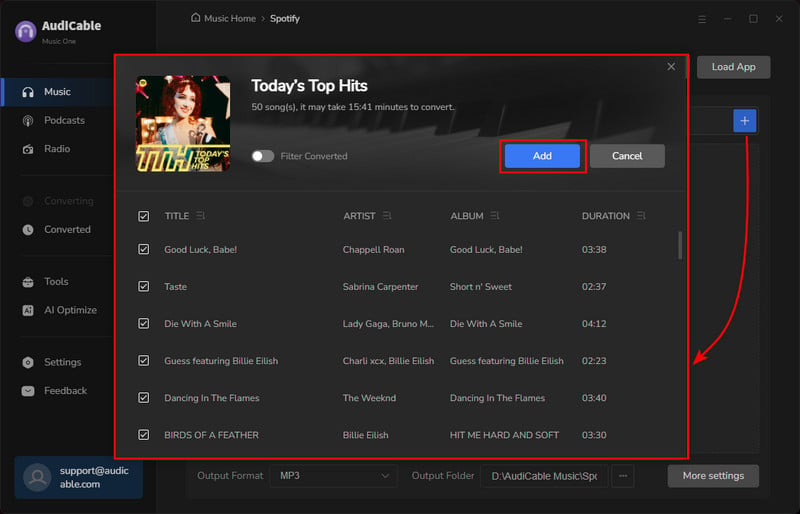
👉Tip: If using Web Download Mode, open the album in the built-in Spotify web player and click "Click to add" to parse it instantly.
Step 4 Start Converting the Spotify Album to MP3
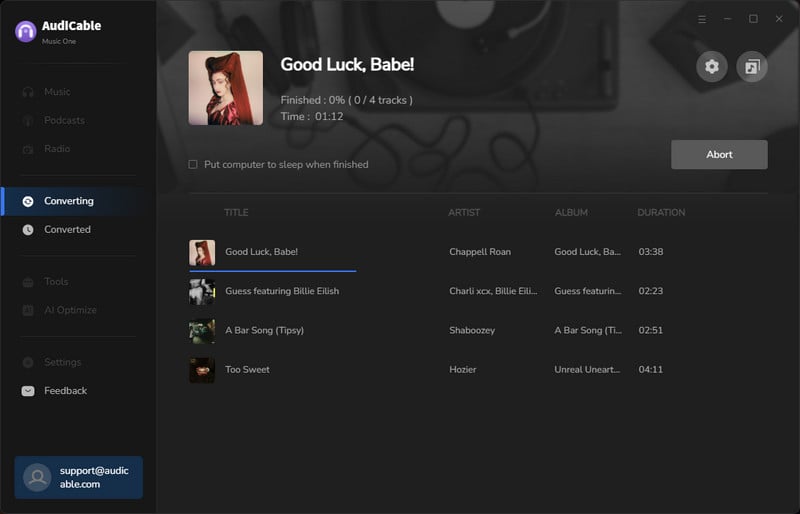
Click "Convert" to begin downloading the full Spotify album as MP3 files. AudiCable will record each track automatically. You can stop the process anytime with Abort if needed.
Step 5 Access Your Downloaded Spotify Album
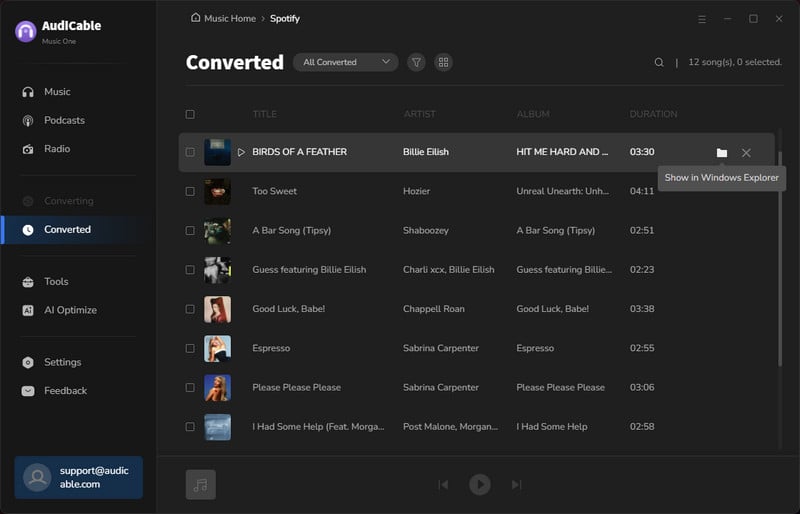
Once finished, go to the Converted tab. Click the folder icon next to any track to open the location where your downloaded Spotify album is stored as MP3 files.
Spotmate.online – Simple Online Spotify Album Downloader
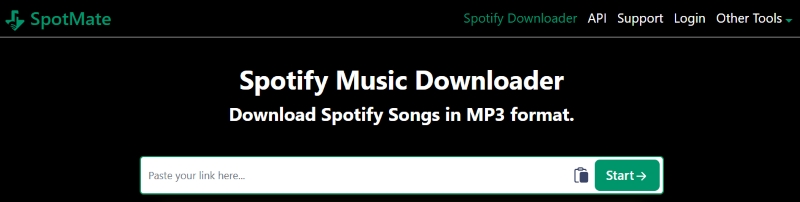
Spotmate.online is a relatively new free online Spotify album downloader. For users looking for a spotify album downloader free online without installing software, this tool offers a quick and browser-based way to extract album tracks for offline listening.
🌐 Official Website: https://spotmate.online/en1
✅Key Advantages
- Download music for free in MP3 format.
- No installation required.
- Simple operation.
- Suitable for occasional downloads.
⚠️ Considerations
- ID3 tags are incomplete.
- Output audio quality is inconsistent.
- Not suitable for large-scale downloads.
💻 How to Download Spotify Album to MP3:
Step 1: Copy and paste a Spotify album link.
Step 2: Click Start→.
Step 3: Tap Convert, then Donwload.
Step 4: The song will automatically download as an MP3 file in your browser.
Spotidown.app – Free Spotify Album to MP3 Downloader
Spotidown.app is a lightweight online Spotify album downloader that prioritizes fast conversion and ease of use over advanced features. By focusing on speed and a no-frills interface, Spotidown.app appeals to users who value efficiency and convenience rather than customization or extended functionality.
🌐 Official Website: https://spotidown.app/en6

✅Key Advantages
- Clean interface.
- Fast response for single tracks and smaller albums.
- No registration required.
- Supports 13 languages.
⚠️ Considerations
- Metadata is mostly discarded.
- Only one song can be downloaded at a time.
- Only supports the MP3 download format.
💻 How to Save Spotify Album as MP3:
Step 1: Copy and paste a Spotify album link.
Step 2: Press Download.
Step 3: Click "Download MP3" on the right side of the song to download it to your computer.
Spotisongdownloader.com – Spotify Album Zip Downloader Online
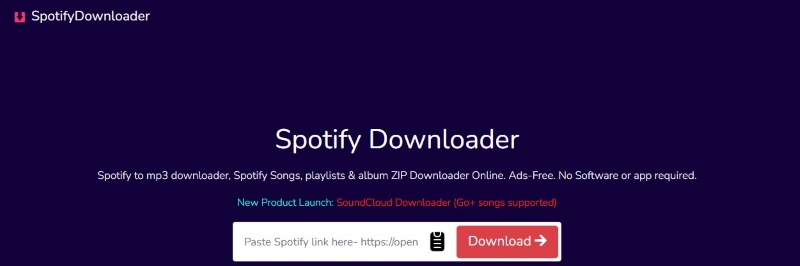
Spotisongdownloader provides a straightforward interface where users can paste Spotify track or album links and convert them into MP3 audio files without installing additional software. The platform focuses on basic functionality rather than modern design or advanced settings, making it suitable for users who prefer a simple, no-frills solution for converting Spotify content to MP3 format.
🌐 Official Website: https://spotisongdownloader.com/en1/
✅Key Advantages
- No ads.
- Free and simple to use.
- Fully browser-based.
- Supports audio quality up to 320 kbps.
⚠️ Considerations
- Mostly supports MP3 only.
- Frequent latency and broken links.
- Quality fluctuates significantly.
💻 How to Convert Spotify Album to MP3:
Step 1: Copy and paste a Spotify album link.
Step 2: Hit Download→.
Step 3: Press "Download ZIP" to get the entire album(Premium features need to be unlocked), or "Generate Download Link" for individual tracks.
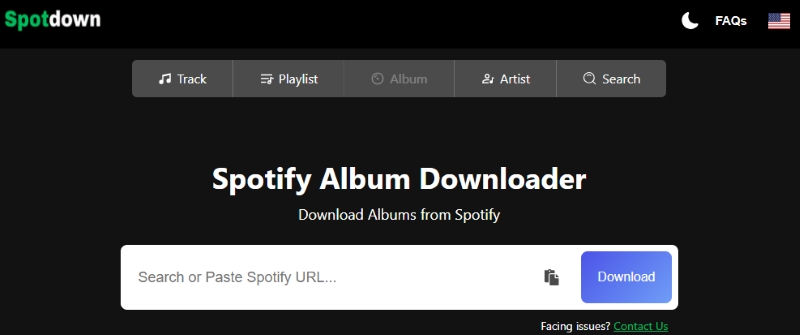
Spotdown.org – Online Spotify Album Batch Downloader
Spotdown.org allows users to submit Spotify album or track URLs, which are then handled by an automated conversion process with limited user interaction. The platform emphasizes functionality over user experience, offering minimal interface elements and few customization options, and is primarily aimed at users who need straightforward Spotify link processing without additional features or configuration.
🌐 Official Website: https://spotdown.org/album
✅Key Advantages
- Basic free online access.
- No sign-up required.
- Lightweight loading.
- Customer support is available.
- Supports batch downloading of songs from the entire album.
⚠️ Considerations
- No metadata or artwork preservation.
- Output audio quality cannot be guaranteed.
- Ads will pop up, affecting the user experience.
💻 How to Export Spotify Album to MP3:
Step 1: Copy and paste a Spotify album link.
Step 2: Click Download All Songs.
Step 3: The website will start working, and the songs in the album will be downloaded in batches to local folders.
Spotdl – Web-based Spotify Album to MP3 Converter
spotdl allows users to paste Spotify track, album, or playlist links and download the corresponding audio files directly through a browser. The site serves as a convenient alternative for users who want to use spotDL's functionality without installing the command-line tool locally.
🌐 Official Website: https://spotdl.io/v2

✅Key Advantages
- Free to use online.
- Easy to use.
- No registration required.
⚠️ Considerations
- Lacks ID3 tags.
- The song processing speed is slow and may cause crashes.
- Batch download is supported, but it may fail midway.
💻 How to Get Spotify Album in MP3 Format:
Step 1: Copy and paste a Spotify album link.
Step 2: Hit Start.
Step 3: Press the "Download All" button, and the entire album will be downloaded to your browser.
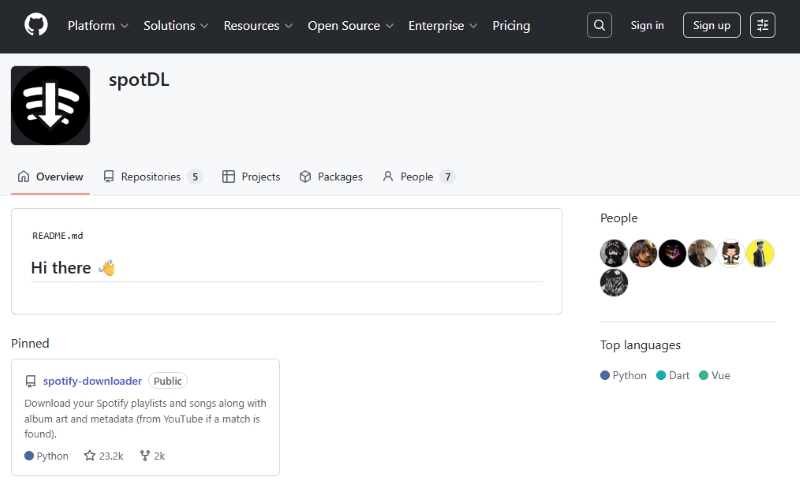
SpotDL – An Open-Source Command-Line Tool
The GitHub version of spotDL represents the most advanced and fully featured edition of the project, designed primarily for technically skilled users. Unlike web-based versions, it requires installing Python and running commands through a terminal or command-line interface. This version provides full control over download options, audio quality, metadata handling, and batch processing, making it ideal for users who want maximum flexibility and customization when downloading Spotify tracks, albums, or playlists. However, it assumes familiarity with programming concepts and command-line operations, which may be a barrier for less technical users.
🌐 Download Website: https://github.com/spotDL/spotify-downloader/releases/tag/v4.4.3
✅Key Advantages
- Completely free and open-source.
- Highly customizable.
- Great for automation or large batch processes.
⚠️ Considerations
- Requires technical knowledge.
- Still relies on YouTube audio sources.
- Sound quality varies.
💻 How to download Spotify Album:
Step 1: Install Python.
Step 2: Install spotDL.
Step 3: Run commands to generate downloads.
📊 A Comparison Table of Spotify Album Downloaders
| Tool | Type | Formats | Audio Quality | Metadata | Batch Downloads | Ease of Use | Stability | Ad-Free |
|---|---|---|---|---|---|---|---|---|
| AudiCable Spotify Album Recorder | Desktop | MP3 · FLAC · AAC · WAV · AIFF · ALAC | Lossless & Original Quality | Full ID3 + Artwork + Lyrics | ✔️ | Very Easy | High | ✔️ |
| Spotmate.online | Online | MP3 | Standard, varies by source | Partial | Limited | Very Easy | Medium | ✔️ |
| Spotidown.app | Online | MP3 | Standard | Minimal | ❌ | Easy | Medium | ✔️ |
| Spotisongdownloader.com | Online | MP3 | Up to 320 kbps, variable | Basic | Partial | Easy | Medium | ✔️ |
| Spotdown.org | Online | MP3 | Source-dependent | None | ✔️ | Easy | Medium | ❌ |
| Spotdl.io (Web v2) | Online | MP3 | Standard | Limited | ✔️ | Easy | Medium | ✔️ |
| Spotify-DL (spotDL CLI) | CLI | MP3 · FLAC · M4A | Good (YouTube-based) | Configurable | ✔️ | Advanced | Medium–High | ✔️ |
Disclaimer:
- All these methods are for personal or educational use only.
- You should not use this tool to distribute music or for business.
FAQs about Spotify Album Downloader
💬 Q1: Are Online Spotify Album Downloaders Safe?
Online Spotify album downloaders are convenient, but they come with risks. Many free web-based tools frequently change domains due to takedowns, making them unreliable over time. A site that works today may disappear tomorrow, and audio quality can be inconsistent. Therefore, relying solely on a Spotify album downloader free online is not ideal for users who need stable access and complete album downloads.
💬 Q2: Why is the album art or metadata sometimes missing from my downloaded Spotify music?
Many online downloaders only grab the raw audio and ignore metadata, so album art, lyrics, or track info may be lost. Yet, AudiCable Audio Recorder can preserve or even edit full ID3 tags, giving a complete offline library experience.
💬 Q3: Can I convert Spotify albums to formats other than MP3?
Most online tools are limited to MP3. Desktop software like AudiCable Spotify Album Recorder supports a wide range of formats, including FLAC, WAV, AAC, AIFF, and ALAC, which is useful if you want lossless quality or compatibility with different devices.
💬 Q4: Do I need a Spotify Premium account to download albums?
Not necessarily. Many downloaders support both Free and Premium accounts. However, your experience may be smoother with a Premium account because Spotify limits certain features and streaming quality for free users.
The End
All the tools listed are effective methods for downloading Spotify albums. If you only occasionally need to download Spotify albums, online tools are convenient to use. In terms of functionality and stability, AudiCable Music One offers better overall performance, making it the most balanced and recommended choice for users in 2026.
Get the best AudiCable Spotify Album to MP3 Converter now!!

