


AudiCable Audio Recorder
Best Qobuz Downloaders in 2026: 8 Tools Tested

By
Updated on: July 31, 2026
Category: Music Streaming Tips
Qobuz is known for its lossless and Hi-Res audio quality, making it a popular choice among music enthusiasts. While the platform offers a great streaming experience, some listeners prefer saving their favorite tracks as local files for easier management and playback. This is where a Qobuz music downloader can help. With different tools offering different features and levels of convenience, finding the right option can take some time.
In this guide, we tested 8 Qobuz download solutions, including desktop apps, open-source tools, online services, Telegram bots, and recording software. We compared them based on audio quality, download reliability, metadata preservation, and ease of use to help you find the best Qobuz downloader for your needs.
📑 Content
Quick Comparison of the Qobuz Downloaders
To help you find the right tool quickly, we compared the best Qobuz downloaders based on features, audio quality, ease of use, and overall performance.
| Tool | Type | Best For | Supporting Formats | Audio Quality | Metadata | Ease of Use |
|---|---|---|---|---|---|---|
| AudiCable Music One | Desktop software | Best overall | MP3, AAC, WAV, FLAC, AIFF, ALAC | Up to 24-bit/192 kHz FLAC | ✓ Preserves tags & artwork | ⭐⭐⭐⭐⭐ |
| QBZ-Downloader | Desktop tool | Audiophile libraries | FLAC | Up to 24-bit/192 kHz FLAC | ✓ Advanced metadata support | ⭐⭐⭐ |
| QobuzDownloaderX-MOD | Modified tool | Free downloads | FLAC | Lossless FLAC | ✓ Keeps basic metadata & artwork | ⭐⭐⭐ |
| Streamrip | Open-source | Advanced users | FLAC, MP3, AAC | Lossless & Hi-Res FLAC | ✓ Preserves metadata | ⭐⭐⭐ |
| qobuz-dl | Command-line tool | Technical users | FLAC | Lossless & Hi-Res FLAC | ✓ Metadata support | ⭐⭐ |
| DoubleDouble | Web-based tool | Quick downloads | MP3, FLAC (availability varies) | Depends on source availability | Limited | ⭐⭐⭐⭐ |
| MusicsHuntersBot | Telegram bot | Simple access | MP3, FLAC (availability varies) | Depends on availability | Limited | ⭐⭐⭐⭐ |
| Audacity | Recorder | Recording playback | WAV, MP3, FLAC, OGG, AIFF | Depends on recording settings | Manual editing required | ⭐⭐⭐ |
Can You Download Music Directly from Qobuz?
The answer is yes. Qobuz allows you to download music, but what you can download depends on which Qobuz service you use.
Qobuz offers two main ways to access music: offline listening through the app and purchased downloads. With a Qobuz streaming subscription, you can download songs for offline listening within the Qobuz app. However, these downloads are only available inside the app and cannot be exported as regular audio files.
If you want local music files that work with other players and devices, you’ll need to purchase tracks from the Qobuz Download Store or use a Qobuz downloader.
How to Download Purchased Music from Qobuz
Step 1: Purchase an album or track from the Qobuz Download Store. After purchase, open My Purchases to access your purchased music.
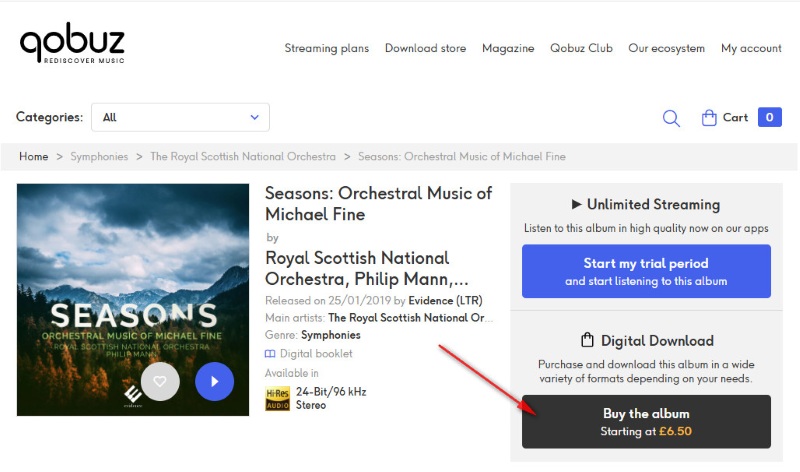
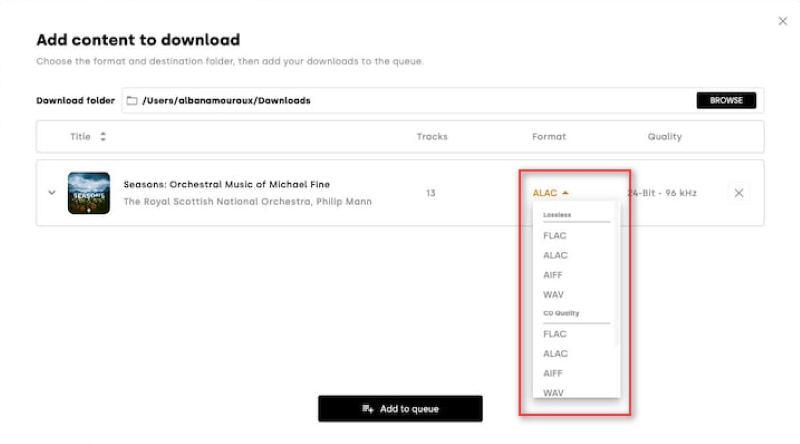
Step 2: Select the download option and save the files to your computer using Qobuz Downloader or the built-in download feature. Available formats depend on the release, including FLAC, ALAC, WAV, AIFF, etc.
Purchasing albums individually can become expensive for users who want to build a large offline music collection. This is why many users look for Qobuz downloaders that provide more convenient ways to manage their music libraries.
Best Desktop Qobuz Downloaders
Desktop applications are usually the easiest option for users who want a simple workflow, better stability, and additional features such as batch downloading and metadata preservation.
AudiCable Music One — Best Overall Qobuz Downloader
🛡️ Stability & Security: High
AudiCable Qobuz Downloader provides an easy way to save Qobuz music as local audio files. During our test, it successfully downloaded Qobuz albums and preserved key metadata, including artist information, album title, and cover artwork. The output files preserved the original audio quality and supported Hi-Res FLAC audio up to 24-bit/192 kHz.
AudiCable supports Qobuz as well as other popular streaming platforms, including Spotify, Apple Music, Amazon Music, Tidal, and Deezer, allowing users to manage music from multiple services in one place. After saving, the files can be backed up, transferred to other devices, or played with your preferred music players. Beyond downloading features, AudiCable also includes additional tools such as format conversion, ID3 tag editing, and CD burning for better music management.
✅ Key Advantages:
- Offers an intuitive and user-friendly workflow.
- Supports lossless and Hi-Res FLAC audio up to 24-bit/192 kHz.
- Downloads Qobuz albums, playlists, and tracks in batches.
- Preserves metadata, including artist names, album art, and track information.
- Converts Qobuz music to MP3, AAC, WAV, FLAC, AIFF, and ALAC.
- Provides free updates and reliable technical support.
⚠️ Considerations:
- A subscription is required to unlock the full-length download.
📂 How to Download Qobuz music with AudiCable
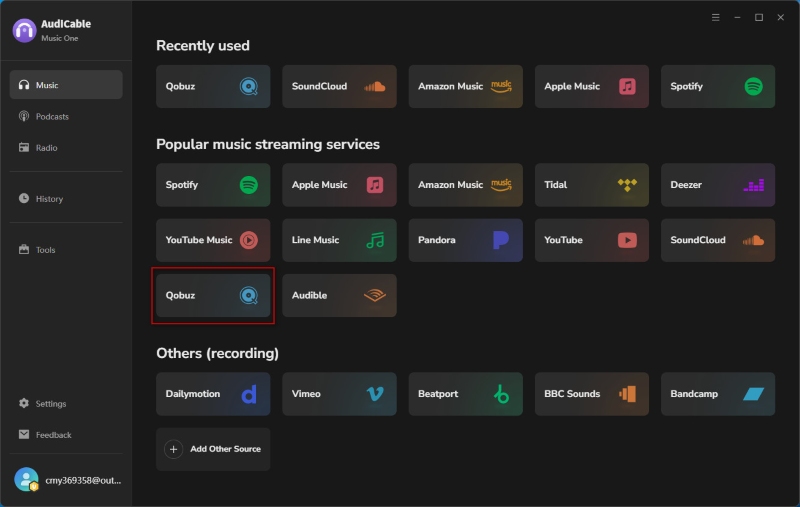
- Step 1: Launch AudiCable Qobuz Playlist Converter on your computer. From the main interface, choose “Qobuz” as the streaming platform you want to download from.
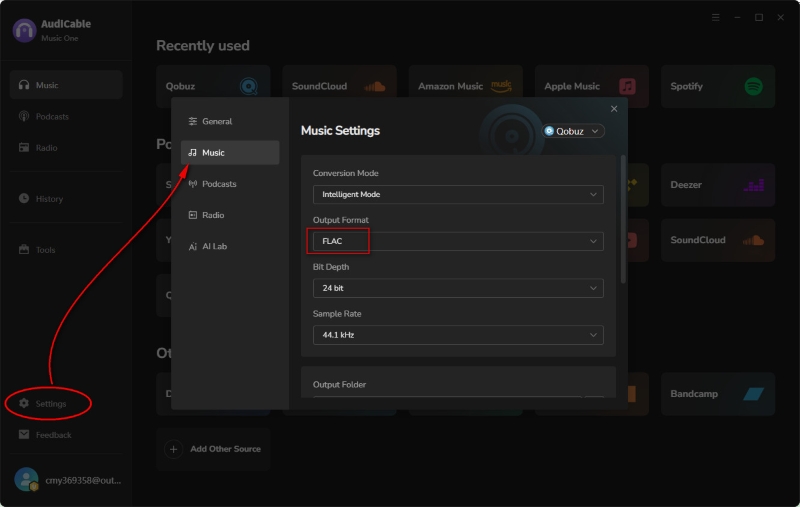
- Step 2: Open “Settings” to select your preferred output format, such as FLAC. You can also adjust the conversion mode, output folder, and other options before starting.
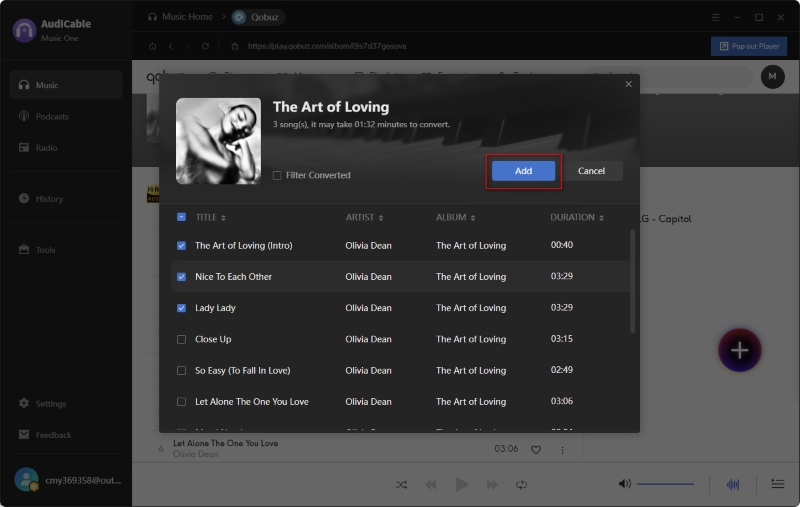
- Step 3: Find the Qobuz playlist, album, or track you want to save, then drag and drop it into AudiCable or paste the music link directly. Select the songs you need and add them to the conversion list.
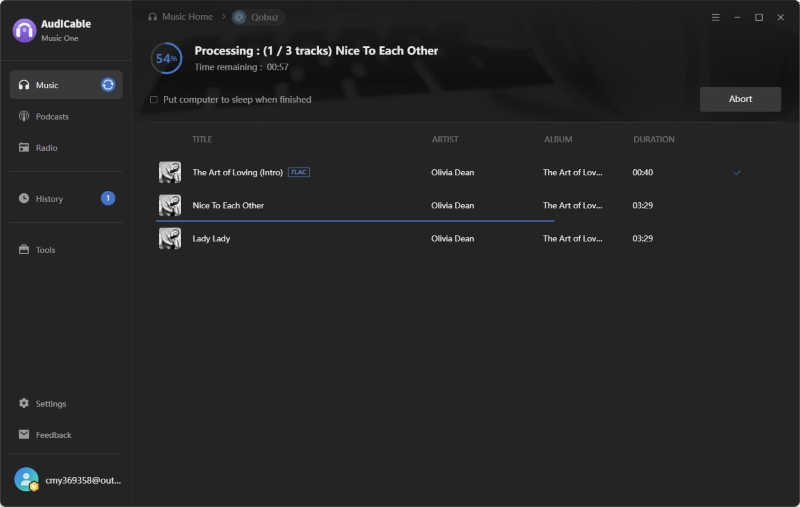
- Step 4: Click “Convert” to begin saving Qobuz music to your computer. AudiCable will process the tracks automatically, and you can pause or stop the task whenever needed.
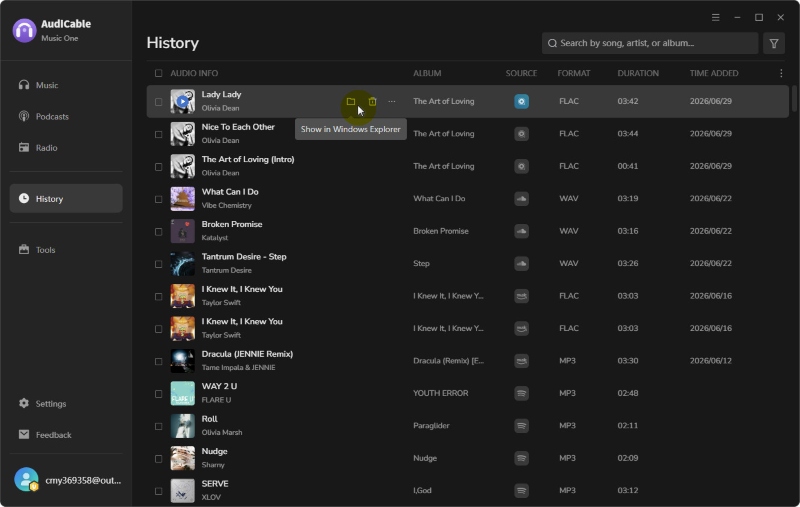
- Step 5: After conversion, open the “History” section to view your saved tracks. Click the folder icon to quickly locate your converted FLAC files.
🎧 Audio Quality Check
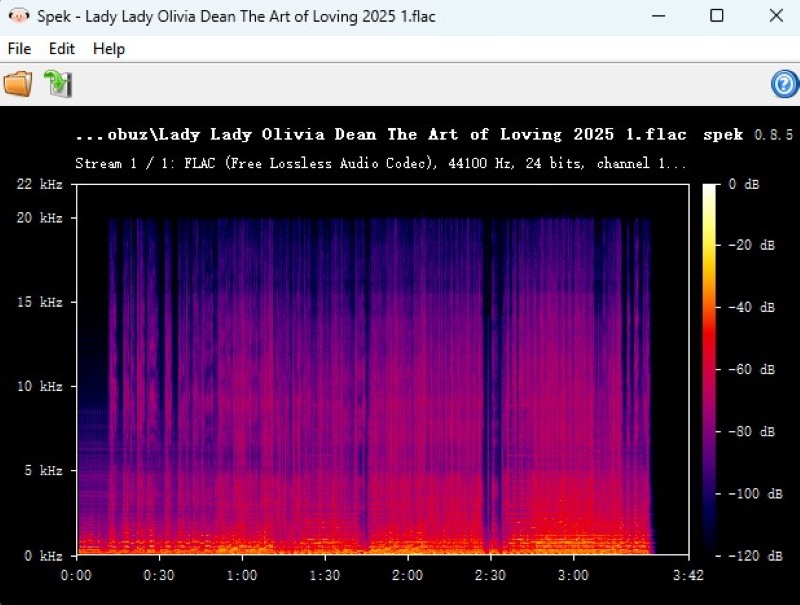
The downloaded file was saved as FLAC with 24-bit/44.1 kHz audio quality. Spek analysis showed no obvious high-frequency cutoff, indicating a genuine lossless FLAC spectrum.
QBZ-Downloader
🔗 https://github.com/ifauzeee/QBZ-Downloader/releases/tag/v5.5.0
🛡️ Stability & Security: Medium
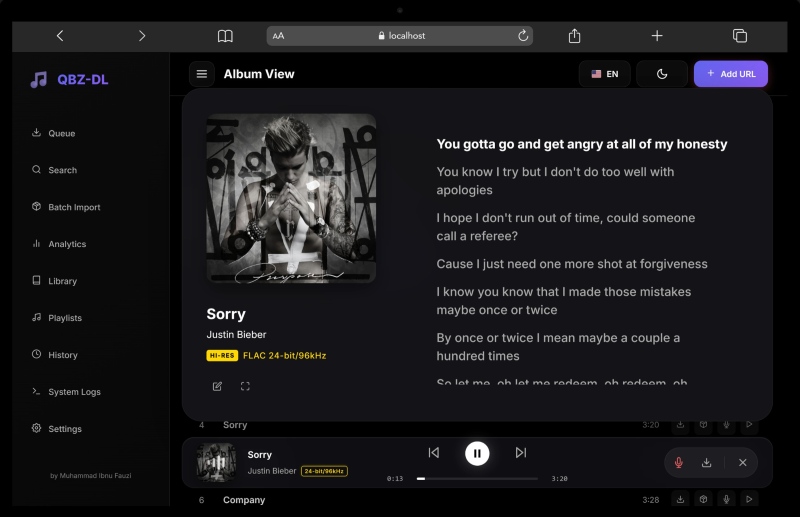
QBZ-Downloader is a desktop application designed for Qobuz users who want to build and manage a high-resolution music library. The app supports lossless FLAC downloads up to 24-bit/192 kHz and automatically organizes your collection with detailed metadata, cover artwork, and synced lyrics. Beyond basic downloads, QBZ-Downloader offers advanced library management features, including batch processing, quality analysis, playlist monitoring, and collection insights.
With its modern dashboard and flexible customization options, it is a powerful choice for audiophiles who want more control over their Qobuz music library. Please note that a valid Qobuz account with access to the music is required. Free accounts without music access cannot download full tracks.
✅ Key Advantages:
- Designed specifically for Qobuz.
- Powerful music library management.
- Advanced features for audiophiles.
⚠️ Considerations:
- Requires more technical knowledge.
- Requires Qobuz account access.
📂 How to use QBZ-Downloader to Download Qobuz Music
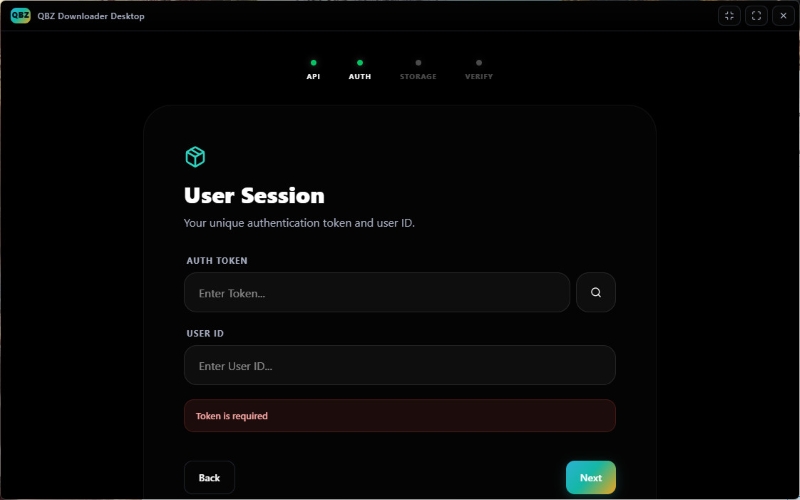
- Step 1: Enter your Qobuz authentication token and user ID to connect QBZ-Downloader with your account.
- Step 2: Search for Qobuz albums, tracks, or playlists, then add them to the download queue and start the download.
- Step 3: Your downloaded files are organized with metadata, cover artwork, and other library information.
QobuzDownloaderX-MOD
🔗 https://github.com/DJDoubleD/QobuzDownloaderX-MOD/releases/tag/1.2.7.0
🛡️ Stability & Security: Medium
QobuzDownloaderX-MOD is a Windows-based Qobuz downloader that helps users save Qobuz music locally with high-quality audio and detailed metadata. It supports downloading albums, tracks, artists, and other Qobuz content while keeping important information such as artist names, album details, and cover artwork.
As a free Qobuz downloader option, QobuzDownloaderX-MOD provides a simple way to save Qobuz music locally. However, users should keep in mind that modified tools may come with limitations in terms of security, updates, and long-term reliability.
✅ Key Advantages:
- Provides a free way to save Qobuz music locally.
- Preserves metadata and cover artwork.
- Supports downloads from Qobuz albums, tracks, artists, and label pages.
- Focuses on simple downloading without unnecessary features.
⚠️ Considerations:
- Only available for Windows users.
- Authentication configuration may be complicated for beginners.
- Updates, security, and long-term reliability may be concerns.
📂 How to use QobuzDownloaderX-MOD to Download Qobuz Music
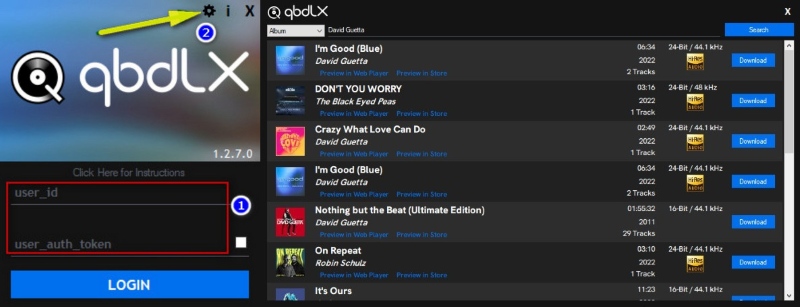
- Step 1: Install QobuzDownloaderX-MOD and complete the login configuration with your Qobuz account details and required authentication information.
- Step 2: Copy a Qobuz album, track, artist, or playlist link and paste it into the downloader.
- Step 3: Choose download settings, such as output location, audio quality, and metadata options, then start the download.
- Step 4: After completion, open the output folder to access your downloaded files with metadata such as artist, album information, and artwork.
Best Open-Source Qobuz Downloaders
Open-source tools provide more control and transparency but usually require more technical knowledge.
Streamrip
🔗 https://github.com/nathom/streamrip/releases/tag/v2.2.0
🛡️ Stability & Security: High
Streamrip is an open-source Qobuz downloader that allows users to save music from Qobuz and other streaming platforms with advanced customization options.It supports Qobuz, TIDAL, Deezer, and SoundCloud, allowing users to download albums, playlists, and tracks while controlling settings such as audio quality and file organization. Its command-line interface and manual configuration process make it better suited for advanced users.
✅ Key Advantages:
- Free and open-source.
- Highly customizable download options.
- Supports Qobuz, TIDAL, Deezer, and Hi-Res audio.
⚠️ Considerations:
- Requires technical knowledge.
- Command-line interface may not be beginner-friendly.
- Setup and troubleshooting can take additional time.
📂 How to Use Streamrip to Download Qobuz Music
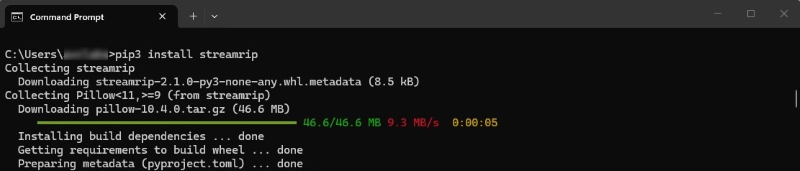
- Step 1: Install Streamrip on your computer and complete the initial setup.
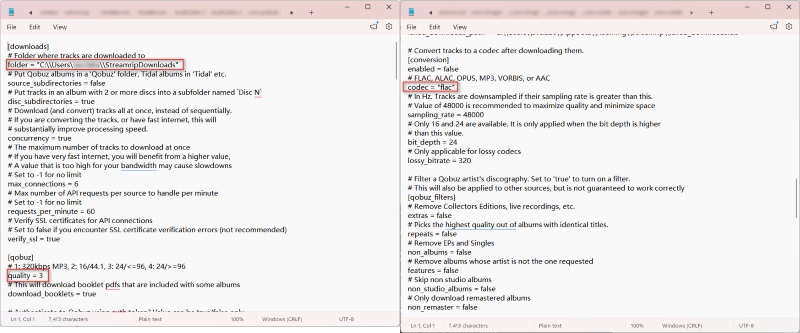
- Step 2: Configure Streamrip settings and connect your Qobuz account. You can adjust options such as audio quality, download location, and file organization.
- Step 3: Copy a Qobuz album, track, or playlist link and use Streamrip to start the download. The tool will process the link and download the selected content.
- Step 4: After the download is complete, open the output folder to access your saved music files with metadata such as artist, album information, and cover artwork.
👍 Read more: Streamrip Review: What It Is, How to Use It & Is It Safe?
qobuz-dl
🔗 https://github.com/vitiko98/qobuz-dl
🛡️ Stability & Security: High
Qobuz-dl is another lightweight command-line Qobuz downloader for users who prefer a simple and flexible way to save high-quality music. It supports albums, tracks, playlists, and artist downloads, while offering features like FLAC output, metadata preservation, and batch downloading.
✅ Key Advantages:
- Lightweight and focused specifically on Qobuz.
- Supports lossless and Hi-Res music downloads.
- Downloads albums, playlists, tracks, and artists.
⚠️ Considerations:
- No graphical user interface is available.
- Requires Python setup and command-line knowledge.
- Not ideal for beginners.
📂 How to Use qobuz-dl to Download Qobuz Music
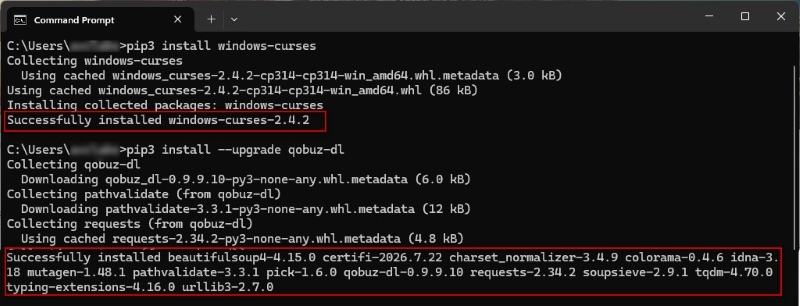
- Step 1: Install qobuz-dl through Python and launch the tool from the terminal. Log in with your Qobuz account to complete the initial setup.
- Step 2: Copy a Qobuz album, track, artist, or playlist link. qobuz-dl will process the URL and prepare it for download.
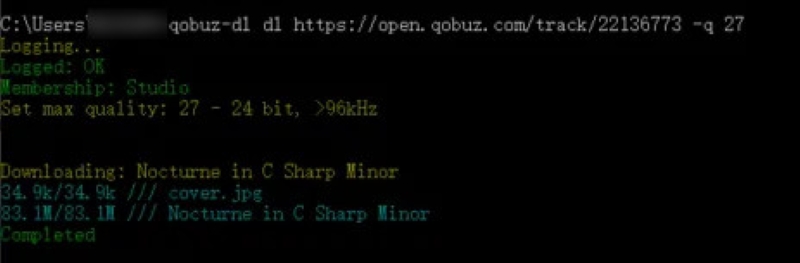
- Step 3: Start the download and adjust settings such as audio quality and output options based on your needs. qobuz-dl supports lossless and Hi-Res downloads when available from Qobuz.
- Step 4: After completion, open the output folder to access your downloaded files with metadata such as artist, album information, track details, and cover artwork.
💡Pro Tips: For users who want to create a local music library without dealing with Python installation, command lines, or complicated configurations, AudiCable Music One offers a much smoother experience.
Web-Based & Telegram Qobuz Download Tools
Web-based tools and Telegram bots offer convenient access without traditional software installation. However, their availability and reliability can change more frequently.
DoubleDouble
🔗 https://us.doubledouble.top/
🛡️ Stability & Security: Medium
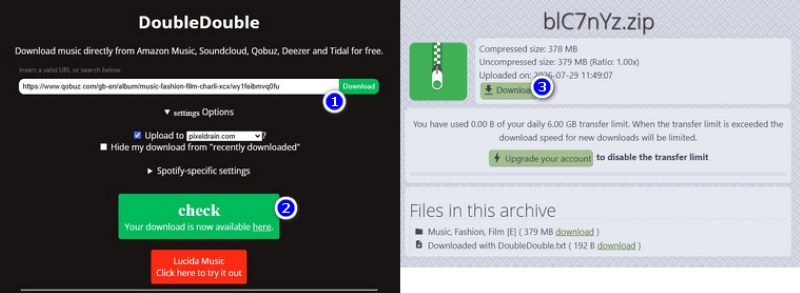
DoubleDouble is an online Qobuz downloader that allows users to download music from supported streaming platforms directly through a web browser. Unlike desktop applications or command-line tools, it runs entirely in a web browser—users simply paste a supported music link, choose the available download options, and save the files to their computer.
✅ Key Advantages:
- No software installation required.
- Simple browser-based download workflow.
- Supports multiple streaming platforms.
⚠️ Considerations:
- Availability and supported services may change over time.
- Offers fewer customization options than desktop downloaders.
📂 How to Use DoubleDouble to Download Qobuz Music
- Step 1: Visit the DoubleDouble website and paste a Qobuz track, album, or playlist URL into the search box.
- Step 2: Click the download button and wait for DoubleDouble to process the link and display available options.
- Step 3: Choose the available download option and save the files to your computer.
@MusicsHuntersBot
🔗 https://t.me/MusicsHuntersbot
🛡️ Stability & Security: Medium
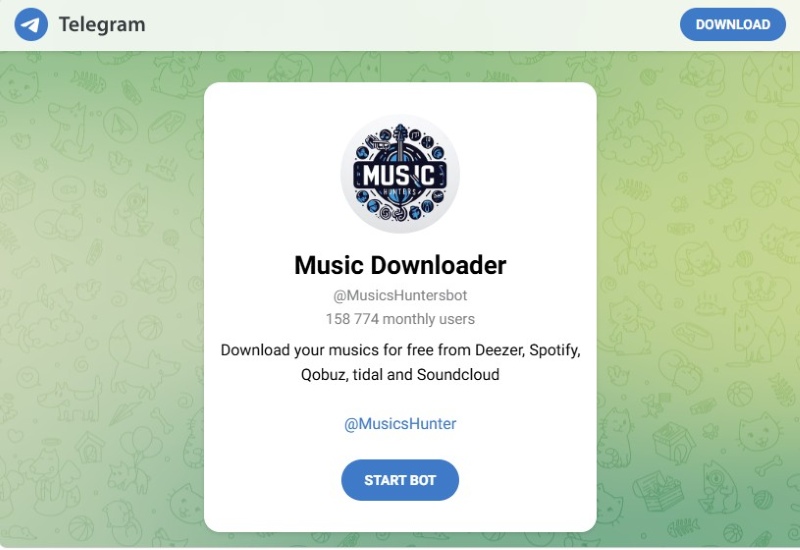
@MusicsHuntersBot is a Telegram-based music downloader that allows users to access music files by sending supported streaming links directly in a chat. It supports platforms including Qobuz, Spotify, Deezer, TIDAL, and SoundCloud, providing a simple way to download music without installing additional software. However, bot availability, supported services, and privacy considerations should be carefully evaluated before use.
✅ Key Advantages:
- Works directly inside Telegram without extra software.
- Downloads music by simply sending supported streaming links.
- Supports multiple platforms, including Qobuz.
⚠️ Considerations:
- Offers few customization options.
- Availability and supported services may change over time.
- Security should be considered.
📂 How to Use @MusicsHuntersBot to Download Qobuz Music
- Step 1: Search for @MusicsHuntersBot on Telegram and click "Start" to activate the bot.
- Step 2: Copy a Qobuz album, track, or playlist URL and send it to the bot. The bot will analyze the link and prepare the available content.
- Step 3: After processing, download the available audio files directly from the Telegram chat.
Qobuz Recorder Alternative
Audacity
🔗 https://www.audacityteam.org/download/
🛡️ Stability & Security: High
Audacity is a free, open-source audio recorder and editor that can capture streaming audio from your computer. While it is not a dedicated Qobuz downloader, it provides an alternative method for saving music by recording playback in real time and exporting the audio files.
✅ Key Advantages:
- Completely free.
- Works with various audio sources.
- Includes built-in audio editing and export features.
- Supports multiple output formats.
⚠️ Considerations:
- Records music in real time.
- Requires manual setup before recording Qobuz playback.
- Audio quality depends on recording settings and playback sources.
📂 How to Use Audacity to Record Qobuz Music
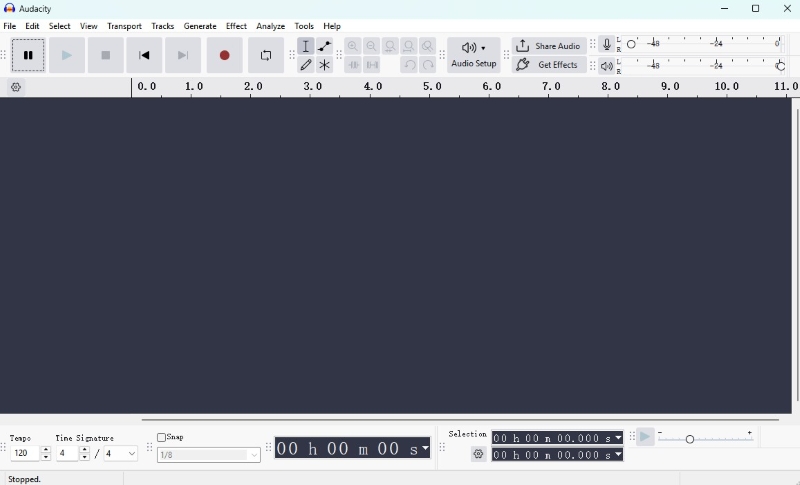
- Step 1: Download Audacity from the official website. Open Audio Setup and set the recording input to system audio / (loopback).
- Step 2: Play a Qobuz song or album on your computer and click "Record" in Audacity. The software will capture the audio in real time.
- Step 3: After recording is complete, edit the track if needed, then go to File > Export Audio and select your preferred audio format.
Final Verdict
The best Qobuz music downloader depends on your needs, whether you prioritize audio quality, convenience, or customization.
| User Need | Recommended Tool | Why |
|---|---|---|
| Best overall Qobuz downloader | AudiCable Music One | Simple workflow, high-quality output, metadata preservation, and support for multiple streaming platforms. |
| Best open-source Qobuz downloader | Streamrip | Free, highly customizable, and supports Qobuz along with other music services. |
| Best for quick downloads | DoubleDouble | No installation required and works directly in a browser. |
| Best recording alternative | Audacity | A free option for capturing Qobuz playback when direct downloading is not available. |
FAQs About Qobuz Music Downloaders
💬 Q1: Is Qobuz downloader safe?
A: Safety depends on the specific tool. Official desktop software and well-established open-source projects are generally easier to verify, while modified tools and Telegram bots require more caution. Users should download software from official sources whenever possible.
💬 Q2: Can I download Qobuz playlists as FLAC files?
A: Yes. Some Qobuz download tools support playlist downloads and can save available tracks in FLAC format. Tools such as AudiCable Music One, Streamrip, and qobuz-dl allow users to process playlists instead of downloading songs individually.
💬 Q3: What is the best Qobuz downloader for FLAC and Hi-Res audio?
A: For users who want high-quality FLAC and Hi-Res audio, AudiCable Music One and Streamrip are among the most suitable options. They support lossless formats and can save Qobuz music in high-quality audio formats when available. The right choice depends on your needs: choose AudiCable Music One for an easy-to-use all-in-one solution, or Streamrip for advanced control over download settings and a more technical workflow.
Disclaimer:
- All these methods are for personal or educational use only.
- You should not use this tool to distribute music or for business.
The End
For most users, AudiCable Qobuz Downloader offers the best balance of audio quality, ease of use, and music management features. Those who prefer advanced customization can explore Streamrip and qobuz-dl, while DoubleDouble is suitable for quick downloads, and Audacity provides a practical recording solution when direct downloading is not possible.

