


Spotify Downloader Android: 5 Tools Reviewed in 2026

By
Updated on: September 22, 2026
Category: Spotify Music Tips
Want to download Spotify music on your Android phone? There are more options than just Spotify’s built-in offline mode, but finding one that actually works well can take some trial and error.
We tested five Spotify music downloader tools for Android, looking at download speed, audio formats, batch downloads, ease of use, and common issues. Here’s what we found, including where each tool works well and where you may run into limitations. Also, read to the end for an all-in-one desktop solution for Spotify and other streaming platforms.
📑 Content
Spotify Downloaders for Android Review
Spotify Downloaders for Android at a Glance
| Tool | Type | Need Spotify Premium | Output Formats | Batch Download |
|---|---|---|---|---|
| NoteBurner | Android app | No | MP3, AAC, FLAC, WAV, AIFF, ALAC | ✅ Yes |
| Spotube | Android app | No | MP3 | ✅ Yes |
| SpotiFLAC | Android app | No | FLAC and other formats | ✅ Yes |
| Fildo | Android app | No | MP3, FLAC | ✅ Yes |
| SpotiSaver | Web tool | No | MP3 | ✅ Yes |
✨ Looking for a broader music downloader?
If you want to download music from more than Spotify, AudiCable Music One is another option to consider. It works on Windows and Mac and combines music downloading with tools for format conversion, ID3 editing, audio editing, and more.
NoteBurner Spotify Downloader for Android
🔍 Official Website: https://www.noteburner.com/sp-music-converter-windows/tutorial-android.html
NoteBurner for Android is a Spotify playlist downloader for Android that can save songs, albums, playlists, and podcasts as local audio files such as MP3, AAC, and FLAC. Use the app's built-in player to sign in, select songs or playlists, and download them directly. These files are regular audio files, separate from Spotify's offline downloads, making them easy to manage and move between devices.
😀 Key Advantages:
- Download Spotify songs, playlists, albums, and podcasts without Spotify Premium.
- Batch download multiple tracks and entire playlists.
- Save music as MP3, AAC, FLAC, WAV, AIFF, or ALAC with ID3 tags.
- Enjoy an ad-free interface with a built-in Spotify web player.
☹️ Considerations:
- Requires a paid subscription for full-length downloads.
- Spotify Lossless audio is available only with the desktop version.
💻 How to Download Spotify Music on Android with NoteBurner?
Step 1 Download and install NoteBurner Spotify Downloader on your Android phone, open the app, and log in to your Spotify Free or Premium account using the built-in Spotify web player.
Step 2 Open a Spotify playlist, album, artist, podcast, or audiobook you want to save in the web player, then click the + icon to add it to NoteBurner.


Step 3 Select an output format such as MP3, AAC, FLAC, or WAV, set your preferred audio quality, and choose a storage location on your Android device for the downloaded files.
Step 4 Click “Download” to start saving the selected Spotify tracks, then monitor the download progress within the app.
Step 5 Once the download is complete, open the Audio Library, locate your Spotify tracks as local audio files, and play them offline on your Android phone.


👥 User Reviews
NoteBurner gets mostly positive feedback from users, with reviews often praising its simple interface, playlist downloads, audio quality, and responsive support. Some long-term users also mention using it for years to save Spotify music for offline listening and older devices.
Spotube
🔍 Official Website: https://spotube.cc/
Spotube takes a different approach from a traditional Spotify music downloader for Android. It’s an open-source, cross-platform music streaming application that uses Spotify for metadata and playlists while pulling playable audio from supported sources through its plugin system. Instead of requiring a Premium subscription, it accesses your Spotify library using browser cookies. The audio itself comes from third-party sources like YouTube or Piped. It supports offline downloads, playlist syncing, and synced lyrics without requiring a Spotify Premium subscription. However, it does not support Spotify podcasts or audiobooks.
😀 Key Advantages:
- No Spotify Premium subscription required and no ads.
- Download Spotify music with metadata preserved.
- Sync Spotify playlists and view synced lyrics.
- Available on Android, Windows, macOS, and Linux.
☹️ Considerations:
- Playback and downloads depend on external audio sources.
- Spotify podcasts and audiobooks are not supported.
- Users report slow loading, lag, crashes, and login issues.
- Retrieving browser cookies can be challenging for beginners.
💻 How to Download Spotify Music on Android with Spotube?
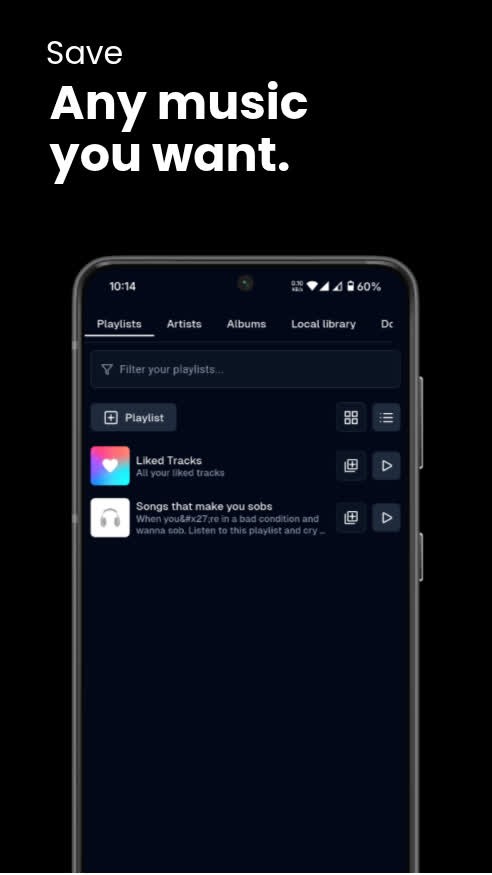
Step 1 Download and install the Spotube APK from the official GitHub releases page.
Step 2 Open Spotube, choose an audio source such as YouTube or Piped, and connect your Spotify account.
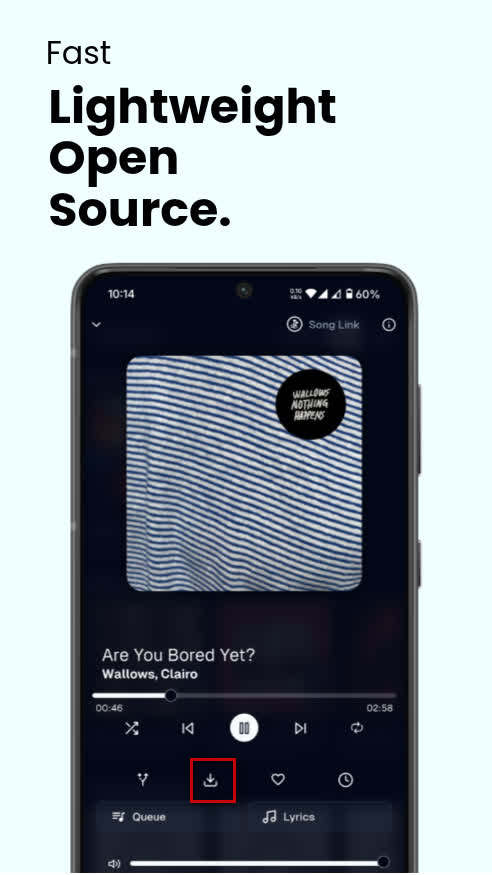
Step 3 Find the Spotify song, album, or playlist you want, select your preferred audio quality, and tap the download icon.
Step 4 Wait for Spotube to match and download the audio, then open your download history or local folder to play it offline.

⚠️Note: Spotube uses Spotify for metadata while sourcing the actual audio from third-party services, so the downloaded audio is not directly taken from Spotify.
👥 User Reviews
Spotube has a relatively large user community, so there is plenty of feedback to draw from. Some Reddit users recommend it as a free, open-source alternative to Spotify, while GitHub Issues include reports of login failures, playback glitches, lag, and downloads getting stuck at “querying info.”
SpotiFLAC
🔍 Official Website: https://spotiflac.com/
SpotiFLAC is an open-source music downloader focused on building a personal library of lossless audio. The Android version supports Spotify and other music services through its provider/extension system. The project currently supports Android, iOS, Windows, macOS, and Linux. It focuses primarily on FLAC and lossless audio, rather than just offering basic MP3 downloads. It continues to receive new releases and development updates on GitHub.
😀 Key Advantages:
- Free and open source.
- Support Hi-Res FLAC up to 24-bit/192 kHz.
- Preserve metadata such as cover art, lyrics, and album information.
- Support multiple music providers, including Tidal, Qobuz, Amazon Music, and Deezer.
☹️ Considerations:
- More complicated to set up than a simple MP3 downloader.
- Metadata fetching may fail due to rate limiting.
- Actual audio quality depends on the available source.
- Provider or source availability issues may affect downloads.
💻 How to Download Spotify Music with SpotiFLAC
Step 1 Download the arm64 or arm32 APK from the SpotiFLAC-Mobile GitHub Releases page, enable installation from unknown sources, and install the app.
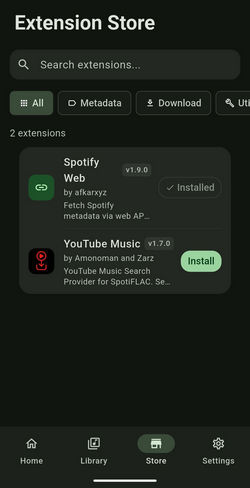
Step 2 Open the Store tab, enter an extension repository URL when prompted, and install the extensions you need.
Step 3 Go to Settings > Extensions > Provider Priority and choose which music sources should be tried first.
Step 4 Paste a Spotify track, album, or playlist link into the search bar, then wait for SpotiFLAC to find matching tracks.
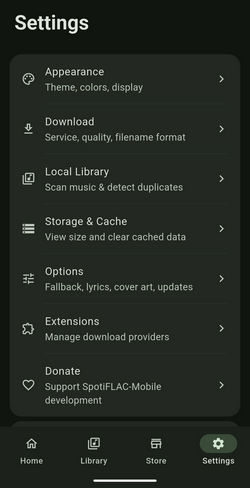
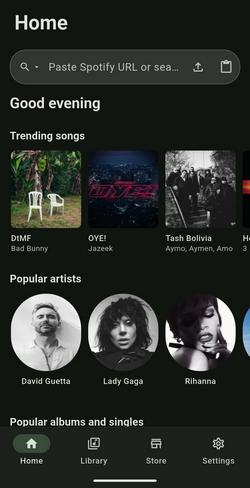
Step 5 Select the matching track or playlist, choose the available audio quality and format, and add it to the download queue.
Step 6 Start the download and choose a storage folder through the Android system folder picker if prompted.
⚠️Note: If you select 24-bit quality and downloads come through as very short clips (around 30 seconds), try switching to 16-bit or check your internet connection stability.
👥 User Reviews
SpotiFLAC has received positive feedback from Android music communities, with some Reddit users recommending it for downloading music from services such as Spotify, Tidal, and Amazon Music. Some users also mention that the project continues to receive updates, although others report problems with the app; GitHub feedback is more mixed, with users reporting slow or failed downloads and occasional problems with 24-bit FLAC files, including incomplete downloads or cases where 24-bit settings still produced 16-bit files.
Fildo
🔍 Official Website: https://fildo.net/android/en/
Fildo is an Android music streaming and downloading app that gives you access to a massive library of songs without a subscription. It’s not on the Google Play Store, so you’ll need to sideload the APK from the official website. But once it's up and running, it can search for, stream, and download MP3s in a way that's very similar to Spotify—except it doesn't require a Spotify subscription.
😀 Key Advantages:
- Free to use with no subscription or account required.
- Support music streaming and downloads in MP3 and FLAC.
- Include playlist management and a built-in music player.
- Support storing downloaded music on an SD card.
☹️ Considerations:
- Requires manual APK installation and does not auto-update.
- Music quality and availability vary by third-party sources.
- The interface feels somewhat dated and unpolished.
- Users report bugs, crashes, and download issues.
💻 How to Download Spotify Music with Fildo
Step 1 Download the Fildo APK from the official website and install it on your Android device.
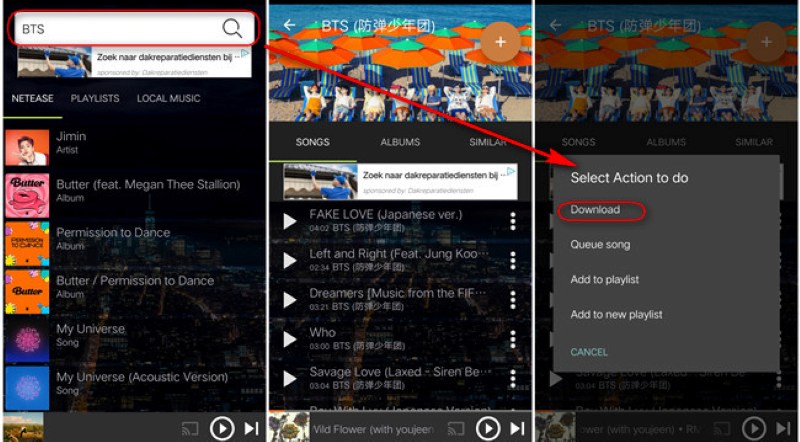
Step 2 Open Fildo, go to the More tab, and tap Import Spotify.
Step 3 Sign in with your Spotify account to load your playlists into Fildo.
Step 4 Open a playlist and wait for Fildo to match the tracks with its external audio sources.
Step 5 Tap the three-dot menu next to a matched song and select Download to save it as an MP3 file.
👥 User Reviews
Fildo gets mixed feedback from Android users. Some long-time users appreciate it for being free and offering a wide selection of music and download options, while others report intrusive ads, playback or download problems, and missing content. Reddit discussions include users recommending Fildo for music downloads, while more recent feedback mentions issues such as excessive ads and failed FLAC downloads.
SpotiSaver
🔍 Official Website: https://spotisaver.net/en1
SpotiSaver is a web browser tool that allows users to download Spotify songs directly to their Android devices without the help of any third-party applications or even a Spotify account login. A user simply copies the link to a particular Spotify track, and the tool scans the web for the best match to download the corresponding MP3 file with cover art. It’s also well-suited for downloading small batches of tracks.
😀 Key Advantages:
- Works directly in an Android browser without installing an app.
- Supports Spotify songs, albums, and playlists through shared links.
- Download individual tracks or entire playlists as a ZIP archive.
- Offers a simple link-based workflow for quick downloads.
☹️ Considerations:
- Some tracks may fail or match a different version than expected.
- Playlist processing may become unstable during periods of high traffic.
- VirusTotal flagged the site as suspicious with 9 of 90 security vendors.
💻 How to Download Spotify Music with SpotiSaver
Step 1 Open SpotiSaver in your Android browser and copy the Spotify track, album, or playlist link you want to download.
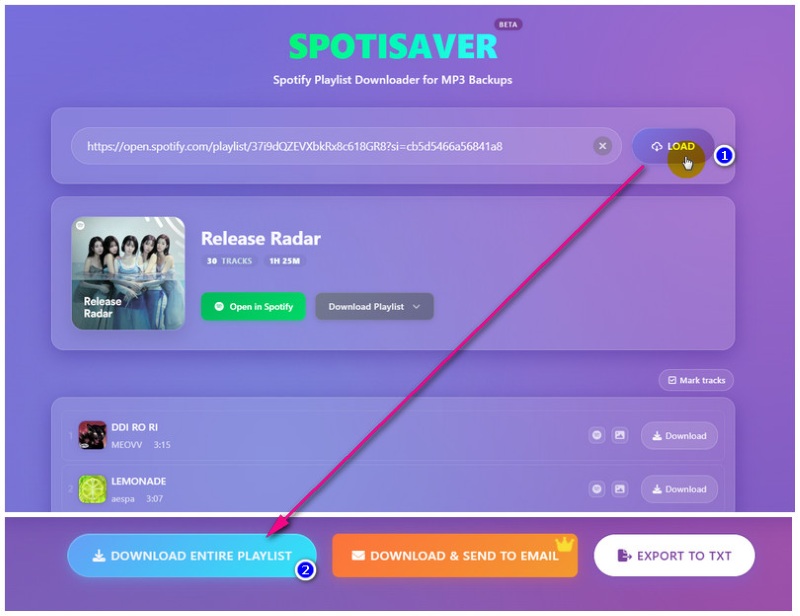
Step 2 Paste the Spotify link into SpotiSaver and tap LOAD.
Step 3 Wait for SpotiSaver to load the tracklist and find matching audio.
Step 4 Select the tracks you want, or download the entire playlist as a ZIP archive.
Step 5 Save the downloaded MP3 files to your Android device and play them with your preferred music player.
👥 User Reviews
SpotiSaver has relatively limited independent user feedback compared with established Android apps, so its current experience is best considered alongside hands-on testing. In our hands-on test, the service successfully recognized and eventually downloaded a complete Spotify playlist, although multiple attempts were sometimes needed before the download could start.
The Android downloaders above are convenient if your main goal is to save Spotify music directly to your phone. But what if you want to manage music from more than just Spotify or do more with your audio files after downloading? That's where a desktop-based tool can come in handy.
AudiCable Music One — A Desktop Alternative to Android Downloaders
AudiCable Music One takes a different approach from the Android tools above. It's not just about Spotify. This tool brings music from a bunch of streaming platforms into one desktop workflow. We're talking Spotify, Apple Music, Amazon Music, Tidal, YouTube Music, Deezer, Qobuz, SoundCloud—and more. It also goes beyond downloading. After saving your music, you can use built-in tools such as the Format Converter, ID3 Editor, and Audio Editor to convert formats, organize metadata, or make basic edits without switching to separate programs. For anyone with a large music collection or who works across multiple streaming platforms, AudiCable offers a wider set of tools than the Android apps mentioned above.
AudiCable Music One (Win / Mac)
- Download Spotify songs, albums, playlists, and podcasts in batches.
- Support MP3, AAC, WAV, FLAC, AIFF, and ALAC output formats.
- Preserve Spotify metadata, cover art, and lyrics as editable ID3 tags.
- Download Spotify music at speeds of up to 10×.
- Organize downloaded music by playlist, album, and artist.
- Support both Spotify Free and Premium accounts.
- Support Apple Music, Amazon Music, YouTube Music, Tidal, Qobuz, and Deezer.
- Include Format Converter, ID3 Editor, CD Burner, AA/AAX Converter, and AI Vocal Remover.
💻 How to Download Spotify Songs to MP3 with AudiCable:
Step 1 Install and launch AudiCable Music One, then select Spotify from the Music tab.

Step 2 Open Settings, choose MP3 as the output format, and select your preferred output folder.

Step 3 Paste a Spotify link or drag and drop the content into AudiCable. Select the tracks you want to download and click Add.

Step 4 Click Convert to start processing. AudiCable will save the downloaded tracks as MP3 files in your selected folder.

Step 5 Once the process is complete, open the History tab and click the folder icon next to a download to access your MP3 files.

Disclaimer:
- All these methods are for personal or educational use only.
- You should not use this tool to distribute music or for business.
Final Verdict
Each tool takes a slightly different approach, depending on what you need from a Spotify downloader.
| Tool | Best For |
|---|---|
| NoteBurner | Easy Spotify downloads with multiple output formats |
| Spotube | Free, open-source Spotify music access |
| SpotiFLAC | Lossless-focused downloads |
| Fildo | Free music downloads on Android |
| SpotiSaver | Quick downloads without installing an app |
| AudiCable Music One | Multiple streaming platforms and broader audio management |
FAQs About Spotify Downloader Android
💬 Q1: Can I download songs within Spotify without using any other tools?
A: Yes, Spotify Premium users can download music for offline listening directly in the Spotify app. However, these downloads remain within Spotify and cannot be used as regular audio files in other music players. If you want regular audio files such as MP3 or FLAC, you can consider a Spotify downloader for Android such as NoteBurner or SpotiFLAC, depending on your preferred workflow.
💬 Q2: Can I transfer downloaded Spotify songs to another Android phone?
A: Yes, if the downloader saves the music as regular audio files such as MP3 or FLAC, you can transfer them to another Android phone using USB, cloud storage, an SD card, or another file-sharing method. The exact process depends on where the files are stored.
💬 Q3: Are Spotify Downloader Apps Safe?
A: Safety depends on the specific app and where it is downloaded from. Open-source projects provide more source-code transparency, while apps distributed as APK files outside Google Play require users to pay closer attention to the download source and requested permissions.
💬 Q4: Can I Download Music from Multiple Streaming Platforms?
A: Yes. Some tools support multiple streaming services. For example, SpotiFLAC supports several providers, while AudiCable is designed as a desktop solution for downloading music from multiple streaming platforms.
Wrapping It Up
No tool fits every listener. If your phone is where you do most of your listening, one of the Android options above will likely do the job. But if you find yourself wanting more—more formats, more platforms, or just an easier way to manage everything—a desktop tool like AudiCable Music One is worth checking out.

