


AudiCable Audio Recorder
MusicFab Review 2026: Real-World Test & Its Alternative

By
Updated on: October 22, 2026
Category: Music Streaming Tips
Looking for one tool to download music from Spotify, Apple Music, Amazon Music, and Tidal? MusicFab All In One aims to bring them all under one roof. But how well does it actually work? We put it to the test.
In this MusicFab review, we examine its download performance, audio quality, stability, and safety to see whether it lives up to its promises. We also explore alternative tools for users considering other options.
📑 Content
What Is MusicFab?
MusicFab is a brand of desktop music downloader and converter software for Windows and macOS. It’s not a single tool but a family of products—including dedicated converters for individual platforms and an all-in-one version that bundles multiple services into one app. This review focuses on MusicFab All-In-One, which supports 10+ streaming services. We put it through tests covering performance, audio quality, stability, and value for money.
⚙️ Key features:
Here's what MusicFab All-In-One promises, based on its product page.
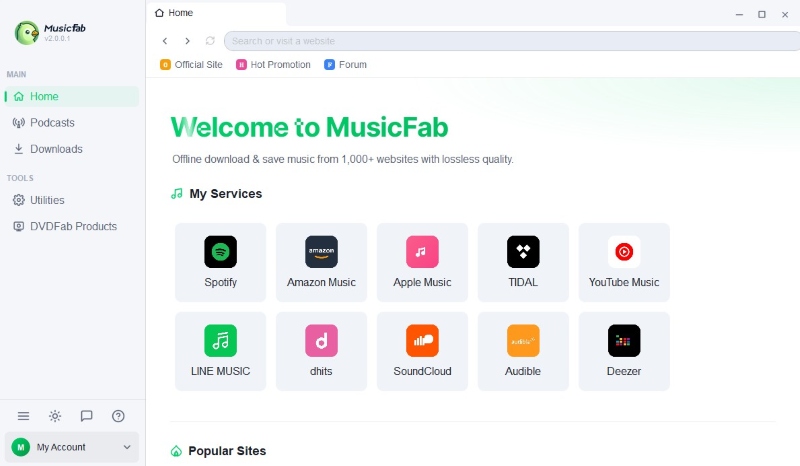
- Supports 10+ streaming services, including Spotify, Apple Music, Amazon Music, TIDAL, YouTube Music, Deezer, and Qobuz.
- Downloads audio directly without real-time recording. Each song reportedly takes about 10 seconds.
- Exports MP3, M4A, FLAC, WAV, and OPUS for lossless quality or smaller file sizes.
- Downloads multiple tracks, playlists, albums, podcasts, radio shows, and music videos (MVs).
- Preserves artist, album, title, year, artwork, and track number. Also saves lyrics as external .lrc files.
- Runs on Windows 11/10 (32-bit and 64-bit) and macOS. Requires 1GB RAM, 10GB free disk space, and internet access.
- Download up to 3 songs per day from each supported streaming platform for free.
Real-World Test of MusicFab All-In-One (2026.10)
We spent about a week with MusicFab All-In-One—installing it on Windows 11, trying it across several supported platforms, and pushing it through a mix of single tracks, full albums, and a couple of podcasts. Here's how the official promises held up.
Supported Platforms & Music Sources
We tested Spotify, Amazon Music, TIDAL, and YouTube Music in MusicFab All-In-One. All four were accessible, but performance differed. Spotify, TIDAL, and YouTube Music allowed individual track downloads after repeated attempts. On Amazon Music, however, we could only play music; the download button was highlighted but unresponsive.
Output Quality & Formats
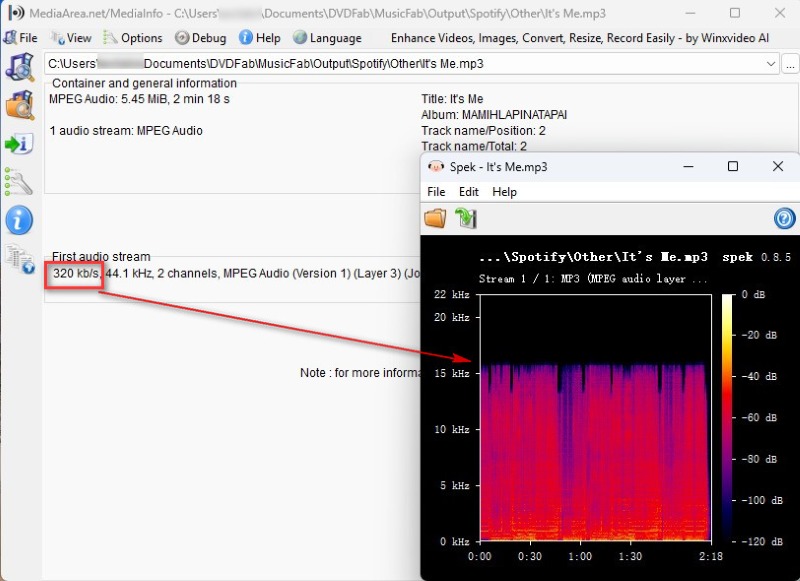
MusicFab All-In-One supports five output formats: MP3, M4A, FLAC, WAV, and OPUS. Our tests focused mainly on MP3. We checked the downloaded files with MediaInfo and Spek—MediaInfo reported a bitrate of 320 kbps for most MP3s, but Spek showed the frequency spectrum cutting off around 16–17 kHz.
Download Speed & Batch Processing
The "10 seconds per track" claim is optimistic. In our tests, a single track usually took 15–30 seconds, depending on the platform and song length. That's still fast—much faster than real-time recording—but not quite the "under 10 seconds" the site advertises.
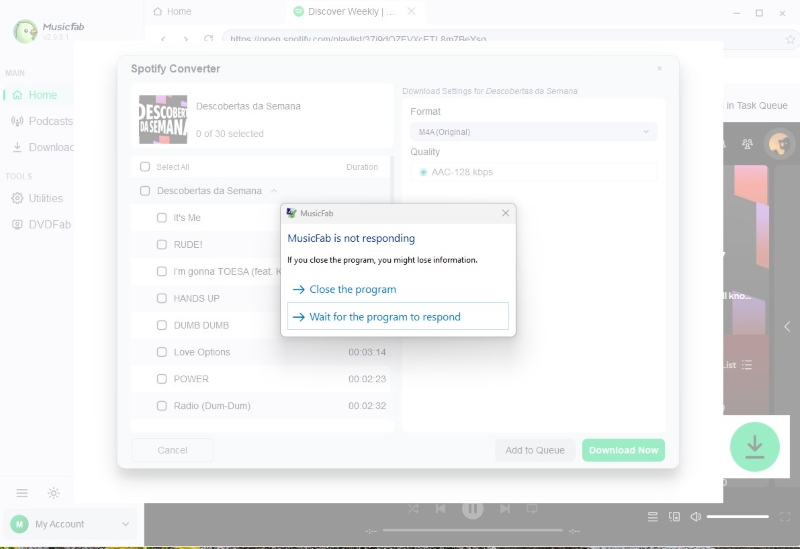
Playlist parsing, however, was a different story. In our trial tests, the app failed to parse playlists on all four platforms. The goal was simple—parse a playlist, then download two or three songs. But the program froze every time.
Tags, Artwork & Metadata
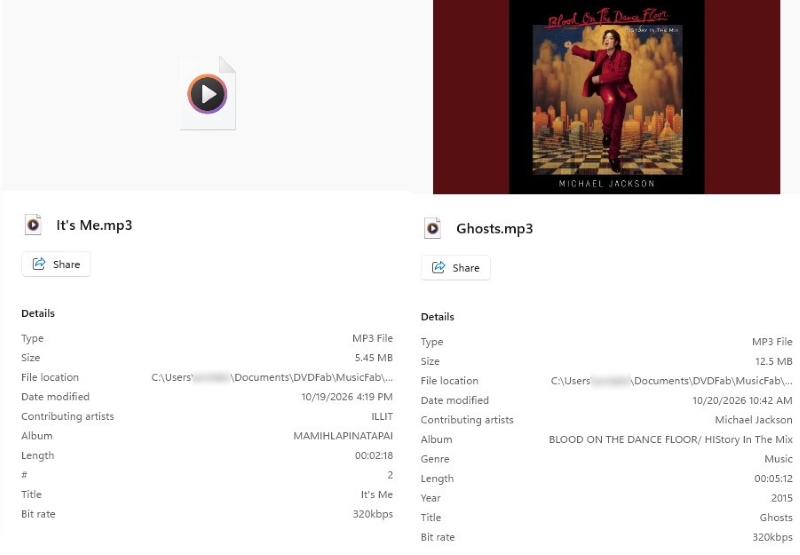
MusicFab preserved basic metadata—artist, album, and track names—in the MP3 files we downloaded, which makes them easier to identify and organize. Album artwork was a different story: only YouTube Music retained cover art and year tags, while tracks from the other platforms came without covers.
Ease of Use
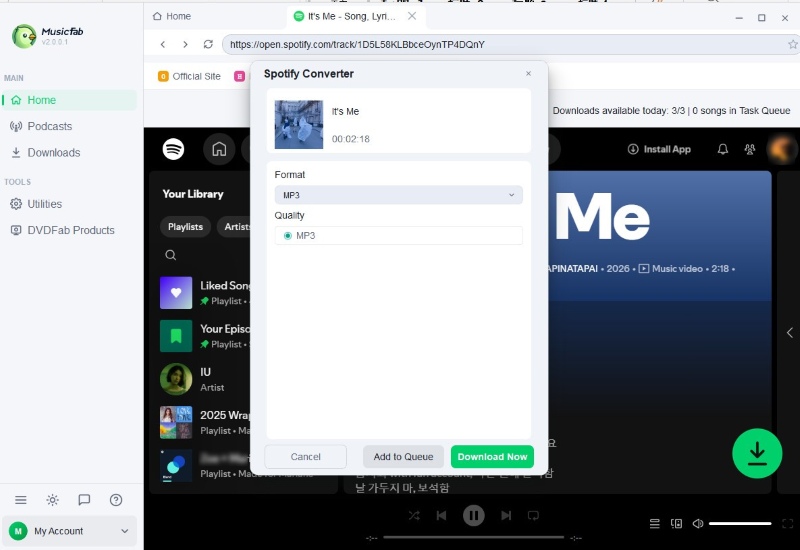
The interface is clean and easy to navigate. Choose a streaming service, paste a track link, and click the download icon to parse it. Once parsing finishes, select an output format in the settings panel and start downloading.
Stability & Download Success Rate
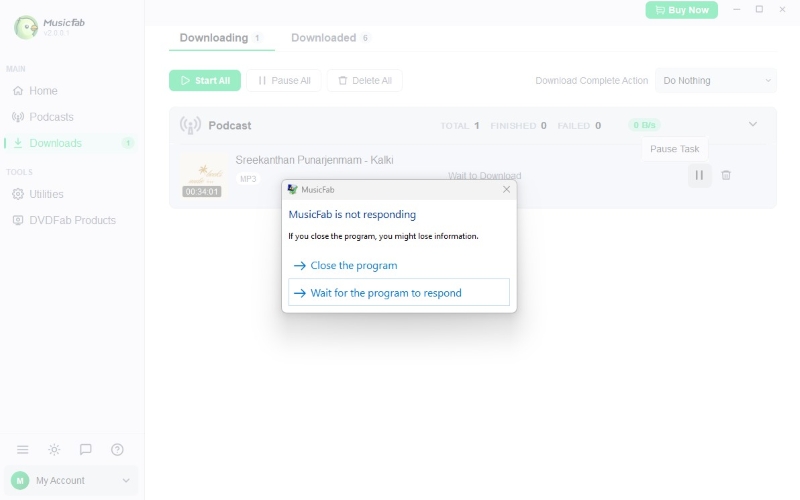
MusicFab showed noticeable stability issues during testing. It frequently became unresponsive while parsing playlists, and when a podcast download failed and we tried again, it sometimes triggered another "Not Responding" error, forcing us to close and restart the app manually. We tested around 50 songs and nine podcast episodes. All the songs downloaded successfully, but the podcast success rate came in below 70%.
User Experience
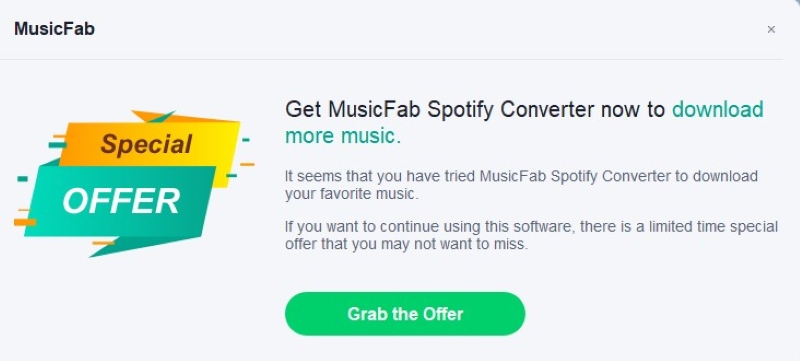
Beyond the issues above, the free trial felt cluttered with promotional content. After launching the program, we were greeted by a "Welcome to MusicFab!" screen that summarized the software and pitched the paid version. Clicking "Try" took us to a promotional page; only after clicking "Start Using MusicFab" did we finally reach the main interface. The program also showed pop-up ads for its own products during use, which made the trial experience feel more like a sales pitch than a test drive.
Verdict
MusicFab All-In-One offers a wide range of features, but our hands-on experience fell short of our expectations for a versatile music downloader. The main issue isn’t a lack of features, but rather its unstable performance and reliability during everyday use. Users looking for a smooth playlist download workflow may find this frustrating.
Is MusicFab Safe?
Based on our research, we found no evidence of actual security threats associated with MusicFab. A VirusTotal check of its download URL returned 0 detections out of 96 security engines, with no vendors flagging the URL as malicious.
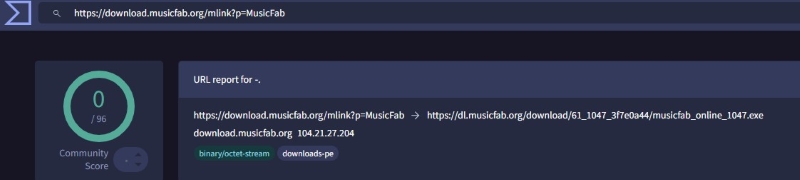
That said, some users may encounter warnings such as “File corrupted or musicfab crack” when launching certain DVDFab programs. According to discussions on the DVDFab forum, this issue may be related to security software interference rather than an actual infection.
Overall, we don’t see a concrete security concern with MusicFab. For the safest experience, download it from the official website.
MusicFab Pricing
MusicFab All-In-One is currently listed at $199.99 for a lifetime license, discounted from $285.99. The license covers three computers. Unlike individual MusicFab converters, which offer yearly and lifetime licenses, the All-In-One product page currently advertises only a lifetime purchase option.
💡 Tips: Try the free version before purchasing to make sure MusicFab works properly on your computer.
MusicFab All-In-One bundles multiple streaming services into one app, but our tests raised questions about performance and reliability. Given its relatively high lifetime price, it's worth weighing alternatives—like AudiCable Music One, which also supports multiple services and output formats. Let's see how the two compare in terms of performance, audio quality, and overall value.
Best MusicFab All In One Alternative: AudiCable Music One
AudiCable Music One is a versatile desktop music downloader for Windows and macOS that consolidates music from multiple streaming services into one place. Users can download music, podcasts, audiobooks, and other audio content from a wide range of streaming services. The downloaded content can be saved as local files for easy access anytime. Format flexibility is another key advantage. AudiCable supports MP3, FLAC, WAV, AAC, AIFF, and ALAC, covering both compressed and lossless formats. Additionally, it includes several free audio tools.
Key Features of AudiCable Music One (Win / Mac)
- Wide platform support: Download songs, albums, and playlists from Spotify, Apple Music, Qobuz, TIDAL, Amazon Music, YouTube Music, and other supported services.
- Multiple output formats: Export music in MP3, FLAC, WAV, AAC, AIFF, or ALAC. For Amazon Music, EAC3 and AC4 are also available.
- ID3 tag preservation: Preserve selected metadata, such as track titles, artists, year, and album information, so you can keep the tags you want and still keep your library organized.
- Batch downloads: Download entire playlists and albums at speeds of up to 10×. The click-based workflow keeps the process straightforward.
- Free and Premium account support: Use supported streaming services with either Free or Premium accounts, where applicable.
- Built-in audio tools: Convert audio formats, edit ID3 tags, burn CDs, and remove vocals with the built-in tools.
- Updates and support: AudiCable provides free software updates and customer support.
AudiCable Music One Test: How Does It Compare with MusicFab?
To see whether AudiCable Music One offers a more reliable alternative to MusicFab, we tested it using the same Windows 11 setup and, wherever possible, the same streaming services and music tracks.
Installation & Stability
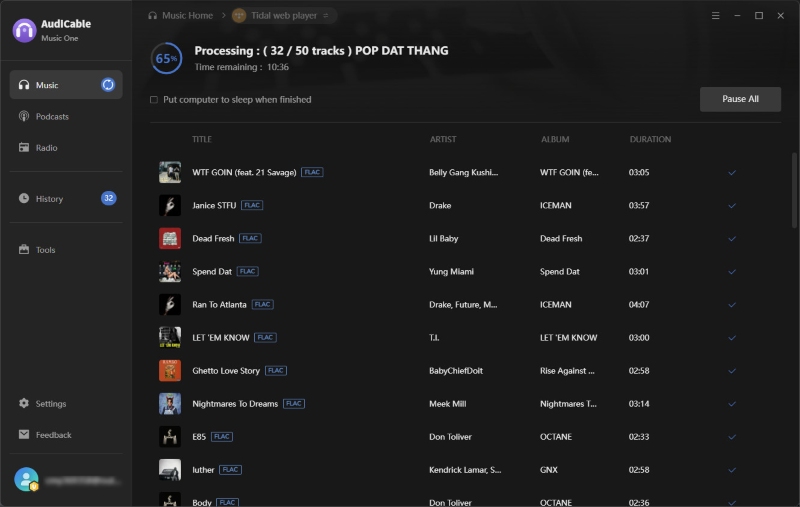
AudiCable Music One 3.6.4 installed and launched without issue on our Windows 11 test system. We signed in with our existing free streaming accounts and tested browsing and playback in Amazon Music and YouTube Music. Both services worked normally, and the app remained responsive throughout these initial checks. We then selected several tracks from a playlist and started a batch download in trial mode. Playlist selection and download initiation both worked as expected, and no adverts interrupted our use of the app during testing.
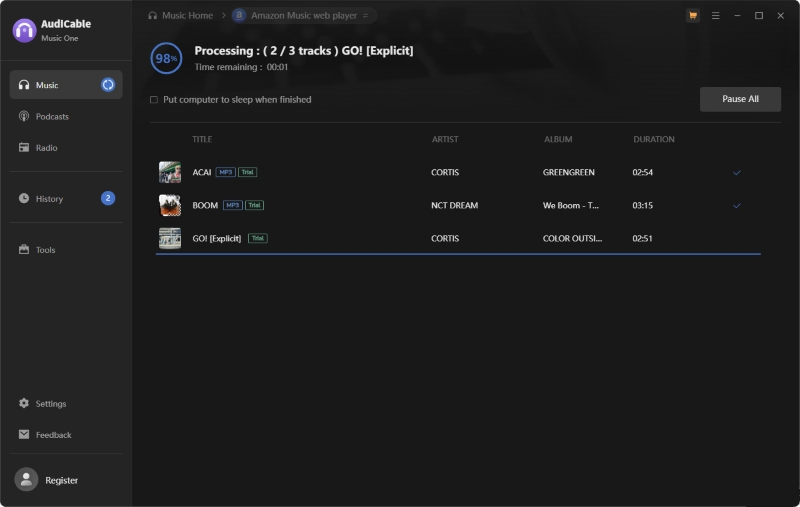
Music Download & Platform Tested
We tested AudiCable Music One with six streaming services: Amazon Music, Spotify, TIDAL, Apple Music, YouTube Music, and Qobuz. Tracks downloaded successfully from all six, and the output files matched the selected formats. We did not observe any crashes or freezes during these download sessions.
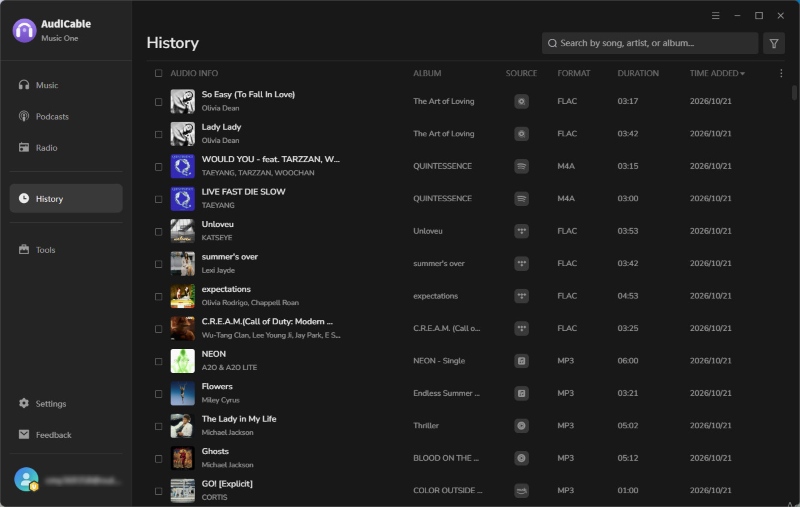
Playlist Parsing & Batch Download Speed
We tested AudiCable Music One with a playlist of 50 songs totaling 156 minutes. The entire playlist took approximately 18 minutes to download, equivalent to an average speed of about 8.7X real time. Actual speeds may vary depending on the streaming service, network conditions, playlist size, and output settings, but our result came close to AudiCable’s advertised maximum speed.
Audio Quality & File Properties
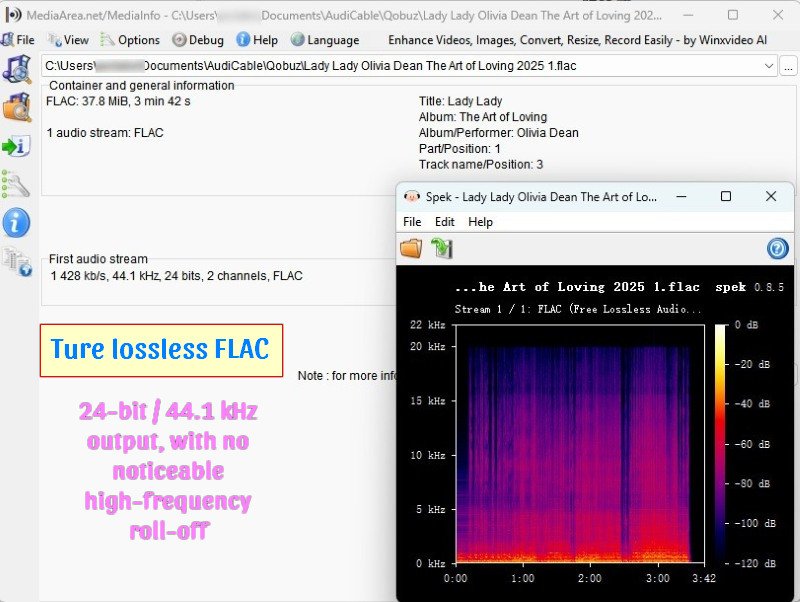
We tested MP3, M4A, and FLAC exports using MediaInfo and Spek. MediaInfo showed that the exported files’ actual properties generally matched the selected output settings, including bitrate, sample rate, and bit depth where applicable. Spek showed no obvious frequency cutoffs in the tested files.
Playback & Metadata Preservation
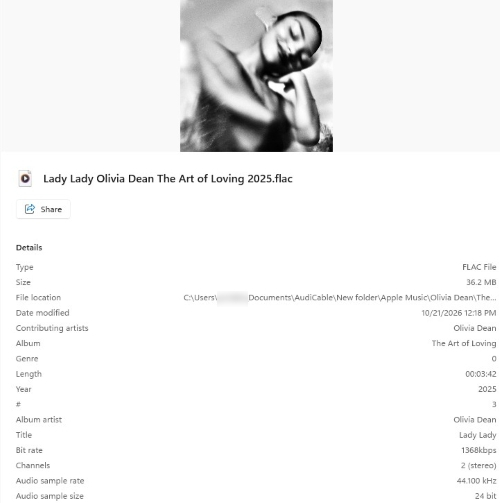
All tested exports played correctly in our playback checks. We also verified the embedded metadata, including track title, artist, album, year, track number, audio format, sample rate, bit depth, and bitrate. The checked fields were preserved accurately, and album artwork remained embedded in the exported files.
MusicFab vs. AudiCable: Side-by-Side Comparison
| Feature | MusicFab All-In-One | AudiCable Music One |
|---|---|---|
| Platforms Tested | 4 services | 6 services |
| Individual Track Downloads | Successful on 3 of 4 tested services | Successful on all 6 tested services |
| Playlist Parsing | Failed during trial testing; trial limitations could not be ruled out | Completed a 50-track playlist download in approximately 18 minutes |
| Batch Download Speed | Not established due to parsing issues | Approximately 8.7× real time |
| Supported Audio Formats | MP3, M4A, FLAC, WAV, and OPUS | MP3, FLAC, WAV, AAC, AIFF, and ALAC |
| Audio Quality | Tested MP3 files showed a frequency cutoff around 16–17 kHz | No obvious frequency cutoffs observed in tested files |
| Stability | Freezes and unresponsive behavior observed | No freezes during tested sessions |
| Metadata & Artwork | Basic tags preserved; artwork missing on some platforms | Tested metadata tags and artwork were preserved |
| Trial Experience | Promotional screens and pop-ups observed | No ads observed; batch downloads could be initiated in trial mode |
| Pricing | $199.99 lifetime | $79.90/year; $149.90 lifetime |
Overall, both tools offer broad streaming platform support, but our tests revealed noticeable differences in reliability. MusicFab handled individual track downloads reasonably well but struggled with playlist parsing and stability. AudiCable, on the other hand, completed our 50-track batch download test without freezes and delivered more consistent results across the tested services. It also offers a lower-priced lifetime license at $149.90, compared with MusicFab's $199.99. Based on our experience, AudiCable appears to offer better value, especially for users who frequently download playlists and albums.
FAQs
💬 Q1: Do I need a Spotify Premium or Apple Music subscription to use MusicFab?
A: Not always. MusicFab supports both Free and Premium Spotify accounts, so Spotify Premium isn't required. However, Apple Music requires an active subscription, and most other paid streaming services also require a valid subscription. The requirements depend on which music service you're downloading from.
💬 Q2: What should I do if MusicFab gets stuck or stops responding?
A: First, try restarting MusicFab and checking your internet connection. If the problem persists, update the application and try downloading a single track instead of an entire playlist. You can also contact MusicFab support to check whether the issue is related to your software version, account, or trial limitations.
💬 Q3: Can I use MusicFab downloads in DJ software or video editing programs?
A: MusicFab supports widely used formats such as MP3, WAV, and FLAC, which many DJ applications and video editors can import. However, compatibility depends on the software and file format. You should also ensure that your intended use complies with applicable copyright rules and licensing requirements.
💬 Q4: How do I burn music to a CD with AudiCable?
A: First, download your preferred songs as local audio files. Then go to Tools > Burn CD, add the songs you want to burn, and insert a blank CD into your computer's CD/DVD burner. You can arrange the track order and adjust the disc settings before clicking Burn to start the process.
Disclaimer:
- All these methods are for personal or educational use only.
- You should not use this tool to distribute music or for business.
Wrapping It Up
MusicFab All-In-One brings multiple music streaming services into one application and offers useful features for downloading individual tracks. However, our tests revealed some limitations, particularly with playlist parsing, application stability, and metadata consistency. While these issues may not affect every user, it's worth trying MusicFab for yourself before committing to the $199.99 lifetime license.
If you're looking for a more reliable alternative, AudiCable Music One is worth a closer look. It performed consistently across our tested services.
Get AudiCable Music One Today~~
Related Articles
- Spotify++ Review 2026: Is It Safe? Best Alternatives
- Y2Mate Review & Alternatives: Tested in 2026
- Is EzMP3 Safe & Reliable in 2026? Full Test & Best Alternatives
- TuneCable Spotify Downloader Review [2026]
- Tidabie Tidal Music Converter Review: Tested 2026
- 10 Best Free Hindi Songs MP3 Download Sites in 2026

