


Tidabie Tidal Music Converter
Tidabie Tidal Music Converter Review: Tested 2026

By
Updated on: Oct 16, 2026
Category: Music Streaming Tips
Tidal users who want offline access often mention Tidabie Tidal Music Converter, but is it the best choice? This Tidabie Tidal Music Converter review examines its features and performance so you can decide if it's right for you.
We put Tidabie Tidal Music Converter through hands-on tests covering ease of use, speed, audio quality, ID3 tags, and pricing, and collected common user complaints to see how it performs in real-world use. This Tidabie Tidal Music Converter review will help you make an informed choice.
📑 Content
- Part 1. What Is Tidabie Tidal Music Converter?
- Part 2. Real-World Performance Testing
- Part 3. How to Use Tidabie Tidal Music Converter: Step-by-Step Guide
- Part 4. Pricing, Plans & Trial Limits
- Part 5. Common Complaints: What Negative Reviews Reveal
- FAQs about Tidabie Tidal Music Converter
- Final Verdict: Pros & Cons, Overall Rating
Part 1. What Is Tidabie Tidal Music Converter?
Tidabie Tidal Music Converter is a Tidal music downloader for Windows and Mac that downloads songs, albums, and playlists from Tidal and converts them into multiple common formats. Unlike Tidal's native offline mode, which locks downloads inside the app and renders them unplayable once a subscription ends, Tidabie produces standard audio files you can keep permanently. It works with Tidal both during the free trial and with paid subscriptions, though Hi-Res quality requires a paid plan. In essence, it is built for Tidal users who want a portable, private music library free from streaming restrictions.
⭐ Key Features of Tidabie Tidal Music Converter
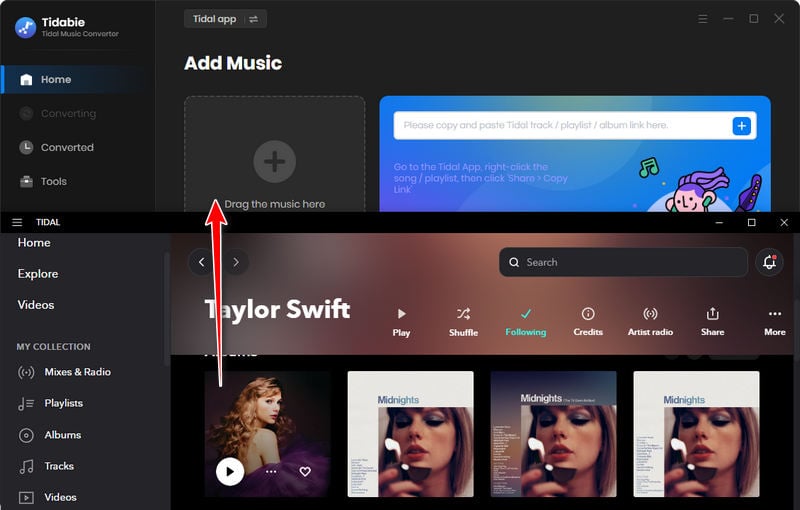
- Dual download sources. The Tidal web player is faster, up to 10x speed at CD quality with no app installation. The Tidal app supports Max quality at around 5x speed and allows importing via drag and drop.
- Broad download coverage for Tidal content. Tidabie supports downloading individual songs, full albums, playlists, and podcasts.
- Original audio quality preservation. Tidabie preserves Tidal CD quality and Max quality based on the selected source.
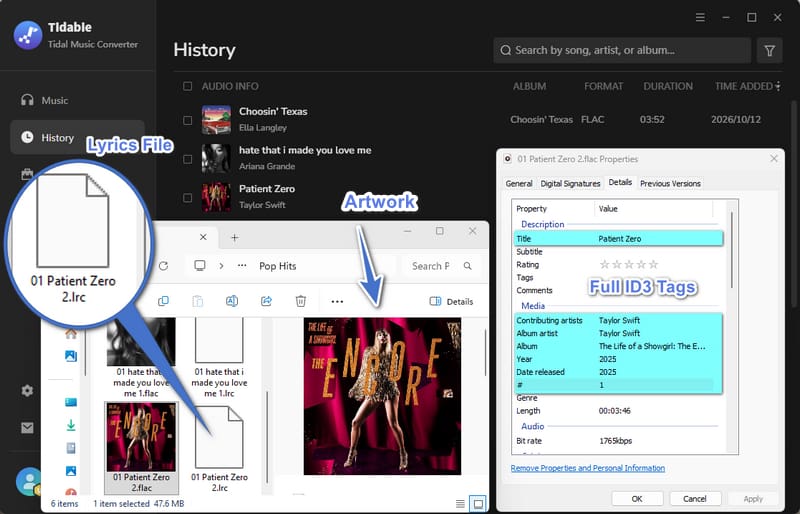
- Complete ID3 tag and lyrics retention. Tidabie retains full metadata, including title, artist, album, artwork, track number, disc number, genre, & year, and saves lyrics as LRC or TXT when available.
- Up to 10X faster conversion speed with batch processing. Batch conversion grabs songs from multiple playlists simultaneously at up to 10x faster than real time.
- Customizable output settings and file naming. Users can adjust output format, output path, filename, etc. before conversion.
- User-friendly interface with regular updates. It offers an intuitive interface with clearly defined functions. The development team releases regular updates to maintain Tidal compatibility.
Part 2. Real-World Performance Testing
To see whether Tidabie lives up to its claims, we tested it hands-on across four key areas: ease of use, conversion speed, audio quality, and ID3 tag retention. Here is what I found.
Test environment: Windows 11 (64-bit), Intel Core i3, 16 GB RAM, 100 Mbps fiber connection, Tidal Individual account. Audio analysis and metadata check was done with Spek and Windows File Properties. Testing conducted in October 2026.
1. Ease of Use
Tidabie is fairly easy to use, even for beginners. During testing, we could switch between the Tidal app and web player, add individual tracks or entire playlists, and adjust output settings without much effort. The interface is well-organized, with clear buttons for adding music, starting conversions, and accessing downloaded files.
📒 Jump to the step-by-step guide for a closer look at Tidabie's interface.
2. Conversion Speed
How fast is Tidabie Tidal Music Converter? With download speeds of up to 10× advertised, we tested both the Tidal web player and app modes across different batch sizes and output formats to measure their real-world performance.
| Test Scenario | Tracks | Download Source | Format | Avg. Time | Speed |
|---|---|---|---|---|---|
| Single track (4:12) | 1 | Web Player | FLAC | ~20 s | ~12× |
| Single track (4:12) | 1 | Web Player | MP3 | ~12 s | ~21× |
| Single track (4:12) | 1 | App | FLAC (Hi-Res) | ~32 s | ~8× |
| Playlist | 10 | Web Player | FLAC | ~2 min 30 s | ~10× |
| Playlist | 50 | Web Player | FLAC | ~13 min | ~10× |
| Playlist | 50 | App | FLAC (Hi-Res) | ~23 min | ~5× |
When downloading Tidal music to FLAC, the web player consistently reached or slightly exceeded the advertised 10× speed in our tests. Converting Tidal tracks to MP3 was even faster, partly due to the smaller output file sizes. Downloads from the Tidal app were slower, roughly 5–8×, because it handles significantly larger Hi-Res files. Conversion speeds remained relatively consistent across the playlist sizes tested. A 50-track playlist maintained steady throughput from start to finish, which is a genuine strength for users with extensive libraries.
3. Audio Quality
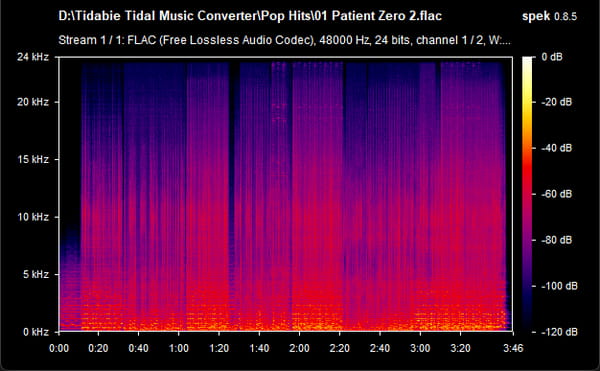
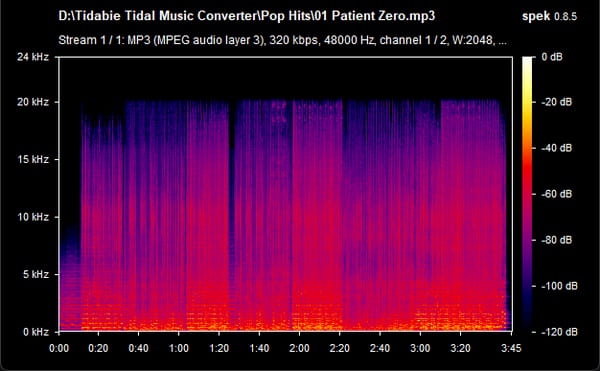
To evaluate Tidabie Tidal Music Converter's audio quality, we examined the downloaded MP3 and FLAC files using Spek to analyze their frequency spectra and checked the file properties for bitrate, sample rate, and bit depth.
The FLAC file showed no obvious signs of lossy compression in its spectrogram and was saved at 24-bit/48 kHz. The MP3 output was encoded at 320 kbps with a sample rate of 48 kHz. Overall, the results suggest that Tidabie can deliver high-quality audio files, although spectrograms alone cannot fully verify whether the original source quality has been preserved.
FLAC file: 24-bit/48 kHz FLAC
MP3 file: 320 kbps, 48 kHz
4. ID3 Tags and Metadata
We checked the downloaded files using Windows File Properties to verify that metadata transferred correctly.
Title, Artist, Album, Artwork, Track Number, Disc Number, and Year all appeared correctly in Windows File Properties. The built-in tag editor lets you fix any missing or incorrect metadata after conversion without needing a separate tool. Lyrics files are saved in LRC or TXT format when available, which is a useful bonus for karaoke or scrolling-lyrics playback.
One small caveat: genre tags were occasionally missing on certain tracks, depending on the source metadata from Tidal. This is not a Tidabie-specific issue but worth checking if genre organization matters to you.
Part 3. How to Use Tidabie Tidal Music Converter: Step-by-Step Guide
Tidabie supports both the Tidal app and the Tidal web player. The Tidal app preserves up to Max quality (24-bit/192 kHz) at up to 5× speed, while the Tidal web player retains up to CD quality (16-bit/44.1 kHz) at up to 10× speed. The steps differ slightly, so both are covered below.
Step 1 Launch Tidabie and choose your download source by clicking the cycle icon in the top left, which is labeled "Tidal App/

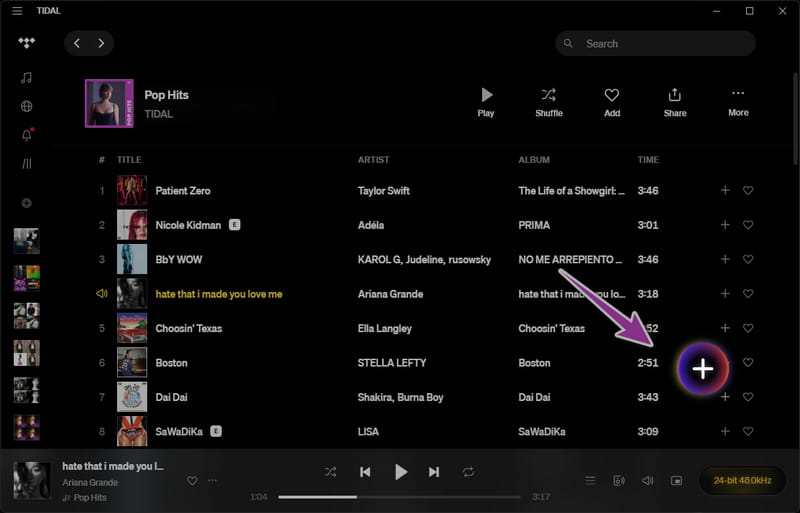
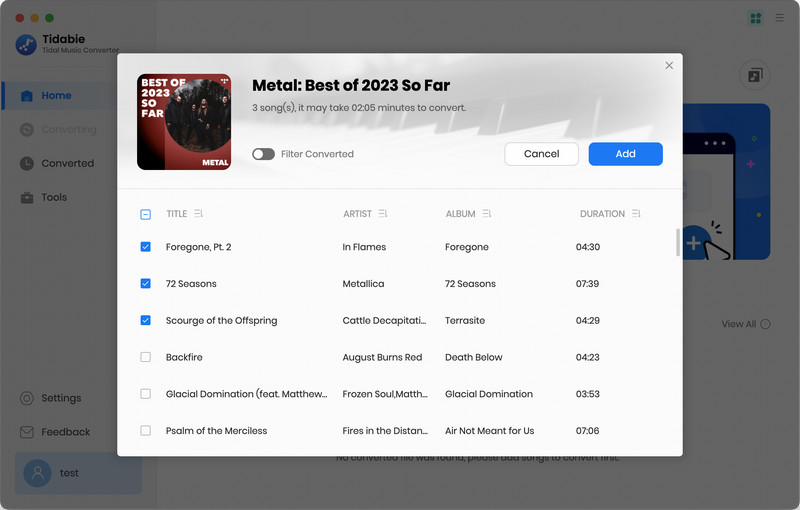
Step 2 Browse TIDAL, then click "+(Click to add)" in the bottom right to parse a song, playlist, or album. Alternatively, copy a track link and paste it into the parse bar within Tidabie, or click the "Paste" button in the built-in web player. If you're downloading from the Tidal app, you can also drag and drop a song, playlist, or album directly into Tidabie's interface. Tidabie will display the parsed songs in a pop-up where you can select the tracks you want and hit "Add" to confirm.
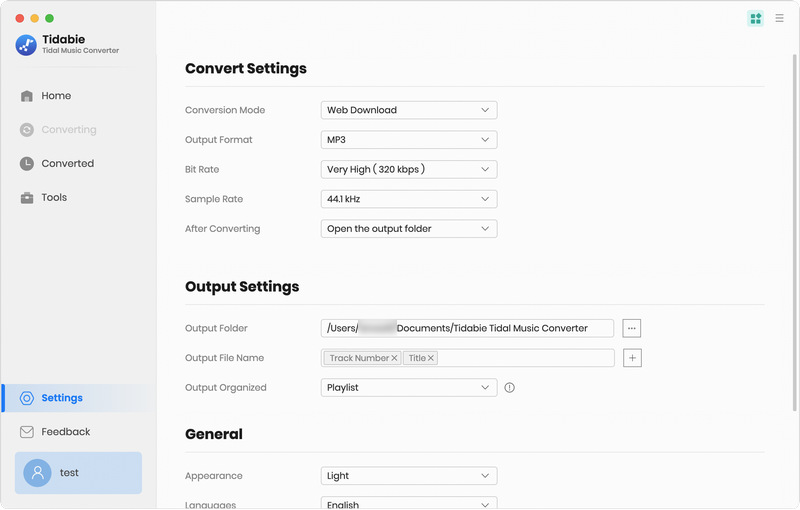
Step 3 Click the "Settings" button to adjust output parameters. You can set conversion mode, output format, bit rate, sample rate, and bit depth. The filename can be customized with track number, title, artist, album, playlist index, year, and disc number. Files can also be organized by playlist, artist, album, genre, year, or disc number. For the best quality, choose "Recommended" or "FLAC" and select "Record Mode". Tick the "Save lyrics" box to keep lyrics files.
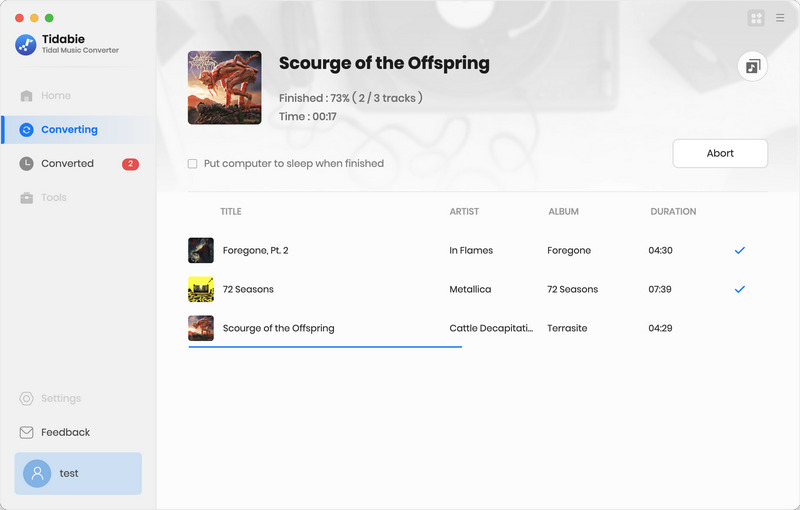
Step 4 If you want to add more tracks to the batch, click "Add More" and repeat the previous step. Once your list is ready, click "Convert" to begin converting Tidal songs at up to 10× speed.
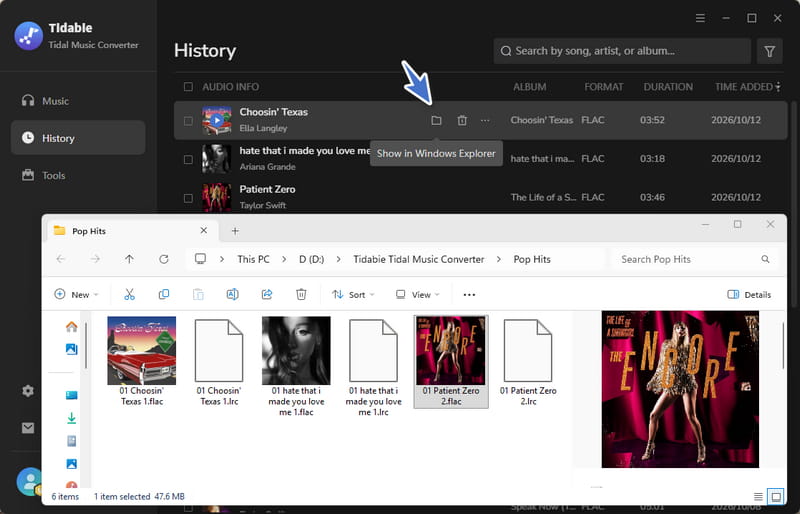
Step 5 When conversion finishes, go to the "History" tab to view your download history. From there, you can play the songs, click the file icon to open the output folder or manage the converted tracks.
Part 4. Pricing, Plans & Trial Limits
How much does Tidabie Tidal Music Converter cost? Tidabie offers three pricing plans, depending on how long you want to use the software:
| Plan | Pricing | Note | Refund Window |
|---|---|---|---|
| Quarterly Plan | $29.95 | ~$9.98 / Month | 5 days |
| Annual Plan | $44.95 | ~$3.75 / Month | 5 days |
| Lifetime Plan | $89.90 | Lifetime free updates | 30 days |
*Prices checked in October 2026 and may change.
3-Month Plan. The entry-level paid option costs around $29.95 for three months of full access. This is a reasonable starting point if you want to test Tidabie without committing to a full year.
1-Year Plan. The annual plan runs $44.95 for twelve months of use. This offers better value per month than the 3-month plan and is the most practical choice for users who plan to convert music regularly over a longer period.
Lifetime Plan. The lifetime license costs approximately $89.90 and is a one-time payment. You are charged only once, and the license covers lifelong use and updates. For users who want a permanent solution without recurring fees, this is the most economical option in the long run.
Important Note: The 3-month and 1-year plans are set to auto-renew by default. If you decide not to continue using Tidabie, be sure to cancel your subscription before the renewal date to avoid being charged again.
The free trial version of Tidabie Tidal Music Converter lets you convert the first 1 minute of each song. This means you can test the full workflow, including adding tracks, adjusting output settings, and converting files, but every output file will be cut off after 60 seconds. To remove this limit, you need to register the program with a license received after purchase. The trial is enough to confirm that the software works and that output quality meets your expectations, but it is not a usable long-term solution for building an offline library.
Part 5. Common Complaints: What Negative Reviews Reveal
What do real users say about Tidabie Tidal Music Converter? Reviews on Trustpilot and REVIEWS.io are generally positive, but some customers have reported technical issues, licensing problems, and billing concerns. We reviewed the negative feedback and identified three main concerns worth considering before purchasing.
1. Download Failures and Software Stability
Some users reported that Tidabie suddenly stopped downloading music or failed to parse Tidal links. One Trustpilot reviewer mentioned the error "could not parse all links", while a REVIEWS.io user reported conversions getting stuck for an extended period.
These problems may be related to changes in Tidal's platform or software compatibility issues. Although one reviewer later confirmed that downloading was working again, such interruptions can be frustrating, especially for paid subscribers. On the positive side, Tidabie's version history shows regular updates and bug fixes. If you run into an issue, contacting support may help you find a workaround while waiting for a fix.
2. License Activation and Customer Support
A few customers complained about not receiving their activation codes after payment or having difficulty getting technical support. One Trustpilot reviewer wrote, "I never received a code to open the software".
In response, the Tidabie team suggested in comments that the registration email might have been missed due to a typo in the email address entered at checkout or because it landed in the spam folder. To avoid this, double-check your email address before completing your purchase. If the code still doesn't arrive, check your spam folder or contact Tidabie support with your order details.
3. Automatic Renewals and Refund Disputes
Billing is another concern raised in negative reviews. One customer complained about unexpected automatic renewal charges, while others reported difficulty obtaining refunds when the software did not work as expected.
We tested Tidabie's checkout process and found that users can choose to opt out of automatic renewal by unchecking a box during purchase. Tidabie also states that email reminders are sent before renewal charges. If you notice an unwanted renewal, contact customer support within five days to request a refund. Tidabie promises to promptly address customer concerns and provide timely refunds if issues cannot be resolved, subject to its refund policy.
FAQs about Tidabie Tidal Music Converter
Q1. Does Tidabie Tidal Music Converter work on iPhone or Android?
No. Tidabie Tidal Music Converter is a desktop program for Windows and Mac. However, you can transfer the downloaded MP3 or FLAC files to your Android phone or iPhone for offline playback.
Q2. Can I use Tidabie without a paid Tidal subscription?
You need a Tidal account with access to the music you want to download. Tidabie also works during an eligible Tidal free trial, but the available audio quality depends on your Tidal plan. Hi-Res FLAC requires access to Tidal's high-resolution streaming quality.
Q3. Can I use Tidabie downloads with DJ software?
Yes. You can import downloaded audio files into DJ software such as Rekordbox, Serato, or Traktor, provided the file format is supported. For example, MP3 and FLAC are widely used, although compatibility varies by software version. Tidabie supports multiple formats, including MP3, AAC, FLAC, WAV, AIFF, and ALAC.
Q4. Why is Tidabie not downloading Tidal songs?
Download failures may be caused by outdated software, login problems, or changes to Tidal's service. Try updating Tidabie, signing in again, or switching between the Tidal app and web player. If the problem persists, contact Tidabie support.
Q5. Can I keep Tidabie downloads after canceling Tidal?
Yes. Tidabie saves converted tracks as local audio files, so they are not automatically deleted when your Tidal subscription ends.
Final Verdict: Pros & Cons, Overall Rating
Overall Score
4.5 / 5
Pros
- Excellent audio quality with Hi-Res preservation.
- Fast conversion speed up to 10×.
- Multiple output formats for both compatibility and lossless playback.
- Dual download sources for flexibility between speed and quality.
- Complete ID3 tags, artwork, and lyrics retention.
- Customizable output settings and file naming.
Cons
- Free trial limited to only 1 minute per song.
- Auto-renewal enabled by default on subscription plans.
- Occasional parsing failures when Tidal updates its platform.
- Customer support quality is inconsistent.
Who Should Use Tidabie Tidal Music Converter?
So, is Tidabie Tidal Music Converter worth buying? Based on our hands-on tests and review of user feedback, it's a solid option for Tidal listeners who want to save music as local MP3 or FLAC files for offline playback. Its fast conversion speeds, flexible output settings, and support for Hi-Res audio make it particularly appealing to users who manage large music libraries or prefer offline playback. However, consider occasional download failures, subscription auto-renewals, and the limited free trial before purchasing. If these trade-offs are acceptable, Tidabie is worth trying, but we recommend testing the free version first to ensure it meets your needs.
Related Articles
- Spotify Downloader Android: 5 Tools Reviewed in 2026
- Y2Mate Review & Alternatives: Tested in 2026
- Streamrip Review: What It Is, How to Use It & Is It Safe?
- Is EzMP3 Safe & Reliable in 2026? Full Test & Best Alternatives
- Vanced YouTube Music Review & Best Alternative
- YTMP3 Converter Review & Top Alternative

