


ReVanced Spotify Safe Alternatives: What Still Works in 2026

By
Updated on: November 6, 2026
Category: Spotify Music Tips
ReVanced Spotify, a modified version of the official Android app created using ReVanced patches, is no longer a dependable option. In September 2025, ReVanced removed its official Spotify "Unlock Premium" patch following a DMCA takedown notice from Spotify. This raises several questions: Is ReVanced Spotify safe to use? Can you trust every APK claiming to be an official ReVanced release? If you want ad-free streaming, fewer playback restrictions, or offline access to music, what’s your best option? This guide examines the risks of using this modified app and reviews ReVanced Spotify safe alternatives for different listening needs.
Quick Answer: ReVanced Spotify is no longer a dependable long-term option. Official streaming services are better for ad-free listening, while desktop tools like AudiCable Music One offer a way to save supported tracks as local audio files.
Quick Comparison: Which Alternative Should You Choose?
| Your Goal | Recommended Option | Why |
|---|---|---|
| Listen to Spotify without ads | Spotify Premium | Official access to ad-free playback. |
| Switch to another music platform | Apple Music, TIDAL, or Qobuz | Different catalogs and high-resolution audio. |
| Save Spotify songs as MP3 or FLAC files | AudiCable Music One | Multiple output formats and local file access. |
| Replace ReVanced with another Spotify mod | Not recommended | Unofficial apps still pose security risks. |
📑 Content
Part 1 Does ReVanced Spotify Still Work in 2026?
What Is ReVanced Spotify?
ReVanced is an open-source Android app patching project that provides tools such as ReVanced Manager. ReVanced Spotify refers to a modified version of the official Spotify Android app created by applying ReVanced patches to a compatible Spotify APK. It is not a standalone application provided by ReVanced, nor is there an official version for iOS, Windows, or macOS.
Historically, ReVanced Spotify patches were designed to remove ads and bypass the limitations of Spotify Free, including skip limits and on-demand playback. However, their functionality depends on app and patch compatibility. These patches have not provided access to Spotify's official offline downloads, as download access is controlled by Spotify's servers.
A patch can change supported parts of the app, but it cannot create a genuine Spotify Premium subscription or grant every benefit tied to a paid account.
What Happened: Spotify's DMCA Notice and the Patch Removal
In September 2025, Spotify challenged ReVanced's Unlock Premium patch through a DMCA takedown notice sent to GitHub. ReVanced disputed the claims but temporarily removed the patch while seeking legal advice.
Timeline of the DMCA Dispute
- September 11, 2025: Spotify submitted a DMCA notice to GitHub targeting ReVanced's Unlock Premium patch. Spotify argued that the identified files involved unauthorized copying or derivative works based on its copyrighted software.
- September 12, 2025: ReVanced published an official announcement about the notice. The team disputed Spotify's claims, explained its understanding of the legal issues, and asked for legal assistance.
- September 15, 2025: ReVanced confirmed to TorrentFreak that it had complied with the takedown for the time being. The team was seeking legal advice and considering whether the patch could be reinstated.
- September 17, 2025: ReVanced's DMCA announcement was archived. As of November 5, 2026, there is still no verified official confirmation that the Spotify Unlock Premium patch has been restored.
Why ReVanced Spotify Keeps Breaking
Common ReVanced Spotify not working fixes: patch update or reinstall the app; disable Spotify auto-updates. However, while these steps may fix temporary compatibility issues, they are not permanent solutions. Patches can break when Spotify updates its app or changes server-side behavior, requiring further updates from the patch developers.
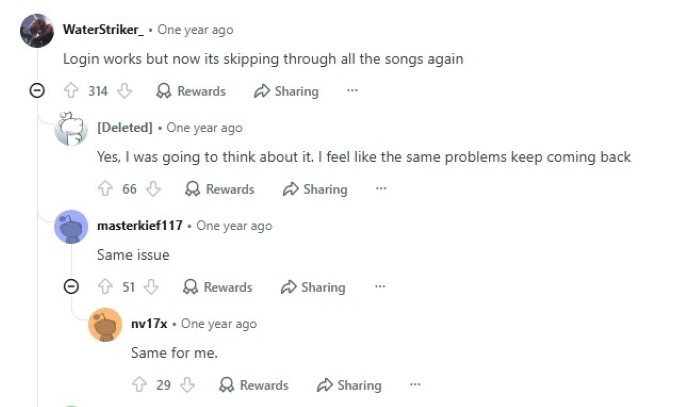
This isn't just a theoretical concern. In July 2025, ReVanced published several updates to address Spotify-related problems, including empty playlists, skipped songs, and login failures. Users in a Reddit discussion also reported recurring playback issues, with some saying songs started skipping again after a fix. This highlights how a workaround that works today may stop working after a Spotify or patch update.
Part 2 Is ReVanced Spotify Safe? 3 Risks to Know
The following information is based on Spotify's official policies and public reports. It is for informational purposes only, not legal advice.
It Breaks Spotify's Terms of Use
Spotify's User Guidelines prohibit users from modifying the service, bypassing technical barriers, or blocking ads. Violations may result in account suspension or termination. These restrictions are part of Spotify's Terms of Use and should be distinguished from legal requirements.
Your Account Can Be Restricted
Spotify may suspend or terminate accounts for violations but does not publish an enforcement policy specific to ReVanced users. This means there is a chance of account bans, but no guarantee. Some users have reported being logged out or losing Premium access, but these reports don’t confirm a formal policy of enforcement. Using a secondary account might lessen the effect on your main account.
Fake ReVanced Sites and Malware
Be cautious of websites offering ready-to-install "ReVanced Spotify Premium APKs". Revanced warns users about counterfeit websites and unofficial pre-patched APKs. Files from untrusted sources may contain malware or unwanted software.
Taken together, these risks make switching to another unofficial Spotify mod an uncertain solution. A better approach is to choose an alternative based on what you actually need, whether that's ad-free streaming, switching to another music service, or saving music as local files.
Part 3 ReVanced Spotify Safe Alternatives Explained
Streaming Downloads vs. Local Music Files
Spotify Premium and other streaming services let you download music for offline listening within their apps. These downloads are generally tied to your account and the platform, so you can't manage them like ordinary audio files.
Desktop music tools offer a different approach by saving supported tracks as local audio files, such as MP3 or FLAC. You can then organize and play these files with compatible media players outside the original streaming app.
Spotify Premium: Official Ad-Free Listening
If you want to keep using Spotify without modified apps, its official plans are the most straightforward option.
| Monthly Price | Cost Per Person | |
|---|---|---|
Individual |
$12.99/month | $12.99/month |
Duo |
$18.99/month | $9.50/month |
Family |
$21.99/month | As low as $3.67/month |
Student |
$6.99/month | $6.99/month |
Premium Individual currently offers a one-month free trial to eligible first-time subscribers. Student subscribers can also receive a one-month trial period after verification. The Duo plan covers two people living at the same address, while the Family plan supports up to six family members. The per-person prices above assume all available slots are used.
💡 Tips: Want more ways to enjoy Spotify Premium for free? Check out our guide to How to Get Spotify Premium for Free.
Switch to Another Music Service
If you're open to switching platforms, other music services may offer a free tier, introductory trial, or different subscription options. Here are some of the main choices available:
| Free Option / Trial | Maximum Audio Quality | |
|---|---|---|
| Free tier with ads; premium trial offers vary | Up to 256 kbps AAC/Opus (Premium) | |
| No permanent free tier; 1-month trial, up to 3 months with eligible new devices | 24-bit/192 kHz Hi-Res Lossless | |
| 30-day trial for eligible new users; no permanent free tier | 24-bit/192 kHz HiRes FLAC | |
| 30-day trial for eligible new users; no permanent free tier | 24-bit/192 kHz FLAC |
💡 Tips: You can move your playlists instead of rebuilding them manually. Tools such as NoteBurner Playlist Transfer can match tracks between supported services.
Why xManager, Spotify++, and ReVancedXposed Aren't Safer
xManager: An Android project used to retrieve and manage modified Spotify builds. Its official GitHub repository was archived in April 2026, raising concerns about future maintenance and compatibility.
Spotify++: An unofficial modified version of Spotify distributed as an APK for Android or an IPA for iOS. Both versions require installation outside the official app stores, making the download source and ongoing maintenance important considerations.
ReVancedXposed / RVX Spotify: A third-party LSPosed module, not an official ReVanced project. It requires a modified Android environment and is maintained separately from the official ReVanced team.
All three remain unofficial ReVanced Spotify alternatives rather than authorized Spotify apps.
Part 4 A Desktop Option for Saving Spotify Music: AudiCable Music One
AudiCable Music One is a desktop music converter for Windows and Mac that supports Spotify and other popular streaming services, including YouTube Music, Apple Music, Amazon Music, TIDAL, and Qobuz, etc. It lets you save supported songs, albums, and playlists as local audio files in formats such as MP3, FLAC, WAV, AAC, and ALAC. It also preserves ID3 tags and album artwork, making it easier to organize your music library and play your saved tracks with compatible media players.
Why AudiCable instead of a modded app
✅AudiCable runs on Windows and Mac, providing a desktop-based way to save streaming music without modifying the Spotify app.
✅Allows both free and Premium Spotify users to download songs.
✅Multiple output formats: MP3, AAC, WAV, FLAC, AIFF, and ALAC.
✅Retains the track title, artist, album, artwork, track number, and other available metadata.
✅Supports a variety of music services, including Spotify, Apple Music, Amazon Music, TIDAL, Qobuz, and more.
✅Includes tools such as a built-in format converter, tag editor, CD burner, and AI audio separator.
Our Test: Converting a Spotify Free Playlist to MP3
| Test | Result |
|---|---|
| Test Date | November 5, 2026 |
| AudiCable Version | 3.6.6 |
| Operating System | Windows 11 |
| Spotify Account | Free |
| Playlist Size | 21 songs |
| Output Format | MP3 |
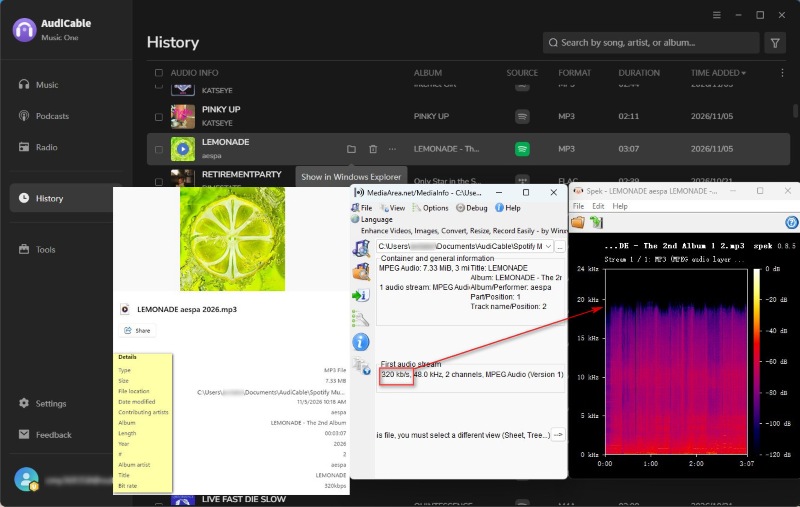
| Actual Bitrate | 360 kbps |
| ID3 Tags | All available ID3 tags are retained |
| Ads in Output | No |
| Total Time | 3.5 minutes for 57 minutes of audio |
🔬 Test Result:
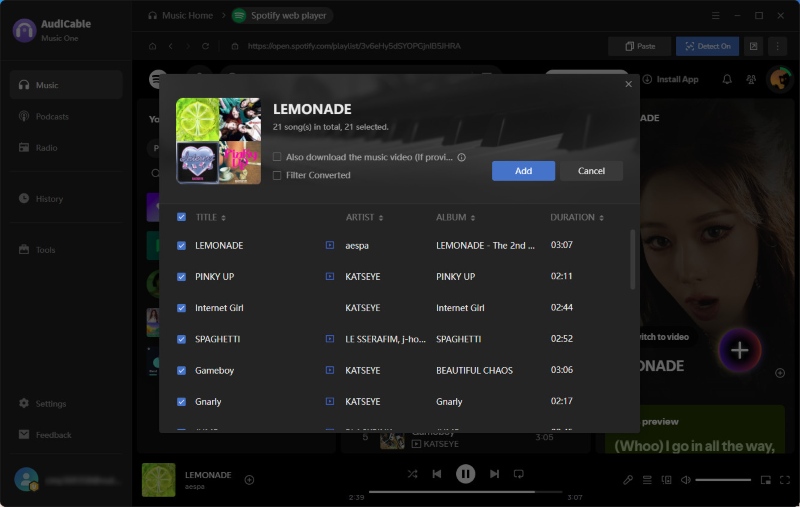
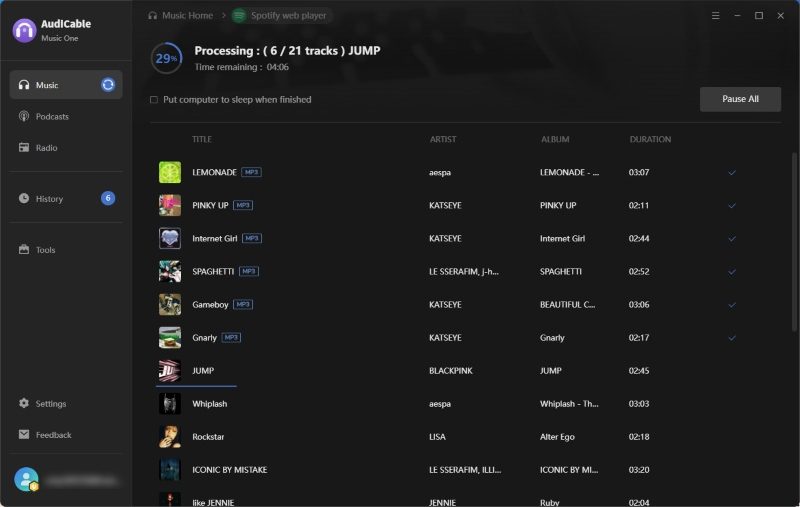
With a stable internet connection, the 57-minute Spotify playlist was converted in just 3.5 minutes, with no errors. The exported tracks matched the selected output quality settings and retained their ID3 tags and album artwork, with no ads in the resulting audio files.
📂 How to Download Spotify Songs with AudiCable
Step 1 Install and launch AudiCable Music One, then select Spotify.

Step 2 Open Settings to choose the output format, audio quality, and destination folder.

Step 3 Open a playlist and select the songs you want.
Step 4 Click Convert and find the output files in History.
Part 5 FAQs About ReVanced Spotify
💬 Q1: Is there a safe ReVanced Spotify alternative for iPhone?
ReVanced is an Android-only patching project, so there is no official ReVanced Spotify version for iPhone. iOS tweaks such as Spotify++ and EeveeSpotify are unofficial alternatives with their own sideloading and compatibility concerns. If you want local audio files on your iPhone, you can save supported tracks with a desktop tool like AudiCable and transfer them to your device.
💬 Q2: Can ReVanced Spotify download songs for offline listening?
No. ReVanced Spotify cannot reliably unlock Spotify's official offline music downloads, which require Spotify Premium authorization from Spotify's servers. Removing playback restrictions does not grant the account the server-side permissions needed to download songs.
💬 Q3: Is ReVanced Spotify ad-free?
It depends on the patch and app version. Some earlier patches could block ads, but this functionality is no longer dependable following the removal of ReVanced's Unlock Premium patch in September 2025.
💬 Q4: How do I install ReVanced Spotify?
ReVanced is an Android app patching project, not a provider of ready-to-install Spotify apps. It provides patching tools that modify a compatible Spotify APK. Following Spotify's September 2025 DMCA notice, the Unlock Premium patch was removed. Be cautious of websites offering pre-patched "ReVanced Spotify Premium APKs," as they are not official ReVanced releases and may contain outdated or unsafe files. See our guide to ReVanced Spotify safety risks.
Disclaimer:
- All these methods are for personal or educational use only.
- You should not use this tool to distribute music or for business.
Wrapping It Up
ReVanced Spotify is not a good long-term choice. It often has compatibility issues, and the Unlock Premium patch has been removed, making it less dependable for Premium features. If you want ad-free listening, Spotify Premium is the straightforward option. You can also try other streaming services if you're curious about different music catalogs. And if you'd rather keep your favorite Spotify tracks as MP3 or FLAC files, AudiCable Music One is another option. Ultimately, it comes down to how you like to listen to and manage your music.

