


KlickAud Review 2026: Is It Safe & Does It Give Real 320 kbps?

By
Updated on: November 12, 2026
Category: SoundCloud Music Tips
Are you searching for a way to download SoundCloud tracks as MP3s? KlickAud SoundCloud Downloader allows you to do this directly in your browser. Yet does it really provide the 320 kbps audio quality it promises? Can it manage playlists? Is KlickAud safe to use?
We tested this KlickAud Converter in November 2026, examining its download quality, download speed, ID3 tags, playlist support, and its performance with various SoundCloud links. We also reviewed KlickAud website’s ads, redirects, and a better alternative that might be worth trying if KlickAud does not meet expectations.
👍See also: How to Get SoundCloud Unblocked at School
📑 Content
What Is KlickAud?
🌐Site: https://www.klickaud.org/en17/
KlickAud is a free online SoundCloud downloader that converts supported public tracks into MP3 files. It works directly in a web browser on desktop and mobile devices, so there's no need to install software or create an account.
KlickAud launched in 2017 and has changed domains over the years, moving from klickaud.co to klickaud.org on June 4, 2024. According to its official What's New section, the service was restored and upgraded on October 17, 2026, and added French and Spanish language support on October 8, alongside English.
KlickAud at a Glance
| Feature | Details |
|---|---|
| Price | Free |
| Output Format | MP3 |
| Advertised Bitrates | 128 & 320 kbps |
| Platform | Web browser (desktop and mobile) |
| Playlist Support | Not supported |
| Account Required | No |
How to Use KlickAud to Download SoundCloud to MP3?
KlickAud lets you convert SoundCloud to MP3 through your browser in just a few steps. Here's how to use it:
Step 1 Copy the SoundCloud Track Link
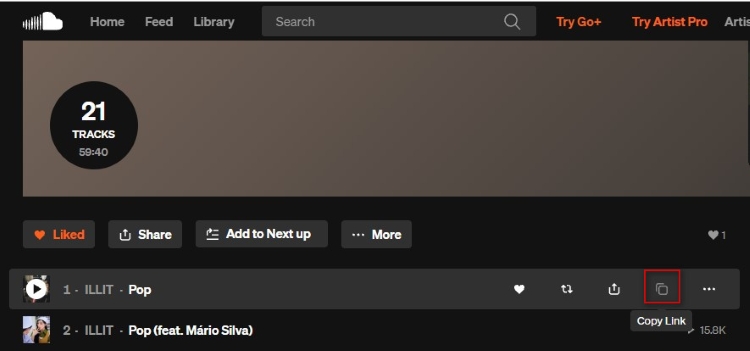
Open SoundCloud and find the track you want to download, then click the Copy Link icon to copy its URL.
Step 2 Visit the KlickAud Website
Open a new browser tab and go to the official KlickAud website.
Step 3 Paste the Link and Convert
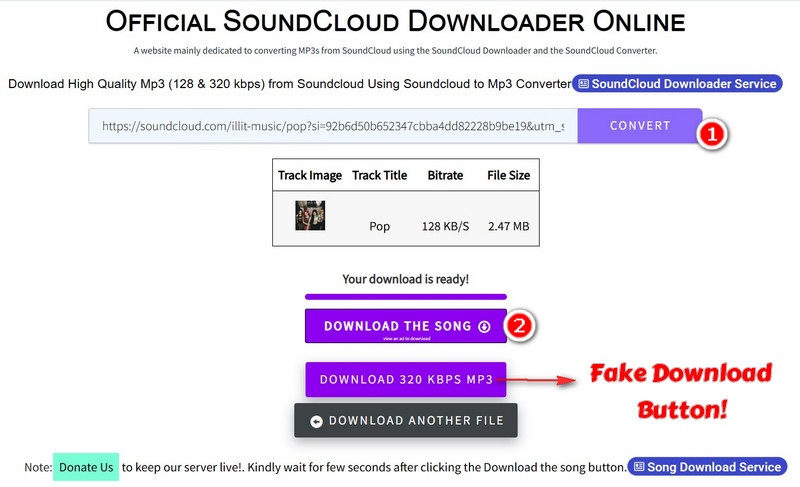
Paste the copied SoundCloud URL into the input box, then hit CONVERT to process the track. Wait a few seconds for the download result to appear.
Step 4 Download the MP3 File
On the results page, click the DOWNLOAD THE SONG button to save the MP3 file. Avoid the button labeled 320 kbps, as our test found that they redirected to unrelated websites rather than downloading the track.
💡 Tips: The downloaded MP3 file is usually saved in your browser's default Downloads folder. Press Ctrl + J on Windows to view it.
KlickAud Test Results: Quality, Speed & More (2026)
To see how KlickAud performs in practice, we tested it with different types of SoundCloud content, including public tracks, Go+ tracks, a private track, a long podcast, and a playlist. Our test setup included Windows 11 Pro (Version 26H2) and Google Chrome (Version 157.0.8103.38, 64-bit). We used MediaInfo to check file properties and bitrates, Spek to analyze audio frequency response, and Mp3tag to inspect ID3 metadata.
Test Samples:
- 6 public SoundCloud tracks
- 2 SoundCloud Go+ tracks
- 1 private track link
- 1 podcast longer than 1 hour
- 1 playlist containing 21 tracks
| Track Type | File Name | Audio Duration | Download Time | File Size | Result | Actual Bitrate | ID3 Tags |
|---|---|---|---|---|---|---|---|
| Public Track 01 | Pop | 02:23 | 5 sec | 2.47 MB | Success | 136 kb/s | Partial |
| Public Track 02 | You’re Under Arrest | 03:01 | 8 sec | 2.98 MB | Success | 132 kb/s | Partial |
| Public Track 03 | HOME - Twisted Light | 03:36 | 10 sec | 3.3 MB | Success | 128 kb/s | No |
| Public Track 04 | Tyga - Type Beat | 03:55 | 12 sec | 3.59 MB | Success | 128 kb/s | No |
| Public Track 05 | Lucid Dream | 22:45 | 19 sec | 20.8 MB | Success | 128 kb/s | Partial |
| Public Track 06 | in love with myself | 02:32 | 11 sec | 2.32 MB | Success | 128 kb/s | Partial |
| Go+ Track 01 | Sunday Morning | 02:52 | 15 sec | 2.81 MB | Success | 130 kb/s | Partial |
| Go+ Track 02 | Soda Pop | 02:30 | 14 sec | 2.54 MB | Success | 135 kb/s | Partial |
| Private Link | N/A | 04:31 | N/A | 4.2 MB | Failed | N/A | N/A |
| Podcast (1+ hr) | Sekhmet - Everyday Junglist Podcast - Episode 766 | 01:02:47 | 136 sec | 57.4 MB | Success | 128 kb/s | Partial |
| Playlist (21 tracks) | N/A | 01:14:41 | N/A | N/A | Failed | N/A | N/A |
Audio Quality: Does KlickAud Really Deliver 320 kbps?
KlickAud advertises MP3 downloads at both 128 and 320 kbps, but our test results fell short of the higher bitrate claim. The downloaded public and Go+ tracks had actual bitrates ranging from 128 to 136 kb/s, while the long podcast was encoded at 128 kb/s.
We also analyzed three downloaded files with Spek. All three showed a frequency cutoff at approximately 16 kHz, suggesting limited high-frequency content in the tested audio files.
| Track | Advertised Bitrate | Actual Bitrate | Frequency Cutoff |
|---|---|---|---|
| You’re Under Arrest | 128 / 320 kbps | 132 kb/s | 16 kHz |
| Sunday Morning | 128 / 320 kbps | 130 kb/s | 16 kHz |
| Everyday Junglist Podcast | 128 / 320 kbps | 128 kb/s | 16 kHz |
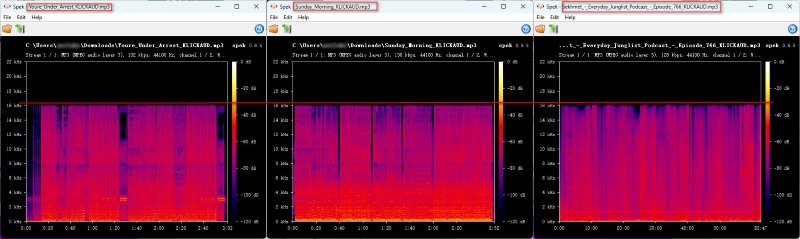
Versict: KlickAud's actual output was closer to 128 kbps than the advertised 320 kbps. Combined with the 16 kHz frequency cutoff, our tests suggest that its downloads are better suited to casual listening than users looking for higher-quality audio.
Download Speed: How Fast Is KlickAud?
KlickAud processed our tested tracks quickly. The six public tracks, ranging from 2:23 to 22:45, took just 5–19 seconds each. Even the podcast, which lasted over an hour, took only 2 minutes and 16 seconds to download. This suggests that KlickAud can process longer audio files efficiently without requiring users to wait for the full playback time.
| Test File | Audio Duration | Download Time | File Size |
|---|---|---|---|
| Public Track | 3–22 min | 5–19 seconds | 2–21 MB |
| Long Podcast | 1h+ | 2.27 minutes | 58 MB |
ID3 Tags, File Names, and Cover Art
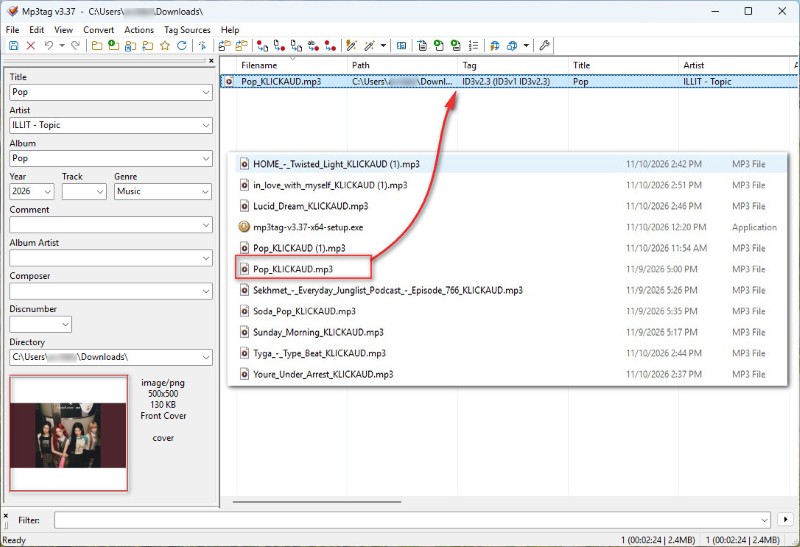
We used Mp3tag to check whether KlickAud preserved common metadata fields in the downloaded MP3 files.
| Title | Artist | Album | Album Artwork | Track Number |
|---|---|---|---|---|
| Yes | Yes | Yes | Yes | No |
Although most downloaded files retained basic metadata such as the title, artist, album, and cover art, tag preservation was inconsistent. Some files had incomplete tags, two public tracks had no ID3 tags, and track numbers were missing across our tests. If you plan to organize these downloads into a music library, you may need to fix the metadata manually with a tag editor such as Mp3tag.
The downloaded file names also included "KLICKAUD", so users may need to rename them manually before adding them to music library.
Can KlickAud Download SoundCloud Playlists?
KlickAud advertises SoundCloud playlist downloads on its website, with instructions to paste a playlist URL and select tracks from the results. However, our test with a 21-track playlist was unsuccessful. Therefore, playlist downloading is not a working feature in our current test.
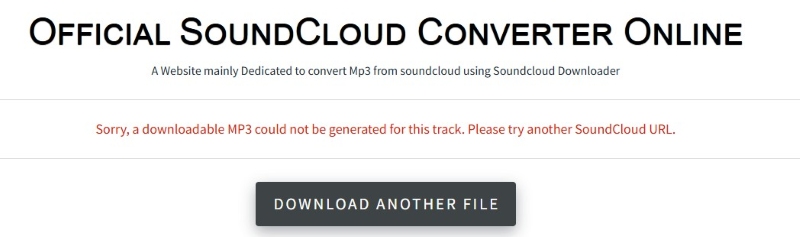
If you need to save multiple tracks from a playlist, you'll have to look for another solution rather than relying on KlickAud to process the entire playlist at once.
💡Read also: Top 9 Free SoundCloud Playlist Downloaders Online in 2026
Go+ Tracks, Private Links, and Long Podcasts
We also tested whether KlickAud could handle content beyond standard public tracks. The results varied by content type.
| Content Type | Test Result | Details |
|---|---|---|
| SoundCloud Go+ | Success | Both tested Go+ tracks were downloaded successfully. |
| Private Track | Failed | KlickAud could not process the private track link. |
| Long Podcast | Success | A podcast lasting 1 hour and 2 minutes was downloaded in 2 minutes and 16 seconds. |
In our tests, KlickAud successfully processed both Go+ tracks and the long podcast, but failed to process the private track. These results show that it can handle some types of longer or subscription-labeled content, though private SoundCloud links is unsupported in our tests.
Is KlickAud Safe and Legal?
KlickAud passed our VirusTotal website scan, but its frequent ads and redirects still require caution. Downloading SoundCloud tracks also depends on the uploader's permission and the track's license.
Is KlickAud Safe to Use?
While KlickAud claims to be safe, there are some things to note.
KlickAud claims their service is 100% safe in a statement published on 4th June 2025. We ran a VirusTotal scan on klickaud.org, and the results showed 0 hits from 91 security vendors.
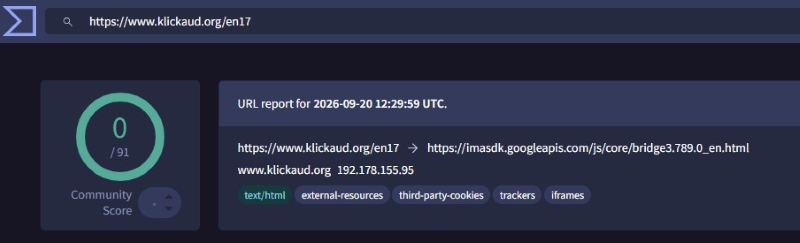
This is positive news. However, when browsing the site, you will notice there were quite a few ads. Approximately 4-5. There was a video ad on the homepage. When attempting to close it, you would get a pop-up asking you to watch another 15-second ad to lift the usage restrictions for an hour. An ad blocker made the page cleaner but did not remove all ads.
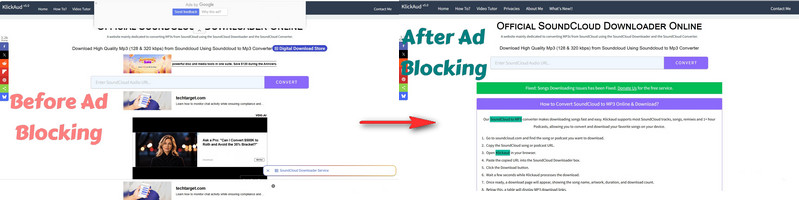
There is also a chance to get redirected to a third-party promotion for unrelated software by clicking the 320kbps button. Always use the DOWNLOAD THE SONG button. Don’t click any unexpected pop-ups asking to download or install software.
Overall, the site does work; however, there are a few ads and redirects, which can be frustrating. Be careful what you click on.
Is KlickAud Legal to Use?
Using KlickAud is not illegal in and of itself. It all depends on whether you are allowed to download the song. You can only download public SoundCloud tracks through KlickAud if the copyright holder approves. To download, please make sure that the track’s license permits your intended use.
A More Powerful KlickAud Alternative
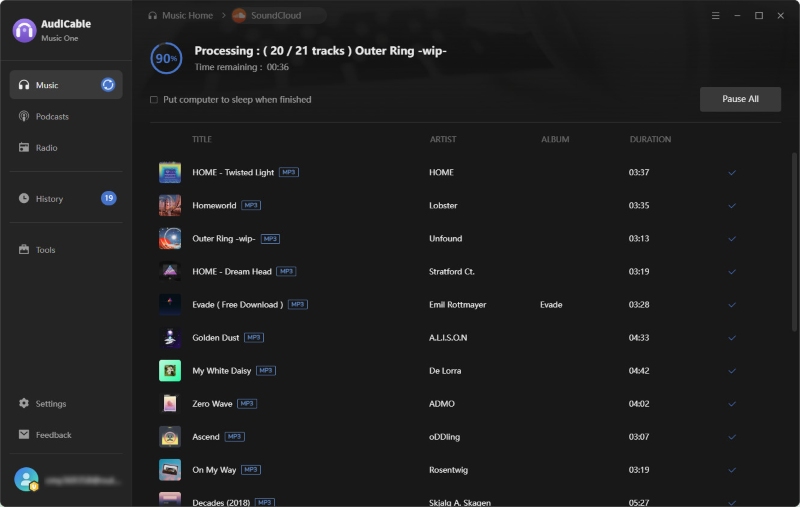
KlickAud works well enough for downloading a few SoundCloud tracks, but saving a whole playlist means handling songs one by one. It also offers MP3 only, and you may need to organize track tags and cover art yourself. AudiCable SoundCloud Music Converter makes this easier with batch playlist downloads, multiple output formats (MP3, FLAC, WAV, and more), and automatic retention of available ID3 tags and cover art. It also supports Spotify, Apple Music, Amazon Music, YouTube Music, and other platforms, with conversion speeds of up to 10×.
AudiCable SoundCloud Music Converter
- Stable, safe, and easy to use.
- Download SoundCloud songs, albums, playlists, and podcasts in batches.
- Support MP3, AAC, WAV, FLAC, AIFF, and ALAC output formats.
- Batch download SoundCloud music at speeds of up to 10×.
- Maintain full song tags: Title, Artist, Album, Playlist Index, and Year.
- Support both SoundCloud Free and paid accounts.
- Support other streaming platforms like Apple Music, Amazon Music, YouTube Music, Tidal, Qobuz, and Deezer.
- Include Format Converter, ID3 Editor, CD Burner, AA/AAX Converter, and AI Vocal Remover.
KlickAud vs AudiCable at a Glance
| Feature | KlickAud | AudiCable SoundCloud Music Converter |
|---|---|---|
| Price | Free (with limitations) | Free trial available; paid license |
| Platform | Browser-based | Windows & Mac desktop app |
| Output Formats | MP3 only | MP3, FLAC, WAV, AAC, AIFF, ALAC |
| Audio Quality | MP3; often lower bitrates | Retains original source quality |
| Playlist Support | Manual, track-by-track | Batch download entire playlists |
| ID3 Tags & Artwork | Often missing or requires manual fixes | Automatically preserved and embedded |
| Ads | Yes | No ads |
| Other Platforms | SoundCloud only | Spotify, Apple Music, YouTube, etc. |
| Extra Tools | None | Format Converter, Audio Editor, Vocal Remover, etc. |
How to Download SoundCloud Songs with AudiCable?
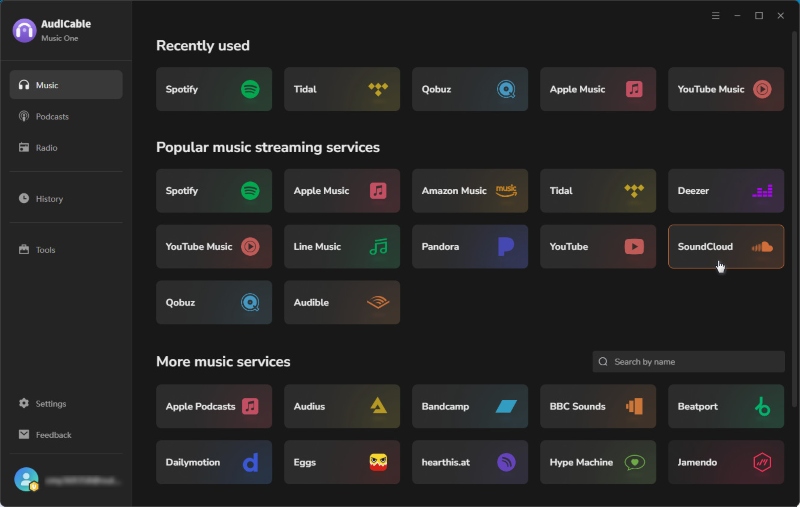
Step 1 Choose the Music Platform
Open AudiCable Audio Recorder and choose SoundCloud from the available music platforms. Its built-in web player will open.
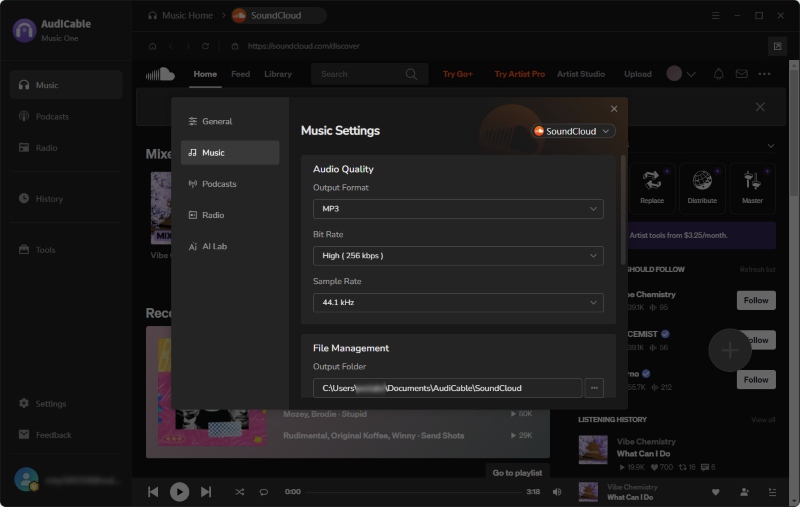
Step 2 Customize Ouput Settings
Click the Settings icon and choose your preferred output format, such as MP3, FLAC, or WAV. You can also adjust the audio quality and output folder.
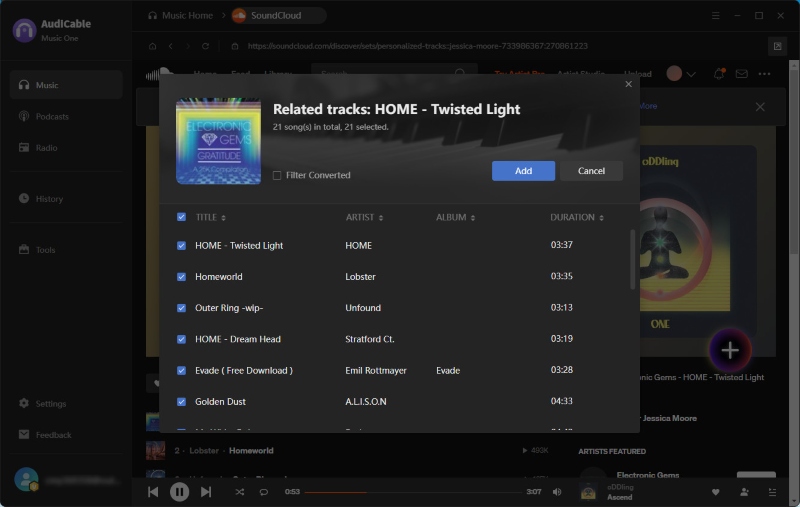
Step 3 Add SoundCloud Playlists to Download
Find the song or playlist you want to download in the built-in player. Click the floating + button to load the tracks, then select the songs you want to add to the conversion list.
Step 4 Access the Downloaded Files
Click Convert to start downloading. Once finished, open the History tab and click the folder icon to locate your files. You can check the downloaded tracks, ID3 tags, and cover art there.
FAQs About KlickAud
💬 Q1: Can KlickAud download SoundCloud to WAV?
A: No. KlickAud only supports MP3 downloads and does not offer WAV as an output format. If you need WAV files, you'll have to use another tool. See our guide to converting SoundCloud to WAV for other options.
💬 Q2: Can you download 320 kbps from SoundCloud?
A: Not usually with online SoundCloud downloaders. Most tools capture the audio stream available on SoundCloud, which is often around 128 kbps. Getting a higher-quality file may be possible if the uploader has enabled downloads of the original file. Simply choosing a 320 kbps option does not guarantee a genuine 320 kbps download.
💬 Q3: Why Is KlickAud Not Converting My SoundCloud Link?
A: KlickAud has experienced server and download issues in the past. Its What's New page records a server issue fixed on September 26, 2024, and another download error fixed on December 5, 2024. More recently, the service went down again but was restored and upgraded on October 17, 2026. If KlickAud isn't converting your link, the problem may be a temporary server issue. Here's what you can try:
- Check the service status: Visit KlickAud's What's New page to see whether there's a reported outage or maintenance update.
- Try again later: If the service is experiencing downtime or heavy traffic, wait a while and retry.
- Use the suggested backup: During its December 2024 service issue, KlickAud recommended
forhub.ioas an alternative SoundCloud downloader.
If the website is online but your link still won't convert, check whether the track is publicly accessible and make sure you've copied the correct SoundCloud URL.
💬 Q4: Is There a Way to Download a SoundCloud Playlist as MP3 Files?
A: KlickAud doesn't currently support playlist downloads. If you want to save an entire playlist without downloading each song separately, AudiCable Music One supports batch playlist downloads and lets you export tracks as MP3, FLAC, WAV, and other formats.
Disclaimer:
- All these methods are for personal or educational use only.
- You should not use this tool to distribute music or for business.
The End
KlickAud SoundCloud Downloader is a reasonable choice if you only need to download an occasional public SoundCloud track and don't mind its ads or occasional redirects. But if you regularly save playlists, want more output formats, or prefer properly organized music files, AudiCable SoundCloud Music Converter is a more practical option.
Related Articles
- Y2Mate Review & Alternatives: Tested in 2026
- Top 9 Free SoundCloud Playlist Downloaders Online in 2026
- How to Download SoundCloud Music to WAV
- How to Get SoundCloud Unblocked at School
- Is EzMP3 Safe & Reliable in 2026? Full Test & Best Alternatives
- Streamrip Review: What It Is, How to Use It & Is It Safe?

